Disclosure: As an Amazon Associate, umtsmarttool.com earns from qualifying purchases. Links to Amazon on this page are affiliate links; they cost you nothing extra. Listing details such as price and availability change often, so check the current Amazon listing before you buy.
If you want the best robot vacuums for noise-sensitive homes, the short answer is to look for a machine with a dedicated quiet or low-power mode, a schedule you can control, and a dock that does not force a loud cycle at the wrong moment. Nobody enjoys a motor roaring while a video call is running or a baby is finally napping, and the right robot lets you move the work to the part of the day when nobody cares.
This guide compares six robot vacuums that suit that goal, from a slim entry machine to full robot-and-mop systems with a docking station. Each profile covers who it suits, three strengths, one honest limitation and a clear choose-it or skip-it line. Below that you will find a comparison table, a buying checklist, the mistakes that lead people to the wrong robot, and answers to the questions shoppers ask before ordering. Details come from the makers’ published listings, so confirm the exact configuration on the page before you buy.
In this guide
Quick Picks
| If you want | Pick | Why it stands out | Link |
|---|---|---|---|
| Best overall for a quiet home | Roborock Qrevo S | Multi-function dock and selectable power levels | Check on Amazon |
| Best for a small apartment | Lefant M210 | Slim body that reaches under furniture | Check on Amazon |
| Best value-for-money wording | Roborock Q8 Max | Strong feature list without a full mop dock | Check on Amazon |
| Best premium all-in-one | Dreame L40 Ultra | Full station that handles emptying and mop care | Check on Amazon |
| Best for hands-off schedules | eufy Clean X8 Pro | Self-empty station reduces daily attention | Check on Amazon |
How These Picks Were Chosen
We have not run these machines in a home ourselves, and we are not going to pretend a decibel reading from memory. Noise is also very personal: a sound that one household ignores will bother another. So the selection leans on things that are published and checkable, namely whether the maker lists multiple suction or power settings, whether the robot can be scheduled from an app, how it finds its way around, and what the docking station does and when.
We then spread the list across sizes and styles so that a studio renter and a family with a large open plan both find something. If a listing gives a sound figure, compare it with the others in this article and treat it as one input, not the whole decision.
One more point on honesty: no list can promise how a particular robot will sound in your rooms. Floor type, room shape and how full the bin is all change the sound, and so does the power level you choose. Treat this article as a way to narrow the field, then read the listing details and the maker’s manual for the model you like.
1. Roborock Qrevo S
Roborock markets this as a robot vacuum and mop that comes with a multi-function dock. It is the most complete option here for a home where you want the machine to work and finish without being babysat.
Who it suits: households with a mix of hard floors and low rugs that want one scheduled run and as little attention afterward as possible.
- The dock handles emptying and mop care, so the robot does not need you nearby during or after a run.
- Several suction levels are listed in the app, which lets you pick a gentler setting for hours when the house is quiet.
- Laser-based navigation and a room map make it practical to clean one room at a time and leave the others undisturbed.
Honest limitation: the dock is large, and its emptying and washing cycles make their own sounds, so place it away from a bedroom wall.
Choose it if you want one machine for floors and light mopping with room-by-room control. Skip it if you have a small space where a big dock would dominate the room.
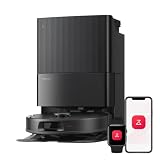
2. Dreame L40 Ultra
The Dreame L40 Ultra is a full-station robot vacuum and mop aimed at buyers who want the machine to look after itself for long stretches. It sits at the premium end of this list, so it is worth considering only if you will use the extra automation.
Who it suits: larger homes and busy households that want a robot to run on a fixed schedule while everyone is out.
- The station is built for automatic emptying and mop cleaning, which keeps manual chores to a minimum.
- Obstacle sensing helps it avoid small items on the floor, which means fewer interruptions and fewer rescue trips.
- App controls let you set cleaning by room and choose different power levels for different areas.
Honest limitation: the whole system takes up more floor space than a bare robot and is more than a studio or dorm room needs.
Choose it if you want a premium, hands-off system and have room for a station. Skip it if you only want a simple robot for a couple of rooms.
3. eufy Clean X8 Pro
The eufy Clean X8 Pro pairs a robot with a self-empty station, which is the single feature that most reduces how often you need to touch the machine. For noise-minded owners this matters because the robot can go back to its dock and offload without your involvement.
Who it suits: people who want a scheduled vacuum with a hands-off dock but do not need a robot that washes its own mop.
- The self-empty station lets the robot carry on across several runs before you handle the dust bag.
- Dual-turbine suction is the maker’s headline feature, aimed at pulling debris from different floor types.
- Laser navigation builds a map, so you can limit cleaning to specific zones and times.
Honest limitation: check the listing for exactly how the mopping function works, because it is not the same as a station that washes pads.
Choose it if vacuuming is your main concern and you want a dock that empties itself. Skip it if mopping is the priority.
4. eufy Omni C20
The eufy Omni C20 is an all-in-one station model, meaning the dock takes care of the mop as well as the debris. It targets buyers who like the idea of a fully automatic robot but are not ready for the highest tier.
Who it suits: mixed-floor homes with an open kitchen and living space that need regular light mopping.
- The all-in-one station is designed to wash and care for the mop between runs.
- Scheduling and room control sit in the app, so you decide when it works and where.
- It covers vacuuming and mopping in one pass, which saves a separate mopping routine.
Honest limitation: the station has a larger footprint than a plain charging base, so measure the corner where it will sit.
Choose it if you want an all-in-one station at a step below the flagship tier. Skip it if you rarely mop and would rather not manage water tanks.
5. Roborock Q8 Max
The Roborock Q8 Max is a robot vacuum and mop without the large wash dock, which makes it easier to place in a typical home. It is a sensible middle choice for those who want mapping and app control without a bulky station.
Who it suits: two or three bedroom homes that want mapping and room-by-room cleaning at a manageable size.
- Laser navigation and app maps allow zone control and no-go areas, so it can skip a nursery or home office.
- Adjustable suction levels let you choose a gentler run during quiet hours.
- The mop attachment gives you a light wipe for sealed hard floors between deeper cleans.
Honest limitation: without a wash dock you will empty the bin and rinse the mop yourself, so it is not fully hands-off.
Choose it if you want mapping and mopping without the footprint of a big station. Skip it if you want the robot to empty itself.

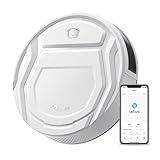
6. Lefant M210
The Lefant M210 is a slim, simple robot vacuum for small rooms. It does not have a dock that empties itself and it does not map a home the way laser models do, but it is easy to understand and easy to place.
Who it suits: studio renters, dorm rooms and anyone who wants a basic scheduled vacuum for hard floors and thin rugs.
- A slim body lets it go under many sofas and beds where taller robots would stop.
- The setup is simple, with fewer rooms, zones and settings to learn.
- Without a bulky dock, it tucks into a corner and stays out of the way.
Honest limitation: navigation is more basic than on laser-mapping robots, so it may cover a floor less methodically.
Choose it if you live in a small space and want a simple, slim robot. Skip it if you want detailed maps, room control or a self-emptying base.
Comparison Table
| Product | Type | Dock | Key feature | Best use | Link |
|---|---|---|---|---|---|
| Roborock Qrevo S | Vacuum and mop | Multi-function | Room maps and dock care | Mixed floors, low attention | Check on Amazon |
| Dreame L40 Ultra | Vacuum and mop | Full station | Obstacle sensing | Larger homes | Check on Amazon |
| eufy Clean X8 Pro | Vacuum | Self-empty | Dual-turbine suction | Daily vacuuming | Check on Amazon |
| eufy Omni C20 | Vacuum and mop | All-in-one | Mop care in station | Open-plan homes | Check on Amazon |
| Roborock Q8 Max | Vacuum and mop | Charging base | Laser mapping | Mid-size homes | Check on Amazon |
| Lefant M210 | Vacuum | Charging base | Slim body | Small rooms | Check on Amazon |
How to Choose a Quiet Robot Vacuum
Begin with the setting, not the machine. A robot that runs at a gentle power level while you are out and only boosts suction on rugs will bother you far less than one that always runs flat out. Look through the listing for the words quiet mode, standard, strong or max, and read what each does. A robot with only one power setting offers you no choice.
Next, think about timing. Scheduling is the single most useful quiet feature, because it lets you move the noise to when you are at work or outdoors. Check that the app supports weekly schedules and a do-not-disturb window, and confirm that the robot returns to its dock on its own.
Third, consider the dock. A self-emptying base is convenient, but the emptying burst is short and distinct, so put the base where you will not hear it from the bedroom. A wash-and-dry station adds more cycles, but they also run when you are away. If you are very sensitive to sound, a plain charging base with a manual bin may suit you better.
Fourth, navigation. Laser mapping lets a robot work through a home in tidy lines, which means fewer repeat passes and fewer bumps into furniture. Basic bump-and-turn robots wander, and that can mean longer total running time even if each moment is quieter.
Fifth, floors. Hard floors and low rugs are easy for nearly any robot. Thicker carpets may need a higher power setting, and higher power usually means more sound. If you have mostly deep carpet, a robot may not be the answer to a noise problem.
Finally, check size. Measure the gap under your sofa and bed against the height listed for the robot, and measure the spot where the dock will sit, including clearance on each side. Read the listing for how the maker describes the dust bin or bag, the brush design and the app’s room controls, and keep in mind that replacement parts such as filters and brushes are an ongoing cost of owning any robot.
Matching a Robot to Your Daily Routine
The same robot can feel intrusive in one household and invisible in another, and the difference is almost always the routine around it. Think about the sequence of a normal weekday. If everyone leaves by eight and returns after five, a mid-morning schedule means you never hear the machine at all, and the dock quietly empties itself while the house is empty. In that case the loudest cycle in the system is irrelevant to you, and you can choose on navigation and mop features instead.
If you work from home, the picture changes. A robot that runs during your meetings is a daily irritation, so you want room-by-room control: send it to the kitchen and hallway while you sit in the office, then let it do the study when you break for lunch. Maps and zone cleaning on the Roborock and Dreame models make this much easier than a basic bump-and-turn robot that simply roams the whole floor.
Shift workers and parents of young children have a different problem, because quiet hours are not the same every day. For them, an app that lets you pause, send the robot home and begin a single room on demand is more valuable than a rigid weekly timer. Look for a quick-clean button in the app and a physical button on the robot, so someone can stop it without hunting for a phone.
Finally, think about the night. Some owners like to run a robot late in the evening on a low power level while the house is settling. That only works if the bedrooms are far from the dock and the robot has a gentle mode, so read the manual for any do-not-disturb setting that stops it from leaving the dock during set hours.
Dock and Placement Tips for a Calmer Home
Where the base station sits affects how noticeable the whole system feels. A dock in a hallway outside a bedroom door will carry sound straight into the room, while the same dock in an entryway or a utility corner is barely noticed. Solid floors and bare walls reflect sound, so a rug under or beside the station and a bookcase nearby can soften it a little.
Leave open space on both sides of the base and in front of it, using the clearances in the maker’s manual, so the robot can find its way home without bumping around. Keep the area free of cables, shoes and pet bowls, because a robot that struggles to dock repeats its approach, and that repetition is the part you will hear.
It also helps to place the dock near an outlet that is not behind furniture, since a tight space makes it harder to reach the bin or water tank when you need to. A station that is easy to service gets serviced, and a serviced robot runs more smoothly than one with a clogged brush or full bag.
Common Buying Mistakes
- Buying on suction numbers alone. A higher suction figure often goes with a louder setting. Choose a robot that does the job on a mid-level mode.
- Ignoring the dock. People focus on the robot and forget that the station has its own noises and its own footprint.
- Paying for features you will not use. A wash-and-dry station is wasted on a home with carpet throughout.
- Skipping the measuring tape. A robot that cannot fit under the sofa leaves a lot of dust behind.
- Forgetting upkeep. Brushes, filters and mop pads wear out, and a neglected robot works harder.
Final Recommendation
There is no single quietest robot, because the answer depends on your floors and your daily routine. Here is how the list breaks down by buyer type.
- Best overall: Roborock Qrevo S, for the balance of scheduling, room control and a dock that looks after the work.
- Best for small spaces: Lefant M210, for its slim body and simple setup.
- Best middle ground: Roborock Q8 Max, for mapping without a large station.
- Best premium: Dreame L40 Ultra, for a full station that does almost everything.
- Best for vacuum-only homes: eufy Clean X8 Pro, for the self-empty base.
- Best all-in-one at a step down: eufy Omni C20.
If you are still undecided, begin with our top two. Open the listings, read the quiet-mode details and dock description, and pick the one that fits your space.
Frequently Asked Questions
Will a quiet-mode setting clean as well as full power?
Generally it will pick up everyday dust and crumbs on hard floors, while thicker carpet may need a higher setting. Try a lower power level first and raise it only for rooms that need it.
Where should I put the dock to keep noise down?
Choose a spot away from bedroom walls, such as a hallway or a corner of the living room, with open space around it so the robot can dock without trouble. Follow the maker’s clearance notes in the manual.
Do I need a self-emptying station?
No. It reduces how often you handle the bin, but a manual bin is perfectly workable in a small home. Choose a station if you run the robot daily or have a lot of floor to cover.
Will the robot fit under my furniture?
Measure the clearance beneath your sofa and bed, then compare it with the height on the listing. Leave a little room to spare, because a robot that wedges itself will stop mid-run.
What if the robot is not right for my home?
Check the seller’s return window on the Amazon listing before you buy, and keep the packaging for the first few weeks so a return is simple.
Does it work with my phone and voice assistant?
Most models in this guide use a phone app, and many list voice assistant support. Confirm the exact assistants on each listing, since support varies by model and region.
Is a robot enough to replace a regular vacuum?
For daily upkeep on hard floors and low rugs, often yes. Most owners still keep a stick or upright for stairs, upholstery and the occasional deep clean of thick carpet.
How often do replacement parts need changing?
Filters, side brushes, main brushes and mop pads wear with use. The maker’s manual gives the suggested schedule, and spare parts are sold for most of these models.