Where to buy
A small business does not need enterprise storage — it needs its files in one protected place, its workstations backed up without human memory, and its client data out of personal laptops and email inboxes. These six are the picks under $150, ranked for that job. Start with the list, then read the reasoning — including the honest account of what this budget cannot do, because business storage chosen with open eyes is infrastructure, and chosen on a sales pitch is a future incident report.
- TerraMaster F2-212 — Check on Amazon
- Synology DiskStation DS124 — Check on Amazon
- Asustor Drivestor 2 Lite AS1102TL — Check on Amazon
- Buffalo LinkStation 210 (2TB, drive included) — Check on Amazon
- Synology DiskStation DS223j (step-up pick — usually just above this budget; see review)
- QNAP TS-233 (step-up pick — usually just above this budget; see review)
Read the full guide ↓
Disclosure: As an Amazon Associate, umtsmarttool.com earns from qualifying purchases. Links to Amazon on this page are affiliate links; they cost you nothing extra. Listing details such as price and availability change often, so check the current Amazon listing before you buy.
The best nas for small business under $150 comes with an honesty requirement stricter than any home guide: at this budget, a business is buying a file-and-backup appliance, not a server, and the guide that pretends otherwise sets its reader up for a bad quarter. What $150 genuinely delivers is considerable — a mirrored two-bay enclosure from a supported brand, per-staff accounts with real permissions, automatic workstation backup, snapshot protection against the ransomware that arrives through a staff laptop, and an off-site copy path to the cloud. What it does not deliver is also knowable in advance: no virtual machines, no heavy database hosting, no multi-gigabit networking, and no substitute for an actual backup policy. Buy the tier for what it is and it will serve a small firm faithfully for years.
The small-business brief is specific. A handful of staff, a shared drive that everyone can reach, client files that must not live on one person’s laptop, backups that run whether or not anyone remembers, and an owner who is also the IT department. Judged on that brief, the priorities reorder: reliability and permissions first, backup automation second, snapshot ransomware defence third, and raw specifications a distant fourth. Every linked pick runs a Gigabit Ethernet port (about 110 MB/s at best — ample for documents, images and office workloads), draws roughly 11–20 watts, and except the Buffalo arrives diskless, so NAS-rated drives are a planned second purchase that will out-cost the box. The two class leaders — Synology’s DS223j and QNAP’s TS-233 — normally sit just above this line; they close the guide as prose step-ups, because knowing what a small stretch buys is part of honest procurement. Our Best Nas Under $150 guide covers the same tier without the business lens.
One expectation to set before the reviews: the enclosure is the minority of the system’s cost and the entirety of its reliability story. The drives will cost more, the off-site arrangement a little more, and the box’s software will decide whether the firm trusts the result or routes around it with laptops and inboxes — the failure mode this purchase exists to end. That is why this guide ranks maintained software and honest protection above marginal specifications at every tie: in a business, the interface is the policy, and the policy is the product.
Four residents and two step-ups, then. The F2-212 leads on the strength of a real mirrored two-bay at the price; the DS124 is the micro-business Synology with a backup discipline; the AS1102TL brings snapshots and a three-year warranty to the tier’s edge; the Buffalo removes every decision including the drive. Read them as a ladder: protection and policy first, convenience second, and the step-ups as the growth path when the firm’s headcount — or its data — outgrows the tier.
In this guide
Quick Picks
| Pick | Best for | Key spec |
|---|---|---|
| TerraMaster F2-212 | Best value: mirrored business storage | 2-bay hot-swap, RTD1619B 1.7 GHz, 1 GB DDR4, TRAID, snapshots |
| Synology DiskStation DS124 | Micro-businesses, best software | 1-bay, RTD1619B, 1 GB DDR4, full DSM, 71 mm wide |
| Asustor Drivestor 2 Lite AS1102TL | Snapshots and warranty at the edge | 2-bay, RTD1619B 1.7 GHz, 1 GB DDR4, 18.6 dB, 3-yr warranty |
| Buffalo LinkStation 210 2TB | Fewest decisions, drive included | 1-bay, 2 TB HDD fitted, fanless |
| Synology DiskStation DS223j | Step-up: the small-office default | 2-bay, RTD1619B 1.7 GHz, 1 GB DDR4, DSM, snapshots |
| QNAP TS-233 | Step-up: most headroom | 2-bay hot-swap, Cortex-A55 2.0 GHz, 2 GB RAM, NPU |
How These Picks Were Chosen
Specifications were verified against the manufacturers’ published datasheets — TerraMaster’s F2-212 datasheet, Synology’s DS124 and DS223j pages, Asustor’s AS1102TL product page, QNAP’s TS-233 hardware specification and Buffalo’s LinkStation datasheet — never against retail listings. Business fitness was judged on the small firm’s real workload: per-user accounts and folder permissions, workstation backup automation (including bare-metal restore paths), snapshot ransomware recovery, cloud backup integration for the off-site copy, remote access that does not expose the admin interface to the internet, warranty length, and the vendor’s firmware-update cadence, because an unpatched business NAS is a liability with a power LED.
Tier honesty was applied strictly. A pick is linked only if its street price genuinely lives at or below the $150 line in ordinary trading; products that normally sit above it are reviewed as prose step-ups so the guide’s recommendations can be acted on at the stated budget. We excluded enclosures from brands that no longer publish security updates — disqualifying for business use regardless of price — and populated “personal cloud” drives whose software cannot express staff permissions. Firms also building out the office network will find the storage’s companions in our Best Wifi Router For Small Business Under $30 and Best Network Rack For Small Business Under $30 coverage.
The 6 Best NAS Picks for Small Business Under $150
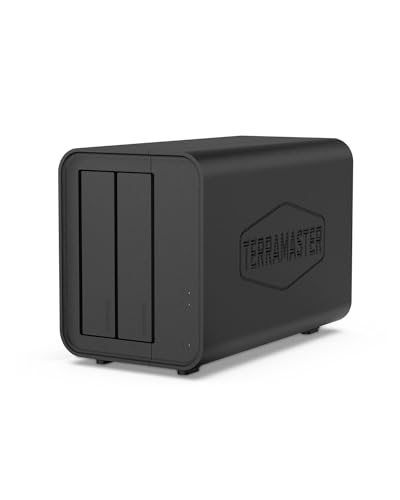
1. TerraMaster F2-212 — mirrored business storage at the price
Who it suits: Small firms that want the complete protection story — mirror, snapshots, permissions, cloud backup — at the stated budget, and can accept plainer client apps as the trade.
The F2-212 leads because it is the tier’s only complete business answer: two hot-swappable, tool-free bays; a Realtek RTD1619B quad-core at 1.7 GHz with 1 GB of DDR4; TRAID, TerraMaster’s flexible RAID that tolerates mismatched drive sizes so the firm can grow storage in stages; Btrfs snapshots, the ransomware rollback layer; and TOS 5’s business essentials — SMB shares with per-user and per-folder permissions, scheduled workstation backup, cloud sync for the off-site copy, and remote access through TNAS.online rather than an exposed port. Rated reads of 112 MB/s saturate its gigabit port, drives up to 22 TB each fit, and its 19 dB(A) standby rating keeps it office-friendly. Power is about 20 watts at full tilt. The honest trade is software polish and cadence: TerraMaster’s apps are the plainest of the four systems and its updates trail the big two, so the firm’s one admin habit — checking firmware currency monthly — matters more here. For protected storage at the lowest real price, that is the right trade — the mirror and the snapshots guard the firm’s irreplaceable things, and the plainer apps still sync every workstation’s files without being asked, which is the daily miracle the business actually experiences.
Pros: Only mirrored two-bay resident at the tier; tool-free hot-swap; TRAID flexibility; snapshots; permissions and cloud backup included. Honest limitation: Plainest apps; fixed 1 GB RAM; slower software cadence than Synology or QNAP.
Choose it if protection per pound leads the brief. Skip it if the firm will live inside polished client apps daily — the Synology step-up serves that business better.
2. Synology DiskStation DS124 — DSM for the micro-business
Who it suits: One-to-three-person firms that want the best software in the class — client file sync, effortless backup, clean permissions — and will keep the off-box backup discipline its single bay demands.
The DS124 is the full Synology experience in a 71 mm-wide one-bay: the same RTD1619B chip and 1 GB of DDR4 as its two-bay sibling, and the complete DSM — Synology Drive for staff file sync and client sharing links, Hyper Backup for scheduled protection to USB or cloud, per-user accounts and folder permissions, and the class’s most approachable admin interface — with two USB 3.2 Gen 1 ports for the backup drive. For a micro-business whose data is modest, it delivers professional file infrastructure at the lowest Synology price, quietly enough for a desk corner. The discipline is structural: one drive is a single point of failure, so the off-box copy — a USB drive rotated off the premises, or a cloud job covering the business shares — is part of this purchase, not an accessory. Firms that know they will not keep that habit should buy the F2-212 and let the mirror do the remembering.
Pros: Complete DSM; best client apps and sharing; tiny and quiet; fast USB backup ports. Honest limitation: No mirroring; capacity capped at one drive; protection depends on backup discipline.
Choose it if the firm is tiny and the habit is real. Skip it if the data is growing or the habit is doubtful.
3. Asustor Drivestor 2 Lite AS1102TL — snapshots and three years of cover
Who it suits: Small firms at the tier’s upper edge that want two bays and snapshot protection, reassured by the longest warranty in the class — a real procurement factor when the box holds the business.
The AS1102TL runs the RTD1619B at 1.7 GHz with 1 GB of DDR4 under Asustor’s ADM, and holds two distinctions worth a firm’s attention: it was Asustor’s first ARM NAS with Btrfs, so proper snapshots — the ransomware and fat-finger recovery layer — are included at this price; and its three-year warranty outlasts every rival’s standard cover, which matters when the enclosure is business infrastructure rather than a gadget. ADM covers the business essentials competently: user and group permissions, scheduled backup, cloud sync, EZ-Connect remote access, and Wake-on-LAN so the box can sleep outside office hours. It is also the quiet, frugal pick — 18.6 dB rated with drives idle, about 11.7 watts in operation — so it can share an office without joining the conversation. The app catalogue and client polish trail Synology’s; the protection and the warranty lead the tier.
Pros: Snapshots at the price; three-year warranty; quiet and low-power; full permissions and cloud backup. Honest limitation: Smaller app ecosystem; 3.5-inch bays only; fixed 1 GB RAM.
Choose it if protection and warranty lead the procurement. Skip it if client-app polish is the firm’s top priority.
4. Buffalo LinkStation 210 2TB — the no-project appliance
Who it suits: Very small firms that need shared storage and workstation backup tonight, with no drive shopping and no setup project — and whose needs will stay modest.
The LinkStation 210 ships with its 2 TB drive inside a fanless enclosure and asks almost nothing of its owners: plug it into the router, run the simple setup, and it provides a shared drive, backs up PCs (NovaBACKUP licences included) and Macs (Time Machine), and offers WebAccess to files from outside the office. Its Marvell Armada 370 processor and 256 MB of memory mark it as an appliance rather than a platform — reads are rated up to 100 MB/s, the software is basic, permissions are simple, and there is no mirroring — but for a firm with stable, modest needs it is a complete answer in one purchase, covered by a two-year warranty that includes the drive. Its honest role in a business is a bridge: better than files scattered across laptops from day one, and the natural predecessor of a two-bay when the firm grows into one — at which point it retires gracefully into service as the backup target it was always half-designed to be.
Pros: Drive included; fanless; simplest setup; backup licences in the box. Honest limitation: Old, slow hardware; no mirror; basic permissions; fixed capacity.
Choose it if immediacy outranks growth. Skip it if the firm’s data is expanding — a diskless two-bay expands with it.
5. Synology DiskStation DS223j — the step-up worth budgeting for
Who it suits: Firms whose real priority is the software experience — staff sync, client sharing, effortless backup — and whose budget can flex slightly or wait for a promotion.
Reviewed without a buy link because it normally sells above this tier, the DS223j is what the step-up buys: the same entry processor class and 1 GB of RAM, but two bays for mirroring under Synology Hybrid RAID, Btrfs snapshots, and above all DSM in full — Synology Drive, Hyper Backup, Active Backup for Business’s workstation tooling heritage, and the admin interface a non-specialist owner can actually run. It draws about 17 watts in use and 5 asleep. If the firm’s judgement is that software is the product — for a business whose admin is its owner at 11 pm, a defensible judgement — then this enclosure, caught on promotion or with the budget stretched modestly, is the correct purchase, and the F2-212 is the correct purchase when it is not. Both statements are true; the firm’s priorities decide.
Pros: Best software; mirroring plus snapshots; low power; huge support community. Honest limitation: Normally above this budget; fixed 1 GB RAM; bays are not hot-swappable.
Choose it if the budget flexes or a deal appears. Skip it if $150 is a hard ceiling — the F2-212 protects the same data today.
6. QNAP TS-233 — the headroom step-up
Who it suits: Growing firms that expect to outgrow entry hardware and want the upgrade already in the room.
Also normally above the line, the TS-233 is the hardware step-up: a Cortex-A55 quad-core at 2.0 GHz, 2 GB of RAM — double every resident pick — hot-swappable bays, an NPU that accelerates photo organisation for firms with image libraries, typical draw around 10.8 watts, and support for an optional USB 5GbE adapter that gives the box a faster-network future no rival here has. QTS provides snapshots, per-user quotas and Hybrid Backup Sync, and asks more of its administrator than DSM asks of its owner — the standing trade. For the firm with a designated tech person and growing data, stretching to the TS-233 buys years of headroom; for everyone else, the residents above already cover the brief.
Pros: Most RAM and fastest CPU in the class; hot-swap; optional 5GbE; strong backup tooling. Honest limitation: Normally above this budget; QTS learning curve; firmware currency is a duty someone must own.
Choose it if headroom is the firm’s plan. Skip it if nobody wants the admin role.
Comparison Table
| Model | Bays | CPU | RAM | Business note | Standout |
|---|---|---|---|---|---|
| TerraMaster F2-212 | 2 (hot-swap) | RTD1619B 4-core 1.7 GHz | 1 GB DDR4 | Mirror + snapshots at the price | TRAID, permissions |
| Synology DS124 | 1 | RTD1619B 4-core 1.7 GHz | 1 GB DDR4 | Best software, tiny | Full DSM |
| Asustor AS1102TL | 2 | RTD1619B 4-core 1.7 GHz | 1 GB DDR4 | 3-yr warranty | Snapshots, quiet |
| Buffalo LinkStation 210 2TB | 1 (2 TB fitted) | Marvell Armada 370 800 MHz | 256 MB DDR3 | Complete appliance | Drive included |
| Synology DS223j (step-up) | 2 | RTD1619B 4-core 1.7 GHz | 1 GB DDR4 | Small-office default | DSM, snapshots |
| QNAP TS-233 (step-up) | 2 (hot-swap) | Cortex-A55 4-core 2.0 GHz | 2 GB | Most headroom | 5GbE option |
How to Choose a NAS for a Small Business on This Budget
Write the policy before the purchase. Four sentences suffice: what lives on the NAS, who can see which folders, how backups run, and where the off-site copy lives. Every pick here can execute that policy; none can invent it. Firms that skip this step buy hardware and discover, mid-incident, that they never decided the things that mattered.
Protection before capacity, always. A mirrored two-bay survives the drive failure that is a matter of when; snapshots undo the deletion and the ransomware encryption that are matters of whoops and when; an off-site copy survives the office-level event. Rank those layers above terabytes — capacity can be added later, client history cannot. On a one-bay pick, the off-site copy is not a layer among others; it is the system.
Count the whole system. Diskless enclosures need NAS-rated drives (CMR, RAID-friendly, 24/7-rated), which will cost more than the box, plus the backup arrangement — a rotating USB drive or a business cloud tier. The Buffalo’s included drive is its quiet economic argument. Our Best Nas Hard Drive For Small Business Under $30 coverage deals with the drive side of the procurement.
Permissions are a business feature, not an IT luxury. Client folders separated by engagement, finance visible to its owners only, leavers’ accounts disabled the day they leave. Every platform here supports the model; the firm’s job is to use it from day one, while the structure is empty and the decisions are easy.
Think in years, not in launch features. A business NAS is a five-year asset that will outlive laptops and at least one office move. The maker’s update cadence, the drive-size ceiling and the warranty length — where the Asustor’s three years quietly shine at this price — predict the ownership experience better than any benchmark. Buy the system that will still be patched, capacious and warranted when the archive is three times its current size.
Assign the admin duty by name. One person owns firmware currency, the monthly health-report glance, and the quarterly test restore. Small-business storage fails socially before it fails technically; a named owner prevents both failure modes for the price of a calendar entry.
The First Evening: A Business Setup That Holds
Fit the drives, cable the NAS to the office router or switch, and run the wizard: mirrored volume on a two-bay, a strong unique admin password in the firm’s password manager, automatic updates on. Create the structure — Clients, Operations, Finance, Archive — with permissions matched to the policy, and an account per staff member; admin stays an admin-only login, never a daily one. Point every workstation’s backup at the NAS on a nightly schedule; enable daily snapshots on the business shares; and arrange the off-site copy, whether a cloud job covering Clients and Finance or a USB drive rotated off the premises weekly.
Finish with the two demonstrations that convert configuration into confidence: restore one file from a snapshot, and restore one file from the off-site copy. A business NAS is trusted when the firm has watched it rescue something once. Document the setup — accounts, schedules, where the copies live — in the Operations folder on the NAS itself, so the knowledge survives the person who configured it. After that evening, the system should disappear into the firm’s background, which is precisely what infrastructure at this price is for.
Ransomware: The Scenario the Snapshots Are For
Small firms meet ransomware through an ordinary Tuesday: a staff laptop opens the wrong attachment, and within the hour every file it can reach is encrypted — including, if the shares are writable and unprotected, the firm’s central storage. This is the scenario the protection layers were designed in sequence to defeat. The mirror is irrelevant to it, and honest guides should say so: RAID replicates the encryption faithfully. The snapshots are the answer — point-in-time images the malware cannot reach from a workstation, from which yesterday’s clean Clients folder restores in minutes. The off-site copy is the answer’s backstop, covering the worse scenario where the NAS itself is compromised. The configuration that makes this real is unglamorous and specific: snapshots scheduled daily with weeks of retention on every business share, snapshot visibility restricted so workstations cannot browse or delete them, staff accounts with write access only where their work requires it, and the admin login used for administration alone. Rehearse the restore once, in calm conditions, and the firm’s worst data day becomes an afternoon’s inconvenience instead of an existential event. At this budget, that rehearsal is the highest-value hour in the entire purchase. Our Best Nas Hard Drive For Backups Under $30 coverage deals with the drives the recovery depends on.
Three Safety Nets, in Business Language
Procurement conversations go better when the three protection layers are stated in the language of consequences. The mirror — RAID 1 on the two-bay picks — is a continuity layer: a drive fails on a deadline day and the firm does not notice until the alert email, because service never stopped. The snapshot — Btrfs on the TerraMaster, Asustor and Synology picks — is a regret layer: the overwritten proposal, the deleted client folder, the encrypted share, each reversible to yesterday’s state in minutes. The off-site copy is a survival layer: the only mechanism that answers theft, fire, flood and the compromised-box scenario, because it does not live in the building or on the box. Proportion them by replaceability, as a home would, but with a business’s sharper pencil. The media and reference folders need the mirror alone. Operations deserves mirror plus snapshots. Clients and Finance deserve all three, always, no exceptions — and at this budget all three are achievable, because the snapshot layer is free in the software and the off-site layer can begin as a rotated drive the firm already owns. The twenty minutes of setup is the entire premium on the only insurance policy that pays out in the firm’s own history.
The Drives Are the Asset: Choosing What Goes Inside
Firms agonise over the enclosure and then drop in the cheapest drives, which inverts the economics and the reliability. The enclosure will likely outlive two sets of drives; the drives — spinning around the clock in a pair, in a warm office — are what fail, and NAS-rated models exist precisely for this life. Their firmware reports errors promptly to the NAS instead of retrying silently until the array drops them mid-rebuild; their vibration compensation tolerates a neighbouring drive; and their CMR recording keeps mirror rebuilds predictable, where shingled desktop drives can make a rebuild crawl or fail on the firm’s busiest day. Both benchmark lines, WD Red Plus and Seagate IronWolf, publish these properties openly. Size the pair for the firm of three years from now — client archives only grow — and buy the two drives from different production batches when you can, a free hedge against a bad batch threatening both halves of the mirror in the same season. Register the warranties, record the purchase dates in the Operations folder on the NAS itself, and the eventual replacement becomes a planned errand with a purchase order instead of an emergency with a client waiting.
Growth: What the Second Year Looks Like
A well-chosen budget NAS does not get replaced in year two; it gets promoted in responsibility. The typical arc: the shared drive becomes the firm’s memory, the backup target absorbs a new workstation the week it arrives, the client-sharing links replace the attachment habit, and the off-site copy graduates from a rotated drive to a cloud tier as the archive’s value clarifies. The tier’s ceilings announce themselves honestly when they approach — the gigabit port during the first full-archive migration, the fixed memory when the firm asks the box to host one service too many — and by then the firm knows exactly which step-up it needs and why, which is the correct order of operations for small-business procurement. Plan the two cheap futures now: leave the switch port and the shelf space for a second enclosure (the classic pattern is a newer primary and this box demoted to backup target, a role the residents here would serve for years), and keep the drive bays’ headroom in mind when sizing the first pair. Bought this way, the under-$150 NAS is not a compromise to be apologised for; it is the first, correctly sized layer of an infrastructure that grows by addition rather than replacement. Firms planning the wider office build-out will find the companion thinking in our Best Network Switch For Small Business Under $30 coverage.
Staff Onboarding and Offboarding: The NAS as HR Infrastructure
The account model quietly makes the NAS part of the firm’s personnel process, and small firms feel both ends of it. Onboarding becomes a five-minute ritual: create the account, assign the group permissions, install the sync client, and the new starter has the firm’s files — and only the firm’s files their role touches — before their coffee cools. Offboarding becomes the same ritual in reverse, and it is the one that pays: disable the account the day someone leaves, and their access to client data ends with it, cleanly and completely, because the data never lived on their laptop in the first place. Contrast the firm without central storage, where a departure is an archaeology project — which files were on that machine, which client folders went home in an inbox — and the business case for the tier writes itself. Add the sharing discipline the platforms support natively (expiring links for client deliveries instead of attachments that live forever in strangers’ inboxes) and the budget NAS is doing governance work that firms many times its buyer’s size pay consultants to design. The technology is the easy part; the habit — accounts for people, permissions for roles, links with expiry — is the entire implementation.
Power, Presence and the Office Corner It Lives In
A business NAS earns its keep by being awake when the office is not — receiving the overnight workstation backups, syncing the off-site copy in the cheap hours, serving the early starter’s files before the kettle boils — and the running costs of that vigilance are trivially small in this tier: roughly 11 to 20 watts in use across the linked picks, single figures asleep, with power schedules and Wake-on-LAN to shape the box’s day around the firm’s. Placement deserves one paragraph of procurement thought. It wants the wired heart of the office — the router or switch shelf — with ventilation, on a surface that will not hum, and ideally on the same small UPS as the network gear, because the commonest cause of filesystem drama in small offices is not malice or failure but the cleaner unplugging things and the summer storm. A NAS that rides through a two-minute outage finishes its writes cleanly and never meets its owner in a recovery console. Add the monthly ritual — one named person glances at the health report and the backup log — and the firm’s entire storage infrastructure costs less attention than the coffee machine it probably sits near, while holding considerably more of the business.
The Compliance Conversation, Sized Honestly
Some small firms carry obligations beyond good practice — client contracts that ask where data lives, professional standards that ask who can see it, insurers who ask how it is backed up. A budget NAS answers those questions surprisingly well when it is configured as this guide describes: data held on the firm’s own premises under its own control; access governed by named accounts and folder permissions with an audit trail; backups layered with an off-site copy; encryption available on the volumes and in transit. What it does not provide — certifications, formal attestations, a vendor’s compliance department — is exactly what the tier above sells, and a firm whose contracts demand those artefacts should budget accordingly rather than stretch a $150 box into a promise it cannot sign. For the large middle of small business, though, the honest position is this: a properly configured budget NAS moves a firm from “data scattered across personal devices, protected by hope” to “data centralised, permissioned and backed up in three layers,” which is the substance most obligations actually ask for, whatever their letterhead.
Maintenance Reality: The Fifteen Minutes a Month, Professional Edition
Owners fear a business NAS will become a second job; the truth, on any pick here, is a quarter-hour a month once the first evening’s setup is done. The box updates itself if you let it, backs up on its schedule, and reports by email. The named owner’s duties reduce to three: read the monthly health summary when it lands; act on a drive warning while the mirror still makes it a chore rather than a crisis; and once a quarter, restore one file from a snapshot and one from the off-site copy, keeping the proof fresh. Add two calendar entries a year — review the account list against the staff list, and check the off-site rotation is actually rotating — and the firm’s storage governance is complete. That is the entire operating cost in attention for a system that holds the business’s memory: less time than the payroll run, protecting the asset the payroll run depends on.
Setting Up Shared Folders and Permissions on Day One
The most valuable configuration work on a small-business NAS happens before the first real file arrives, and it uses only the facilities these picks already provide: shared folders, per-user permissions and snapshot protection. Create folders by function rather than by person — client work, accounts, administration, shared resources — because staff change more often than the firm’s structure does. Then create one account per staff member and grant each folder deliberately: read-only where someone only needs to look, read-write where they genuinely produce work, and no access at all where a folder is not their business. That discipline is what turns the NAS from a shared dumping ground into the separation the guide’s picks, with their real permissions systems, were chosen to support.
Two cautions complete the day-one setup. First, keep an offline or off-site copy of the firm’s most critical folder from the start: a mirror protects against a failed drive, but it faithfully copies deletions and encrypted files too, which is why snapshots and a second copy are layers, not alternatives. Second, test the arrangement while stakes are low — have each staff member sign in, open what they should, and confirm they cannot open what they should not. Ten minutes of testing on day one prevents the two classic small-firm failures: the folder nobody can reach during a deadline, and the folder everybody could always reach. For firms comparing enclosure sizes while planning this layout, Best 2 Bay Nas For Small Business Under $150 covers the two-bay class in its own right.
Common Buying Mistakes
Giving everyone access to everything to save time. It saves an afternoon and spends it later — in overwritten files, in client folders visible to temporary staff, and in an offboarding with nothing clean to revoke. Set permissions per folder on day one, while the structure is small enough to hold in your head.
Forcing the tier with an unsupported brand. A no-name two-bay under the line trades the one thing business data cannot spare — maintained, patched software — for a spec sheet. The residents here are the honest floor of the market.
Buying the box and forgetting the drives. A diskless NAS is half a system. Price NAS-rated drives into the procurement, or choose the drive-included Buffalo knowingly.
Treating a mirror as a backup. RAID survives a dead drive; it faithfully mirrors deletions and ransomware too. Snapshots and an off-site copy complete the protection — for a business, all three layers are the minimum professional standard.
Client data on personal laptops and inboxes. The NAS exists to end that pattern: central files, per-staff permissions, sharing links with expiry instead of attachments. A firm whose data lives on the NAS can survive a lost laptop; a firm whose data lives on the laptop cannot.
Exposing the admin interface to the internet. Use the maker’s relay for remote access, enable two-factor authentication, and let firmware update itself. The small-business NAS incidents that make the news begin with an exposed login page and a reused password.
Skipping the test restore. A backup nobody has restored from is a hope, not a system — and for a business, it is a hope with clients attached. Restore one file from a snapshot and one from the off-site copy on the first evening, in front of a witness, and the NAS becomes trusted infrastructure instead of an article of faith.
No named owner. Unowned infrastructure decays silently: firmware ages, backups fail unnoticed, a departing staffer’s account stays live. One named person and a monthly fifteen minutes prevent all three.
Final Recommendation
Under a hard $150 ceiling, buy the TerraMaster F2-212: it is the only pick that gives a small firm the complete professional protection story — mirrored drives, snapshots, real permissions, cloud backup path — at the stated budget, and its plainer apps are a fair price for that completeness. The runner-up is the Synology DiskStation DS124 for the micro-business that values the best software and will keep its off-box backup habit. And if the budget can breathe at all, the DS223j step-up remains the small office’s ideal — the honest shape of this tier is that both answers are right, depending on the firm reading them. What neither answer permits is another quarter of delay dressed as research: every month without the system is another month of client files living on single laptops and in personal inboxes, and the firm’s data does not care which of the good picks finally protects it, only that one does.
Frequently Asked Questions
Can a small business really run on a NAS under $150?
For file storage, staff sharing, workstation backup and ransomware-resilient snapshots — yes, genuinely. The tier contains a real mirrored two-bay and a snapshot-capable alternative at its edge. What it cannot do is application hosting, virtual machines or multi-gigabit networking; firms needing those should budget for the class above.
Where should a small-business NAS live?
At the wired heart of the office — beside the router or switch, ventilated, on a stable surface, ideally sharing the network gear’s small UPS. Not in a locked server room the firm does not have, and not under a desk where the cleaner, the kettle lead and the office dog all hold opinions about it.
Is a NAS a backup?
The NAS is where backups live; it is not itself a backup. The professional minimum is three layers: the mirror inside the box, snapshots on the business shares, and one copy off the premises — cloud or a rotated drive. All three are achievable at this budget.
Is a budget NAS secure enough for client data?
Configured as this guide describes — relay access instead of exposed ports, two-factor authentication, per-person accounts, current firmware, encrypted shares where the platform supports them — yes, for the ordinary obligations of small business. The residual risks are human (password reuse, phishing), and the NAS’s account model is precisely the tool that contains them.
How do staff access files from home or client sites?
Through the maker’s relay service and apps — the NAS dials out, staff connect through the vendor, and no port on the office router is opened. Enable two-factor authentication and per-person accounts, and remote access is both convenient and defensible.
What happens when a drive fails?
On a mirrored two-bay: an alert, continued service from the surviving drive, and an automatic rebuild when you fit a replacement — a chore, not a crisis. On a one-bay: you restore from the off-site copy, which is why that copy is non-negotiable there.
What does a budget business NAS actually do day to day?
It holds the firm’s shared files in one permissioned place, syncs them to staff machines, backs up every workstation nightly, keeps snapshot history against accidents and ransomware, and serves files to staff wherever they work. After the first evening, it should need almost no attention beyond its named owner’s monthly fifteen minutes.
Can it separate client data properly?
Yes. Every platform here supports per-user accounts, group permissions and per-folder access control, plus expiring share links for delivering files to clients instead of emailing attachments. Set the structure up on day one, while it is empty.
How much storage does a small firm need?
Documents are small; images, design files and video are not. In a mirrored two-bay your usable space is one drive’s size; buy the pair for three years of growth rather than this year’s usage. Running out mid-year is the commonest small-business NAS regret, and it is avoidable at purchase.
What should a small business do in the first week with a new NAS?
Five things: fit NAS-rated drives and build the mirror; create the folder structure with permissions while it is empty; connect every workstation’s nightly backup; turn on daily snapshots and the off-site copy; and rehearse one restore from each layer. Document the configuration in the Operations folder. That week converts a purchase into infrastructure.
Can staff work on the same files without overwriting each other?
For ordinary office documents, use the sync clients with the platforms’ office integrations or a check-out habit for shared workbooks; the NAS provides the single home and the version history, and snapshots catch the accidents the workflow misses. Firms whose core work is simultaneous editing of the same files should pair the NAS with a collaborative suite and keep the NAS as the archive and backup layer.
Does it need to stay on all the time?
It is designed to. Draw is roughly 11–20 watts in use and much less asleep, and power schedules plus Wake-on-LAN let it match office hours. Always-on is what makes the nightly backups and syncs automatic.
How should a small firm organise folders when several people share the same files?
By function, not by person: one shared folder per area of work, with named accounts and deliberate permissions for each. Agree that the NAS copy is the working copy — files checked out informally to laptops and emailed back are how versions multiply — and let snapshots carry the recovery story when two people edit in the same week.