Where to buy
A small business buys pocket routers for unglamorous, essential reasons: the card machine that needs its own network, the pop-up location that needs Wi-Fi today, the guest network that must not touch the office systems, the travel kit that turns a hotel room into a branch office. The best portable router for small business under $30 is a one-product answer with an unusually strong case: exactly one router genuinely sells under $30 with a verified listing, GL.iNet’s Mango, and it runs genuine OpenWrt with real OpenVPN and WireGuard clients — the feature set businesses actually deploy. The other five picks are the step-ups that define what more money buys, covered in prose so the tier stays honest. Start with the list, then read the reasoning.
- GL.iNet Mango GL-MT300N-V2 — Check on Amazon
- GL.iNet GL-AR300M16-Ext (step-up pick — external antennas for weak-signal sites, above this budget; see review)
- GL.iNet Opal GL-SFT1200 (step-up pick — dual-band with gigabit ports, above this budget; see review)
- TP-Link TL-WR902AC (step-up pick — mainstream dual-band pocket router, above this budget; see review)
- GL.iNet Beryl AX GL-MT3000 (step-up class — Wi-Fi 6 flagship, well above this budget; see review)
- GL.iNet Slate AX GL-AXT1800 (step-up class — the larger flagship, well above this budget; see review)
Read the full guide ↓
Disclosure: As an Amazon Associate, umtsmarttool.com earns from qualifying purchases. Links to Amazon on this page are affiliate links; they cost you nothing extra. Listing details such as price and availability change often, so check the current Amazon listing before you buy.
The business jobs cluster into four. Separation: a dedicated network for payment devices or guests, isolated from the office LAN by a real router with a real firewall — not by hope. Mobility: a configured kit that gives travelling staff the same SSID, the same VPN and the same posture in every hotel and client site. Improvisation: a network where none exists yet — the market stall, the site cabin, the new unit before the broadband install — built on whatever connection is available. Insurance: a configured spare that turns a router failure during trading hours into a ten-minute swap. The Mango performs all four on maintained OpenWrt firmware, at a per-unit price that makes buying two the obvious procurement. Offices planning the fixed network should read this alongside our Best Wifi Router For Small Business Under $30 and Best Network Switch For Small Business Under $30 coverage.
In this guide
Quick Picks
| Pick | Best for | Wi-Fi | Link |
|---|---|---|---|
| GL.iNet Mango GL-MT300N-V2 | Separation, travel kits, pop-ups and spares | N300 single-band | Check on Amazon |
| GL.iNet GL-AR300M16-Ext | Step-up: weak-signal sites | N300 single-band | Prose-only — above this budget |
| GL.iNet Opal GL-SFT1200 | Step-up: small-office anchor | AC1200 dual-band | Prose-only — above this budget |
| TP-Link TL-WR902AC | Step-up: mainstream simplicity | AC750 dual-band | Prose-only — above this budget |
| GL.iNet Beryl AX GL-MT3000 | Step-up: Wi-Fi 6 flagship | AX3000 dual-band | Prose-only — above this budget |
| GL.iNet Slate AX GL-AXT1800 | Step-up: larger flagship | AX1800 dual-band | Prose-only — above this budget |
How These Picks Were Chosen
Every pick was verified against its maker’s specifications and cross-checked against its Amazon listing — the Mango’s ASIN additionally confirmed against the maker’s records via the Creators API. The filters were business-shaped and budget-honest. Rule one: firmware life — a device that segments a business network or carries its VPN must run maintained firmware; the Mango’s genuine OpenWrt, with OpenVPN and WireGuard clients as headline features, is the core specification. Rule two: standardisation value — at this price a business can hold identical spares, so identical behaviour across units outranks any single unit’s marginal edge. Rule three: power humility — USB power from anything, because sites, stalls and hotel rooms share one trait: the outlet is never where you need it. Rule four: the tier is the tier — only the Mango genuinely sells under $30, so the step-ups are prose-only rather than linked as if they fit. Prices move constantly, so none are printed; check the current listing, and confirm per-unit pricing at fleet quantities when ordering.
The 6 Best Portable Router Picks for Small Business Under $30
1. GL.iNet Mango GL-MT300N-V2 — the business utility standard
Who it suits: the business that needs separation, mobility, improvisation or insurance — which is to say, most small businesses, at $30 per unit.
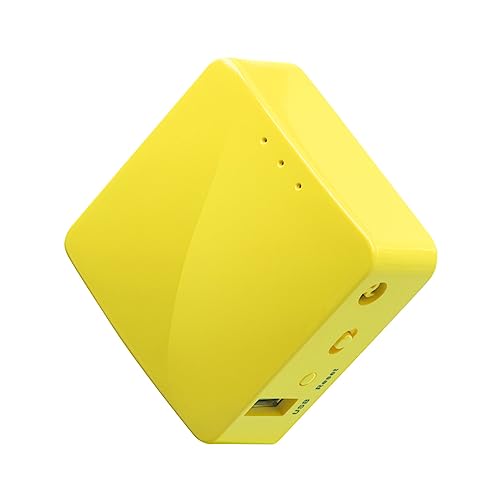
The Mango is a matchbox running full OpenWrt: a MediaTek MT7628NN with 128 MB RAM, 300 Mbps-class 2.4 GHz Wi-Fi, two 10/100 Ethernet ports, a USB 2.0 port and micro-USB power it sips from anything. Its business résumé is exact. As a separation device, it runs the payment terminal or the guest network on its own SSID behind its own firewall rules, isolated from the office LAN. As a travel kit, it gives staff one SSID and one VPN posture in every venue — the hotel portal completed once, the session encrypted to the office or the provider. As an improvisation tool, it builds a network on a site connection, a phone hotspot uplink or a borrowed line within minutes. As insurance, configured and shelved, it is the spare that keeps the till ringing. GL.iNet maintains the firmware like a security product, because for this use it is one.
Pros: genuine OpenWrt; both VPN clients; every mode; standardisable and spare-friendly at the price. Honest limitation: single-band with 10/100 ports — utility pace; a busy small office’s main-router ambitions belong to the Opal step-up or a full-size unit.
Choose it if the job is separation, travel, pop-up or spare — buy two. Skip it if you need a small office’s anchor router with dual-band speed; that is the Opal’s job description. Check on Amazon
As a business standard, the Mango’s virtue is repeatability: every unit configures identically, every staff member learns one admin page, and a replacement restores service by copying the standard setup rather than by improvisation. Keep one configured spare per site and the failure conversation becomes a five-minute swap. Its limits are equally standardisable — one band, modest throughput — which is why the standard suits card machines, staff laptops and guest access at small sites, and why this guide is explicit about the loads it should never be given.
2. GL.iNet GL-AR300M16-Ext — the weak-signal step-up
Who it suits: the business whose sites have bad signals — the yard cabin, the rural unit, the market hall’s far corner — where connecting at all is the first job.
The AR300M16-Ext (Qualcomm QCA9531 at 650 MHz, 128 MB RAM, 16 MB NOR flash) broadcasts the same 300 Mbps-class 2.4 GHz Wi-Fi through two external antennas, which hear and repeat weak signals better than any internal-antenna design; it carries the Mango’s OpenWrt firmware and VPN clients, with two 10/100 ports and USB 2.0. It sits above this tier, prose-only here. The step-up logic is narrow and honest: where the signal is strong it buys nothing over the Mango; where it barely exists, it is the difference between a working site network and a daily complaint.
Pros: external antennas for weak-signal sites; full OpenWrt and VPN clients. Honest limitation: above this budget; single-band and 10/100 — a reach tool. Choose it if your sites’ signals are weak at the wall. Skip it if your premises have ordinary coverage — standardise on the Mango.
For business sites the Ext answers a property problem: the market stall at the pitch’s far end, the workshop unit in a metal building, the pop-up whose only connectivity is a shared network two doors down. External antennas hear weak shared signals that defeat internal-antenna boxes, and the identical firmware means the standard configuration drops straight in. Businesses standardising on the Mango for ordinary sites often hold one or two Ext units as the difficult-site variant — same training, better ears, no new procedures.
3. GL.iNet Opal GL-SFT1200 — the small-office step-up
Who it suits: the micro-office or retail unit that wants one small box to anchor the network — dual-band for staff devices, wired ports for the till and the printer.
The Opal tops our $50 guide: a dual-core 1 GHz processor, AC1200 dual-band Wi-Fi, three Gigabit Ethernet ports, USB-C power and GL.iNet’s OpenWrt-based firmware with both VPN clients. It removes every Mango ceiling at once and can genuinely anchor a small premises, with the Mango as its separation-and-spare partner. It sits above $30, hence prose-only here; for the budget-firm reader it defines exactly what the stretch buys.
Pros: dual-band AC1200; gigabit ports; full VPN firmware. Honest limitation: above this budget; room-scale coverage by design. Choose it if one premises needs an anchor. Skip it if the jobs are separation and travel — the Mango standardises better for less.
The Opal is the step-up a growing site graduates to: wired ports for the till and the office laptop, a 5 GHz band for staff devices, and processor headroom that keeps the VPN to head office comfortable all day. It remains in the same firmware family, so the business standard survives the upgrade — same pages, same habits, more capacity. It is prose-only at this per-site budget, but as the named upgrade for the busiest location, it protects the whole standard from being ripped out when one site outgrows it.
4. TP-Link TL-WR902AC — the mainstream step-up
Who it suits: the business that wants a familiar brand’s simple interface for basic repeating and one-port problems.
The WR902AC broadcasts AC750 dual-band Wi-Fi (433 + 300 Mbps classes) with router, hotspot, bridge, extender, access-point and client modes, one 10/100 port and a USB 2.0 port, powered by micro-USB. It sits above this tier, prose-only here. Its honest positioning for business: conventional multiplication, conventionally done — without GL.iNet’s VPN-client depth, which is why the separation and travel jobs in this guide route to the Mango for less money.
Pros: dual-band; every mode; pocket size; familiar setup. Honest limitation: above this budget; VPN and segmentation duties are not its strengths. Choose it if simplicity and brand lead. Skip it if the VPN is the point — take the Mango.
The TP-Link tempts businesses with its friendly interface and familiar brand, and for a single simple job — a bridge for a wired device, a basic access point in a back office — it performs without fuss. The caution is standardisation: its VPN behaviour and firmware approach differ from the GL.iNet standard, so every TP-Link in the fleet is a second procedure to document, train and troubleshoot. A one-off convenience can be worth that; a fleet decision rarely is. This guide keeps it as the named alternative, with the trade stated plainly.
5. GL.iNet Beryl AX GL-MT3000 — the flagship step-up
Who it suits: the travelling professional whose road kit is a business expense — Wi-Fi 6 AX3000 rates, a 2.5-gigabit port, fast WireGuard throughput to the office, the same mature firmware.
The Beryl AX is the best travel router its maker sells for most people, and it sits well above $30, so it is prose-only with no link. Its business edge is headroom: VPN pace for real file work, Wi-Fi 6 for local traffic, ports for the hotel desk. Whether that headroom earns flagship money depends on travel days per year — this tier has already answered for itself.
Pros: Wi-Fi 6, fast VPN, 2.5G port. Honest limitation: price, far above this tier. Choose it if travel is the job. Skip it if you are equipping a business at this budget — the Mango standardises.
For a business, the Beryl AX reads as the head-office-in-a-box step-up: Wi-Fi 6 for a modern office’s devices, a fast wired port, and VPN throughput that makes a permanent tunnel to a central network feel unremarkable. A flagship site, a design studio or a clinic’s admin office can justify it as the standard for that tier of location. The fleet honesty remains — it is well above the per-site budget in prose only — but naming the top of the ladder keeps the standard coherent as sites diverge.
6. GL.iNet Slate AX GL-AXT1800 — the larger flagship
Who it suits: the long-stay site office — the month-long project base — that wants flagship radios in a set-and-forget box.
The Slate AX (AX1800 class) trades pocketability for sustained performance on the same GL.iNet firmware. Like the Beryl, it lives far above this budget and stays prose-only, marking the category’s top honestly for business readers: everything the form can be, at a price this tier has declined — usually correctly.
Pros: flagship radios and firmware. Honest limitation: price and size, for this tier. Choose it if your bases are measured in months. Skip it if the kit must travel weekly — the Mango fits the bag.
The Slate AX suits the business location that is really a small headquarters: several staff, wired desks, all-day video calls and a router that must simply never be the problem. Its size and ports stop being travel compromises and become office virtues. Businesses rarely standardise a whole fleet on it at this budget, and this guide does not pretend otherwise — it is the anchor-site option, the box for the location whose downtime costs the most, bought with the same firmware habits as the rest of the fleet.
Comparison Table
| Model | Wi-Fi | Ethernet | VPN client | Power | Firmware | Link |
|---|---|---|---|---|---|---|
| GL.iNet Mango GL-MT300N-V2 | N300 2.4 GHz | 2× 10/100 | OpenVPN + WireGuard | Micro-USB | OpenWrt | Check on Amazon |
| GL.iNet GL-AR300M16-Ext | N300 2.4 GHz, ext. antennas | 2× 10/100 | OpenVPN + WireGuard | Micro-USB | OpenWrt | — |
| GL.iNet Opal GL-SFT1200 | AC1200 dual-band | 3× Gigabit | OpenVPN + WireGuard | USB-C 5V/3A | OpenWrt-based | — |
| TP-Link TL-WR902AC | AC750 dual-band | 1× 10/100 | Limited | Micro-USB | TP-Link | — |
| GL.iNet Beryl AX GL-MT3000 | AX3000 dual-band | 2.5G + Gigabit | OpenVPN + WireGuard | USB-C | OpenWrt-based | — |
| GL.iNet Slate AX GL-AXT1800 | AX1800 dual-band | Gigabit | OpenVPN + WireGuard | USB-C | OpenWrt-based | — |
How to Choose a Portable Router for a Small Business
Standardise first. Pick the Mango as the utility standard, buy the working units plus a configured spare, and record the firmware version and configuration in the asset notes. A fleet of identical $30 boxes is supportable by whoever is nearest; a drawer of assorted bargains is not.
Match the box to the job. Separation, travel, pop-up, spare → Mango. Weak-signal site → AR300M step-up. Premises anchor → Opal step-up. The job chooses the box; the box never chooses the job.
Price the incident, not the unit. The per-unit difference between the Mango standard and any alternative is a few dollars; one hour of downtime at a till is not. Procurement maths for businesses should always include the failure that never happens.
Configure before deployment. SSID and role set, VPN loaded and tested, admin password changed, firmware updated, job labelled underneath. A business device deployed with defaults is a liability with an antenna. Our Best Network Switch For Small Business Under $50 guide covers the wired core these boxes attach to.
Standardise the Decision: A Procurement Order for Small Sites
A business should choose in a different order from a household. First, separation: if card payments, staff work and guest access must not share one flat network — and they must not — the router needs real firmware with genuinely separate networks, which is the GL.iNet pattern this guide is built on. Second, supportability: one model, one configuration, one page of instructions taped inside the cupboard door beats a marginally better box that only one person understands. Third, the uplink reality of each site: shared building Wi-Fi argues for repeater strength, a wired socket argues for ports, and a phone-tethered stall argues for low power draw. Fourth, failure planning: the cost of a site offline for a day dwarfs the price difference between any two picks here, so the spare-unit policy is part of the purchase, not an afterthought. Price per unit comes last, and at this tier it nearly always lands on the Mango — bought in multiples, with the step-ups named for the sites whose loads outgrow the standard.
Deployment: The Standard Kit, Rolled Out Properly
The rollout is deliberately boring. Build one reference Mango: firmware current, the business SSID and VPN configuration loaded, admin password set to the documented standard, its role labelled underneath. Test it against the real loads — the payment terminal’s connection, a staff laptop’s VPN session, the guest SSID’s isolation from the office network (verify a guest device cannot see office machines; this check is the separation job’s whole point). Then clone the pattern per unit: travel kits, the spare, the pop-up box. Keep the spare configured, not boxed-new — a spare that needs setup during an outage is a plan that fails at the only moment it is for. Label every unit with its role and the date of its configuration, and record the standard in the asset notes so a successor can rebuild it without archaeology.
Security and Separation: The Non-Negotiables
Business use justifies stricter defaults than home use, and the Mango’s part is a real router’s toolkit. Put payment devices on their own SSID and network segment, guests on the guest facility, and staff systems behind the office network — the Mango’s firewall and separate interfaces make the segmentation real rather than nominal. Run the VPN for staff traffic on external networks as a matter of policy, not preference. Change every default credential, keep the firmware current through the ordinary update cadence, and disable services the role does not need. This is framing, not compliance advice — businesses with formal obligations (payment-card standards among them) should confirm their setup with their provider — but the direction is unambiguous: at $30, there is no longer a budget excuse for running the till on the guest network. Our Best Vpn Router For Apartments Under $30 guide covers the related remote-access pattern for staff who travel.
Power: Sites, Stalls and Hotel Desks
The Mango runs on 5-volt micro-USB and sips so little that a laptop port, a till’s USB socket or a modest power bank runs it for a very long day — for a business, that means the network survives the site’s outlet geography: the market stall with one socket, the cabin with a generator’s hours, the hotel desk where the lamp took the last plug. A power bank plus a Mango is a self-contained network for a pop-up that trades all day on battery. Portability is not the box’s size; it is the power story, and at $30 the power story is flawless. Businesses equipping travelling staff will find the desk-side companions in our Best Portable Router Under $50 base guide.
Firmware: Why OpenWrt Is the Whole Argument
A business router is a security device whether it wants to be or not — it segments the network and carries the VPN — so firmware maintenance is a purchase specification. The Mango runs genuine OpenWrt, maintained by GL.iNet with regular updates and extendable by the community essentially indefinitely; its VPN clients are headline features, not footnotes. This is the substantive reason a $30 box anchors a business guide while prettier no-name repeaters do not appear at all: an abandoned firmware on a business network is not a bargain at any price. The buying ritual follows directly — update at setup, change the admin password, enable checks — and the fleet ages like infrastructure instead of like gadgets.
The Total Cost Picture: Units Are the Cheap Line
Put the purchase in the business’s own arithmetic. Equipping three roles — separation, travel, spare — with the Mango standard costs roughly what one hour of outside IT support costs, and the standard is specifically designed to prevent the recurring version of that hour: the mystery outage, the per-badge firmware hunt, the “which box is this” archaeology. The Opal step-up spends more per premises for an anchor’s capability; the WR902AC spends more for a badge without the VPN depth; the flagships spend flagship money for travel headroom. None is foolish in isolation; the fleet lens is what orders them, and the fleet lens says: standardise on the maintained OpenWrt box, keep a configured spare, document the configuration, and let the network leave the meeting agenda. Our Best Portable Router Under $50 comparison develops the anchor tier further.
What $30 Per Site Cannot Buy
The honest ceiling. Thirty dollars does not buy enterprise management tooling, centralised fleet control or a support contract with a human’s name on it — those live in different budget lines. It does not buy dual-band speed, gigabit ports, Wi-Fi 6 or cellular uplink; the Mango takes no SIM and redistributes connections that exist. And it does not buy exemption from verification: the separation must be tested, the VPN must be rehearsed, the spare must be swapped once in peacetime. What it buys, completely, is the utility layer of business networking — separation, mobility, improvisation and insurance — at current-firmware standard. For most small businesses, that layer was the missing layer, and $30 a unit retires the problem.
Troubleshooting the Three Usual Business Failures
When a deployed unit misbehaves, the cause is almost always one of three. First, the uplink: the venue session expired or the site connection dropped — rejoin and re-authenticate through the Mango; thirty seconds, and the staff devices never notice. Second, the mode: the unit left in router mode when the site needed repeater, or the reverse — the labelled role underneath the box and the documented standard resolve it without archaeology. Third, the power: a sleeping laptop port or an under-rated charger browns the unit out under load — swap to the power bank or the wall charger. All three are configuration, not hardware; the standard’s documentation is what turns them from incidents into errands, which is why this guide spends as much ink on the standard as on the box.
Pop-Ups, Markets and Site Work: The Improvisation Job in Practice
The improvisation job deserves its own paragraph because it is where the Mango’s design reads as if it were specified by small businesses themselves. A market stall needs the till online and the staff phone off the public network: Mango on a power bank, uplink from a phone hotspot, till on the Mango’s own SSID — trading in twenty minutes. A site cabin needs the drawings accessible and the crew’s devices separated from the client’s network: Mango repeating the site’s signal, VPN to the office, done by the first tea break. A new unit awaiting its broadband install needs something today: Mango on whatever temporary connection exists, replaced in five minutes when the real line lands, then shelved as the spare. None of these is a travel story, exactly — they are business stories that happen to move, which is the category’s real territory.
Measuring the Deployment: Verify Once, Trust the Standard
A business standard deserves one verification, done properly on the first unit. Record the negotiated link behaviour at a real site, run the real loads — the terminal’s transactions, a staff VPN session at the day’s peak, a guest device’s isolation check — and note the firmware version that passed. That record becomes the standard’s definition: every later unit is configured to match it, and any future problem is diagnosed against it (“same model, same configuration, different behaviour” points at the site, not the standard). This is the unglamorous machinery that makes a $30 box a business decision rather than a purchase: verification once, repetition without thought, and a paper trail a successor can follow.
Remote and Hybrid Staff: The Standard at the Kitchen Table
The modern small-business fleet includes the home desks of hybrid staff, and the Mango standard travels well: the same unit, the same configuration pattern and the same VPN posture in a home office presents identically to support. That uniformity is worth more than it first appears — support conversations stop depending on which building the machine sits in, and the home worker’s connection stops being the variable in every call-quality discussion. Where the business supplies the home kit, issue it from the same standard and the same shelf of spares; where staff buy their own, publish this guide’s recommendation in the staff handbook, because it is the box the business knows how to support.
Sharing Files and Devices on Site
The Mango’s USB 2.0 port and wired ports earn a practical paragraph: attach a flash drive or portable disk and the unit shares it across the site network — the drawings for the crew, the price lists for the stall, the day’s photos for the office — while a wired printer or terminal plugs straight into its Ethernet ports and joins the network without a cable run to the main router. Speeds are utility-grade, not NAS-grade; this is operational sharing, not an archive. For a pop-up or a site office, it collapses three boxes’ worth of improvisation into the one that is already in the kit bag.
When the Business Grows: From One Box to a System
The standard’s real test is growth. At one site, any box works; at five, the questions change — anchors for the premises, separation per location, spares per region. The Mango standard scales through that range without changing its answer: the same SKU in every kit, the Opal step-up where a premises needs an anchor, the same configuration pattern and the same documentation. Growth also moves the infrastructure conversation — wired cores, proper access points — and the utility standard absorbs those changes gracefully, because a maintained-OpenWrt box bought today is still the right utility box behind the upgraded network. Buy the standard once, at the small size, and the fleet never has a networking adolescence.
Procurement Notes: Buying the Standard Well
Three habits make the purchase itself painless. Buy the fleet quantity plus spares in one order, so every unit arrives from the same listing and the same revision — revisions of value hardware drift over years, and a single batch keeps the standard truly identical. Keep the order record with the asset notes (date, listing, firmware version installed), because the successor who reorders in three years will bless you for it. And resist the mid-cycle substitution: when a site needs a unit in year two, buy the standard again even if a newer bargain glitters — the fleet’s uniformity is worth more than any single site’s marginal improvement. Procurement discipline is unglamorous, and it is the difference between a standard and a habit of buying routers.
Longevity: The Standard That Refuses to Age
Business hardware ages on two clocks: the silicon’s and the firmware’s. The Mango’s silicon is years old and entirely sufficient for its jobs — separation, VPN, repeating and improvisation are software jobs, and venue and site networks age slowly. The firmware clock is the one that matters, and OpenWrt’s maintenance keeps it at zero: a Mango deployed years ago runs current, patched firmware today, on the same cadence as a new one. Buy the standard once, update it occasionally, document it once, and let the step-up conversation wait until the business — not the calendar, and not the marketing — demands it. That is the deepest sense in which this is the budget pick: not the cheapest box, but the cheapest decade of business networking.
Guest Access Without the Awkward Password Conversation
Guest Wi-Fi is where small businesses most often improvise badly: the staff password on a chalkboard, shared with every customer, changed never. A pocket router standard fixes it structurally. The business network keeps a strong, private key known to staff; the router’s separate guest network carries a simple key that can be printed on a card, changed monthly, and given away freely — because it leads only to the internet, not to the till, the printer or the office laptop. That separation, not the password itself, is the security improvement.
Operating it well is a rhythm, not a project. Change the guest key when staff change or each season, whichever comes first; keep the guest network’s name stable so regulars are not confused; and let the router’s isolation setting keep guest devices from seeing each other, which protects your customers from each other as a free by-product. Cafés, salons, clinics and rental hosts all report the same side benefit: the password conversation disappears, replaced by a printed card — a small professionalism customers genuinely notice.
Spares, Labels and the Five-Minute Swap
The difference between a router standard and a router hope is what happens at the worst moment: Saturday trading, a dead box, and a queue forming. The businesses that shrug this off share a dull, effective system. Every site holds one spare unit, pre-configured with the site’s standard setup, labelled with its role and stored with its power supply and cable. The swap procedure is five steps on a card: unplug, plug in the spare in the same ports, wait for the network name, test the card machine, report the failure. Any staff member can do it; nobody improvises.
Maintaining the system costs an hour a quarter: power up each spare, check for firmware updates, confirm the configuration still matches the standard, and note the check on the label. Rotate the spare into service occasionally so both units age evenly and neither surprises you. This sounds like enterprise ritual shrunk small, and it is — deliberately. At pocket-router prices, redundancy is the one enterprise practice a small business can afford in full, and it converts the fleet’s most likely failure from a crisis into a chore.
Training the Saturday Staff: Networking for Non-Network People
A business standard succeeds or fails at its least technical pair of hands, so design the human side as carefully as the configuration. The training is fifteen minutes and three artefacts: the one-page swap card, a photograph of the correct cabling taped inside the cupboard, and the rule that nobody changes a setting — they swap the spare and report. Settings are the standard-owner’s job; restoration is everyone’s. That division keeps well-meaning improvisation from quietly unravelling the separation the business depends on.
Rehearse it once with the newest staff member, timed, while trading is quiet. If a nervous beginner can restore the card machine inside ten minutes using only the card, the system is finished; if they cannot, the card is wrong, not the beginner. Businesses that run this small drill discover their documentation gaps in peacetime — which is the entire difference between a fleet standard and a pile of identical routers.
Common Buying Mistakes
Running payments on the main guest-accessible network. Separation is the Mango’s first job; skipping it saves nothing and risks the business. Buying assorted bargains per site. Different boxes per location means different firmware stories and no interchangeable spares — the standard is the savings. Deploying with default credentials. A business device on defaults is an incident with a date to be announced. Pricing the unit, not the outage. The spare Mango costs less than fifteen minutes of closed till. Expecting main-router muscle. A busy office’s anchor is a full-size router or the Opal step-up; the Mango is the utility layer, honestly scoped. Letting each site buy its own favourite router. A mixed fleet multiplies training, spares and troubleshooting beyond any saving; the standard is the product you are really buying. Skipping the configured spare to save one unit’s cost. The first Saturday failure repays the spare many times over — downtime is the expensive line, never the hardware. Writing the real network password where customers can see it. The guest network exists so the staff key never has to be shared; using it is the entire point.
Final Recommendation
Standardise on the GL.iNet Mango GL-MT300N-V2 — buy the working units and a configured spare. It is the only router this guide can link under $30, and for business duty it needs no apology: genuine OpenWrt, both VPN clients, real segmentation and power-anything humility, at a per-unit price that makes redundancy the default. If a premises outgrows it, the step-ups are named above with their worth stated plainly. In small-business networking, the cheapest reliable standard wins — and this is it.
Frequently Asked Questions
Can the Mango really separate the card machine from the office network?
Yes — run the payment devices on the Mango’s own network (its SSID and wired ports sit behind its firewall, apart from the office LAN), and verify the isolation once at deployment by checking that a device on the guest side cannot reach office machines. This is framing for a sound setup, not a compliance certification — confirm formal obligations with your payment provider.
How many units should a small business buy?
One per active role (travel kit, separation box, pop-up) plus one configured spare covers realistic failure and growth scenarios. At this price, the spare is cheaper than the courier fee for an urgent replacement — and it is only useful because it is identical and pre-configured.
Is a $30 router appropriate for business use at all?
When the firmware is genuine, maintained OpenWrt with real VPN clients, yes — the business’s support relationship is with the firmware and the standard, not the badge or the price tag. What a business should not deploy is anonymous hardware with abandoned firmware, at any price.
Can staff use the same kit at home?
Yes — the standard travels: the same Mango model, the same configuration pattern and the same VPN posture in a home office presents identically to support. Publish the standard in the staff handbook and the home desks stop being variables.
What if a unit fails mid-trading?
Swap in the configured spare — same model, same configuration pattern — and the site is back inside fifteen minutes; order the replacement spare the same day. This is the entire disaster plan a fleet standard needs, and it is only possible because the spare is the standard, pre-configured rather than boxed-new.
Can the Mango handle our guest Wi-Fi and our staff network expectations?
As the separation layer, yes: guests on the Mango’s guest facility or its own SSID, staff on the office network, payment devices on their own segment. As the whole premises’ main router for a busy office, that is the Opal step-up’s or a full-size router’s job — the guide’s scoping is deliberate, and the standard covers both layers without confusion.
Why is there only one linked pick in this guide?
Because only one router with maintained OpenWrt firmware and real VPN clients genuinely sells under $30 with a verified listing. Padding the list with unverified boxes would make a longer guide and a worse one — and for a business standard, a worse guide is an expensive one. The step-ups are described in full so the choice to stretch is informed.
How should we document the standard setup for staff?
One page per site, kept with the spare: the network names, where the passwords are recorded, the five-step swap procedure, and who to call. The full configuration detail lives in a master document held by whoever owns the standard. Staff need the swap page, not the engineering — and a new starter should be able to restore service from the page alone.
Can one standard really cover a shop, a stall and home workers?
Yes, if the standard is a configuration rather than a hope: the same network structure, the same separation between payment, staff and guest traffic, and the same VPN profile where one is used. Sites differ in uplink — wired, repeated or tethered — and the standard should say so per site. The box and the habits stay identical, which is what makes support across locations possible for a small team.
What should we do with a unit that fails?
Swap in the spare first and trade; diagnose later, away from the queue. Back at base, a factory reset and the standard configuration will revive units that were merely misconfigured — the commonest failure by far. Keep a simple log of failures by site; if one location kills units repeatedly, the site’s power or placement is the problem, and that is a premises fix, not a purchasing one.
Should the business owner hold the only admin password?
One accountable owner of the standard is right; one human bottleneck is not. Record the admin credentials in the business’s password manager with access for a named deputy, keep the swap procedure password-free for frontline staff, and reserve configuration changes for the owner or deputy. That split — everyone can restore service, only two people can alter the system — is the governance pattern that lets a small fleet stay both secure and survivable through holidays and staff changes.