Disclosure: As an Amazon Associate, UMT Smart Tool earns from qualifying purchases. This guide is built from product listings and maker specifications, not from our own hands-on testing. Prices are approximate and can change, so check the current price before you buy. Last updated: November 10, 2026.
“Best office chair” depends on how you sit, not on a single spec sheet. A chair for eight hours of focused desk work needs lumbar support you can position, a seat depth that fits your legs and armrests that meet the desk without lifting your shoulders. A chair for a small spare-room office needs a compact footprint and a back that does not swallow the room. This guide is organized by role and budget, so you can start with the job your chair has to do, then compare the strongest option in that role — from two premium ergonomic benchmarks down to a budget mesh chair that still gets the core adjustments right.
In this guide
Quick Picks
The short version: six ergonomic office chairs we would look at first, one per role.
| Pick | Type | Best for |
|---|---|---|
| Steelcase Leap | Premium ergonomic task chair | All-day desk work and adjustable back support |
| Herman Miller Aeron | Premium mesh office chair | Warm rooms and a long-term, sized fit |
| Steelcase Series 1 | Compact ergonomic chair | Small home offices and tighter spaces |
| HON Ignition 2.0 | Mid-range task chair | Durable all-day use without premium pricing |
| SIHOO Doro C300 | Full-mesh chair with footrest | Recline breaks between work sessions |
| SIHOO M18 | Budget mesh chair | A first ergonomic setup on a budget |
Our Picks

1. Steelcase Leap, Black Frame, Onyx Fabric — Best Overall
The Leap is our first pick for full-time desk work because so much of it adjusts to the person, not the other way round. Steelcase’s LiveBack backrest flexes and changes shape as you shift position, and the lumbar support moves up and down with a separate dial for lower-back firmness — support that can actually be moved rarely lands in the wrong place. The seat depth slides from 15.75 to 18.75 inches, the seat height runs from 15.5 to 20.5 inches, and the 4D armrests move in height, width, depth and pivot. Steelcase rates the chair for users up to 400 lb, the highest capacity in this guide.
The seat is padded foam rather than mesh, so it feels familiar and cushioned, though warmer than a suspension seat in a hot room. There is no headrest on this configuration, and the styling is plain office rather than statement furniture. It sits in the premium tier, backed by Steelcase’s 12-year warranty. For someone who sits six or more hours a day and wants one chair fitted carefully to their body, the Leap is the safest ergonomic bet here.

2. Herman Miller Aeron, Size B, Carbon — Best Premium
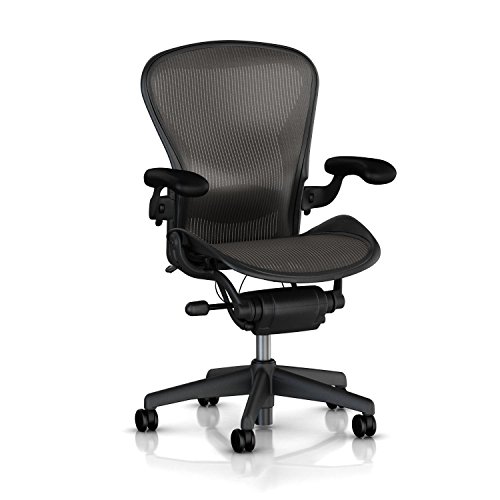
The Aeron takes the opposite route to the Leap. Instead of a padded seat, it suspends you in 8Z Pellicle mesh across seat and back, woven with different tension zones to spread weight and let air pass through — there is no foam to compress, and the chair runs noticeably cool. This Size B configuration comes with the adjustable PostureFit SL support, which braces both the sacral and lumbar regions, plus a tilt limiter and seat-angle adjustment for people who lean in over a desk. Herman Miller backs the Aeron with a 12-year warranty.
The trade-off is that fit is chosen at purchase, not dialed in later: the Aeron comes in sizes A, B and C, and Size B is the middle size, so check Herman Miller’s sizing chart against your height and weight before ordering. There is no seat-depth slider, and the firm, upright suspension feel divides opinion — fans call it supportive, others find the frame edge unforgiving if they sit cross-legged. It is a premium-tier, buy-it-for-years chair. Choose it if you run warm and will take the time to get the size right.

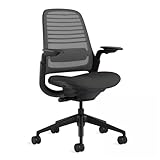
3. Steelcase Series 1, Graphite — Best for Small Spaces
The Series 1 is the Leap’s smaller, lighter sibling, built for exactly the spare-room and apartment offices the bigger chairs overwhelm. It weighs just 29 pounds, so it is easy to move and roll out of the way, and its recline is weight-activated: the back tension adjusts itself to the sitter instead of asking you to wind a tension knob. You still get the family ergonomics — a LiveBack flexor backrest, adjustable lumbar support, and, on this Graphite configuration, 4D armrests and carpet casters. Steelcase rates it for users up to 300 lb.
What you give up versus the Leap is range: there is no seat-depth slider, the seat and back are smaller, and the overall adjustment envelope suits average-sized users best. Very tall users should check the fit carefully against the Leap instead. In return you get a genuine ergonomic chair from a top-tier maker in the mid-range tier, in a footprint that leaves a small room usable. For a compact home office, it is the easiest premium-brand pick to live with.
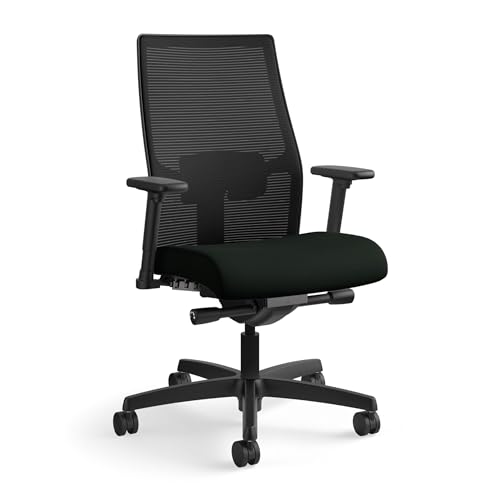
4. HON Ignition 2.0 Mid-Back, Black — Best Mid-Range
The Ignition 2.0 is the workhorse of this list: a contract-grade task chair from HON, the American maker that furnishes whole offices, sold here in the mid-back configuration (model HONI2MM2AMC10BT) with an advanced synchro-tilt control. The mesh back carries adjustable lumbar support, the seat height runs from about 17 to 21.5 inches, the armrests adjust in height and width, and HON rates the chair to 300 lb. The headline spec is the warranty — HON’s limited lifetime warranty is the strongest coverage in this guide, and it reflects how the chair is built.
The compromises are in refinement rather than structure. The armrests stop at height and width adjustment rather than full 4D movement, this configuration is a mid-back with no headrest, and the molded foam seat cushion feels firm before it breaks in. None of that matters much for its job: an all-day chair for home workers who want office-grade durability and a synchro-tilt mechanism without paying premium-brand prices. If you are furnishing a home office for years of daily use on a mid-range budget, start here.

5. SIHOO Doro C300 with Footrest, Black — Best for Recline Breaks
The Doro C300 (model C300 M101 JT) is the feature-led pick: a full-mesh seat and back, a dynamic lumbar support designed to track your back as you move rather than pressing at one fixed point, soft 3D armrests and a backrest you can raise and lower to match your torso. This configuration adds the retractable footrest, which turns the chair into a genuine break seat — recline, put your feet up, take ten minutes away from the keyboard posture, then slide it back under the seat and work. SIHOO’s manual caps the chair at 300 lb, and the warranty runs three years.
Mesh seats are the honest trade-off: breathable and even, but firmer and less cushioned than foam, and the footrest is for breaks, not for working hours — typing with your feet up is poor posture however comfortable it feels. The chair also has a larger footprint than the Series 1, so measure a small room first. For home workers who actually take reclined breaks in the same chair they work in, the C300 packages more adjustment and features per dollar than anything else here.


6. SIHOO M18, Black — Best Budget
The M18 (model M18-M148) is the budget pick that still covers the adjustments that matter. Its separate lumbar pad moves up, down, in and out on a knob, so the support can be placed rather than accepted wherever a fixed curve happens to sit. You also get an adjustable headrest, a breathable mesh back over a foam seat, 2D armrests, a tilt lock for the recline, and a 330 lb (150 kg) weight rating — generous for the tier. The listing carries BIFMA certification, and SIHOO’s warranty runs three years.
Budget limits show in the details. The armrests adjust in fewer directions than the 4D sets above, the lumbar knob sits behind the backrest so you set it before sitting down rather than while working, and the parts and finish are a step below the HON and Steelcase chairs. Assembly is part of the deal at this price. For a first proper desk chair, a second chair for a partner’s setup, or a few hours of work a day, the M18 delivers real, placeable lumbar support at a budget-friendly tier — the one feature cheap chairs usually fake.

Best Picks by Category
- Overall office chair: Steelcase Leap — the widest fit range here: lumbar height and firmness, sliding seat depth, 4D arms and a 400 lb rating.
- Premium office chair: Herman Miller Aeron — cool suspension mesh, sized A/B/C fit and a 12-year warranty.
- Small spaces: Steelcase Series 1 — 29 lb, compact, with self-adjusting recline tension and real lumbar support.
- Mid-range workhorse: HON Ignition 2.0 — synchro-tilt, adjustable lumbar and a limited lifetime warranty.
- Recline breaks: SIHOO Doro C300 — dynamic lumbar, full mesh and a retractable footrest.
- Budget: SIHOO M18 — adjustable lumbar pad, headrest and 330 lb rating at a budget-friendly tier.
Notice the pattern: at every tier, the money should go first to lumbar support you can position and a seat that fits your legs. Extra features only pay off after those two are right.
How to Choose
Start with fit: seat height and depth
Your feet should rest flat on the floor with knees near a right angle, and there should be a small gap — two or three fingers — between the seat edge and the back of your knees. A seat-depth slider, like the Leap’s 15.75–18.75 inch range, is the cleanest way to get that gap; without one, check the fixed seat depth against your thigh length before ordering. Seat height is set against your desk, not in isolation.
Lumbar support: fixed, adjustable or dynamic
A fixed curve only supports you if it happens to match your back. Adjustable lumbar — height on the Series 1, height plus firmness on the Leap, a movable pad on the M18 — can be placed where your lower back actually curves. Dynamic systems like the C300’s follow you as you shift. Any of the three adjustable approaches beats a fixed pad at the wrong height.
Armrests: 2D versus 4D
Armrests should hold your forearms with shoulders relaxed and elbows near a right angle, without pushing you away from the desk. Height adjustment is the minimum. 4D armrests — height, width, depth and pivot, as on the Leap and this Series 1 configuration — matter most if your shoulders are wide or narrow, or you move between typing and writing positions through the day.
Mesh versus padded seats
Mesh runs cooler, holds its shape for years and feels firmer and more even. Foam feels softer and warmer, and slowly compresses with use. Full-mesh chairs like the Aeron and C300 suit warm rooms and people who dislike sinking into a seat; padded chairs like the Leap and Ignition 2.0 suit people who find suspension seats hard. Neither is better — match the seat to your room and your preference.
Capacity, build and warranty
Match the maker’s stated weight limit to everyone who will use the chair, with headroom to spare; the rating is also a rough proxy for frame strength. Then read the warranty in parts — the HON’s limited lifetime cover and the 12-year terms from Steelcase and Herman Miller say more about expected lifespan than any marketing claim. Finally, check the model against the CPSC recall database before buying: office chairs have been recalled over the years for breaking backs and bases, and a two-minute check costs nothing.
Sizing systems and small rooms
Most chairs are one-size; the Aeron is the exception, sold in sizes A, B and C, so treat its sizing chart as part of the purchase. In a small home office, also weigh the chair itself and its footprint: a 29 lb compact chair like the Series 1 keeps a spare room flexible, while a full-size chair with a footrest needs floor space to recline into.
Which Chair Suits Which Sitter
With six chairs in different tiers, it helps to start from the person rather than the product. If one chair has to fit a tall user, a heavier user or several people with different builds, the Steelcase Leap is the strongest match in this guide, because it offers the widest set of adjustments and the highest stated weight rating. Its sliding seat depth and 4D armrests let it be refitted when a different person sits down.
If you are a single user who runs warm and can pin down your size, the Herman Miller Aeron makes sense, since the fit is decided at purchase. If your room is small, the Steelcase Series 1 is the natural choice, and its lighter weight helps if you move the chair between rooms. If you want office-grade durability for years of daily work without paying premium-brand pricing, the HON Ignition 2.0 is the practical middle.
The two SIHOO chairs suit different habits. The Doro C300 fits people who like to lean back and rest between tasks, while the M18 suits someone buying a first real desk chair or furnishing a second workstation. Whichever you lean toward, compare the stated weight rating and the adjustment list against the people who will actually sit in it.
What to Verify on the Listing Before You Order
Product pages for office chairs often blur configurations together, so read the exact variant you are buying. Frame color, fabric, armrest type, casters and even back height can differ between listings of the same chair family, and those details change both the price and the fit.
- Configuration: confirm armrest type, caster type (hard floor or carpet), back height and whether a headrest is included.
- Weight rating: match the maker’s stated limit to every user, with room to spare.
- Seat measurements: compare seat width, depth and height range with your own measurements.
- Assembly: note whether the chair arrives assembled or in parts, and what tools are included.
- Warranty terms: read what is covered, for how long and whether the warranty applies to the seller you are buying from.
- Return policy: a chair is hard to judge in ten minutes, so a generous return window is worth real money.
If a listing does not state a measurement, check the maker’s own manual or product page rather than guessing.
Setting Up the Chair at Your Desk
Even a well-chosen chair works poorly if it is set up in the wrong order. Start with seat height so your feet rest flat and your knees sit near a right angle. Next set seat depth if your chair has a slider, leaving a small gap behind the knees. Then move the lumbar support to where your lower back curves inward, and only then adjust the armrests.
Armrests should come to your elbows without lifting your shoulders. If the desk is too high after all that, raise the chair and use a footrest rather than hunching. If the desk is too low, the better fix is usually to raise the desk, if it allows it, rather than lower the chair so far that your feet dangle.
Recline tension and tilt come last. Set tension so the back follows you without feeling loose or pushing you forward. Revisit all of it after a week, because your body will tell you what felt fine in the first hour but is not working across a full day.
Common Chair Buying Mistakes
The most frequent mistake is buying on looks or headline features instead of fit. A chair with a headrest, a footrest and a sporty shape can still leave the lower back unsupported if the lumbar pad cannot be placed where you need it.
Another mistake is ignoring the desk. A chair with fixed-height armrests may collide with a desk edge, and a tall chair under a low desk forces awkward posture. Measure the clearance beneath the desktop before ordering.
People also over-buy adjustments they never use. A recline lock, tilt limiter or seat-angle control is helpful only if you will set it. Choose the controls that match your habits, and learn them when the chair arrives; many owners leave a chair in its factory setting for years.
Finally, buyers often skip the floor. Casters matched to hard floors or carpet behave differently, and a chair that rolls too freely or drags on a rug is a daily annoyance. Check the caster type on the listing and swap if needed.
Looking After a Chair and Spotting Wear
A little routine care extends the life of any chair. Wipe mesh with a damp cloth and mild soap, vacuum fabric and foam seats, and clean the casters, since hair and grit collect around the wheels and make the chair harder to roll. Check the maker’s manual for approved cleaning products, because some can damage finishes or fabrics.
Every few months, tighten visible bolts and screws, especially those holding the armrests and base. Loose hardware causes creaks and, if ignored, can wear threads.
Signs that a chair is nearing replacement include a seat that no longer holds your height, a gas cylinder that sinks during the day, a back that will not hold its recline, mesh that has stretched or frayed, and foam that has flattened enough to feel the frame. Some of these can be fixed with replacement parts, so check what the maker sells and what the warranty still covers before you buy a new chair.
Budget Tiers and What Each Delivers
The six picks fall into three broad tiers, and each tier shows a different set of priorities. The budget tier, represented here by the SIHOO M18, aims at getting the essential adjustments in place, above all a lumbar pad you can position. You should expect simpler armrests, lighter finish and assembly work.
The mid-range tier, with the HON Ignition 2.0 and the Series 1, tends to add sturdier mechanisms, better warranties and more refined adjustment. This is where many full-time home workers find the best balance of cost and longevity.
The premium tier, with the Leap and the Aeron, adds the broadest adjustment ranges, long warranties and long-term parts support. Spread across years of daily use, the higher purchase cost can be reasonable, but it only pays off if the chair actually fits you.
Before moving up a tier, ask what the extra spending buys: a feature you will use daily, or a refinement you will barely notice. If the answer is a feature, move up; if not, keep the money.
Getting Comfortable: The First Two Weeks in a New Chair
Almost every office chair in this guide feels slightly wrong on day one, and that is normal. Your body has adapted to your old chair, including its flaws, and a chair with firmer support, a different lumbar shape or a more upright default will announce itself to muscles that had gone quiet. Judge a new chair across two weeks of real work, adjusting one thing at a time, rather than declaring a verdict after the first afternoon. Change seat height first and live with it for a day. Then set seat depth if your model allows it. Then position the lumbar support, and only then fine-tune the armrests and recline tension. Changing everything at once leaves you unable to tell which adjustment actually helped.
Comfort in this guide is discussed purely in terms of fit, support and how a chair feels across a working day. No chair here should be bought as a remedy for a medical concern, and persistent discomfort is a reason to look at your whole workstation — desk height, screen position, footwear and how often you stand and move — rather than a reason to keep swapping chairs. The best chair in this shortlist is the one whose adjustments cover your body and your desk, and whose seat you stop noticing by mid-afternoon.
How the picks suit different sitters
The Steelcase Leap is the safest all-round recommendation because its back and seat respond as you shift position through the day; it suits sitters who move, lean and perch rather than sitting in one fixed pose. Its honest limitation is that the padded seat and fabric back feel warmer than mesh in a hot room. The Herman Miller Aeron takes the opposite approach with its suspended mesh and strict sizing system: superb breathability and a very deliberate fit, provided you choose the correct size. Choose the Aeron if you run warm and value that crisp, hammock-like support; skip it if you like to sit cross-legged or perch on one foot, because the firm frame edges discourage informal postures.
The Steelcase Series One is the considered choice for smaller rooms and smaller desks, giving up some of the Leap’s sophistication for a lighter footprint and easier movement in tight spaces. The HON Ignition mid-back is the pragmatic middle route — a conventional, well-judged chair that suits buyers who want adjustability without paying flagship prices, with the trade-off of a less distinctive feel. The SIHOO Doro with its footrest suits people whose workday includes deliberate recline breaks, reading or calls away from the desk surface; it is less ideal if you rarely recline, since you pay for a feature you will not use. The SIHOO M18 is the budget entry: entirely serviceable for moderate daily hours and lighter sitters, with the honest limitation that materials, casters and adjustment finesse reflect its tier, so very long daily sessions are better served higher up this list.
Fitting the Chair to the Desk, Not Just the Body
A chair does not work alone. Armrests that cannot slide under the desk force you to sit too far from your keyboard, and a seat set correctly for your legs can still leave your elbows low if the desk is tall. Work through the chain in order: feet supported flat, knees comfortable, seat depth leaving a small gap behind the knees, armrests meeting your forearms without lifting your shoulders, and the screen arranged so you are not leaning forward to read it. If your desk is fixed and tall, a footrest can close the gap more cheaply than a new desk; if your desk is low, check the chair’s armrest height range before buying, because not every model drops low enough.
Flooring is the forgotten variable. Casters suited to carpet drag and chew on hard floors, while hard-floor casters can roll too freely on smooth surfaces, which becomes tiring in its own way. Check which casters ship with the chair and whether the maker offers the alternative. In shared or hot-desking setups, favour chairs whose adjustments are quick and obvious — the Series One and Ignition score well here — because a chair that takes five minutes to re-fit will simply be used badly fitted. For a single dedicated user, the Leap and Aeron reward the one-time effort of dialling them in precisely.
Mistakes that make a good chair feel bad
The commonest mistake is setting the seat too high because it feels commanding, then spending the day with pressure under the thighs and feet barely grounded. The second is placing lumbar support at the wrong height: support pushed into the middle of the back feels like a prod, while support settled into the natural curve of the lower back disappears, which is exactly what you want. The third is locking the backrest upright all day. Most of these chairs are designed to move with you; a modest recline with tension set so the back follows you usually feels better across long sessions than a rigid vertical pose. Finally, do not ignore assembly and setup instructions for the premium models — gas lift orientation, arm attachment and tension defaults all assume a few minutes of care that pays back every day.
Care is simple but not nothing. Fabric chairs benefit from a regular vacuum with an upholstery tool and prompt attention to spills; mesh chairs want dust removed from under the seat where it accumulates; casters pick up hair and grit that should be cleared before they start marking floors or rolling roughly. Check fixings after the first month, since new chairs settle and a slightly loose arm is far easier to snug up early than after it has worked itself sloppy. Treated this way, the better chairs in this guide should feel consistent for years rather than slowly degrading without you noticing.
Extra Questions Buyers Ask Before Ordering
How long should I sit in a chair each day before judging it?
Give it your normal working pattern for at least a week, ideally two, with small daily adjustments. Short showroom sits reward softness, while real workdays reward support and fit — the two often point to different chairs. If a chair still feels wrong after careful adjustment across that period, the mismatch is usually size or seat depth, which no amount of settling-in will fix.
Is it worth paying more for the premium picks?
It is worth it if you sit for long hours daily, if you are hard to fit in standard chairs, or if you keep a chair for many years, because the Leap and Aeron spread their cost across that heavy use and offer stronger long-term support ecosystems. For moderate daily use, a mid-range pick such as the Ignition usually delivers the comfort most people actually need, and the saved budget is often better spent on desk or screen improvements.
Chairs for Shared Desks, Small Rooms and Hybrid Weeks
Working patterns have changed faster than chair marketing, and several picks here make most sense once you map them to a modern week. A chair used ten hours a day, five days a week by one person justifies flagship money and careful personal fitting — that is Leap and Aeron territory. A chair used three long days at home and ignored the rest of the week serves its owner best at the Ignition or Series One level, where the money saved can improve the rest of a part-time setup. A chair shared between two household members of different sizes needs fast, intuitive adjustment above all, because a chair that is tedious to refit will be used in the other person’s settings, and both people will conclude wrongly that it is an uncomfortable chair.
Small rooms impose their own verdicts. A large chair in a small home office dominates the room, catches on everything when it rolls, and makes the space feel like a cockpit. The Series One was picked with exactly that room in mind, and the SIHOO models keep footprints moderate too. Measure the roll-back space behind your desk as carefully as the desk itself: a chair that cannot recline or roll without meeting a wall or a bed will be sat in defensively all day. In genuinely tight spaces, armless use or arms that adjust low and narrow are not compromises but the features that make the room work at all.
What changes between the first month and the first year
New chairs feel firmer and more structured than they will at month six. Foam settles, mesh relaxes a fraction, and mechanisms free up, which is why a chair that feels almost too assertive in week one often feels perfect by the end of the first season. The reverse also holds: a chair that feels cloud-soft in the showroom has nowhere to go but softer, and budget chairs reveal their tier here first, in padding that thins where you sit most. This is the practical argument for buying support that feels fractionally firm rather than instantly plush, and for treating the premium picks’ structure as a long-term feature rather than showroom stiffness. Keep the packaging and paperwork until the settling-in verdict is genuinely in, and note the warranty terms somewhere you will find them in year three, not in a deleted email from delivery day.
A five-minute weekly reset for your workstation
Chairs drift out of adjustment in ordinary use: armrests get knocked, tension knobs get borrowed by curious hands, casters gather the week’s debris. A five-minute weekly reset keeps a good chair feeling new. Roll the chair out, clear the casters, and check that it rolls straight and quietly. Return each adjustment to your known settings — most owners benefit from noting those settings once, when the chair feels perfect, rather than rediscovering them by feel every time. Sit, confirm your feet, knees and elbows in that order, and only then start work. It sounds ritualistic because it is, and like most small rituals it prevents the slow accumulation of minor discomforts that people otherwise blame on the chair, the desk or themselves.
Frequently Asked Questions
What makes an office chair “ergonomic”?
Adjustability that fits the chair to your body: seat height, lumbar support you can position, armrests that meet your arms without lifting your shoulders, and a backrest that supports an upright-to-slightly-reclined posture. A chair with a curved back but no adjustment is ergonomic in name only.
Is mesh or a padded seat better for long hours?
Neither wins outright. Mesh stays cool and keeps its tension; padding feels softer and warmer. For long hours in a warm room, mesh is usually the safer pick. If you have found mesh seats hard in the past, choose a padded seat like the Leap’s and accept the extra warmth.
Which Aeron size should I buy?
Use Herman Miller’s sizing chart, which maps height and weight to sizes A, B and C. Size B is the middle and most common fit; shorter, lighter users often belong in A, and taller or heavier users in C. Because the Aeron has no seat-depth adjustment, the size choice does the fitting work — do not default to the middle without checking.
Do I need a headrest on an office chair?
For upright work, no: a headrest does nothing while you type. It earns its place when you recline to read, watch or take calls. If you mostly work upright, spend the money on lumbar adjustment first — a chair like the M18 includes a headrest, while the Leap and Ignition 2.0 here do without one by design.
How much should I spend on an office chair?
Spend in proportion to hours. For a few hours a day, a budget-friendly chair with real lumbar adjustment, like the M18, is sensible. For full-time work, the mid-range buys stronger mechanisms and warranties, and the premium tier buys the broadest adjustment and longest parts support — costs spread over many years of daily use.
How long should a good office chair last?
It tracks the warranty. Premium chairs are built for a decade or more of daily use with replaceable parts; contract chairs like the HON carry lifetime cover on many components; budget chairs typically carry around three years, with foam, mesh tension and casters aging first. Care and intensity of use matter as much as the badge.
Should I try a chair in person before buying online?
If you can, yes, since seat firmness and back shape are personal. If not, buy from a seller with a clear return window and plan to test the chair across a full workday, not just a few minutes. Keep packaging until you are sure.
Can I use a footrest with a regular office chair?
Yes. A separate footrest helps when the seat is raised to meet a high desk and your feet no longer reach the floor. Pick one that is stable and lets your feet rest flat, and note that the Doro C300's built-in footrest is meant for breaks rather than working.
Is a taller backrest always better?
Not necessarily. A high back supports more of the spine and shoulders, but a mid-back like the HON configuration here can feel less restrictive and still support the lower back well. Choose based on whether you want upper-back support and whether you recline.
How do I know if the lumbar support is in the right place?
It should meet the inward curve of your lower back, roughly at belt height, without pushing you forward. If you feel pressure or a gap, adjust height first and then firmness or depth if the chair offers it.
Do casters matter for floors?
Yes. Hard casters can roll too freely on hard floors and scratch some surfaces, while softer casters are made for hard floors. The Series 1 configuration here lists carpet casters, so check the caster type on any listing and swap if your floor needs a different style.
Can two people share one office chair?
They can if the adjustments cover both, but it takes resetting height, lumbar and armrests each time. Chairs with quick, intuitive controls and a wide adjustment range suit shared use better than a chair that was set once and left alone.
Is it worth buying replacement parts instead of a new chair?
Often, if the frame is sound. Gas cylinders, casters, armrest pads and seat cushions are the common wear items. Check which parts the maker sells and whether the warranty still applies before deciding.
Bottom Line
Buy the office chair for your hours and your body, not the label. For all-day desk work, the Steelcase Leap’s combination of lumbar height and firmness adjustment, sliding seat depth and 4D arms makes it our first recommendation. The Herman Miller Aeron is the premium alternative if you run warm and will size it properly; the Steelcase Series 1 shrinks the same ideas into small rooms; the HON Ignition 2.0 is the durable mid-range buy; the SIHOO Doro C300 adds a footrest for real breaks; and the SIHOO M18 proves a budget chair can still offer lumbar support you can place. Check the maker’s sizing and capacity figures, and the current price, before you order.
Related Guides
- 7 Best Ergonomic Office Chairs: HON, Duramont, Mesh Picks (2026)
- 6 Best Gaming Chairs: Corsair T3 Rush, GTPLAYER and More (2026)
- 6 Best Big and Tall Gaming Chairs: GTPLAYER, YFO, Athena (2026)
- 6 Best Gaming Chairs with Footrest: GTPLAYER and More (2026)
- 6 Best Ergonomic Gaming Chairs for Long Sessions (2026)