Disclosure: As an Amazon Associate, umtsmarttool.com earns from qualifying purchases. Links to Amazon on this page are affiliate links; they cost you nothing extra. Listing details such as price and availability change often, so check the current Amazon listing before you buy.
The Roomba name has become shorthand for robot vacuums, but iRobot sells a whole family of them, and the differences are not always obvious from the product pages. Some models wander around until they hit a wall. Others map the floor, steer around cables and empty themselves into a dock. This page compares the best Roomba vacuums by model and feature, so you can decide how much automation your home really needs.
It is written for first-time robot buyers, people replacing an older Roomba, and pet owners who are curious whether a robot can keep fur under control between proper cleans. You will find a table, five model profiles, short sections on pet hair and hard floors, a buying checklist, safety and care notes, and a set of questions. Descriptions follow the maker’s published information, so check the listing for the exact bundle and dock before you order.
Quick Comparison
| Product | Best for | Main point | Link |
|---|---|---|---|
| iRobot Roomba 694 | First robot, small homes | Simple, app-connected robot without mapping | Check on Amazon |
| iRobot Roomba i3+ EVO 3550 | Carpet and rugs, less emptying | Comes with a bin-emptying base | Check on Amazon |
| iRobot Roomba j7+ | Homes with cables and pets | Obstacle avoidance and a self-emptying base | Check on Amazon |
| iRobot Roomba Combo j5+ | Mixed floors, light mopping | Vacuum and mop in one robot | Check on Amazon |
| iRobot Roomba Combo j9+ | Large homes, least upkeep | Top-tier combo with a larger dock | Check on Amazon |
In this guide
How These Options Were Chosen
We built this list to show the ladder inside the Roomba range, from a basic robot to a mopping flagship. Each entry draws on manufacturer listings and published specifications. We have not run these robots in our own homes, so the comments describe what iRobot says and what each feature normally means for the user.
iRobot revises model names, docks and software often, and bundles sold by third parties may differ from the original. We leave out battery life, suction and bin size figures for that reason. Read the listing and the iRobot app description for the details that matter to you.
The Best Roomba Robot Vacuums to Consider
iRobot Roomba 694 Wi-Fi Connected Robot Vacuum
The Roomba 694 is the straightforward way into the Roomba family. It cleans using a pattern of passes rather than building a floor map, and it connects to the iRobot app so you can begin and schedule cleans from your phone. It has a three-stage cleaning system and an edge brush for reaching along baseboards.
It suits small apartments, bedrooms, and anyone who wants to try a robot without committing to a complex setup. Because it is simple, there is less to learn and less to go wrong.
The cost of simplicity is behavior. Without mapping it cannot be told to clean one room only, and it may cover the same patch more than once. You will empty the bin yourself after each run. Cables and pet accidents are a risk for any robot of this type, so pick up clutter first.
iRobot Roomba i3+ EVO 3550
The i3+ EVO steps up in two ways: it navigates in a more organized pattern, and it arrives with a base that empties the robot’s bin into a bag. That second point matters because the least enjoyable part of owning a robot is emptying a small bin every day.
It is a good match for homes with carpet and rugs, and for owners who want to leave the robot alone for several runs in a row. The app lets you schedule cleaning and, with the right setup, choose where it goes.
It lacks the obstacle-recognizing camera of the j-series, so loose cords and pet messes remain a concern. Replacement bags for the base are an ongoing purchase. Check the listing to confirm whether the base is included in the version you want.
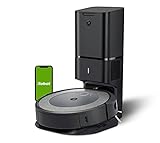
iRobot Roomba j7+ Self-Emptying Robot Vacuum
The j7+ is the Roomba that homeowners with pets and clutter tend to ask about. It uses a camera-based system that iRobot describes as recognizing and avoiding certain obstacles such as cords, and it works with a self-emptying base. The idea is that the robot can run while you are out without becoming tangled or dragging cables across the room.
It suits houses with a lot of electronics, children’s toys and pet bowls on the floor, where a basic robot would need constant supervision. Its app also supports room-based cleaning and scheduling.
It is still a robot, so do not expect it to see everything. Small socks, slippers and unexpected messes may still be an issue, and it does not climb stairs. It is also a larger investment than the i3+, so decide whether obstacle avoidance is worth it for your layout.

iRobot Roomba Combo j5+ Self-Emptying Robot Vacuum and Mop
The Combo j5+ adds a mopping function to the Roomba formula. It vacuums and, on supported floors, can carry out a light damp-mop in the same cycle, with a base that handles bin emptying. For people with a mix of hard floor and rugs, that saves a separate mopping step.
It suits kitchens, entrances and living areas where dust and light grime appear together. A single robot that looks after both jobs is easier to schedule than two separate machines.
Robot mopping is a light-duty job, not a replacement for scrubbing a sticky patch. Check which floors the maker supports and how the mopping attachment works on the listing. Some owners will want to keep a manual mop for deep cleans.
iRobot Roomba Combo j9+ Self-Emptying and Auto-Fill Robot Vacuum and Mop
The Combo j9+ sits at the top of this list. It brings together vacuuming, mopping and a larger dock designed to reduce how much you touch the machine. The dock handles bin emptying and, as the name suggests, helps refill the mopping tank.
It is aimed at larger homes and owners who want the least possible upkeep. If you value a hands-off routine and have hard floors that benefit from regular damp passes, it is the Roomba to compare first.
The dock is large, so you need floor space for it. Features and dock details can change between releases, so read the listing carefully. If your home is small, a simpler model would give you most of the benefit.

Best Roomba Vacuums for Pet Hair
Pet hair is where a self-emptying base earns its keep, because the bin fills quickly. The j7+ and i3+ EVO are the natural candidates. The j7+ is also the one to look at if you worry about pet accidents on the floor, since its camera system is designed to help avoid certain obstacles. The Roomba 694 can still help with fur on a light schedule.
Best Roomba Vacuums for Hard Floors and Mixed Homes
The Combo models are meant for sealed hard floors that benefit from a damp pass. If you have a mix of tile and carpet, check that the robot can lift its mop or avoid carpets as the maker describes. Pure carpet homes may be happier with the i3+ EVO.
Roomba Versus Other Robot Brands
Roombas are known for a mature app and a wide parts supply. Other brands may offer more mopping features or different docks. If you want to compare, look at mopping robots from other makers and read the app features, not just the model name.
Self-Emptying Bases and Docks Explained
A self-emptying base is the feature that changes how a Roomba feels to own. Instead of carrying a small bin to the rubbish every day, you let the robot return to its dock, which pulls the dust into a bag. You then replace the bag when it is full, and how often that happens depends on your home and your pets.
There are costs to consider. The bases are bulky, they make a loud noise for a few seconds while emptying, and the bags are a recurring purchase. Auto-fill docks on the Combo j9+ add a water function for the mop. Think about where the dock will live, because it needs a clear area on each side so the robot can find its way home.
If you rent or have a small place, the extra footprint may not be worth it, and a simple model that you empty by hand could suit you better. If you live with shedding pets or have a larger floor area, the base usually justifies its space.
How to Choose a Roomba
Begin with the problem you want to remove. If it is daily dust on a small floor, the 694 does the job. If it is emptying the bin, look at models with a base. If it is cables and pets, the j7+ is aimed at that. If it is dust plus light mopping, the Combo models fit.
Think about the layout. Robots do best in open floor plans with few obstacles. Thick rug fringes, loose cables and low furniture can trap them. Plan a quick tidy before each run, and consider setting no-go zones in the app if your model supports them.
Check the floors. Dark rugs with fine patterns can confuse some sensors, and mopping should only be used on floors the maker says are suitable. A robot is not a replacement for a stick or upright when you need to tackle stairs, upholstery or corners.
Look at running costs. Bags for self-emptying bases, filters, brushes and mopping pads all wear out. See what the replacement parts cost over a year and how easily you can find them for the exact model.
Finally, check connectivity. Roombas rely on a home Wi-Fi network and a phone app for scheduling and maps. Make sure your router reaches the room where the dock will sit, and read the app’s privacy information before you create an account.
Safety and Electrical Notes
Follow iRobot’s instructions for your model. Place the dock on a flat surface near a wall outlet, clear of stairs and balconies, and do not run the robot over liquids or wet floors unless it is designed to. Keep cords and small items off the floor, and do not leave the robot where children or pets could climb on it.
Use only the batteries, chargers and bases supplied or approved for your model. If an outlet is loose or damaged, ask a licensed electrician to look at it. Follow local rules when disposing of batteries.
Care and Troubleshooting
Empty the bin or bag, clean the brushes and sensors, and replace filters on the schedule in the manual. A soft dry cloth is usually the right tool for wiping sensors and charging contacts.
| Symptom | Check |
|---|---|
| Robot stops mid-room | Tangled brush, stuck wheel or low battery |
| Does not return to dock | Dock position, clear space around it |
| Missed patches | Dirty sensors, bin full or blocked path |
| App will not connect | Wi-Fi signal and app update |
Preparing Your Home Before the First Run
A robot vacuum does its best work in a room that has been set up for it. Most early frustration comes from the floor, not the machine. Spend ten minutes on a first pass through each room you plan to clean and you will avoid the usual rescues.
- Pick up charging cables, shoelaces, socks and loose toys. Anything that can wrap around a brush is a likely stall.
- Tuck in curtain pulls and blind cords, and lift fringed rug edges or fold them under.
- Check thresholds. A low transition strip is usually fine, but a tall lip between rooms can leave the robot stuck on one side.
- Move light chairs, or leave enough space for the robot to pass between legs without wedging.
- Decide where the dock will live. It needs open floor on both sides and in front, a wall outlet nearby, and a spot where a pet will not knock it around.
Dark carpets and very dark floors can sometimes confuse cliff sensors on robots in general, so watch the first few runs near stairs and drop-offs. Keep the robot off stairs until you are confident about its edge detection, and use a physical barrier if there is any doubt.
Docks, Bags and What Ownership Costs After the Purchase
The robot itself is only the first expense. Every Roomba relies on consumables that wear out, and the dock you choose changes how often you deal with them. A model without a dock for emptying has a small onboard bin that you clear by hand. A self-emptying base moves that dust into a bag or compartment that holds several bins worth, so you handle it less often but you must buy replacement bags.
Plan on a recurring list: filters, a main brush set, an edge brush, and sometimes bags or pads depending on the model. The manual lists a suggested replacement window for each part, and that is a better guide than guessing. Third-party parts exist, but fit and filtration can vary, so read the listing carefully and confirm that the part is listed for your exact model.
Also think about noise. Emptying a bin into a base is brief but loud, and some owners schedule cleaning for times when the house is empty. If you work from home or have a baby napping, check the schedule options in the app before you settle on a daily start time.
Finally, keep the battery in mind. Rechargeable cells age with use, and runtime tends to shorten over the years. Replacement batteries are available for many models, which is worth checking before you commit to a low-cost robot you plan to keep for a long time.
Maps, Keep-Out Zones and Schedules in Daily Use
If you buy a model that builds a floor map, the first few runs are for learning the layout. Let it explore without interruptions, and avoid moving heavy furniture until the map settles. After that, the app generally lets you name rooms, start a single room, or draw keep-out zones around problem areas such as a pet bowl corner or a tangle of cables behind a desk.
Scheduling is where a robot starts to earn its keep. A common pattern is a short daily run over the high-traffic areas and a full-house run on a weekly basis. Pair the schedule with a habit, such as clearing the floor before leaving the house, so the robot meets an empty room. Some people set a cleaning job to run only when everyone is out, which keeps the machine from bumping into feet or guests.
Models without a map work differently. They tend to follow a repeating pattern until a time limit or the battery signals the end. That is fine for a small apartment but less efficient for a larger layout. Virtual barriers, where supported by the model, can be made with physical devices that sit on the floor, so check which method your pick uses.
Software updates change the app experience over time, so it is reasonable to read recent feedback on how the app behaves before buying. The listing and iRobot support pages are the places to confirm what each model supports today.
Where a Robot Helps and Where It Does Not
It helps to be realistic about the job. A Roomba is a maintenance tool. It keeps visible dust, crumbs and pet hair from building up between deeper cleans, and it reaches under beds and sofas that you might skip. It does not climb stairs, clean upholstery or lift ground-in dirt from thick carpet the way a strong upright can. Corners are a known weak spot for round robots because the shape cannot reach into a square edge.
Think about your week. If you run a full-size vacuum on weekends anyway, a robot can cut that job from a chore to a quick tidy. If you have a large open floor plan with hard surfaces, mopping models become more attractive, but they still do not replace scrubbing a stuck-on spill. If the main reason you are tempted is time, consider how much time you save by not emptying a bin each day, and let that point you toward a self-emptying dock.
Frequently Asked Questions
Which Roomba is best for pet hair?
Models with a self-emptying base, such as the i3+ EVO and j7+, reduce how often you handle the bin, which is useful with shedding pets.
Do I need a Roomba with mapping?
If you want room-by-room control, yes. For a one-room flat, a basic model may be enough.
Can a Roomba replace my regular vacuum?
Not completely. It helps with daily upkeep, but stairs, corners and upholstery still need a manual tool.
Are Roomba mops good for tile?
They are designed for light damp cleaning on supported floors. Heavy stains may still need a manual mop.
Does a Roomba work without Wi-Fi?
Basic cleaning can often be launched with the buttons, but scheduling and maps rely on the app.
How long do the brushes last?
That depends on use and the home. Replace them when the manual advises or when you see wear.
Will a Roomba get stuck on rugs?
Thick fringe and long tassels can cause trouble, so tuck them away or use no-go zones.
How often should I replace Roomba filters and brushes?
Follow the schedule in the iRobot manual or app for your exact model, since intervals differ. Heavy use, pets and long hair shorten them. Inspect brushes for tangled hair and worn bristles regularly, and replace a filter once it looks clogged or no longer cleans out.
Can a Roomba clean more than one floor of my home?
Yes, if you carry it between floors. Some models can store separate maps for different levels, which saves re-learning. It cannot move itself up or down stairs, and you should keep it away from open drops. Check the app description for the model you choose.
Why does my Roomba keep getting stuck under furniture?
Low furniture, chair legs and tall thresholds are common causes. Measure the clearance beneath your sofa or bed against the robot height on the listing. Keep-out zones in the app or physical barriers can stop it from entering a tight space it cannot leave.
Can I control a Roomba with a voice assistant?
Many iRobot models support voice commands through compatible smart speakers once linked in the app, but support varies by model and region. Basic commands such as start or dock are typical. Check the product listing for assistant compatibility before relying on this feature.
Bottom Line
The Roomba 694 is the simple way in, the i3+ EVO adds a self-emptying base, and the j7+ is the one for cables and pets. The Combo j5+ and j9+ add mopping for hard floors, with the j9+ asking the least of you. Match the model to your layout and your tolerance for upkeep, and confirm the dock and bundle details on the listing before ordering.