Disclosure: As an Amazon Associate, umtsmarttool.com earns from qualifying purchases. Links to Amazon on this page are affiliate links; they cost you nothing extra. Prices and availability change often, so check the current Amazon listing before you buy.
Where to buy
Short on time? Start with our top pick among the best wireless gaming keyboards under $100, the Logitech G613 LIGHTSPEED — check price on Amazon — then read the full guide below for the picks matched to narrower needs.
- Logitech G613 LIGHTSPEED — Best Overall Under $100 — check price on Amazon
- Razer BlackWidow V3 Mini HyperSpeed (Yellow Switch) — Best Compact Brand-Name Pick — check price on Amazon
- Redragon K618 Horus — Best Low-Profile Budget Board — check price on Amazon
- RK Royal Kludge RK84 — Best Hot-Swappable Budget Board — check price on Amazon
- Corsair K57 RGB Wireless — Best Battery and Lighting (Membrane) — check price on Amazon
- Keychron K8 Pro — Best for Customization — check price on Amazon
Read the full guide ↓
A hundred dollars is the price line where wireless gaming keyboards stop being toys. Under it, you can have a genuine low-latency 2.4GHz connection, proper mechanical switches, hot-swappable sockets and batteries that last weeks — as long as you know which corners the manufacturers cut to get there. The six best wireless gaming keyboards under $100 below were picked to spend your money on the parts that affect play: the wireless link, the switches and the keycaps, in that order.
An honest warning about this tier: it is crowded with boards whose listings promise everything and deliver a mushy membrane with gaming lighting. It also contains older flagships and smart budget brands selling well below their original launch prices, which is where the value hides. Street prices move constantly at this level, so a couple of picks sit right at the top edge of the under-$100 band depending on the week — treat the budget as a band, verify the current listing before you buy, and never pay over the line for a board whose only upgrade is brighter RGB. Our wider best gaming keyboards under $50 roundup covers the even cheaper tier if your budget shrinks further.
Every board here connects over 2.4GHz wireless as well as (or instead of) Bluetooth, because Bluetooth-only boards are not gaming boards at any price. Specs are taken from manufacturer and retail listings opened during research, and each review names the compromise plainly — membrane keys, no dongle, older switch designs — so you can decide which cut you can live with.
A note on how to read this tier’s listings while you shop: the same product page often hosts several switch types, layouts and even connection variants at different prices, and the headline price belongs to whichever variant the seller wants to move. Before comparing any two boards here, pin the exact configuration — switch, layout, dongle included or not — or you will compare a price for one keyboard against a review of another. Every specification in the reviews below names the variant we verified.
In this guide
Quick Picks
| Pick | Badge | Key spec |
|---|---|---|
| Logitech G613 LIGHTSPEED | Best Overall Under $100 | Romer-G Tactile switches, LIGHTSPEED 1ms report rate, up to 18 months on 2 AA batteries |
| Razer BlackWidow V3 Mini HyperSpeed (Yellow Switch) | Best Compact Brand-Name Pick | 65% layout, Razer Yellow linear switches, battery up to 200 hours |
| Redragon K618 Horus | Best Low-Profile Budget Board | Tri-mode wireless, low-profile linear Red switches, 1900mAh battery |
| RK Royal Kludge RK84 | Best Hot-Swappable Budget Board | 75% 84-key layout, hot-swappable switches, triple-mode wireless |
| Corsair K57 RGB Wireless | Best Battery and Lighting (Membrane) | SLIPSTREAM sub-<1ms wireless, per-key CAPELLIX RGB, battery up to 175 hours |
| Keychron K8 Pro | Best for Customization | TKL, QMK/VIA remapping, hot-swappable, 4000mAh battery, Bluetooth 5.1 + wired |
How These Picks Were Chosen
The filter for this list was strict: a 2.4GHz gaming-grade wireless mode (with one deliberate exception explained in its review), mechanical or otherwise credible gaming switches, and specifications verifiable from an opened source. Boards were then ranked on switch quality and customizability, battery capacity, layout usefulness and the honesty of their listings — models whose marketing hid membrane construction behind mechanical-sounding language were penalized, and one popular board is included specifically with its membrane design flagged, because its wireless performance and battery earn it a place for the right buyer.
We also favoured boards that will still be pleasant in two years: hot-swappable sockets that let you replace a worn switch instead of the whole keyboard, PBT or pudding keycaps that resist shine, and standard layouts that accept replacement keycap sets. Budget boards die by a single failed switch or a worn spacebar more often than by electronics, so repairability counted heavily. For the premium end of the same features, compare against best wireless gaming keyboards and the FPS-specific picks in best wireless gaming keyboards for fps.
The 6 Best Wireless Gaming Keyboards Under $100

Logitech G613 LIGHTSPEED — Best Overall Under $100
The G613 is for players who want a full-size, genuinely fast wireless board from a major brand and care more about performance and battery than about RGB — it has no backlighting at all, and that is part of why it lasts so long.
- Layout: full-size with six programmable G-keys and media controls
- Switches: Romer-G Tactile mechanical, 1.5mm actuation, rated for 70 million keystrokes
- Wireless: LIGHTSPEED with a 1ms report rate, plus Bluetooth for a second device
- Battery: up to 18 months on 2 AA batteries
- Integrated palm rest and adjustable feet
Strengths
- LIGHTSPEED performance at a fraction of flagship prices
- Battery life measured in seasons, not days — nothing else here comes close
- Full-size layout with macro keys suits gaming and work equally
Trade-offs
- No backlighting or RGB of any kind
- Romer-G switches are not hot-swappable and feel different from Cherry-style switches
- It is an older design and can sell out; check listing availability
The G613’s formula is simple: take Logitech’s esports wireless link, put it in a full-size board with mechanical switches, and spend nothing on lighting. The result is a keyboard that performs like a gaming board and maintains like an office one — a pair of AAs roughly twice a year. For players whose desks double as workstations, the six G-keys and Bluetooth second channel make it the most practical board on this list.
The trade-offs are visible and honest. Romer-G switches have a softer, quieter character than Cherry MX, and because they use a proprietary stem, the keycap aftermarket is limited. There is also no denying the design’s age: it launched years ago and periodically goes unavailable, so if a listing shows stock at a sensible price, that is the moment to buy. Players who want lights and modern trims should look at the Razer or Redragon picks instead — this one is for the performance-per-dollar purists, and it pairs well with the endurance-first thinking in best wireless gaming mice.
Living with the G613 clarifies its philosophy within a week: you simply stop thinking about the keyboard as a device that needs anything. No cable on the desk, no charge anxiety, no lighting decisions — it sits there being a fast, full-size keyboard for months at a time. The Romer-G switches’ quiet, slightly cushioned stroke also makes it the most household-friendly board here for late sessions near sleeping people. If Logitech ever discounts remaining stock, it is the easiest recommendation in budget wireless gaming; if stock vanishes, the K57 below inherits its wireless link but not its switches.
The honest limitation is the complete absence of backlighting: in a dark room you are typing by monitor glow, and no setting changes that. If you game at night in low light, skip to a backlit pick.
Best for: players who value speed and battery over lighting / Not suited for: dark-room gamers or keycap customizers

Razer BlackWidow V3 Mini HyperSpeed (Yellow Switch) — Best Compact Brand-Name Pick
Choose the BlackWidow V3 Mini if you want a big-brand 65% board with fast, quiet linear switches and proper gaming wireless — the compact pick for players who still need dedicated arrow keys.
- Layout: 65% with dedicated arrow keys and aluminium construction
- Switches: Razer Yellow mechanical — linear and silent (Phantom Pudding keycap edition, model RZ03-03891900-R3M1)
- Wireless: HyperSpeed 2.4GHz, Bluetooth for up to 3 devices, or wired USB-C
- Battery: up to 200 hours per charge in Razer’s listing figures
- Chroma RGB backlighting with translucent pudding-style keycaps
Strengths
- HyperSpeed is a genuine flagship-grade wireless link
- Yellow switches are fast and quiet — ideal for shared rooms
- 200-hour battery rating is excellent for a lit board
Trade-offs
- Sits at the very top of the under-$100 band and can drift above it
- Doubleshot ABS pudding caps prioritize glow over long-term texture
- Razer’s Synapse software is required for full customization
This is the board that proves the under-$100 tier can include real flagship technology when a model has been on the market a while. HyperSpeed wireless, per-key Chroma lighting and Yellow linear switches are the same ingredients as Razer’s premium line, compressed into a 65% frame that keeps arrow keys for menus and everyday use. The Phantom Pudding keycaps make the lighting the visual centrepiece — if your setup is a showcase, this is the prettiest board here.
Two cautions belong in any honest review. First, the price: this model lives at the edge of the budget and sales decide which side of the line it falls on, so check the current listing rather than assuming. Second, pudding keycaps are ABS and will eventually shine; the board accepts standard replacement sets when that day comes. Buyers comparing compact boards should also weigh the RK84 below, which trades Razer’s polish for hot-swappable switches at a typically lower price.
The 65% layout earns a specific compliment: by keeping dedicated arrows while dropping the F-row into a layer, it matches how most players actually use a compact board — arrows constantly, F-keys rarely. The pudding keycaps are the board’s party trick, turning Chroma effects into a glow that fills the caps rather than leaking between them; taste will decide whether that is glorious or gaudy, but the build quality underneath (aluminium top, solid heft) is unambiguous. Treat it as a premium board on a discount timer: when the price behaves, it is the classiest object in this guide.
The honest limitation is price discipline: the moment this board sells above the $100 line, its value argument collapses, because the RK84 and K618 deliver most of the experience for less. Buy it on sale or not at all.
Best for: compact-desk players who want brand-name polish and quiet linears / Not suited for: buyers when it is listed above the budget line
Redragon K618 Horus — Best Low-Profile Budget Board
The K618 Horus suits players who like laptop-style flat keys: a full-size, ultra-slim low-profile board with tri-mode wireless and a media scroll wheel, at a true budget price.
- Layout: full-size, ultra-slim low-profile design
- Switches: low-profile linear Red mechanical switches
- Wireless: tri-mode — Bluetooth 5.0, 2.4GHz and wired USB-C
- Battery: 1900mAh rechargeable
- Dedicated media controls with a scroll wheel; RGB backlighting
Strengths
- Flat profile keeps wrists low without a rest
- Tri-mode connection covers PC, laptop and tablet with one board
- Media wheel and full layout at a genuinely low price
Trade-offs
- Low-profile switches have limited aftermarket replacement options
- Battery capacity is modest next to the G613 or K8 Pro
- Redragon’s software is functional rather than polished
Low-profile boards are a taste the big brands charge heavily for — which makes the K618 interesting, because it delivers the flat, fast feel at budget money. The linear Red switches need little force and the short travel suits quick repeated inputs, while the slim body sits naturally on minimalist desks. The media scroll wheel is a small luxury that becomes hard to give up once your volume lives under your right hand.
Expectations should match the tier: the software is basic, the battery is a charge-it-monthly affair rather than a forget-it one, and if a switch ever fails, low-profile replacements are a narrower market than standard switches. Within those limits, this is one of the best-value shapes in budget gaming, and a natural desk-mate for the compact builds in best mini itx cases for gaming.
A few ownership notes sharpen the K618’s case. Its low-profile switches use a slimmer keycap ecosystem, so buy any spare caps or switches from Redragon’s own low-profile line rather than assuming standard parts fit. The battery’s 1900mAh capacity translates to a realistic rhythm of charging every couple of weeks with lighting modest — unremarkable, but honest, and the USB-C wired mode doubles as a charge-while-playing fallback. For students and small desks, the combination of full-size layout, flat profile and tri-mode wireless at this tier remains genuinely hard to beat.
The honest limitation is longevity support: low-profile switches and parts are less standardized than the mainstream mechanical ecosystem, so the board is harder to repair or modify years down the line than the hot-swappable picks.
Best for: fans of flat laptop-style keys on a real budget / Not suited for: modders or multi-year repairability planners
Check on Amazon
RK Royal Kludge RK84 — Best Hot-Swappable Budget Board
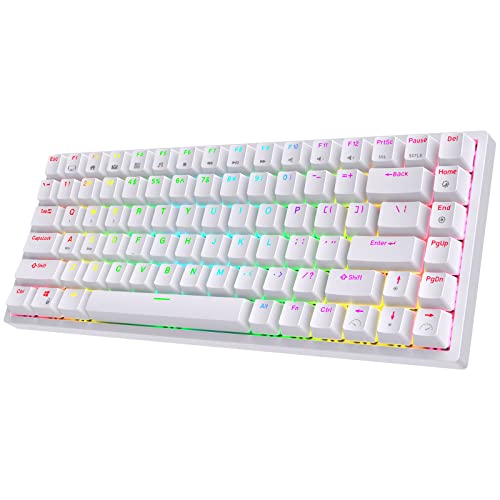
The RK84 is the enthusiast’s budget pick: a 75% board with hot-swappable sockets and triple-mode wireless that invites you to change switches and keycaps as your taste (and budget) grows.
- Layout: 75%, 84 keys, with a detachable frame design
- Switches: hot-swappable sockets — swap standard mechanical switches without soldering
- Wireless: triple mode — Bluetooth 5.0, 2.4GHz and wired USB-C
- RGB backlighting with onboard controls
- Compact footprint that keeps arrow keys and an F-row
Strengths
- Hot-swap sockets make it the most upgradeable board here
- 75% layout is the sweet spot for gaming plus everyday use
- Triple-mode wireless at a budget price
Trade-offs
- Stock switches and stabilizers are serviceable, not great
- Listings vary by switch and colour variant — read the exact configuration
- Software is minimal; most control is onboard shortcuts
Budget keyboards are usually a dead end: when a switch wears out or your taste changes, you replace the whole board. The RK84 breaks that pattern. Its hot-swappable sockets accept the enormous standard switch ecosystem, so a modest board can become a genuinely good one a few switches at a time, and the 75% layout keeps every key most people use while freeing mouse space. It is the board most likely to still be on your desk, in evolved form, three years from now.
Out of the box it is good rather than great — the stock switches are fine, the stabilizers may rattle slightly on large keys, and Royal Kludge sells several variants whose listings can be confusing, so confirm the switch type and connection modes on the exact listing you buy. As an entry into the hobby side of keyboards it has no rival at this money; mechanical keyboard switch types explained is the right next read once the swapping bug bites.
Consider what the RK84 becomes with one modest follow-up purchase: a set of respected budget switches transforms its feel from fine to genuinely good, and a PBT keycap set finishes the job — at which point the total spend still undercuts most mid-range boards while outperforming several. That arithmetic is the RK84’s real review. Royal Kludge’s own software is the weak link (onboard controls cover most needs), and the detachable frame, while clever for cleaning and travel, is a feature you will use twice and forget. Neither dents the core case: this is the budget board with an upgrade path, and upgrade paths are value.
The honest limitation is variance: between switch options, regional listings and production runs, two RK84s can feel slightly different, and the out-of-box refinement trails the Razer and Logitech picks.
Best for: beginners who want a board that can grow with them / Not suited for: buyers who want perfect refinement with zero tinkering

Corsair K57 RGB Wireless — Best Battery and Lighting (Membrane)
The K57 is the pick for players who prioritize wireless speed, bright per-key lighting and long battery over mechanical switches — stated plainly: this is a membrane keyboard, and it earns its place on connection and endurance, not key feel.
- Layout: full-size with six dedicated macro keys and media controls
- Keys: membrane (rubber dome) — not mechanical
- Wireless: SLIPSTREAM with sub-<1ms latency and 1000Hz polling, plus Bluetooth and wired modes
- Lighting: per-key CAPELLIX RGB LEDs
- Battery rated up to 175 hours in Corsair’s product listings (model CH-925C015-NA)
Strengths
- SLIPSTREAM is flagship wireless technology at a budget price
- Per-key RGB this bright is rare under $100
- Excellent battery endurance for a fully lit board
Trade-offs
- Membrane keys feel soft and imprecise next to any mechanical board
- No hot-swap or switch replacement — key feel is fixed for life
- Heavier and bulkier than the compact picks
Every list like this one should include an honesty test, and the K57 is ours. Corsair built it around a membrane keybed, which most gaming buyers would reject on sight — yet its SLIPSTREAM link is the same sub-millisecond technology as Corsair’s esports boards, its per-key CAPELLIX lighting outshines everything else here, and its battery endurance is outstanding. For a player coming from a bundled office keyboard who plays casually and loves lighting, it can be the right buy.
But key feel is the core of a keyboard, and membrane domes cannot match the crisp, consistent actuation of even the budget mechanical boards above. If you play competitive shooters or type heavily, the G613 and RK84 serve you better for similar money. Consider the K57 a lighting-and-wireless purchase with a keyboard attached, and it will not disappoint; buy it expecting mechanical feel and it will. The distinction matters across this whole tier — always confirm switch type on the listing, a habit our best gaming keyboards guide repeats for good reason.
Who, concretely, should buy the K57? A player whose current keyboard is the one that came with a prebuilt PC, who plays socially rather than competitively, and who lights their setup like a display piece. For that buyer the K57 is a revelation: flagship wireless, spectacular per-key lighting, macro keys, months of battery discipline replaced by a simple weekly top-up. The membrane keys will feel familiar rather than disappointing because they are an upgrade on what they know. The K57 only becomes a mistake when bought by a switch enthusiast in denial — a reader of this guide, presumably, no longer at risk.
The honest limitation is the membrane keybed itself: softer, less precise and less durable-feeling than mechanical switches, with no way to upgrade it later.
Best for: casual players who want flagship wireless and bright RGB / Not suited for: anyone who cares about mechanical key feel

Keychron K8 Pro — Best for Customization
The K8 Pro is for players who also type for a living and want deep control: full QMK/VIA remapping, hot-swappable switches and a 4000mAh battery in a tenkeyless frame that works across Mac and Windows.
- Layout: tenkeyless, 87 keys
- Switches: hot-swappable Gateron G Pro (this listing: Red linear, model K8P-G1)
- Remapping: full QMK/VIA support for keys and macros on both Mac and Windows layers
- Connection: Bluetooth 5.1 for up to 3 devices plus wired USB-C — no 2.4GHz dongle
- Battery: 4000mAh; wired polling up to 1000Hz; OSA PBT keycaps
Strengths
- QMK/VIA customization is deeper than any gaming-brand software here
- Big 4000mAh battery and three-device Bluetooth pairing
- PBT keycaps and hot-swap sockets give it a long, evolvable life
Trade-offs
- No 2.4GHz dongle — competitive play should use the wired mode
- Sits at the top edge of the under-$100 band
- Gaming extras like rapid trigger are absent
The K8 Pro comes from the custom-keyboard world rather than the gaming aisle, and it shows in the best ways: every key can be remapped in VIA without proprietary bloatware, the switches swap freely, and the PBT keycaps feel like equipment rather than packaging. As a daily driver for work-plus-gaming desks it is arguably the most complete board on this list, with a battery big enough to forget about for weeks.
The gaming caveat is real and should not be softened: without a 2.4GHz receiver, wireless play runs over Bluetooth, which is not in the same latency class as the dongle boards here. Keychron clearly intends serious play to happen over the USB-C cable, where the board polls at up to 1000Hz. If your desk can live with a cable for matches and wireless for everything else, the K8 Pro rewards you; if cable-free competitive play is the whole point, the G613 or BlackWidow Mini are the correct picks. TKL loyalists can compare it with the wired options in best tkl gaming keyboards.
The K8 Pro’s Mac-and-Windows duality deserves emphasis for households and freelancers who bill hours on both: the board carries both keycap sets and a hardware layer switch, so the same muscle memory serves a work MacBook by day and a gaming PC by night — with the cable coming out only for ranked sessions. Its VIA remapping also enables the kind of per-application layers (editing timelines, IDE shortcuts, game binds) that gaming-brand software rarely matches. In a guide about wireless gaming under $100, it is the pick that most obviously belongs in a wider ‘best keyboards, full stop’ conversation.
The honest limitation is the missing 2.4GHz dongle: Bluetooth is fine for casual and everyday use, but ranked FPS sessions should be played wired, which partly defeats the purpose of a wireless purchase.
Best for: work-and-play TKL users who love deep remapping / Not suited for: players who demand dongle-grade wireless in matches
Comparison Table
| Pick | Layout | Switch / keys | Wireless | Battery headline |
|---|---|---|---|---|
| Logitech G613 LIGHTSPEED | Full-size | Romer-G Tactile mechanical | LIGHTSPEED 2.4GHz / Bluetooth | Up to 18 months (2 AA) |
| Razer BlackWidow V3 Mini HyperSpeed (Yellow Switch) | 65% | Razer Yellow linear mechanical | HyperSpeed 2.4GHz / Bluetooth | Up to 200 hours |
| Redragon K618 Horus | Full-size (low-profile) | Low-profile Red linear mechanical | Bluetooth 5.0 / 2.4GHz / USB-C | 1900mAh rechargeable |
| RK Royal Kludge RK84 | 75% (84 keys) | Hot-swappable mechanical | Bluetooth 5.0 / 2.4GHz / USB-C | Rechargeable |
| Corsair K57 RGB Wireless | Full-size | Membrane (not mechanical) | SLIPSTREAM 2.4GHz / Bluetooth | Up to 175 hours |
| Keychron K8 Pro | Tenkeyless (87 keys) | Gateron G Pro Red, hot-swappable | Bluetooth 5.1 / USB-C wired (no dongle) | 4000mAh rechargeable |
How to Choose a Wireless Gaming Keyboard Under $100
Spend on the link and the switches first
At this price, every board is a compromise — your job is choosing which one. The wireless link and the switches touch every input you make, so they outrank lighting, extra keys and software polish. A board with a proven 2.4GHz link (LIGHTSPEED, HyperSpeed, SLIPSTREAM) and honest mechanical switches will play better for longer than a prettier board with a generic radio and mystery switches.
Read listings suspiciously. ‘Mechanical feel’ means membrane. Battery figures assume lighting off. Polling claims apply to the 2.4GHz or wired mode, not Bluetooth. The boards on this list were chosen because their real specifications survive that scrutiny.
Layouts that make sense under $100
Full-size boards (G613, K618, K57) suit players who also work at the desk and want macro keys and a number pad. TKL (K8 Pro) drops the pad for mouse room and remains the classic gaming compromise. 75% (RK84) squeezes arrows and an F-row into near-60% space, and 65% (BlackWidow V3 Mini) keeps arrows while dropping the F-row.
There is no wrong answer, only mismatched ones: measure your desk, think about your non-gaming hours, and remember that smaller boards are also easier to angle for low-sensitivity aim. The case and desk planning in best small form factor pc cases follows the same space logic.
The features that are actually worth paying for here
Hot-swappable sockets top the value list: they turn a worn switch from a board replacement into a two-minute fix, and they let a budget board improve over time. PBT keycaps are second — they resist the shine that makes keys slippery. A battery above roughly 2000mAh, or AA batteries like the G613’s, keeps charging from becoming a weekly ritual.
What you can safely skip paying for: per-key RGB (zone lighting looks nearly as good), proprietary software suites, and headline polling above 1000Hz. None of them change how a game feels at this tier.
Price honesty in a moving market
Budget pricing moves weekly, and boards drift across the $100 line in both directions — the BlackWidow V3 Mini and K8 Pro on this list live at the top edge of the band. Treat ‘under $100’ as the price you verify at checkout, not a permanent property of the model. If a pick is listed above the line, the correct move is to wait for a sale or step down to the RK84 or K618, not to stretch.
Also compare like with like: switch variants of the same board can be priced differently, and renewed or marketplace listings are not the same product as a new retail box with a warranty.
Setting Up a Budget Board Like You Mean It
Budget boards repay ten minutes of setup out of proportion to their price. Update the firmware first — pairing stability and battery behaviour are the two things budget firmware updates most often fix. Then set your lighting to a static colour at moderate brightness, both for battery life and because rainbow modes make budget stabilizers and keycap legends look cheaper than they are.
Finally, learn your board’s onboard controls: how to switch devices, change lighting and check battery without opening software. Budget companion apps range from basic to abandoned; the keyboard itself is the interface that will still work in three years. The boards here were partly chosen because their essential controls live on the board, not only in an app.
The Two-Year Test: What Budget Boards Teach You
A first budget gaming keyboard is really a research instrument: two years with it teaches you your layout preference, your switch taste and whether you care about lighting at all — knowledge that makes your second keyboard a precision purchase instead of another guess. This is the deeper argument for the hot-swappable picks: they let the lesson change the board instead of ending it.
It is also why this guide resists declaring one winner for everyone. The G613 teaches you nothing about switches because it asks nothing of you; the RK84 teaches you everything because it invites tinkering. Both are correct purchases for different students. Buy the board that matches the education you actually want.
Reading the Fine Print on Budget Listings
Budget listings compress hard truths into small type, and three phrases deserve translation. ‘Up to’ before any battery or speed figure means the best case under the kindest conditions — lights off, gentle use — so plan around half to two-thirds of the headline for real life. ‘Mechanical feel’ and ‘semi-mechanical’ both mean membrane. And ‘for gaming’ in a title, unaccompanied by a named switch family or a polling figure, is decoration rather than information.
The counter-habit is simple: find the manufacturer’s own page for the exact model and variant, and read its specification table against the marketplace listing. Where they disagree, the manufacturer’s page is right and the listing is selling. Every pick in this guide survived that cross-check, which is why several famous budget names are absent — their listings could not decide what their switches were, and neither could we.
A Last Word on Value
Value in this tier is not the lowest price on the page; it is the lowest cost per year of good service. A board that costs a little more but survives three years of daily play — because its switches can be replaced, its battery can be swapped, its keycaps do not shine into ice rinks — is cheaper than the bargain that needs replacing twice. Judge every pick here by that arithmetic, and the right one for your desk will usually identify itself.
Key Takeaways
- The G613 is the performance-per-dollar champion: LIGHTSPEED speed and 18-month battery, no lights.
- Hot-swap boards (RK84, K8 Pro) are the smart long-term budget buys.
- The BlackWidow V3 Mini and K8 Pro sit at the top edge of the budget — verify the current price.
- Bluetooth-only wireless is not gaming wireless; the K8 Pro’s serious mode is wired.
- Membrane can still make sense (K57) if lighting and link matter more than key feel.
How to Make a Budget Wireless Keyboard Feel Premium
A few cheap, reversible upgrades close most of the gap between budget and flagship boards:
- Stabilizer tune-up: if large keys rattle, a small amount of dielectric grease on the stabilizer wires (a common enthusiast trick) quiets them dramatically.
- Add o-rings or switch pads only if bottom-out noise bothers you — test on a few keys first, as they change feel.
- Swap the spacebar and WASD keycaps for textured PBT caps; your fingers live there and the grip difference is immediate.
- On hot-swap boards, replace just the movement-key switches with faster linears and keep the stock switches elsewhere.
- Set a static, low-brightness lighting profile: it looks cleaner and can double real-world battery life.
- Update the firmware once at setup; budget brands quietly fix pairing and battery bugs this way.
Problem: connection drops during play — fix: move the receiver to a front port or short extension cable, away from USB 3.0 drives and other dongles. Problem: one key double-types — fix: on hot-swap boards, reseat or replace that switch; on fixed boards, clean under the keycap with compressed air. Problem: battery drains in days — fix: check whether RGB is at full brightness and whether the board is failing to sleep; a firmware update usually resolves the latter.
Stretching Battery Life Between Charges
Lighting discipline is ninety percent of battery management. A static colour at half brightness, or lights off entirely, turns weekly charging into monthly charging on most boards here. Use the wired mode for long single-player sessions at your desk — it costs nothing and banks the battery for the sessions where wireless actually matters.
For AA-powered boards like the G613, keep a charged spare pair in the desk drawer and swap rather than schedule. And when a rechargeable board will sit unused for weeks, leave it around half charge rather than full or empty; lithium cells age best in the middle.
Common Buying Mistakes
Believing ‘mechanical feel’ means mechanical
It does not — it means a membrane designed to imitate one. If mechanical switches matter to you, the listing must name a real switch family. The K57 on this list is membrane and says so; many listings do not.
Buying Bluetooth-only for gaming
Bluetooth’s latency and polling are fine for typing and casual play but visibly worse in fast games. If a budget board lacks a 2.4GHz mode, plan to play wired — or choose a different board.
Paying over the line for RGB
When a budget board drifts above $100 because of a lighting-heavy variant, its value case disappears. The same money buys genuinely better switches and links elsewhere on this list.
Ignoring the exact variant in the listing
Budget boards sell in many switch, colour and layout variants under one product page. Confirm the switch type, layout and connection modes on the specific configuration in your cart.
Skipping firmware updates
Budget wireless boards ship with fixable pairing and sleep bugs. Five minutes with the manufacturer’s updater at setup prevents the most common ‘wireless is unreliable’ complaints.
Final Recommendation
For most buyers, the Logitech G613 LIGHTSPEED is the under-$100 wireless keyboard to get: flagship-grade 1ms wireless, real mechanical switches, a full-size layout with macro keys and battery life that embarrasses everything else here — as long as you can live without backlighting.
The runner-up is the RK Royal Kludge RK84, the pick with a future: hot-swappable switches and a smart 75% layout mean it improves with you instead of being replaced by you. Choose the G613 for performance today, the RK84 for value over years, and check the current price on either before you buy — at this tier, the sale price is part of the product.
Frequently Asked Questions
Can a wireless keyboard under $100 really be good for gaming?
Yes — the wireless links in the G613, BlackWidow V3 Mini and K57 are the same technologies sold in flagship boards, and budget mechanical switches from established makers are genuinely good. What you give up at this price is refinement: materials, software polish and quality-control consistency, not core performance.
Which is better under $100: a used flagship or a new budget board?
A new budget board with a warranty is usually the safer buy, but discounted older flagships — the G613 is effectively one — are where this tier’s best value hides. If you buy an older model, confirm it is new stock from a reputable seller rather than a marketplace listing with unclear provenance.
Do I need a 2.4GHz dongle, or is Bluetooth enough?
For shooters and other fast games, the dongle matters: 2.4GHz modes poll at 1000Hz with around a millisecond of latency, while Bluetooth is slower and less consistent. Bluetooth is fine for strategy games, typing and second devices. The K8 Pro is the exception that proves the rule — excellent board, but its serious gaming mode is wired.
How important is hot-swappable at this price?
More than most buyers expect. Switches are the part of a keyboard that wears and the part tastes change about; hot-swap sockets turn both problems into small, cheap fixes. If you plan to keep a board for years, weight the RK84 and K8 Pro heavily.
Why do prices on these boards change so much?
Budget peripherals are discounted aggressively and often, and switch or colour variants of the same model are priced independently. A board can sit above the $100 line one week and well below it the next. Set your ceiling, verify at checkout, and let sales timing work for you rather than against you.
Will these keyboards work with consoles and tablets?
Generally yes over Bluetooth or USB, with the usual caveats: console support depends on the game and platform allowing keyboards, and media keys or software features may not carry over. The tri-mode boards (K618, RK84) are the most flexible for mixed device households; check your platform’s keyboard-support documentation for specifics before relying on it.
Are budget wireless keyboards durable enough for daily gaming?
The boards here use established switch families rated for tens of millions of presses, and their electronics are simpler than flagship boards — fewer things to fail. The realistic weak points are stabilizers on large keys, keycap shine on ABS sets, and battery ageing after a few years. Hot-swappable models sidestep the first two almost entirely, which is why they anchor this list’s long-term value picks.
Is it worth waiting for a sale on the boards at the top of the budget?
Usually, yes. The two picks that live at the budget’s edge — the BlackWidow V3 Mini and the K8 Pro — are discounted on a predictable rhythm by major retailers, and the gap between their list and sale prices is often the difference between ‘over budget’ and ‘best value here.’ If your need is not urgent, a price alert on either is the smartest money move in this entire guide.
What is the first upgrade to make on a budget board?
If it is hot-swappable, a handful of quality switches for the keys your fingers live on — WASD, space, shift — because feel is the thing you notice ten thousand times a day. If it is not, a textured PBT spacebar and movement-key caps give most of the grip benefit for very little money. Either way, upgrade the contact points before the cosmetics.
Can I replace the battery in a budget wireless keyboard when it wears out?
On AA-powered models like the G613, trivially — that is one of their hidden advantages. On rechargeable models it depends on the design: some budget boards use standard pouch cells that a careful owner or a repair shop can swap, while others are effectively sealed. If multi-year ownership matters to you, that repairability question is worth one search before buying, and it is another quiet argument for the AA-powered and hot-swappable picks on this list.