Disclosure: As an Amazon Associate, umtsmarttool.com earns from qualifying purchases. Links to Amazon on this page are affiliate links; they cost you nothing extra. Prices and availability change often, so check the current Amazon listing before you buy.
Where to buy
Learning how to set up a portable power station is easier with a concrete unit in front of you, and the three stations referenced throughout this guide — starting with the EcoFlow DELTA 2 — are all available on Amazon.
- Featured: EcoFlow DELTA 2 — Check on Amazon
- EcoFlow RIVER 2 — Check on Amazon
- Anker SOLIX C1000 — Check on Amazon
Read the full guide ↓
Key Takeaways
- Setup is a single Saturday job in five phases: charge, position, configure, label, rehearse.
- The rehearsal is the phase everyone skips and the only one that proves the system works.
- Settings matter as much as placement — one eco default can switch off a must-run load overnight.
- Write the results on a card stored with the station; memory is not a storage medium.
Most owners unbox their station, charge it, push it into a corner and call that setup. It is not. It is storage. A station becomes a system only when somebody has decided where it lives, what it protects, how its settings behave at 3 a.m., and who else in the house can run it — and has tested every one of those decisions while the lights still work. This guide walks through that transformation as five phases you can finish in one unhurried Saturday, using the DELTA 2 as the worked example and flagging where smaller or larger units behave differently. If you are still choosing the hardware itself, begin with the ranked options in Best Portable Power Station For Home Use Under $1000 Best Portable Power Station For Home Use Under $1000 and return here when the box arrives.
In this guide
How to Set Up a Portable Power Station, Phase by Phase
The five phases below share one property: each is reversible until the rehearsal proves it. Move the station, change a setting, rewrite the ladder — setup is the cheap moment to be wrong, and the guide is ordered so that the cheapest mistakes come first and the expensive discoveries are made on paper rather than in the dark.
Phase One: Unbox Slowly and Charge Completely
- Open the box on a table, not the floor, and lay out everything before discarding anything: the station, its AC charging cable, any car or solar leads included, and the paper manual.
- Photograph the contents as arranged. If a cable is missing, that photograph is your evidence; if nothing is missing, it becomes your inventory for every future house move.
- Check the unit over for transit damage — cracked corners, a loose handle, a display that sits oddly — while a return is still effortless.
- Plug the station into a wall socket and charge it to full, untouched, however long that takes. Note the time; it is your first real data point about the unit’s charging behaviour.
- While it charges, read the manual’s caution and storage pages properly — not the marketing pages, the ones with the numbers.
Resist the urge to test the station on the television the moment it reaches fifty percent. The first full charge does two jobs: it calibrates the battery gauge you will be trusting during outages, and it proves the charger, the cable and the unit all work before the return window becomes a negotiation. Owners who skip it sometimes discover a faulty charging lead during their first real outage, which is the most expensive classroom this hobby offers. Keep the packaging until the rehearsal in Phase Five is complete; a station that fails its first month is far easier to return in its own box.
Phase Two: Choose the Position by Testing, Not by Guessing
- Stand in front of the appliance the station chiefly protects — usually the refrigerator — and measure the cable run to each candidate position with the actual lead, not by eye.
- Reject any position inside a sealed cupboard, under soft furnishings, or in direct afternoon sun; the unit needs moving air on every side while it works.
- Reject positions across a walkway, where a cable becomes a trip line in a dark house, and positions in rooms that flood, however rarely.
- Prefer the room the load lives in, at floor level on a hard surface, within reach of the people who will operate it.
- Live with the chosen spot for the rest of the setup day before committing the cables permanently.
Positioning errors are the quietest failures in this category because nothing breaks — the system simply underperforms forever. A station exiled to a detached garage protects a fridge in the kitchen only in theory; in practice, somebody must cross a wet garden at midnight to fetch it, and in practice, sometimes, nobody does. A station baked by a south-facing window all summer ages its battery to protect loads that a shaded hallway would have covered happily. The test that settles every argument is physical: carry the unit to the candidate spot, connect the real load, and watch a tired person’s route to it in the dark. If the route feels foolish at noon, it will feel impossible at 2 a.m.
Phase Three: Configure the Settings Before They Matter
- Connect the manufacturer’s app if you intend to use it, and update the firmware now, on a calm day with a full battery — never on the eve of a forecast storm.
- Find the charge-limit setting, if your model offers one, and set the resting level the manual recommends for storage rather than leaving the unit brimful by default.
- Locate any eco, standby or auto-off behaviour and test it against your smallest must-run load; a router or CPAP that draws little can be mistaken for “nothing plugged in” and switched off by an eager power-saving default.
- Set the display to a brightness you can read in a dark hallway without being dazzled by it, and learn which button wakes the AC output — by touch.
- Switch off anything you do not understand, note what you changed, and keep the note with the manual.
Settings are where modern stations differ most from the simple battery boxes of a decade ago, and they cut both ways. Charge limits genuinely extend battery life; app monitoring genuinely helps a household ration intelligently; and an unexamined eco default genuinely can end a night’s CPAP therapy at 4 a.m. for reasons nobody understands until morning. The rule that governs this whole phase is sequencing: every setting is chosen, tested and recorded in daylight, so that during an outage the household operates the system instead of debugging it. Readers who want the reasoning behind the sizing choices these settings support will find it in How To Choose A Portable Power Station How To Choose A Portable Power Station.
Phase Four: Build the Load Ladder and Label Everything
- Write your protected loads in strict priority order: the load that must never stop, then the load that matters most, down to the comforts that can be shed first.
- Beside each load, write its watts if you know them — from its label, its manual, or a plug-in energy meter if you own one.
- Add the hours each load must run in your longest realistic outage, and multiply through to a total energy figure.
- Compare that total with your station’s capacity, discounted for conversion losses, and adjust the ladder — not the arithmetic — until the plan closes.
- Label each protected appliance’s plug with its ladder position using tape, so reconnection in the dark follows numbers, not memory.
The ladder is the intellectual core of the whole setup, and it repays honesty. Households routinely discover, doing this arithmetic on paper, that their plan was quietly impossible — that the freezer, the fridge and the aquarium heater together exceed the battery by midnight — and that discovery, made in a kitchen in October, is a gift. The fixes are all cheaper on paper: shed a load, shorten a shift, agree that the entertainment stack sleeps during outages, or accept that the station needs a sibling. What the ladder must never become is a work of fiction written to justify a purchase already made. The companion guide, How To Use A Portable Power Station How To Use A Portable Power Station, shows the ladder being operated hour by hour once the power actually fails.
Phase Five: Run the Twenty-Minute Blackout Rehearsal
- Pick a calm hour, tell the household what is happening, and switch off the circuit or simply unplug the protected loads from the wall.
- Connect the ladder to the station in priority order, sacred load first, and start a timer.
- Run everything for twenty minutes. Note the percentage used and multiply honestly to estimate the full runtime of the list.
- Have a second household member repeat the connection from your written card alone, without coaching.
- Write the measured runtime, the date and any surprises on the card, and store the card with the station.
Twenty minutes sounds trivial, and it is the most valuable twenty minutes in the station’s life. It converts the display’s optimistic estimates into your household’s measured truth, exposes the cable that is thirty centimetres too short, reveals that the fridge’s plug sits behind a bookcase, and teaches everyone’s hands the shape of the task. The second-person test matters most of all: if the plan only works when its author performs it, the plan does not work. Simplify the card until a competent teenager, a grandparent or a house-sitter can execute it unaided, because one of them eventually will.
Adding Solar Later Without Rebuilding the System
Solar belongs at the end of setup, not the beginning, because a panel amplifies a working system and merely complicates a broken one. When the five phases are complete and the card carries real numbers, the solar question becomes precise: how many watt-hours does the ladder consume on an outage day, and how many can your site realistically harvest? Walk your balcony, garden or roofline across one full day before buying anything, noting when shade arrives and leaves. Panels are rated for a laboratory noon; your fence, your oak tree and your neighbour’s extension will edit that rating substantially, and the station’s input display during a first test day will tell you by how much.
Two checks precede the first connection. The panel’s open-circuit voltage must sit comfortably inside the station’s published solar input window — cold, bright mornings push voltage upward, so leave margin rather than flirting with the limit — and any plan to wire panels in series adds their voltages together, which changes the answer completely. Then confirm the wattage you intend to buy against the station’s input ceiling: the DELTA 2 and C1000 class can absorb a serious array, while the little RIVER 2 is designed around a modest panel as a top-up source. Buy the cable long enough for the panel to sit in sun while the station sits in shade; that single decision is worth more than an extra fifty watts of glass.
Setting Up Room by Room: Kitchen, Office, Bedroom
The five phases are universal, but each room edits them. In the kitchen, the governing problem is the refrigerator’s plug, which in many homes sits trapped behind the appliance itself. Setup day is when that changes: pull the fridge out once, in daylight, fit a short, honestly rated extension lead that brings the connection point somewhere reachable, and the midnight switchover stops requiring furniture removal. While the fridge is out, vacuum its coils if they need it — a clean coil draws less, and every watt saved is runtime bought — then position the station where the lead reaches without crossing the room’s walking lines.
The home office edits the phases differently. Its loads are small but its tolerance is zero: a router that reboots mid-call or a desktop that dies mid-save costs more than its watt-hours suggest. Set the office station up as a semi-permanent installation, with the router and modem living on its output during storm season if the model’s pass-through guidance permits, and test the eco behaviour against the router’s tiny draw with particular care, because that pairing is the classic setup failure in this entire category. Label the desk’s plugs by ladder position, and accept a slightly untidier cable run as the price of a switchover that takes twenty seconds.
The bedroom is the noise-and-medical room. If a CPAP machine or similar device is the sacred load, the station sleeps where the device sleeps, and Phase Two’s position test must happen at night, with the actual load running, because fan behaviour that seems trivial in a showroom decides sleep in a dark room. Place the unit on a surface that does not drum, keep it a short distance from the pillow, and run the full-night test during setup week rather than discovering a problem during the first outage. Medical loads also change the ladder’s politics: they sit at position one permanently, and every other load in the house understands it is borrowing capacity from them.
The First Week: Living With a New Setup
A setup is not finished when the rehearsal passes; it is finished a week later, after the household has lived alongside it. During that first week, use the station deliberately for ordinary jobs — the evening’s entertainment, a day’s work from the desk, a garden project — because ordinary use exposes what a drill cannot: the cable that everyone trips on at the hallway position, the display too bright for the bedroom, the app notification that annoys at midnight. Adjust once, at the week’s end, with all the evidence in. Owners who skip this settling week often find their “finished” setup quietly migrating — the station pushed behind a door, the card lost under magazines — until the system exists only as a memory of good intentions.
The week’s other task is social. Show one other person the whole arrangement, start to finish, and let them perform the switchover unaided. Then write their questions onto the card, because those questions are the setup’s true documentation gaps. If nobody else is available, photograph the finished installation from the doorway — sockets, cables, card, station — and keep the photograph somewhere the household shares. A picture of a working setup has rebuilt more systems, after moves and muddles, than any manual ever printed.
Setting Up for the Seasons
A setup tuned in spring deserves a sceptical review before winter, because the seasons change every variable it depends on. Outages lengthen, nights lengthen, and heating-adjacent wishes creep toward the load ladder — a fan heater “just for an hour” is the classic winter fiction, and the card should refuse it in writing before December asks. Batteries also give a little less of themselves in deep cold, so the rehearsal numbers recorded in mild weather should be discounted, honestly and in advance, when the plan is re-run for January. Homes in storm country do the same review before their own dangerous season, whatever the calendar calls it.
The seasonal review is short: re-read the ladder against the household as it now is, re-check the storage charge and the cables, confirm the solar position still matches the sun’s changed path if panels are part of the system, and re-run twenty minutes of rehearsal. An hour, twice a year, is the entire maintenance burden of readiness — and it is the difference between owners who describe their station as infrastructure and owners who describe it, eventually, as a disappointment.
A Worked Example: One Station, a Three-Bedroom House
Abstract phases persuade slowly, so here is a complete setup with its numbers exposed. The household: two adults, one teenager, a fridge-freezer in the kitchen, a router in the hallway, a home office in the spare room, and a station in the DELTA 2 class — a kilowatt-hour of storage behind an 1,800-watt inverter. The local outage pattern, from the utility’s own history, is two to six hours, twice a year, with one longer event most winters.
The ladder, written on the Saturday described above, came out like this. Position one: the fridge-freezer, non-negotiable, run in shifts. Position two: router and modem, because both adults work from home and information outranks entertainment. Position three: two lamps for the rooms the family actually occupies after dark. Position four: phone and laptop charging, front-loaded into the first hour of any outage while the battery is full. Position five, explicitly labelled as sheddable: the television, welcome while the percentage is healthy and the first thing sacrificed when it is not. The kettle, the microwave and anything with a heating element appear on the card only as a refusal, written in advance so nobody negotiates with a cold kitchen at midnight.
The rehearsal measured the list honestly. Twenty minutes of everything running consumed a single-digit percentage of the battery, which the household then translated — pessimistically, on purpose — into a full evening’s coverage with reserve, and a winter night’s coverage if the fridge shifts were disciplined. The surprises were physical, as they usually are: the fridge’s socket needed the extension lead trick from the kitchen section, the hallway position put a cable across the bathroom route and was moved two metres, and the teenager’s unaided run of the card exposed that “turn on the AC output” meant nothing to anyone who had not been shown the button. All three discoveries cost nothing on a Saturday. Each would have cost the plan on the night it mattered. That is the entire argument for the method, in one household’s handwriting.
Cables, Leads and the Unglamorous Hardware of Setup
Setup guides dwell on the station because the station is the expensive part, but systems fail at their edges, and the edges are cables. The AC charging lead should live coiled on or beside the unit, never borrowed for other duties, because a station that cannot be recharged during a brief restoration is a battery with a countdown. The solar lead, if solar is part of the plan, should be the long one — long enough for the panel to occupy the sunny patch while the station rests in shade — and its connectors should be inspected on setup day and at every seasonal review, since outdoor connections weather faster than indoor ones.
Extension leads deserve a specification conversation of their own. The lead between the station and the fridge is part of the electrical system, and it should be short, thick, and rated comfortably above the load it carries; a bargain lead chosen by price alone can waste power as heat and, in the worst case, become the hazard the whole exercise exists to avoid. One good lead, bought once and stored with the station, outperforms a drawer of improvisations. The same logic applies to the humble torch that lives on top of the unit, the tape that labels the plugs, and the card itself: setup is a kit, and the kit is complete only when its cheapest components are present.
Finally, decide where the manual sleeps. Ours is not a romantic answer — in a clear sleeve, taped inside the cupboard door nearest the station, with the settings note from Phase Three tucked inside it. During an outage nobody will download anything, search anything, or remember which cloud folder holds the PDF. Paper, near the equipment, findable by touch: the filing standard that every other part of this guide already follows.
When the Setup Outgrows One Station
Some ladders refuse to close, and the honest responses are limited: shed loads, accept shorter coverage, or add capacity. The third option deserves a setup of its own rather than a bigger box bought in frustration. Households that add a second unit usually discover the two-station pattern works best when the roles are divided by geography rather than by size — an anchor that never leaves the kitchen’s orbit, and a satellite, perhaps a small unit in the RIVER 2 class, that owns the bedrooms and the desk. Each gets its own card, its own storage spot and its own place in the seasonal review, because a second station administered as an afterthought becomes a second battery found flat.
The alternative growth path, where the anchor supports it, is the expansion battery: the DELTA 2’s route to double capacity keeps one system, one card and one position, at the cost of one location’s flexibility. Neither answer is universally right. The test is the ladder itself: if the loads that fail to fit are in the same room as the anchor, expand the anchor; if they are scattered across the house, a satellite will serve them better than any single larger box. Decide from the geography of your own evenings, not from the size of anyone else’s system.
Troubleshooting the Setup Itself
Problem: the station beeps and cuts out the moment the refrigerator starts, although the fridge’s running watts look safe → the compressor’s starting spike, not its running draw, has exceeded the inverter’s headroom; confirm the model, check whether a boost mode applies to that load, and if the pairing is simply undersized, move the fridge to a larger unit rather than coaxing this one. Problem: the battery percentage falls overnight although everything is unplugged → an output was left switched on and the inverter idled the night away; make “all outputs off” the last line of your storage routine. Problem: the app refuses to pair or drops the station between sessions → complete setup on the unit’s own controls instead, record the settings on paper, and treat the app as a convenience to revisit after a future update, not as a gate the system depends on. Problem: solar input reads zero at midday under a clear sky → work the chain in order: connector fully seated, cable undamaged, panel voltage inside the station’s window, and the station’s solar input actually enabled; nine times in ten the fault is the first item on that list.
Gear That Makes This Easier
- EcoFlow DELTA 2 — Check on Amazon
- EcoFlow RIVER 2 — Check on Amazon
- Anker SOLIX C1000 — Check on Amazon
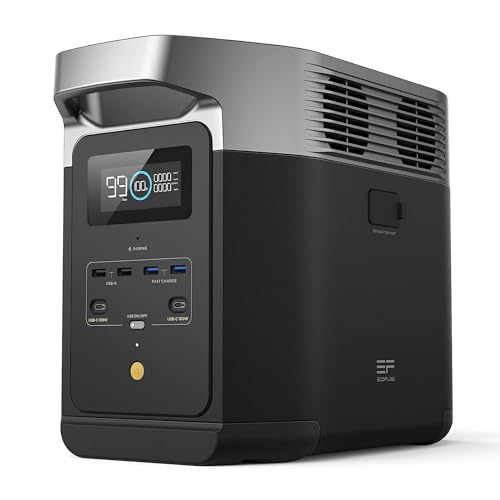
The worked example throughout this guide is the EcoFlow DELTA 2: 1,024 watt-hours, an 1,800-watt inverter and room to expand to 2,048 watt-hours make it the most forgiving station to set up well. The RIVER 2 plays the opposite role — 256 watt-hours, 300 watts of output and about 7.7 pounds of carry — as the satellite that covers a desk or a bedroom once the anchor is placed. The C1000 sits between those poles for households whose setup problem is sheer device count, with six AC sockets behind 1,056 watt-hours. Whichever you build around, the five phases are identical; only the numbers on the card change. The wider context for those numbers is set out in the Portable Power Station Buying Guide Portable Power Station Buying Guide.
Safety Checks That Belong in Every Setup
A portable station is among the safest ways to keep energy in a home — no fuel, no exhaust, no carbon monoxide — and setup is when its few real risks are designed out. Work through them once, deliberately. Ventilation first: the unit’s fans assume moving air, so the chosen position must stay clear while the station charges fast or works hard, and nothing — coats, cushions, the outage’s general debris — gets stored on top of it. Cables second: every lead inspected for damage before it joins the system, routed where feet and furniture will not punish it, and never run under rugs where wear hides. Loads third: the total connected at any moment stays inside the continuous output rating, with surge headroom treated as a starting allowance rather than a running budget.
Two household rules complete the picture. Water and electricity keep their distance: a station serving a basement pump still lives on a dry shelf above any plausible waterline, and wet hands do not reconfigure connections. And children get a briefing proportional to their age — the station is not a toy, its sockets are real sockets, and the card explains what they may and may not touch. None of this is burdensome. It is fifteen minutes of attention, paid once, that lets the household trust the system completely for years.
Setup in Rentals and Shared Houses
Renters face a version of setup with one hand tied: no drilling, no permanent wiring, sometimes no say over where furniture lives. The good news is that everything in this guide is already renter-shaped, because a portable station’s entire premise is plug-in power that leaves no trace. The adjustments are matters of emphasis. Position choices favour the freestanding and the reversible — a hallway corner, the side of a media unit — over anything that marks a wall. Solar, if used at all, becomes a balcony panel on a stand rather than a mounted array, sized honestly as a top-up and agreed with the landlord where the lease requires it.
Shared houses add a diplomatic phase the other sections assume away: the conversation. Housemates who did not buy the station still live with its position, its fan and its rules, and a setup imposed without discussion tends to be unplugged by degrees. Agree the sacred loads together — the shared fridge usually settles the argument — write the card in language any resident can follow, and settle the lending and borrowing rules while everyone is calm. A system the whole house has consented to survives; a system one resident owns and others tolerate has a half-life, and it is shorter than the battery’s.
Keeping a Setup Log
The card on the station is the plan; the log is its memory. A single notebook page — or a note in a shared household file, printed and kept with the card — recording each rehearsal’s date and measured runtime, each outage’s loads and duration, each setting changed and why, turns anecdote into evidence. Within a year that page becomes the most accurate document in the house about its own power needs, and it settles questions no guide can: whether the battery is ageing, whether the ladder still matches the household, whether the next purchase should be capacity, a panel or a second unit.
Keep the log boring. Dates, numbers, one line each. The households that maintain it are not enthusiasts; they are simply people who discovered that the cheapest moment to learn something about their system is while nothing depends on it. When the log shows the fridge shift stretching further each winter, or the percentage after a standard evening creeping upward year by year, the household can act on evidence — a service conversation, a battery decision, a ladder revision — instead of acting on the suspicion, during an outage, that something used to work better.
Mistakes to Avoid
Setting up during the emergency. Everything in this guide is harder by torchlight, under time pressure, with a freezer warming. The entire point of setup is that it happens before it is needed; a station configured during its first outage will be configured badly and remembered worse.
Trusting the display’s first runtime estimate. The hours-remaining figure is calculated from the load of the moment, and loads with compressors change by the minute. Your rehearsal’s measured percentage-per-hour is the number to plan around; the screen is an instrument to glance at, not a promise to bank on.
Leaving the eco default untested. Power-saving features that switch outputs off at low draw are sensible for camping and dangerous for a router or medical device that sips. Test the exact overnight load you intend to protect, for a full night, before trusting it.
Hiding the card. A plan stored in a phone that is flat, an email nobody can find, or the memory of the person currently on holiday is a plan that does not exist. Paper, on the station, in the room — that is the whole filing system, and it has never once run out of battery.
Frequently Asked Questions
How long does a proper first setup actually take?
About half a Saturday, most of it waiting. The first full charge runs in the background while you read, position and configure; the hands-on work — positioning, settings, the ladder, the rehearsal — totals perhaps ninety minutes. Households that spread it across a weekend usually do the charging and positioning on day one and the rehearsal on day two, which has the side benefit of testing the setup with fresh eyes.
Should the station live plugged into the wall permanently?
It can, and many owners keep it connected so it is always ready, but check your model’s guidance on charge limits first. Holding a battery at maximum charge for months is not the kindest resting state, which is why models with a configurable charge ceiling are set below full for standby life. If your unit lacks that setting, a monthly unplug-use-recharge rhythm achieves a similar balance.
Where exactly should the card with the plan be kept?
Taped to the station or slipped into a sleeve on its handle — physically attached to the equipment it describes. The card should carry the priority ladder, the measured runtime, the storage charge, the date of the last rehearsal and the one load that outranks everything else. If the card lives anywhere else, experience says it will be missing on the night it is needed.
Do I need an electrician to set up a portable power station?
No. These units are plug-in appliances: loads connect directly to the station’s sockets, and nothing is wired into the home. An electrician enters the picture only for permanently installed alternatives such as transfer switches and whole-home battery systems, which are a different class of project. Never improvise a connection between a portable station and household wiring.
What is the first thing to check if the rehearsal fails?
Whether the plan failed or the arithmetic did. Run one load at a time from the station, in ladder order, watching the display as each joins. The load that collapses the estimate or trips the unit identifies itself quickly, and the remedy — shed it, shift it, or accept a larger station — follows from that single observation. Most failed rehearsals trace to one appliance whose real draw nobody had measured.
How often should the whole setup be repeated?
The full rehearsal deserves an annual appointment, tied to a date you already remember — the clocks changing is the classic anchor — plus a short version whenever the household changes: new medical equipment, a new freezer, a baby, a parent moving in. Settings deserve a briefer check after every firmware update, since updates occasionally reset the very defaults Phase Three so carefully chose. The still-undecided reader can weigh the purchase itself in Is A Portable Power Station Worth It Is A Portable Power Station Worth It.
Handing the Setup Over: Guests, Sitters and House Moves
A setup proves its documentation the first time its author is absent. The house-sitter feeding the cat during a stormy week, the grandparent staying while the owners travel, the new partner who moved in after the system was built — each inherits the station cold, and each will judge the setup by whether the card, the labels and the photograph are enough. Brief them like the second operator in Phase Five: let them run the switchover once, in daylight, and answer their questions onto the card. Five minutes of handover converts an intimidating box into an appliance they will actually use, and an appliance they will use is the only kind that protects a house whose owner is elsewhere.
House moves deserve the same respect in reverse. Photograph the working setup before dismantling it, keep the station and its cables together through the move rather than trusting them to separate boxes, and repeat Phase Two and Phase Five in the new home instead of assuming the old answers transferred. Rooms differ, sockets differ, the sun’s path across a new garden differs — and a setup is a relationship between equipment and a particular house, not a property of the equipment alone. The households that re-run the phases after a move keep their readiness; the ones that reassemble from memory discover, at the first outage in the new postcode, which parts of the system were actually the old house’s.
What a Finished Setup Looks Like
It may help to picture the destination. A finished setup is quiet about itself. The station sits in its tested place, at its resting charge, with its cables coiled beside it and its card readable at a glance. Nothing about it demands attention on an ordinary day, and that invisibility is earned: the position was chosen by measurement, the settings by experiment, the ladder by arithmetic, and the whole arrangement has survived contact with a rehearsal, a second operator and a week of ordinary life. A visitor would notice nothing at all, which is precisely what infrastructure looks like when it is working.
Contrast the unfinished version, which most households actually own: a capable battery in a plausible corner, charged to an unknown level, protecting a list that exists in one person’s head, through settings nobody has examined, with a solar cable whose whereabouts are a rumour. The hardware in the two homes may be identical. The difference — the whole difference — is the Saturday this guide describes. Setup is not the tax on owning a power station. It is the moment the purchase becomes the thing it was bought to be, and it asks for an afternoon, a notebook and the willingness to test a plan while failing is still free.
Wrap-Up
Setup, done this way, is unglamorous and complete: a charged unit in a tested position, settings chosen on purpose, a ladder written down, a rehearsal measured, and a card that lets anyone in the house run the system. The EcoFlow DELTA 2 remains our reference hardware for the job, but the method outlives any model — repeat it with your next station and the whole exercise takes an hour. What you own afterwards is not a battery in a corner. It is a household capability, and the difference shows on the first dark evening it is asked for.
One habit ties the whole method together, and it is the cheapest in this guide: whenever the system is used — for an outage, a film night, a weekend away — return it to its set-up state the same day. Cables back in their place, charge restored to its resting level, card amended if the day taught the household anything. Systems decay one small exception at a time, and they endure the same way, one small restoration at a time. The Saturday described here builds the system; the two minutes after every use are what keep it built.
And when the first real outage finally arrives — as, given enough seasons, it always does — notice what the setup has bought. Nobody searches for cables. Nobody debates the order of the plugs. Nobody wonders whether the battery is charged, because the card says when it was checked and the routine says it was restored after its last job. The evening is not exciting, and it was never supposed to be. It is simply a household, in the dark, doing exactly what it rehearsed, with equipment it understands, at the pace it planned. That ordinariness is the entire product. Everything else — the watt-hours, the inverter, the app, the solar panel waiting for morning — is merely how that calm, rehearsed, ordinary evening is delivered to the people who prepared for it together in advance.
Keep the faith with the boring parts, then: the card, the coil of cable, the resting charge, the date in the log. Readiness is not a purchase and it is not a personality trait. It is a small set of arrangements, made once and maintained lightly, that hold their shape for years — and it begins, always, with a single Saturday given to setting things up properly.