Where to buy
Check the latest price, availability and delivery on Amazon for the linked picks below. Orders are placed on Amazon. We may earn a commission from qualifying purchases. Picks described without a link are named honestly — the guide explains why each one carries no link at this budget.
- Best wide-coverage clamp lamp: Airlonv LED Desk Lamp with Clamp (17-Inch Bar, 10W) — Check on Amazon
- LEPOWER Clip On Light (5W LED, Gooseneck) — Check on Amazon
- LEPOWER Flexible Swing Arm Desk Lamp (Base + Clamp, E26) — Check on Amazon
- TaoTronics TT-DL13 LED Desk Lamp (named, availability varies) — described in the guide below (no purchase link at this tier — see the review)
- LEPOWER Metal Desk Lamp with Flexible Gooseneck (the base-lamp type) — described in the guide below (no purchase link at this tier — see the review)
- BenQ e-Reading LED Desk Lamp (the step-up) — described in the guide below (no purchase link at this tier — see the review)
Read the full guide ↓
Disclosure: As an Amazon Associate, umtsmarttool.com earns from qualifying purchases. Links to Amazon on this page are affiliate links; they cost you nothing extra. Listing details such as price and availability change often, so check the current Amazon listing before you buy.
The best desk lamp for gaming under $50 has a job description ordinary lamps never face: light a desk for hours without throwing glare into a monitor, survive being aimed and re-aimed around a battlestation, and not cook the mood of a dark room. At this budget the answers are clamp and clip LEDs that mount behind the setup and one classic swing arm — this guide verifies their specs and explains the gaming-specific positioning that makes cheap light feel expensive.
Specifications in this guide — wattages, clamp limits, colour temperatures, dimensions — come from the makers’ own listings and manuals, cross-checked against independent coverage where it exists, and the sources file shows each one. Where a well-known model’s listings proved unstable during research, the lamp is still named and specced, in prose, because a guide that only mentions what it can link is a catalogue, not a guide.
Three picks carry purchase links at the $50 tier — the Airlonv clamp bar, the LEPOWER clip light and the LEPOWER swing arm — each verified against its maker’s listing or store. The prose picks are a benchmark lamp whose Amazon availability is unstable, a replaceable-bulb lamp type we could not pin to one listing, and the BenQ step-up that defines the top of the category. Taken together, the six picks below are ordered by how completely they solve the central problem of this category at this budget for a typical reader — the first pick is the default answer, and each later pick trades a little of that all-round case for a specific strength: a shape, a mounting style, a capacity, or a price of entry that the top pick cannot match.
For gaming, add two criteria to the general list: stability under lateral force (fast mouse work and leaning are side loads, and side loads are what cheap frames and clamps feel most), and serviceability — a gaming setup changes peripherals constantly, so anything that must be cut, unbolted or disassembled to change a cable will be hated within a month. When you are ready to go further, our guide to the Best Desk Lamp Under $20 covers the natural companion purchase, and the Best Desk Lamp For Gaming Under $20 guide answers the follow-up question most readers ask next.
In this guide
Quick Picks
| Pick | Best for | Key specification |
|---|---|---|
| Airlonv LED Desk Lamp with Clamp (17-Inch Bar, 10W) | Best wide-coverage clamp lamp | 17 in light bar; 10W; stepless dimming; adjustable colour temperature |
| LEPOWER Clip On Light (5W LED, Gooseneck) | Best overall under this budget | 5W LED; clip fits up to 2.36 in; two colour temperatures |
| LEPOWER Flexible Swing Arm Desk Lamp (Base + Clamp, E26) | Best traditional architect-style lamp | Swing arm; weighted base and clamp included; E26 bulb socket |
| TaoTronics TT-DL13 LED Desk Lamp (named, availability varies) | Best full-featured budget lamp when in stock | 5 colour modes; 5 brightness levels; USB charging port; memory function |
| LEPOWER Metal Desk Lamp with Flexible Gooseneck (the base-lamp type) | Best simple base lamp type | Metal gooseneck; E27/E26-class bulb lamp; weighted round base |
| BenQ e-Reading LED Desk Lamp (the step-up) | The step-up for all-day screen work | 2700K–5700K; CRI above 95; auto-dimming sensor; 35.4 in coverage |
How These Picks Were Chosen
Lamps were judged on the specifications that decide whether light is comfortable for hours: output, colour temperature range, dimming control, and the physical design that aims the light — arm, gooseneck or bar. Every figure in this guide comes from the maker’s published listing or manual, or from an independent review that measured the specific model, and the sources file records which. Where a model’s Amazon presence could not be verified as stable, the lamp is named and specced in prose without a purchase link.
We weighted flicker behaviour and diffusion heavily. Cheap LEDs that pulse visibly or throw a bare-bulb glare spot are the lamps people stop using; every pick here either diffuses its output or directs it at the work surface rather than the user. We also weighted mounting: at this budget a clamp or clip that frees the desk is worth more than a prettier base that eats it.
Excluded: novelty lamps with no stated wattage, battery lamps sold as desk lamps (they are reading lights with a curfew), and anything whose ‘brightness’ was described only with adjectives. Light is measurable; guides should measure their words accordingly.
Three picks carry purchase links at the $50 tier — the Airlonv clamp bar, the LEPOWER clip light and the LEPOWER swing arm — each verified against its maker’s listing or store. The prose picks are a benchmark lamp whose Amazon availability is unstable, a replaceable-bulb lamp type we could not pin to one listing, and the BenQ step-up that defines the top of the category.
The 6 Best Desk Lamps for Gaming Under $50
Airlonv LED Desk Lamp with Clamp (17-Inch Bar, 10W)
Best for: Best wide-coverage clamp lamp. Who it suits: Monitor users and wide desks: the long bar throws an even sheet of light across a keyboard and paperwork instead of a spotlight circle.
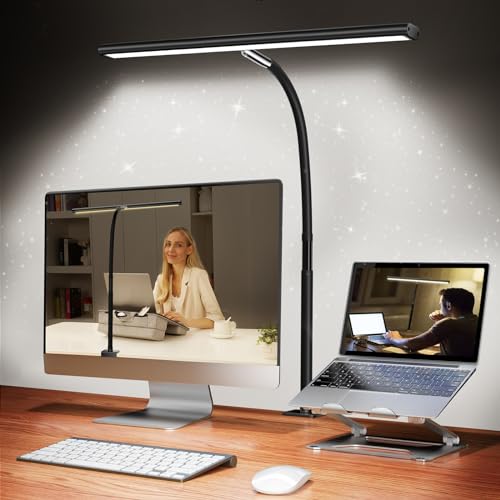
The Airlonv takes the clamp idea and scales it up. A metal clamp grips desk edges up to 2.36 inches thick, a gooseneck rises to about 35 inches overall, and the business end is a 17-inch light bar whose width is the whole point: light spread across the full working area, so a keyboard, a notebook and a phone are all lit at once instead of competing for one bright pool. Reviewers of this model measure the bar at 100 LEDs with stepless dimming from near-off to full, and adjustable colour temperature spanning warm to daylight (2700K–6500K in the model’s published coverage).
It runs at 10 watts from the included 5V USB adapter, and the bar rotates on the gooseneck through a full circle, so the same lamp can light a desk from behind a monitor or swing round to light a craft project. Aluminium in the bar helps it shed heat, which matters for a lamp that may run all evening.
The honest compromises: clamp lamps need a suitable edge — glass desks and rounded lips need not apply — and stepless touch controls are slower to set precisely than a knob. But as coverage per dollar goes, a 17-inch bar at this tier is remarkable.
For gaming specifically, Airlonv LED Desk Lamp with Clamp faces the battlestation tests: long sessions, frequent peripheral swaps and a setup that gets leaned on, bumped and re-aimed. Its published specifications — not its styling — decide whether it passes, and the limits noted above are the ones to respect when a rig grows: add the next peripheral’s weight, width or cable to the total before assuming there is room.
A practical note for gaming setups: Airlonv LED Desk Lamp with Clamp will be judged by your rig’s growth, not its current state. Battlestations accrete — a second screen, a stream light, a bigger GPU’s thicker cables. The figures that matter are the headroom figures: how much of the stated capacity (Clamps desks up to 2.36 in thick) your current setup already uses, and what remains for the next upgrade. Buy the pick whose headroom matches your upgrade habits, and re-check the fit every time the rig changes; gaming setups are never finished, and the gear underneath them has to tolerate that.
- 17-inch bar lights the whole work zone evenly
- Stepless dimming and adjustable colour temperature
- Clamp mount frees the entire desk surface
- Gooseneck and rotating bar aim light anywhere
Honest limitation: Needs a clampable desk edge up to 2.36 in; not for glass or rounded-edge desks.
Choose it if: Choose it if you work at a monitor and want the whole desk lit, not a spotlight.
Skip it if: Skip it if your desk has no clampable edge — look at the base lamps in this guide.
LEPOWER Clip On Light (5W LED, Gooseneck)
Best for: Best overall under this budget. Who it suits: Readers, students and small-desk workers who need real task light that takes up zero desk surface.
The LEPOWER clip light is the budget lamp that makes sense: instead of a base eating six inches of a small desk, a spring clip grips the desk edge, a shelf or a headboard — the listing rates the clip opening at up to 2.36 inches — and a flexible metal gooseneck puts the light exactly where the book or keyboard is. The 5-watt LED head offers two colour temperatures (a warm and a white light) at two brightness levels, switched from a control on the cord.
Power comes from a standard outlet via the included 2-prong USB AC adapter, with a 5-foot cord that reaches most desk-to-socket runs. The flicker-free, softened output is the point of the design: this is a reading and task light meant to be looked near, not at, for hours. The all-metal clip and gooseneck are why this model, rather than the plastic crowd, anchors the guide — clips are the part that fails on cheap lamps, and metal clips fail last.
Its limits are honest ones: two brightness steps is coarse next to stepless dimming, there is no timer or memory, and a 5W head lights a task zone, not a whole room. For reading, studying and keyboard work, a task zone is precisely what you need.
For gaming specifically, LEPOWER Clip On Light faces the battlestation tests: long sessions, frequent peripheral swaps and a setup that gets leaned on, bumped and re-aimed. Its published specifications — not its styling — decide whether it passes, and the limits noted above are the ones to respect when a rig grows: add the next peripheral’s weight, width or cable to the total before assuming there is room.
A practical note for gaming setups: LEPOWER Clip On Light will be judged by your rig’s growth, not its current state. Battlestations accrete — a second screen, a stream light, a bigger GPU’s thicker cables. The figures that matter are the headroom figures: how much of the stated capacity (Clips to edges up to 2.36 in thick) your current setup already uses, and what remains for the next upgrade. Buy the pick whose headroom matches your upgrade habits, and re-check the fit every time the rig changes; gaming setups are never finished, and the gear underneath them has to tolerate that.
- Clip mounting uses zero desk surface
- Metal gooseneck holds its aim; clip fits edges up to 2.36 in
- Two colour temperatures for evening and daytime tasks
- Runs from a standard outlet with the included adapter
Honest limitation: Only two brightness levels — no fine dimming for late-night low light.
Choose it if: Choose it if desk space is scarce and your lighting need is reading and typing.
Skip it if: Skip it if you need stepless dimming or a lamp that also lights the whole room.
LEPOWER Flexible Swing Arm Desk Lamp (Base + Clamp, E26)
Best for: Best traditional architect-style lamp. Who it suits: Anyone who wants the classic architect’s lamp — a long-reach arm over the desk — and likes choosing their own bulb.
The swing-arm LEPOWER is the traditional answer: a sprung, articulated arm on your choice of a weighted base or the included clamp (which fits edges up to about 2 inches), reaching roughly 32 inches tall so the head can hang over the middle of a desk from the back edge. The head takes a standard E26 bulb — not included — which is a feature disguised as an omission: you choose the bulb’s brightness and colour temperature, and when the bulb eventually dies you replace the bulb, not the lamp.
The all-metal construction is the reason to buy it at this tier. Swing arms live a hard life of daily repositioning, and metal joints with proper springs outlast the plastic friction joints of cheaper architect lamps by years. The switch sits on the cord, which is the design’s one daily annoyance.
Budget honestly: the lamp plus a good LED bulb is the real purchase. Even so, the total lands inside this article’s tier, and the result is the most repairable, longest-lived lamp in this guide.
For gaming specifically, LEPOWER Flexible Swing Arm Desk Lamp faces the battlestation tests: long sessions, frequent peripheral swaps and a setup that gets leaned on, bumped and re-aimed. Its published specifications — not its styling — decide whether it passes, and the limits noted above are the ones to respect when a rig grows: add the next peripheral’s weight, width or cable to the total before assuming there is room.
A practical note for gaming setups: LEPOWER Flexible Swing Arm Desk Lamp will be judged by your rig’s growth, not its current state. Battlestations accrete — a second screen, a stream light, a bigger GPU’s thicker cables. The figures that matter are the headroom figures: how much of the stated capacity (Clamp fits edges up to about 2 in) your current setup already uses, and what remains for the next upgrade. Buy the pick whose headroom matches your upgrade habits, and re-check the fit every time the rig changes; gaming setups are never finished, and the gear underneath them has to tolerate that.
- Base or clamp mounting — your choice, both included
- E26 socket: choose and replace your own bulb
- All-metal arm and springs for daily repositioning
- Long reach lights the centre of the desk from the edge
Honest limitation: Bulb not included, and the on-cord switch is less handy than a head switch.
Choose it if: Choose it if you want a lamp that lasts and a bulb you can choose.
Skip it if: Skip it if you want integrated LED features like USB charging or timers.
TaoTronics TT-DL13 LED Desk Lamp (named, availability varies)
Best for: Best full-featured budget lamp when in stock. Who it suits: Buyers who find it in stock: it has been the budget class benchmark, with the feature list everything else at this price is measured against.
The TT-DL13’s published specification reads like a lamp costing twice as much: five colour-temperature modes spanning roughly 3000K to 6000K, five brightness levels, a 5V/1A USB port in the base for a phone, a memory function that restores your last setting, and a rated 50,000-hour LED lifespan at 12 watts. Independent roundups consistently place its output around 410–510 lumens-equivalent task brightness — squarely in the range office guidance recommends for desk work.
Why is it prose-only here? TaoTronics’ Amazon presence has been inconsistent in recent years and we could not verify a current, stable Amazon listing for the exact model during research — so rather than link you somewhere uncertain, we name it, spec it from the manufacturer’s published data and reputable roundups, and let you check availability yourself. If you find it at this tier, it is arguably the pick of the guide.
For gaming specifically, TaoTronics TT-DL13 LED Desk Lamp faces the battlestation tests: long sessions, frequent peripheral swaps and a setup that gets leaned on, bumped and re-aimed. Its published specifications — not its styling — decide whether it passes, and the limits noted above are the ones to respect when a rig grows: add the next peripheral’s weight, width or cable to the total before assuming there is room.
A practical note for gaming setups: TaoTronics TT-DL13 LED Desk Lamp will be judged by your rig’s growth, not its current state. Battlestations accrete — a second screen, a stream light, a bigger GPU’s thicker cables. The figures that matter are the headroom figures: how much of the stated capacity (Base lamp — needs desk surface) your current setup already uses, and what remains for the next upgrade. Buy the pick whose headroom matches your upgrade habits, and re-check the fit every time the rig changes; gaming setups are never finished, and the gear underneath them has to tolerate that.
- Five colour modes and five brightness levels
- USB charging port and memory function at a budget price
- Flicker-free output praised across independent roundups
Honest limitation: Amazon availability is inconsistent; no verified current listing, hence no link.
Choose it if: Choose it if you find the genuine TT-DL13 in stock at this tier.
Skip it if: Skip lookalike listings with no model number — the name is widely copied.
LEPOWER Metal Desk Lamp with Flexible Gooseneck (the base-lamp type)
Best for: Best simple base lamp type. Who it suits: Bedside and study-desk users who want a lamp that simply stands, points and works, with a replaceable bulb.
LEPOWER’s metal gooseneck lamp is the archetype of the simple desk lamp: a weighted round base about 5.7 inches across, a flexible metal neck, and a metal shade over a standard bulb socket (the listing rates the fitting for bulbs up to 40 watts; a modern LED bulb is the sensible fill). The published figures put it at roughly 14 inches tall and under two pounds — a lamp that can live on a bedside table as happily as a desk.
We list the type in prose because the exact current Amazon variant could not be pinned to one stable listing during research; the model (UT2032 in LEPOWER’s line) is widely sold, and any listing you find should be checked against those base and height figures. As a type, its virtues are permanence and repairability: no integrated LED to die, no battery to fade, just a bulb you can replace in a decade.
For gaming specifically, LEPOWER Metal Desk Lamp with Flexible Gooseneck faces the battlestation tests: long sessions, frequent peripheral swaps and a setup that gets leaned on, bumped and re-aimed. Its published specifications — not its styling — decide whether it passes, and the limits noted above are the ones to respect when a rig grows: add the next peripheral’s weight, width or cable to the total before assuming there is room.
A practical note for gaming setups: LEPOWER Metal Desk Lamp with Flexible Gooseneck will be judged by your rig’s growth, not its current state. Battlestations accrete — a second screen, a stream light, a bigger GPU’s thicker cables. The figures that matter are the headroom figures: how much of the stated capacity (Base lamp — needs a small circle of desk) your current setup already uses, and what remains for the next upgrade. Buy the pick whose headroom matches your upgrade habits, and re-check the fit every time the rig changes; gaming setups are never finished, and the gear underneath them has to tolerate that.
- Replaceable-bulb design outlives integrated-LED lamps
- Weighted base and metal neck feel planted and aim precisely
- Small footprint suits bedside and study desks
Honest limitation: No dimming or colour control beyond the bulb you choose.
Choose it if: Choose this type if you value simplicity and repairability over features.
Skip it if: Skip it if you want colour-temperature control for different tasks.
BenQ e-Reading LED Desk Lamp (the step-up)
Best for: The step-up for all-day screen work. Who it suits: Full-time screen workers who light a desk for eight hours a day and can justify stepping well above this tier once.
BenQ’s e-Reading lamp is what the top of this category looks like, and it is named here as the honest landmark. Its published specifications: an oval light panel covering a 35.4-inch-wide area at a minimum of 500 lux, colour temperature adjustable from 2700K to 5700K across 13 levels, 23 brightness levels, a colour rendering index above 95, flicker-free output, and an ambient sensor that auto-dims for screen or paper modes. At 18 watts and nearly five kilograms, it is built like equipment, not an accessory.
It costs several times this article’s budget, so it carries no purchase link here. Its role is calibration: if your desk lamp is a tool of your trade and you will sit under it for a decade, this is the class worth saving for. If you need good light this week at this budget, the LEPOWER and Airlonv picks above are the rational buys.
For gaming specifically, BenQ e-Reading LED Desk Lamp faces the battlestation tests: long sessions, frequent peripheral swaps and a setup that gets leaned on, bumped and re-aimed. Its published specifications — not its styling — decide whether it passes, and the limits noted above are the ones to respect when a rig grows: add the next peripheral’s weight, width or cable to the total before assuming there is room.
A practical note for gaming setups: BenQ e-Reading LED Desk Lamp will be judged by your rig’s growth, not its current state. Battlestations accrete — a second screen, a stream light, a bigger GPU’s thicker cables. The figures that matter are the headroom figures: how much of the stated capacity (Base lamp — needs desk surface) your current setup already uses, and what remains for the next upgrade. Buy the pick whose headroom matches your upgrade habits, and re-check the fit every time the rig changes; gaming setups are never finished, and the gear underneath them has to tolerate that.
- Widest, most even coverage in the category (35.4 in at 500 lux)
- CRI above 95 for accurate colour work
- Auto-dimming sensor for screen and paper modes
Honest limitation: Costs several times this article’s budget — a step-up reference, not an in-tier pick.
Choose it if: Choose it if lighting is professional equipment for you and the budget can grow.
Skip it if: Skip it if you need light now at this tier — the in-budget picks are genuinely good.
Comparison Table
| Pick | Size / format | Capacity / key limit | Key specification |
|---|---|---|---|
| Airlonv LED Desk Lamp with Clamp (17-Inch Bar, 10W) | 17″ W x 35″ H overall | Clamps desks up to 2.36 in thick | 17 in light bar; 10W; stepless dimming; adjustable colour temperature |
| LEPOWER Clip On Light (5W LED, Gooseneck) | Clip-on; 5 ft cord | Clips to edges up to 2.36 in thick | 5W LED; clip fits up to 2.36 in; two colour temperatures |
| LEPOWER Flexible Swing Arm Desk Lamp (Base + Clamp, E26) | About 32 in tall at full reach | Clamp fits edges up to about 2 in | Swing arm; weighted base and clamp included; E26 bulb socket |
| TaoTronics TT-DL13 LED Desk Lamp (named, availability varies) | Folding arm, base lamp | Base lamp — needs desk surface | 5 colour modes; 5 brightness levels; USB charging port; memory function |
| LEPOWER Metal Desk Lamp with Flexible Gooseneck (the base-lamp type) | About 14 in tall | Base lamp — needs a small circle of desk | Metal gooseneck; E27/E26-class bulb lamp; weighted round base |
| BenQ e-Reading LED Desk Lamp (the step-up) | Swing arm, weighted base | Base lamp — needs desk surface | 2700K–5700K; CRI above 95; auto-dimming sensor; 35.4 in coverage |
Specifications are the manufacturers’ published figures for each model, verified during research for this guide; the sources file published alongside this article records where each figure came from. If a figure matters to your setup — a clamp limit, a load rating, an interior dimension — confirm it on the current listing before ordering, because manufacturers revise products without renaming them. Readers comparing setups often pair this guide with our Best Desk Lamp For Home Office Under $20 coverage for the adjoining decision.
How to Choose a Desk Lamp for gaming Under $50
Choosing a desk lamp is choosing three things: how much light, what colour of light, and where the light is allowed to live on your desk. Get those right and almost any lamp in this guide will serve you well.
For gaming, add two criteria to the general list: stability under lateral force (fast mouse work and leaning are side loads, and side loads are what cheap frames and clamps feel most), and serviceability — a gaming setup changes peripherals constantly, so anything that must be cut, unbolted or disassembled to change a cable will be hated within a month.
Brightness: think in tasks, not watts
LED wattage misleads; what matters is light on the page. For reading and desk work, guidance used by lighting professionals puts comfortable task light in the region of 300–500 lux at the surface. A 5–10W LED lamp aimed from a foot or two away lands in that zone. If a listing gives lumens, a few hundred focused lumens beat a thousand scattered ones.
Colour temperature is a daily decision
Warm light (around 2700K) suits evenings and reading; neutral (around 4000K) suits general work; daylight (5000K–6500K) suits detail and colour tasks but feels harsh at night. A lamp with adjustable temperature — or at least two settings, like the LEPOWER clip — lets one lamp serve the whole day. Fixed-temperature lamps force you to choose your hour.
Dimming: steps versus stepless
Stepped dimming (two to five levels) is simple and repeatable; stepless dimming finds the exact level but can be fiddly to reset. For shared desks and late-night work, the low end matters most: a lamp that dims genuinely low is a lamp you can use at midnight without waking the room.
Mounting decides your desk’s future
Bases are simple and movable but consume a circle of desk forever. Clamps and clips need a suitable edge — up to about 2.36 inches thick on the models here — and return the whole surface to you. Measure your desk edge, including any lip or bevel, before falling for a clamp lamp.
Bulb versus integrated LED
Integrated LEDs give the features — colour tuning, USB ports, timers — but the lamp dies with its diodes, albeit after tens of thousands of hours. A socket lamp like the LEPOWER swing arm lets you choose and replace the bulb forever. Neither is wrong; know which bargain you are making.
One more resource before the detail sections: if your setup spans several purchases, the Best Desk Lamp For Remote Work Under $20 and Best Desk Lamp For Small Spaces Under $20 guides cover the neighbouring categories readers most often combine with this one, in the same verified, no-invented-numbers format.
Positioning a Desk Lamp So It Helps Instead of Glaring
The rules are old because they work. Place the lamp on the opposite side from your writing hand, so the hand’s shadow falls away from the page. Aim the head so the light strikes the work at roughly 45 degrees and the bare light source is never visible from your chair — if you can see the LEDs, they can see you, and glare is just that, repeated for hours.
For screen work, the lamp’s job changes: it should light the desk and the room’s near field, not the display. Position it to the side or behind the monitor’s plane, keep its pool off the screen, and match its brightness roughly to the room so your eyes are not adapting between a bright desk and a dark room with every glance up. A lamp with adjustable colour temperature earns its keep here — cooler by day, warmer after dark tracks the room’s own light.
Height matters last: the head should sit above eye level when you are seated, or below the screen’s top edge when it cannot, so the light’s angle never points up into your face. Goosenecks and swing arms exist to make these three adjustments; spend the first evening with a new lamp making them, and it will not need touching for months.
Lamp Care: Keeping Cheap Light Good
LED lamps ask little: dust the shade or bar monthly (dust is a measurable light thief on diffusers), keep vents and the bar’s heat-sinking surfaces unobstructed, and do not coil the cord tightly around a warm gooseneck. The clip and clamp screws on budget lamps loosen with repositioning — a monthly finger-check keeps aim drift away.
For socket lamps, care is the bulb’s: replace a flickering bulb promptly, because flicker is both a comfort and a bulb-health issue, and keep a spare — the whole point of the replaceable design is that a dead bulb is a two-minute event, not a new lamp. For integrated lamps, the memory of your settings is the feature to protect: if a lamp forgets its level at every switch-off, put it on a switched outlet strip so its own switch — and its memory — stays untouched.
Light for Video Calls: The Lamp’s Second Job
The modern desk lamp moonlights as a key light. On calls, the flattering arrangement is a soft light in front of you, slightly above eye level and angled down a little — which a gooseneck or swing-arm lamp provides by swinging round to face you, and a light bar approximates from above the monitor. The colour temperature to choose is the middle of your lamp’s range: warm enough to look human, cool enough to look awake.
Two warnings from the positioning rules still apply: never let the lamp shine into the camera’s lens from behind you (you become a silhouette), and never call from a pool of desk light in an otherwise dark room — raise the room’s general light a little, or your face floats in a cave on screen. The dimming range you bought for midnight paperwork turns out to be a broadcast tool.
If calls are a large part of your job, this second job can justify the stepless lamps in this guide over the stepped ones: faces notice small brightness changes that paperwork ignores. It is one more reason the Airlonv bar’s fine control earns its place — the same control that sets a reading level sets a camera level.
Gaming Sessions: The Long-Haul Checks
Gaming loads equipment differently from office work: sessions run longer, mice move fast and hard, and frustration expresses itself physically on the desk. Whatever you buy from this guide, do the gamer’s checks in week one — the full-session test at your longest typical playtime, the rage-proof test (a firm downward push where your hands rest), and the cable test (nothing where a foot or a chair wheel travels during play).
Heat and light deserve a thought too. Gaming rigs warm a room; anything you add should not trap that heat against a wall or a monitor. And if you stream or record, remember your setup’s background is a broadcast set: the tidiness choices in this guide — bundled cables, aimed light, contained strips — read on camera as production value that costs almost nothing.
For readers building out the rest of the desk, our Best Desk Lamp Under $50 guide is the most common next step after this purchase, followed by the Best Desk Lamp For Home Office Under $50 roundup for the piece that pairs with it.
Common Buying Mistakes
- Buying brightness by wattage alone. Two 10W lamps can light a desk completely differently depending on optics and diffusion. Look for lumens, lux or at least a light-bar design that spreads output — and treat wattage as the electricity figure it is.
- Choosing a battery lamp as a desk lamp. Rechargeable lamps are reading lights: their output drops as the battery fades and their day ends at the socket. A desk lamp that works eight hours daily should plug in.
- Ignoring the desk edge. Clamp lamps are wonderful until the desk turns out to have a rounded lip, a glass top or a 3-inch apron. Measure the edge’s thickness and shape first — the models here grip up to about 2.36 inches of honest, flat edge.
- One fixed colour temperature for all hours. A 6500K-only lamp feels like an interrogation at 11 p.m.; a 2700K-only lamp feels sleepy at 9 a.m. Adjustable temperature, even in two steps, is worth more than raw brightness at this budget.
- Aiming light at the screen. A lamp pool reflected in a monitor doubles eye strain while feeling like ‘more light’. Light the desk, the paper and the room — never the display.
Final Recommendation
Start with the Airlonv LED Desk Lamp with Clamp (17-Inch Bar, 10W). It is this guide’s top pick because it does the central job of this category at this budget with published specifications you can plan around: 17 in light bar; 10w; stepless dimming; adjustable colour temperature. Choose it if you work at a monitor and want the whole desk lit, not a spotlight. Check on Amazon
The runner-up is the LEPOWER Clip On Light (5W LED, Gooseneck). Choose it when its particular strength — best overall under this budget — matches your setup better than the top pick’s all-round case. Choose it if desk space is scarce and your lighting need is reading and typing. Check on Amazon
And if neither fits, that is information too: it usually means your space, load or habits exceed what this tier honestly serves, and the step-ups and strategies named in this guide point at the right next tier. A purchase postponed beats a purchase returned — or worse, a purchase kept and resented at every workday. Readers at exactly that decision point often find the Best Desk Lamp For Remote Work Under $50 guide settles which side of the line their setup falls on.
Frequently Asked Questions
How bright should a desk lamp be for studying?
Aim for the equivalent of 300–500 lux on the page — in practice, a 5–10W LED lamp positioned a foot or two above the work. If you are squinting or leaning in, it is too dim or badly aimed; if you are shielding your eyes, it is glare, not brightness, and repositioning beats replacing.
What colour temperature is best for a home office?
Adjustable is best. Work around 4000K for general tasks, cooler (5000K+) for detail and colour work, warmer (2700K–3000K) in the evening. The two-setting LEPOWER clip covers the evening/day split; the Airlonv bar tunes across the whole range.
Do clamp lamps damage desks?
Properly fitted, no: the models here use padded or flat clamp faces on edges up to about 2.36 inches. Damage comes from over-tightening on soft veneer or clamping a bevelled edge that concentrates pressure — check the edge, tighten firmly, not brutally.
LED or bulb lamp — which lasts longer?
Integrated LED lamps quote lifespans in the tens of thousands of hours, after which the whole lamp is replaced. A socket lamp’s body can outlive several bulbs. In calendar terms both serve for years; the socket design wins on repairability, the LED design on features.
Can a desk lamp help with eye strain?
A lamp can remove two causes of strain — too little light on the task and glare — and the positioning section above covers both. It cannot fix screen distance, prescription or break habits; treat lighting as one leg of a three-legged stool.
Are LED desk lamps repairable?
Integrated models, mostly no — which is why their rated lifespans run to tens of thousands of hours. Socket lamps like the swing-arm pick are repairable by design: the bulb is the wear part, and it unscrews. Choose based on which philosophy you prefer; this guide includes both.
Why does my cheap lamp flicker on camera?
Some LED drivers pulse at rates cameras catch even when eyes do not. If you record or stream, it is one more reason to choose the flicker-free designs this guide favours — and to test any lamp on your camera during the return window, not after it.
Will budget gear survive gaming sessions?
Within its published ratings, yes. Gaming’s extra demands are duration and force, not exotic loads — respect the weight limits, keep fasteners and clamps tight, and a budget setup handles years of play. What it will not survive is being used as a step, a shelf for a tower it is not rated for, or a leaning post.
What should a gamer upgrade first beyond this budget?
Whatever touches your body longest: chair, then screen position, then light. The products in this guide are the supporting cast; spend the step-up money where the hours accumulate.
Still deciding between neighbouring categories? The Best Desk Organizer For Gaming Under $20 guide answers the version of this question most readers ask next.