Where to buy
Check the latest price, availability and delivery on Amazon for the linked picks below. Orders are placed on Amazon. We may earn a commission from qualifying purchases. Picks described without a link are named honestly — the guide explains why each one carries no link at this budget.
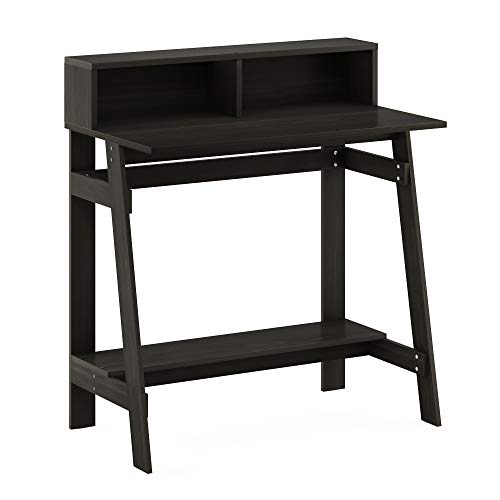
- Best overall under this budget: Furinno Simplistic A-Frame Computer Desk (Model 14054, Espresso) — Check on Amazon
- Furinno Simplistic Computer Desk with Keyboard Tray (Model 14098R1) — described in the guide below (no purchase link at this tier — see the review)
- Furinno Compact Computer Desk with Round Side Shelves (Model 11181) — described in the guide below (no purchase link at this tier — see the review)
- A folding tray table (the honest stopgap) — described in the guide below (no purchase link at this tier — see the review)
- A cushioned lap desk (for sofa and bed workers) — described in the guide below (no purchase link at this tier — see the review)
- A wall-mounted drop-leaf desk (the space trick) — described in the guide below (no purchase link at this tier — see the review)
Read the full guide ↓
Disclosure: As an Amazon Associate, umtsmarttool.com earns from qualifying purchases. Links to Amazon on this page are affiliate links; they cost you nothing extra. Listing details such as price and availability change often, so check the current Amazon listing before you buy.
Shopping for the best computer desk under $30 means accepting one truth early: at this price, a desk is a rated surface on a sensible frame, not a piece of furniture with drawers and cable grommets. The good news is that a rated surface on a sensible frame is exactly what most laptop and single-monitor setups need — and the verified models in this guide publish the dimensions and load ratings to prove what they can hold.
This guide covers both tiers of the same question — what a small budget honestly buys in a desk — with every manufactured pick verified against its maker’s published dimensions and load ratings. Where a model normally sells above the tier in the title, it is still described in full, because knowing the real landscape beats pretending the landscape is cheaper than it is; it simply carries no purchase link, and the text says why.
Only the Furinno A-Frame carries a purchase link at the $30 tier: it is the one complete desk we could verify as genuinely sold in this band. The keyboard-tray and round-shelf Furinno models are real desks with verified specifications, but they normally sell above $30, so they are described in full without links — check their current price yourself, and treat anything else advertised as a ‘desk’ under $30 with suspicion. Taken together, the six picks below are ordered by how completely they solve the central problem of this category at this budget for a typical reader — the first pick is the default answer, and each later pick trades a little of that all-round case for a specific strength: a shape, a mounting style, a capacity, or a price of entry that the top pick cannot match.
For general use, weight the criteria in this order: fit (dimensions against your space), capacity (ratings against your equipment), then features. Features are what brochures sell; fit and capacity are what you live with. When you are ready to go further, our guide to the Best Computer Desk For Gaming Under $30 covers the natural companion purchase, and the Best Computer Desk For Home Office Under $30 guide answers the follow-up question most readers ask next.
In this guide
Quick Picks
| Pick | Best for | Key specification |
|---|---|---|
| Furinno Simplistic A-Frame Computer Desk (Model 14054, Espresso) | Best overall under this budget | 31.6 in wide desktop; 30 lb desktop capacity |
| Furinno Simplistic Computer Desk with Keyboard Tray (Model 14098R1) | Best with a keyboard tray | 31.5 in wide; pull-out keyboard tray; 30 lb max load |
| Furinno Compact Computer Desk with Round Side Shelves (Model 11181) | Best for a corner or wall edge | 23.7 in wide main top; three round side shelves |
| A folding tray table (the honest stopgap) | Best zero-commitment stopgap | Folds flat; sold singly and in sets |
| A cushioned lap desk (for sofa and bed workers) | Best for sofa and bed working | Flat work surface over a cushion base |
| A wall-mounted drop-leaf desk (the space trick) | Best when floor space is zero | Folds flat against the wall when closed |
How These Picks Were Chosen
Every desk in this guide had to pass three tests. First, identity: a real manufacturer model with published dimensions and — critically — a published weight rating, because a desk without a load rating is a desk the maker does not trust either. Second, honesty: the desk had to be genuinely sold in or near this article’s budget band, verified against current listings; models that normally sell above the tier are named as step-ups in prose, never linked as if they were in budget. Third, structure: the design had to make sense for its stated capacity, whether that is an A-frame resisting racking or a tube frame that trades capacity for tool-free assembly.
We compared manufacturers’ published dimensions, load ratings, materials and assembly requirements across the budget desk market, and cross-checked them against retailer listings and the manuals makers file for each model. We did not invent test results: where a figure appears in this guide — a width, a depth, a load limit — it is the maker’s own published number, and the sources file published alongside this article shows where each one came from.
What we excluded matters as much as what we included. Desks with no stated load capacity, desks whose photos show setups their own dimensions make impossible, and ‘gaming desks’ at this price that are ordinary panels with a coloured stripe all failed the tests. What remains is a short, honest list: a few real desks, and the non-desk alternatives that sometimes serve better.
Only the Furinno A-Frame carries a purchase link at the $30 tier: it is the one complete desk we could verify as genuinely sold in this band. The keyboard-tray and round-shelf Furinno models are real desks with verified specifications, but they normally sell above $30, so they are described in full without links — check their current price yourself, and treat anything else advertised as a ‘desk’ under $30 with suspicion.
The 6 Best Computer Desks Under $30
Furinno Simplistic A-Frame Computer Desk (Model 14054, Espresso)
Best for: Best overall under this budget. Who it suits: Laptop users, students and anyone setting up a first small workstation who needs one honest, full-size-enough surface plus a shelf for a monitor or books.
The Simplistic A-Frame is the desk that makes this entire price tier possible. Furinno builds it from CARB-grade engineered wood panels with a laminated finish, held in an A-frame layout that adds an elevated shelf above the main surface and a second shelf down low. The main desktop measures 31.6 inches wide by 17.9 inches deep, which is genuinely enough for a laptop with a notebook beside it, or a compact monitor on a stand with a keyboard in front. Overall the desk stands 35.5 inches tall including the hutch shelf, and it weighs about 26 pounds, so one person can carry the flat pack and the finished desk without help.
Load ratings are where cheap desks usually get vague, and Furinno is unusually specific here: the main desktop is rated for 30 pounds, the elevated shelf for 10 pounds, the lower shelf for 10 pounds, and the total static load for 50 pounds. Treat those numbers as hard limits, not suggestions. A laptop, a lamp and a stack of books sit comfortably inside them; a heavy desktop tower plus a large monitor plus leaning elbows during a frustrating spreadsheet moment is how budget desks die. Within its limits, the A-frame geometry is a sensible design — the angled legs resist the side-to-side racking that makes straight-legged panel desks wobble.
Assembly follows Furinno’s usual pattern: panels, tubes and fasteners, a mallet and a screwdriver, and roughly half an hour if you lay the parts out first. The laminated surface wipes clean with a damp cloth, and the manufacturer covers the desk with a one-year limited warranty. There is no cable grommet, no drawer and no keyboard tray — at this price those omissions are the honest trade that keeps the structure itself adequate.
In everyday use, Furinno Simplistic A-Frame Computer Desk earns its place by doing its stated job without demanding attention: the specifications above are the ones you will actually feel — the fit, the capacity, the control — and they hold up because they come from the maker’s own published data rather than from a listing’s adjectives. Treat the stated limits as the product’s real personality and it will not surprise you.
A practical note on living with it: Furinno Simplistic A-Frame Computer Desk rewards being set up once and left alone. Its headline figures — 31.6 in wide desktop; 30 lb desktop capacity — describe a product with a defined comfort zone, and daily life inside that zone is uneventful in the best way: no rituals, no workarounds, nothing to re-tighten, re-aim or re-route every morning. Most owners’ long-term verdict on this class of product is decided in the first week, which is why the setup sections in this guide repay the time they take. If your equipment and habits match the suits-line above, expect this pick to disappear into your routine — the highest compliment everyday gear can earn.
- Real published load ratings: 30 lb desktop, 50 lb total static load
- Elevated shelf lifts a monitor or stores books off the work surface
- A-frame legs resist racking better than straight panel legs
- Light enough at about 26 lb to move rooms or homes easily
Honest limitation: The 17.9-inch depth is tight for a separate monitor plus a full-size keyboard with wrist room to spare.
Choose it if: Choose it if you want the most complete real desk this budget can buy and your gear is a laptop or a single modest monitor.
Skip it if: Skip it if you run dual monitors, a heavy tower PC, or you know you lean and push on a desk hard while you work.
Furinno Simplistic Computer Desk with Keyboard Tray (Model 14098R1)
Best for: Best with a keyboard tray. Who it suits: Touch-typists and desktop-PC users who want the keyboard on its own sliding level so the desktop itself stays clear for a monitor and paperwork.
This Simplistic variant trades the A-frame’s hutch shelf for the feature desktop users actually ask for: a pull-out keyboard tray. The desk measures 31.5 inches wide, 15.75 inches deep and 28.75 inches high — a standard sitting height — and the tray slides out from under the top so your keyboard and mouse sit a few inches lower than the monitor surface, which is the arrangement basic ergonomics guides have recommended for decades. Two open shelves in the frame give a small tower, a router or textbooks a place that is not the floor.
Furinno rates the maximum weight recommendation at 30 pounds for the whole desk, and that number should shape what you put on it: a monitor and keyboard, yes; a monitor, a tower, a printer and a pile of hardbacks, no. The tabletop is about half an inch thick, which is typical of the brand’s Simplistic line and another reason to respect the rating. Assembly is a two-person job according to the listing, mostly because holding panels aligned while fastening is easier with help, and the maker suggests a mallet and screwdriver.
The tray itself is the honest compromise to understand. At this price it is a simple sliding panel rather than a ball-bearing, height-adjustable ergonomic platform, and wide gaming keyboards with a separate number pad crowd it. For a standard keyboard it does its one job — separating typing height from screen height — for less money than any aftermarket tray you could bolt to another desk.
In everyday use, Furinno Simplistic Computer Desk with Keyboard Tray earns its place by doing its stated job without demanding attention: the specifications above are the ones you will actually feel — the fit, the capacity, the control — and they hold up because they come from the maker’s own published data rather than from a listing’s adjectives. Treat the stated limits as the product’s real personality and it will not surprise you.
A practical note on living with it: Furinno Simplistic Computer Desk with Keyboard Tray rewards being set up once and left alone. Its headline figures — 31.5 in wide; pull-out keyboard tray; 30 lb max load — describe a product with a defined comfort zone, and daily life inside that zone is uneventful in the best way: no rituals, no workarounds, nothing to re-tighten, re-aim or re-route every morning. Most owners’ long-term verdict on this class of product is decided in the first week, which is why the setup sections in this guide repay the time they take. If your equipment and habits match the suits-line above, expect this pick to disappear into your routine — the highest compliment everyday gear can earn.
- Keyboard tray separates typing height from monitor height
- Standard 28.75-inch sitting height suits most chairs
- Two open shelves keep a small tower or books off the floor
- Compact 31.5-inch width fits small rooms and dorms
Honest limitation: The 30 lb whole-desk rating is the lowest ceiling in this guide; heavy multi-device setups exceed it quickly.
Choose it if: Choose it if a keyboard tray matters more to you than shelf space and your setup is a single monitor or a laptop on a stand.
Skip it if: Skip it if your keyboard is extra-wide, or if your gear list includes a printer that also has to live on the desk.
Furinno Compact Computer Desk with Round Side Shelves (Model 11181)
Best for: Best for a corner or wall edge. Who it suits: Anyone furnishing a corner, a hallway wall or the side of a room where a full-width desk simply will not fit, and whose setup is a laptop rather than a desktop rig.
Furinno’s 11181 is the smallest footprint in this guide: a 23.7-inch-wide main top, 15.6 inches deep and 29.8 inches high, with three round shelves stacked down one side. The shape is the point. The round shelves tuck into the dead space where a wall meets a corner, so the desk works in spots — beside a bed, at the end of a sofa, in a wide hallway — where a rectangular desk would jut into the walkway. The frame mixes engineered-wood panels with recycled-plastic tubes in Furinno’s Turn-N-Tube style, which keeps the whole thing light at about 20 pounds.
Be clear-eyed about capacity. The manual rates the desktop at 15 pounds and each shelf at 10 pounds. That is a laptop, a lamp and a phone, with the shelves carrying a router, a speaker, books or a small plant. It is not a monitor-and-tower desk, and it is not a surface to lean on while standing up. Used inside those limits it is a tidy little command post; used outside them it will let you know.
Assembly is the Turn-N-Tube promise: the tubes twist together largely by hand, which makes this the fastest build in the guide and the easiest to take apart again when you move. For renters and students who relocate often, that tool-light design is a genuine feature, not a gimmick.
In everyday use, Furinno Compact Computer Desk with Round Side Shelves earns its place by doing its stated job without demanding attention: the specifications above are the ones you will actually feel — the fit, the capacity, the control — and they hold up because they come from the maker’s own published data rather than from a listing’s adjectives. Treat the stated limits as the product’s real personality and it will not surprise you.
A practical note on living with it: Furinno Compact Computer Desk with Round Side Shelves rewards being set up once and left alone. Its headline figures — 23.7 in wide main top; three round side shelves — describe a product with a defined comfort zone, and daily life inside that zone is uneventful in the best way: no rituals, no workarounds, nothing to re-tighten, re-aim or re-route every morning. Most owners’ long-term verdict on this class of product is decided in the first week, which is why the setup sections in this guide repay the time they take. If your equipment and habits match the suits-line above, expect this pick to disappear into your routine — the highest compliment everyday gear can earn.
- Smallest footprint here; round shelves use corner dead space
- Turn-N-Tube assembly is fast and largely tool-free
- Three shelves give vertical storage without a bigger desk
- Lightweight frame is easy to move between rooms
Honest limitation: A 15 lb desktop rating rules out monitor-plus-tower setups entirely.
Choose it if: Choose it if your only available spot is a corner or narrow wall and your whole setup is a laptop and a lamp.
Skip it if: Skip it if you need to type at a full keyboard all day — the top is small and the depth is shallow.
A folding tray table (the honest stopgap)
Best for: Best zero-commitment stopgap. Who it suits: Anyone who needs a surface tonight — for a week of working from a sofa or a spare room — while saving for a real desk.
Every guide at this price should say this plainly: a folding tray table is not a desk, but it is a legitimate short-term answer that costs less than any desk and stores in a closet. The better ones have a wide, stable top, legs that lock open, and a raised lip so a laptop does not slide. What they never have is knee room geometry designed for hours of typing, or the rigidity a mouse needs for precise work.
If you go this route, treat it as a bridge, not a destination: put the laptop on a stand or a stack of books so the screen rises, use a separate keyboard if you can, and set a calendar reminder to revisit the desk budget. Ergonomics debt compounds quietly, and the tray table’s job is to buy you weeks, not years.
In everyday use, A folding tray table earns its place by doing its stated job without demanding attention: the specifications above are the ones you will actually feel — the fit, the capacity, the control — and they hold up because they come from the maker’s own published data rather than from a listing’s adjectives. Treat the stated limits as the product’s real personality and it will not surprise you.
A practical note on living with it: A folding tray table rewards being set up once and left alone. Its headline figures — Folds flat; sold singly and in sets — describe a product with a defined comfort zone, and daily life inside that zone is uneventful in the best way: no rituals, no workarounds, nothing to re-tighten, re-aim or re-route every morning. Most owners’ long-term verdict on this class of product is decided in the first week, which is why the setup sections in this guide repay the time they take. If your equipment and habits match the suits-line above, expect this pick to disappear into your routine — the highest compliment everyday gear can earn.
- Cheapest possible work surface
- Folds completely flat for storage
- Doubles as a side table or guest surface later
Honest limitation: Poor long-session ergonomics and noticeable flex under a mouse hand.
Choose it if: Choose it if the need is temporary and the alternative is the kitchen table or the bed.
Skip it if: Skip it if this will be your full-time desk for months — put the money toward the A-Frame instead.
A cushioned lap desk (for sofa and bed workers)
Best for: Best for sofa and bed working. Who it suits: People whose ‘office’ is a sofa, an armchair or a bed, and who work in shorter sessions rather than full days.
A lap desk — a flat board on a fabric cushion — solves the two real problems of sofa computing: heat on your legs and a laptop that slides around. The good versions add a wrist pad and a phone slot; the size to look for is wide enough for your laptop plus a mouse, because trackpad-only working all day is its own strain.
Its limits are the same as the tray table’s, only softer: posture is whatever the sofa gives you, and there is no monitor height to speak of. As a second workspace for evening email, reading and video calls it is genuinely pleasant. As an eight-hour desk replacement it is not, and no cushion changes that.
In everyday use, A cushioned lap desk earns its place by doing its stated job without demanding attention: the specifications above are the ones you will actually feel — the fit, the capacity, the control — and they hold up because they come from the maker’s own published data rather than from a listing’s adjectives. Treat the stated limits as the product’s real personality and it will not surprise you.
A practical note on living with it: A cushioned lap desk rewards being set up once and left alone. Its headline figures — Flat work surface over a cushion base — describe a product with a defined comfort zone, and daily life inside that zone is uneventful in the best way: no rituals, no workarounds, nothing to re-tighten, re-aim or re-route every morning. Most owners’ long-term verdict on this class of product is decided in the first week, which is why the setup sections in this guide repay the time they take. If your equipment and habits match the suits-line above, expect this pick to disappear into your routine — the highest compliment everyday gear can earn.
- Comfortable for short sessions anywhere in the home
- Protects legs from laptop heat
- No assembly, no floor space used
Honest limitation: No screen height, no typing posture — unsuitable for full workdays.
Choose it if: Choose it as a secondary surface for evenings and calls.
Skip it if: Skip it as your only workstation if you work full days at a screen.
A wall-mounted drop-leaf desk (the space trick)
Best for: Best when floor space is zero. Who it suits: Micro-apartments, hallways and multipurpose rooms where a desk must disappear completely when the workday ends.
The drop-leaf desk is the one design that truly fits this budget’s hardest constraint: no floor space at all. A panel hinges down from a wall-mounted frame, gives you a work surface, and folds away to a few inches of depth. In a studio apartment that transformation — office by day, living room by night — is worth more than drawers.
The catch is installation. The desk is only as strong as its fixings, which means studs or proper wall anchors, a drill, and a landlord conversation if you rent. Load ratings vary wildly between models, so read the specific listing’s numbers rather than assuming. Installed well, it is the most grown-up solution in this guide; installed into bare drywall with the included screws, it is a countdown.
In everyday use, A wall-mounted drop-leaf desk earns its place by doing its stated job without demanding attention: the specifications above are the ones you will actually feel — the fit, the capacity, the control — and they hold up because they come from the maker’s own published data rather than from a listing’s adjectives. Treat the stated limits as the product’s real personality and it will not surprise you.
A practical note on living with it: A wall-mounted drop-leaf desk rewards being set up once and left alone. Its headline figures — Folds flat against the wall when closed — describe a product with a defined comfort zone, and daily life inside that zone is uneventful in the best way: no rituals, no workarounds, nothing to re-tighten, re-aim or re-route every morning. Most owners’ long-term verdict on this class of product is decided in the first week, which is why the setup sections in this guide repay the time they take. If your equipment and habits match the suits-line above, expect this pick to disappear into your routine — the highest compliment everyday gear can earn.
- Uses zero floor space when folded away
- Feels like a real, rigid work surface when open
- Doubles as a dining or craft surface
Honest limitation: Requires drilling into studs or solid anchors; renters may not be allowed.
Choose it if: Choose it if you own your walls (or have permission) and the room must convert daily.
Skip it if: Skip it if you cannot drill, or if your setup includes a heavy monitor that stays out permanently.
Comparison Table
| Pick | Size / format | Capacity / key limit | Key specification |
|---|---|---|---|
| Furinno Simplistic A-Frame Computer Desk (Model 14054, Espresso) | 31.6″ W x 17.9″ D x 35.5″ H | 30 lb desktop / 50 lb total | 31.6 in wide desktop; 30 lb desktop capacity |
| Furinno Simplistic Computer Desk with Keyboard Tray (Model 14098R1) | 31.5″ W x 15.75″ D x 28.75″ H | 30 lb maximum | 31.5 in wide; pull-out keyboard tray; 30 lb max load |
| Furinno Compact Computer Desk with Round Side Shelves (Model 11181) | 23.7″ W x 15.6″ D x 29.8″ H | 15 lb desktop / 10 lb per shelf | 23.7 in wide main top; three round side shelves |
| A folding tray table (the honest stopgap) | Varies by model | Light loads only — check the specific model | Folds flat; sold singly and in sets |
| A cushioned lap desk (for sofa and bed workers) | Varies by model | Laptop only | Flat work surface over a cushion base |
| A wall-mounted drop-leaf desk (the space trick) | Varies by model | Depends entirely on wall fixing — check the specific model | Folds flat against the wall when closed |
Specifications are the manufacturers’ published figures for each model, verified during research for this guide; the sources file published alongside this article records where each figure came from. If a figure matters to your setup — a clamp limit, a load rating, an interior dimension — confirm it on the current listing before ordering, because manufacturers revise products without renaming them. Readers comparing setups often pair this guide with our Best Computer Desk For Remote Work Under $30 coverage for the adjoining decision.
How to Choose a Computer Desk Under $30
Choosing a budget desk is mostly an exercise in matching three numbers — width, depth and load — to your actual equipment, and in refusing to buy features this price cannot honestly include.
For general use, weight the criteria in this order: fit (dimensions against your space), capacity (ratings against your equipment), then features. Features are what brochures sell; fit and capacity are what you live with.
Measure the space, then the desk
Write down the wall length you can spare and the depth from the wall you can live with, then shop inside those numbers. Budget desks cluster at 31–32 inches wide and 16–18 inches deep; if your space allows 40 inches, know that at this budget you will usually be choosing between a wider no-name desk with no load rating and a narrower rated one — we would take the rated one every time.
Add up your load before you fall in love
A laptop weighs 3–5 lb. A 24-inch monitor on its stand, 8–12 lb. A small tower, 15–25 lb. A printer, 10–20 lb. Add your own list and compare it honestly against the desk’s published desktop rating — not its total rating, which spreads weight across shelves you may not load the same way. If your total beats the rating, the desk is not a bargain; it is a future collapse with a delivery date.
Depth is the comfort spec nobody checks
Seventeen inches of depth puts a monitor’s screen roughly at arm’s length with a compact keyboard; it leaves little room for a notebook in front of you. If you write on paper while you work, depth matters more than width, and a slightly narrower but deeper desk — or a keyboard-tray model that moves typing off the top — will feel bigger than its numbers.
Frame design predicts wobble
A-frames and cross-braced legs resist the side-to-side racking that makes typing on cheap desks feel like typing on a boat. Straight panel legs are the wobbliest design; tube frames sit in between and gain ground by being light. Push-test any assembled floor model if you can, and tighten fasteners again after the first week — budget desks settle, and a quarter-turn restores most of their rigidity.
Assembly is part of the price
Tool-light designs like Furinno’s Turn-N-Tube genuinely assemble in minutes and disassemble for moves, which matters for renters and students. Cam-lock panel desks take longer and tolerate fewer rebuilds. If you move yearly, assembly style is not a footnote; it is the feature you will feel most.
One more resource before the detail sections: if your setup spans several purchases, the Best Computer Desk For Small Spaces Under $30 and Best Computer Desk Under $50 guides cover the neighbouring categories readers most often combine with this one, in the same verified, no-invented-numbers format.
Setting Up a Small Desk So It Feels Bigger
The small desk rewards deliberate setup. Put the monitor or laptop at the back edge, centred on your chair — not on the room. Every inch of depth in front of the screen is typing and writing room, and off-centre screens quietly wreck posture over a month of workdays. If the desk has a hutch or elevated shelf, that is where the monitor belongs if its rating allows, with the keyboard on the main surface below it.
Vertical storage is the second trick: shelves, a small riser, or wall space above the desk hold the books, chargers and stationery that otherwise colonise the work surface. The rule that keeps small desks usable is that the main surface holds only what the current task needs — everything else lives one reach away, not under your elbows.
Finally, route the cables once, properly: power and signal drops should leave the back edge together, bundled, to a strip on the floor or in a cable box. A small desk with tidy cables feels twice its size; the same desk with a cable nest reads as clutter no matter how clear the surface is.
Keeping a Budget Desk Alive for Years
Budget desks die of three causes: overload, moisture and loose fasteners. Overload is prevented at purchase time by respecting the published rating. Moisture is the quiet one — laminated particleboard swells permanently where a wet mug ring or a spilled glass soaks an edge, so coasters are structural equipment at this tier, and spills get wiped the minute they happen, not at the end of the day.
Loose fasteners announce themselves as wobble, and wobble is fixable: re-tighten every screw and cam a week after assembly, then every few months, working around the frame in a circle. If a cam-lock hole eventually strips — the classic end-of-life failure — a matchstick-thin sliver of wood and glue in the hole gives the fastener fresh material to bite, a five-minute repair that buys another year.
Floors matter too. Felt pads under legs stop the micro-sliding that works fasteners loose on hard floors, and on carpet, a desk this light can rock on the pile — a thin hardboard sheet under the legs spreads the load and steadies it.
Desk Height, Chair Height and the 90-Degree Rule
A desk’s height is fixed the day you buy it — 28.75 inches on the keyboard-tray Furinno here, a little more to the A-Frame’s main surface — so the adjustment has to happen at the chair. The working rule is simple geometry: seated, your elbows should rest at about 90 degrees with your forearms level with the keyboard, your feet flat on the floor (or a footrest), and the top of your screen at or just below eye level. If your feet dangle, the chair is compensating for the desk; a footrest or a lower chair solves what a new desk cannot.
Budget desks make one part of this easier: their surfaces sit at standard heights, so standard chairs pair predictably. Where readers go wrong is the monitor: on a 17.9-inch-deep desk the screen lands close, and the fix is height, not distance — raise the screen on the desk’s own hutch shelf or a small riser until your neck is neutral, and let your eyes, not the furniture, do the adjusting.
Recheck the geometry after the first week. Chairs compress, cushions settle, and the setup that measured perfectly on day one drifts. Two minutes with the 90-degree rule each month keeps a budget desk feeling like a fitted one.
Making the Purchase Last: Setup Day Done Right
Whatever this guide led you to, the first hour decides how the next years feel. Unbox on a clear floor, read the maker’s instructions before touching a fastener or a cable, and keep every spare screw, tie and manual in one labelled bag — the bag you will be grateful for at the first move or rearrangement.
Set the purchase up completely before judging it: cables routed, heights adjusted, settings dialled. Most returns in this category are not bad products but unfinished setups. Give the finished arrangement a full week of real use before deciding — first impressions of anything you sit at, plug in or work under are notoriously unreliable, in both directions.
For readers building out the rest of the desk, our Best Computer Desk For Gaming Under $50 guide is the most common next step after this purchase, followed by the Best Computer Desk For Home Office Under $50 roundup for the piece that pairs with it.
Common Buying Mistakes
- Buying by the photo, not the dimensions. Product photos at this tier are staged with small laptops and no peripherals. A desk that ‘fits a gaming setup’ in a picture may be 31 inches wide. Read the dimension line, measure your gear, and let the numbers overrule the staging.
- Ignoring the load rating — or its absence. If a listing will not tell you what the desktop holds, assume the answer is ‘not much’. Rated desks exist at this price; unrated ones are a gamble with your monitor as the stake.
- Putting the tower on the desk. On a 30 lb-rated desktop, a tower eats most of the budget before the monitor arrives. Towers belong on the floor beside the desk or on a low shelf rated for them — which also keeps their fans’ dust away from your face.
- Forgetting knee and chair space. A desk is a three-dimensional object: check that your chair’s arms fit under the top, that a keyboard tray (if fitted) clears your knees, and that shelves do not sit where your shins need to be.
- Paying for ‘features’ instead of structure. At this price, every dollar spent on cup holders, headphone hooks and LED strips is a dollar not spent on the frame. Buy structure first; accessories can be added for pocket change later.
Final Recommendation
Start with the Furinno Simplistic A-Frame Computer Desk (Model 14054, Espresso). It is this guide’s top pick because it does the central job of this category at this budget with published specifications you can plan around: 31.6 in wide desktop; 30 lb desktop capacity. Choose it if you want the most complete real desk this budget can buy and your gear is a laptop or a single modest monitor. Check on Amazon
The runner-up is the Furinno Simplistic Computer Desk with Keyboard Tray (Model 14098R1). Choose it when its particular strength — best with a keyboard tray — matches your setup better than the top pick’s all-round case. Choose it if a keyboard tray matters more to you than shelf space and your setup is a single monitor or a laptop on a stand.
And if neither fits, that is information too: it usually means your space, load or habits exceed what this tier honestly serves, and the step-ups and strategies named in this guide point at the right next tier. A purchase postponed beats a purchase returned — or worse, a purchase kept and resented at every workday. Readers at exactly that decision point often find the Best Computer Desk For Remote Work Under $50 guide settles which side of the line their setup falls on.
Frequently Asked Questions
Can a desk this cheap really hold a monitor?
Yes — if it is a rated desk and a single monitor. The Furinno A-Frame in this guide rates its desktop at 30 lb, and a typical 24-inch monitor on its stand weighs 8–12 lb. What budget desks cannot do is hold a monitor, a tower and a printer at once; the rating, not the price, is the limit to respect.
What is the smallest desk that still works for a laptop?
Around 24 inches wide is the practical floor for laptop-plus-mouse work, and the compact Furinno in this guide is built exactly to that brief. Below that you are in tray-table territory, which works for short sessions but not as a daily desk.
Are these desks hard to assemble?
The tube-frame models assemble largely by hand in minutes. Panel models with cams and screws take 30–60 minutes and are easier with a second person holding panels. A mallet and a screwdriver cover the tool list for everything in this guide.
Will a budget desk wobble?
A little, if you type hard on carpet. A-frame and braced designs wobble least; re-tightening fasteners after the first week removes most of what remains. If wobble persists, check that all four feet are truly on the floor — an uneven floor is the cause more often than the desk.
How long will a desk at this price last?
Used within its load rating and kept dry, several years of daily use is realistic; the usual failure is a stripped cam hole or swollen edge, both of which the maintenance section above addresses. Used as a shelf, a step or a tower stand, considerably less.
Can I put a desktop tower on these desks?
Only where the published rating allows, and at this budget it mostly does not: a tower can weigh as much as the A-Frame’s whole desktop rating. The floor beside the desk, or a low rated shelf, is the right home — with better airflow as a bonus.
What tools do I need for assembly?
A screwdriver and a mallet cover every model in this guide; the tube-frame designs need even less. A second pair of hands helps with panel models. Keep the Allen keys and spare fasteners — budget furniture rewards owners who can re-tighten it.
Is it worth buying at this budget, or should I save for more?
If the product’s published specifications cover your actual equipment and habits, buy with confidence — the picks here were chosen because their specs are real. Save for more only when your needs exceed those specs: heavier loads, bigger surfaces, longer hours. Buying beyond your needs is its own waste.
Where should I check before ordering?
The maker’s own listing for dimensions and ratings, and your own room with a tape measure. Every disappointment in this category is a measurement that was available and not taken.
Still deciding between neighbouring categories? The Best Desk Organizer Under $20 guide answers the version of this question most readers ask next.