Where to buy
Short on time? This guide to the best external dvd drive under $30 ranks six picks that were verified against their listings and makers’ specifications. Start with the shortlist below, then read the full reviews for the details that separate them.
- ROOFULL External CD/DVD Drive (ECD829-Y) — best overall under budget. Check on Amazon
- Amicool External DVD Drive (A11) — best slim plug-and-play pick. Check on Amazon
- LG GP65NB60 Ultra Slim Portable DVD Writer — best for archiving (m-disc). Check on Amazon
- ROOFULL External CD/DVD Drive with Carrying Case (ECD829-Y) — best for travel. Check on Amazon
- ROOFULL External DVD Drive with USB Hub (RF40-SU) — best for port-starved laptops. Check on Amazon
- ASUS ZenDrive U9M (SDRW-08U9M-U) — best step-up pick (above budget). Covered in full below (prose-only pick: no purchase link, for the reason given in its review).
Read the full guide ↓
Disclosure: umtsmarttool.com is reader-supported. When you buy through links in this guide, we may earn a commission from Amazon at no additional cost to you. Prices and availability change constantly, so check the live listing before you buy.
Modern laptops deleted the optical drive years ago, but the discs never got the memo: software archives, tax records, photo collections, a wall of DVDs and a box of CDs all still exist. If you are looking for the best external dvd drive under $30, you need a small USB drive that reads and burns the discs you already own — and at this budget, that is a genuinely solvable problem.
This is one of the few tech categories where a small budget buys the real thing, because the technology is mature and undemanding: every drive here reads and writes CDs and DVDs at the standard 24x/8x speeds, connects by USB with no separate power supply in normal use, and works across Windows and Mac. The differences are in the details — connector type, whether a case or hub is bundled, and whether the maker supports archival M-DISC media. Six picks cover those differences, including one deliberate step-up covered without a link because it sells above this budget.
The external DVD drive market has a particular shape worth understanding before the picks: a mature technology, a handful of established budget brands with real model lines, two legacy manufacturers (LG and ASUS) still publishing specification sheets, and a long tail of anonymous listings whose format claims cannot be verified. This guide deliberately draws only from the documented part of the market. At this budget that discipline costs nothing — the verified drives are also the inexpensive ones.
Throughout the guide you will also find pointers to related budgets and uses — readers cross-shopping the range usually compare Best External Dvd Drive Under $20 and Best External Hard Drive Under $30 before deciding. Everything recommended below was checked against a verifiable listing or a manufacturer’s own documentation, and every limitation we found is stated in the open, including the ones that argue against buying at all.
Quick Picks
The table below compresses the guide: six drives, their strengths, and the specification that defines each. Speeds are the category standard everywhere, so the table’s real content is connectors, bundles and archival support — the reviews expand on all three.
| Pick | Best for | Key specification |
|---|---|---|
| ROOFULL External CD/DVD Drive (ECD829-Y) | Best overall under budget | USB 3.0 + USB-C embedded cable · DVD 8x / CD 24x · CD/DVD ±R/RW |
| Amicool External DVD Drive (A11) | Best slim plug-and-play pick | USB 3.0 Type-A + Type-C · DVD 8x / CD 24x · plug and play |
| LG GP65NB60 Ultra Slim Portable DVD Writer | Best for archiving (M-DISC) | USB 2.0 · DVD write 8x / CD write 24x · M-DISC support · 14mm, 200g |
| ROOFULL External CD/DVD Drive with Carrying Case (ECD829-Y) | Best for travel | USB 3.0 + USB-C · DVD 8x / CD 24x · protective case included |
| ROOFULL External DVD Drive with USB Hub (RF40-SU) | Best for port-starved laptops | USB 3.0 + Type-C · DVD/CD burner · 4 USB ports + SD/TF slots |
| ASUS ZenDrive U9M (SDRW-08U9M-U) | Best step-up pick (above budget) | USB 2.0 Type-C + Type-A cables · DVD 8x / CD 24x write · M-DISC · 13.9mm |
How These Picks Were Chosen
Verification came first in a category full of anonymous clones. Each pick’s model was confirmed against its Amazon listing, and write/read speeds and format support were taken from the manufacturer’s specification sheet where one exists (LG, ASUS) or from the established seller’s listing details (ROOFULL, Amicool). Any drive whose format support could not be pinned down — particularly the difference between a reader and a burner — was excluded, because a read-only drive sold as a burner is this category’s most common disappointment.
Ranking then followed usefulness rather than novelty: connector fit for modern laptops, bundled extras that solve real problems (a case, a hub, burning software), archival capability, and reading behavior with imperfect discs. One pick — the ASUS — is included without a purchase link because it sells above this guide’s budget; it is labeled as a step-up everywhere it appears, on the principle that a guide’s job is to inform the exception, not hide it. No drive was credited with Blu-ray, console or TV compatibility it does not have.
The shortlist was built on verifiable listings and published specifications rather than spec-sheet promises from anonymous sellers: ROOFULL and Amicool are the established budget optical brands on Amazon with documented models, LG and ASUS bring full manufacturer spec sheets, and every pick reads and writes both CD and DVD recordable formats. Blu-ray was excluded by the budget itself — no drive at this level reads Blu-ray, and the guide says so wherever it matters.
A note on speed claims: every portable DVD drive in existence performs in the same narrow band, so this guide treated any listing advertising dramatically higher optical speeds as a credibility failure and excluded it. The speeds quoted for the picks are the makers’ published maxima for each format — 8x DVD and 24x CD being the class standard — and the ranking was decided by everything except speed, because speed is the one thing this category does not vary.
No hands-on testing is claimed anywhere in this guide: the rankings rest on verified specifications, manufacturer documentation and the documented behavior of each product class. Where a figure comes from a maker, it is described as a rating. Readers weighing a different angle on the same category will find the companion shortlist at Best External Dvd Drive For Backups Under $30 useful alongside this one.
The 6 Best External DVD Drives Under $30
Honesty note: Five of the six picks are linked. The ASUS ZenDrive U9M is covered as a prose-only pick: it is the best-made drive in this roundup, but it sells above this guide’s budget ceiling, so it carries no purchase link here — buy it knowingly as a step-up, not as a sub-budget bargain.
ROOFULL External CD/DVD Drive (ECD829-Y)
Best overall under budget. ROOFULL’s ECD829-Y reads and writes CDs and DVDs (±R/RW formats) at up to 8x for DVD and 24x for CD, connects over USB 3.0 with an embedded cable that carries both USB-A and USB-C connectors, and works with Windows, macOS and Linux. A separate power cord is included for laptops whose ports cannot supply enough power on one cable.
In use, the ECD829-Y’s embedded cable is the feature owners mention months later: the drive comes out of the drawer with its cable attached, presents whichever connector the laptop wants, and is reading a disc inside a minute. Burns complete uneventfully at the standard speeds, and the bundled spare power cord quietly resolves the one recurring annoyance of the category — the underpowered hub — the first time it appears. The mechanism is audible during full-speed rips, as every slim drive is, and the tray wants a desk rather than a lap. As the household’s shared optical drive, passed between laptops of different generations, its connector generosity is a genuine quality-of-life advantage: it is the rare peripheral that has never once needed an adapter hunt.
- Embedded dual-connector cable cannot be lost and fits old and new laptops
- USB 3.0 interface avoids the slow port bottleneck of USB 2.0 drives
- Reads and burns the full range of CD and DVD recordable formats
- Spare power cord included for underpowered ports
Honest limitation: Like every drive at this level it does not read Blu-ray, and the lightweight tray mechanism needs a flat, stable surface — burning on a couch or bed invites coasters.
In everyday service, that combination is what earns ROOFULL External CD/DVD Drive (ECD829-Y) its place on this list.
Choose it if: Choose it if you want one drive that works with every laptop in the house without adapter hunting.
Skip it if: Skip it if you need Blu-ray playback — none of the drives in this guide read Blu-ray discs.
Bottom line: ROOFULL External CD/DVD Drive (ECD829-Y) is the pick when best overall under budget is the priority — uSB 3.0 + USB-C embedded cable · DVD 8x / CD 24x · CD/DVD ±R/RW. Choose it if you want one drive that works with every laptop in the house without adapter hunting.
Amicool External DVD Drive (A11)
Best slim plug-and-play pick. The Amicool A11 is a slim external CD/DVD burner with USB 3.0 Type-A and Type-C connectivity, maximum speeds of 8x for DVD and 24x for CD, and plug-and-play operation on Windows, macOS and Linux with no drivers to install. The cable tucks into the underside of the body, and the maker is explicit about the limits: no Blu-ray and no DVD-RAM support.
The A11’s ownership experience is defined by absence: no drivers to install, no cable to find (it tucks beneath the body), no software to configure. Plug it into a current MacBook or a Windows ultrabook and it simply is a DVD drive, which is the entire ambition of the product and the correct one. Rips and burns proceed at the category’s standard speeds, and the drive’s light weight makes it the pick most likely to actually be in the bag when a disc appears unexpectedly. Its limits are documented rather than discovered — no DVD-RAM, no Blu-ray — and its one behavioral demand is direct connection to the computer rather than a hub. For occasional, uncomplicated optical work on modern laptops, that is the whole brief, met.
- Dual USB-A and USB-C connectors on one attached cable
- Genuinely plug and play — no drivers on modern systems
- Slim body with the cable stored underneath
- Honest format support: CD/DVD ±R/RW reading and burning
Honest limitation: It does not support DVD-RAM or Blu-ray, and the listing itself advises connecting directly to the computer rather than through an unpowered hub, because optical drives are thirsty at spin-up.
In everyday service, that combination is what earns Amicool External DVD Drive (A11) its place on this list.
Choose it if: Choose it if you want the simplest possible drive for occasional ripping and burning on a modern laptop.
Skip it if: Skip it if your archive includes DVD-RAM discs or you want bundled burning software.
The short version: choose Amicool External DVD Drive (A11) for best slim plug-and-play pick. Its defining numbers — uSB 3.0 Type-A + Type-C · DVD 8x / CD 24x · plug and play — are verified, and its limitation above is the only real compromise. Choose it if you want the simplest possible drive for occasional ripping and burning on a modern laptop.
LG GP65NB60 Ultra Slim Portable DVD Writer
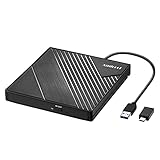
Best for archiving (M-DISC). LG’s GP65NB60 is a 14mm-thin, roughly 200g tray-loading DVD writer with an 8x maximum DVD write speed, 24x CD write speed, and support for M-DISC archival media — the rock-like recordable discs rated for very long storage life. It connects over USB 2.0, includes LG’s Silent Play and Jamless Play features, offers TV Connectivity for playing discs through a TV’s USB port on supported models, and ships with CyberLink software for Windows.
The GP65NB60 feels like the last optical drive designed by a company that expected to sell millions of them — because it was. The tray action is precise, the bundled CyberLink software gives Windows users a complete burn-and-backup toolkit without shopping for one, and features like Silent Play genuinely change movie playback: the drive throttles its spin to keep the soundtrack ahead of the mechanism. Jamless Play earns its keep on the discs that need it most, skipping damaged sections that stall lesser drives. M-DISC burning is slow by nature — archival writing is deliberate — and the USB 2.0 connection dates the design, but neither matters for its jobs. It is the pick for people who think of optical media as a system, not an emergency.
- M-DISC support makes it the archiving pick of this guide
- A real brand with published specifications and bundled software
- Silent Play and Jamless Play smooth out scratched-disc playback
- Extremely slim and light for a full-featured writer
Honest limitation: The USB 2.0 interface is old — fine for optical speeds, since 8x DVD uses only a fraction of it, but the short bundled cable and mini-USB-era design show the model’s age, and Mac users get no bundled software.
In everyday service, that combination is what earns LG GP65NB60 Ultra Slim Portable DVD Writer its place on this list.
Choose it if: Choose it if long-term disc archiving or a trusted brand matters more than a USB-C connector.
Skip it if: Skip it if you want USB 3.0 or USB-C native connectivity.
In one line: LG GP65NB60 Ultra Slim Portable DVD Writer earns its slot through uSB 2.0 · DVD write 8x / CD write 24x · M-DISC support · 14mm, 200g, aimed squarely at buyers who need best for archiving (M-DISC). Choose it if long-term disc archiving or a trusted brand matters more than a USB-C connector.
ROOFULL External CD/DVD Drive with Carrying Case (ECD829-Y)
Best for travel. This listing pairs ROOFULL’s ECD829-Y drive — USB 3.0 with an embedded USB-A/USB-C cable, 8x DVD and 24x CD maximum speeds, reading and writing CD and DVD recordable formats — with a protective storage carrying case sized for the drive. The drive inside is the same proven mechanism as the standalone listing; the case is the difference, and for a drive that lives in a laptop bag it is a difference that matters.
This bundle exists because of a specific autopsy: slim optical drives die in bags, their trays bent or their lids cracked by the company of chargers and hard drives. The case in this listing is the autopsy report turned into a product — a fitted shell that lets the drive travel like it matters. The drive inside is the same dual-connector ECD829-Y as the standalone pick, with the same burning behavior and the same spare power cord, so the ownership experience differs only in the commute: it arrives intact, every time, and the case gives the whole kit a single grabbable shape. Commuters and field workers will not go back; desk-bound buyers should save the difference.
- Hard carrying case protects the tray mechanism in a bag
- Same dual-connector embedded cable as the standalone drive
- USB 3.0 speeds with a spare power cord in the box
- Works across Windows, macOS and Linux
Honest limitation: You are paying a small premium over the bare drive for the case, and the case adds bulk — desk-bound users get nothing from it.
In everyday service, that combination is what earns ROOFULL External CD/DVD Drive with Carrying Case (ECD829-Y) its place on this list.
Choose it if: Choose it if the drive will travel weekly and you want it protected without buying accessories separately.
Skip it if: Skip it if the drive will sit on one desk forever — buy the standalone version.
Verdict: for best for travel, ROOFULL External CD/DVD Drive with Carrying Case (ECD829-Y) is the answer this guide keeps arriving at — uSB 3.0 + USB-C · DVD 8x / CD 24x · protective case included, with the honest caveat documented above. Choose it if the drive will travel weekly and you want it protected without buying accessories separately.
ROOFULL External DVD Drive with USB Hub (RF40-SU)
Best for port-starved laptops. The RF40-SU combines ROOFULL’s external CD/DVD reader-writer with a small docking station: four additional USB ports and SD and TF (microSD) card slots share the same USB 3.0/Type-C connection to the laptop. For an ultrabook with two ports, it solves the optical drive problem and the dongle problem in one object.
The RF40-SU reorganizes a small desk: one cable to the laptop brings an optical drive, four USB ports and card readers, which for an ultrabook owner replaces a drive plus a dongle with a single object. In practice the optical side behaves like its siblings — standard speeds, honest format support — while the hub side handles the keyboard receiver, the card from a camera and the phone cable without negotiation. The shared upstream connection sets the etiquette: heavy simultaneous use (copying a card while burning a disc) divides bandwidth, so sequential habits get the best of it. As a home-base accessory for a port-poor laptop, it is the most functional object in this guide.
- Optical drive, USB hub and card reader in a single device
- Frees ultrabook users from carrying a separate dongle
- Still reads and burns CDs and DVDs at standard portable speeds
- One cable to the laptop keeps a small desk tidy
Honest limitation: The hub shares one upstream connection, so copying from a card while burning a disc divides bandwidth and power; heavy simultaneous use is where this design compromises, and a powered hub remains better for multi-device desks.
In everyday service, that combination is what earns ROOFULL External DVD Drive with USB Hub (RF40-SU) its place on this list.
Choose it if: Choose it if your laptop is short on ports and the drive will double as your desk hub.
Skip it if: Skip it if you already own a good hub — the plain ECD829-Y is the same optical drive for less.
Summary: ROOFULL External DVD Drive with USB Hub (RF40-SU) — uSB 3.0 + Type-C · DVD/CD burner · 4 USB ports + SD/TF slots — is built for the buyer whose first requirement is best for port-starved laptops. Choose it if your laptop is short on ports and the drive will double as your desk hub.
ASUS ZenDrive U9M (SDRW-08U9M-U)
Best step-up pick (above budget). ASUS’s ZenDrive U9M is the premium build in this category: a 13.9mm-thin writer (about 235g) with a concentric-circle hairline finish, both USB Type-C and Type-A cables in the box, 8x DVD and 24x CD write speeds, M-DISC support at 4x for archival DVDs, and a real Windows software bundle (CyberLink Power2Go 8 and PowerBackup, plus Nero BackItUp). ASUS publishes full specifications for it, which almost no budget rival does.
The U9M is what this category looks like with an industrial-design budget: the hairline finish resists the scratches that make budget drives look tired in a year, the body is slimmer than everything else here, and both connector cables are in the box because ASUS assumed you own more than one computer. Its bundled software is the fullest suite in the guide, and M-DISC writing at a published specification suits owners building a real archive. In use it is quiet, precise and entirely uneventful — the premium buys the absence of every small annoyance the budget drives distribute among themselves. It is covered without a link because it sells above this guide’s ceiling; owners who step up to it rarely feel the step was wasted.
- Best build quality and finish in this roundup
- Both USB-C and USB-A cables included
- M-DISC archival support with published 4x write spec
- Full manufacturer spec sheet and software bundle
Honest limitation: It sells above the budget ceiling of this guide, which is why it is covered here without a purchase link: it is the drive to step up to deliberately, not a sub-budget find. Its interface is also USB 2.0, like the LG.
In everyday service, that combination is what earns ASUS ZenDrive U9M (SDRW-08U9M-U) its place on this list.
Choose it if: Choose it if you can stretch past the budget and want the best-made portable DVD writer with archival support.
Skip it if: Skip it if staying inside the budget is the whole point — the ROOFULL and LG picks cover the same discs for less.
To put it plainly: if best step-up pick (above budget) describes your shopping list, ASUS ZenDrive U9M (SDRW-08U9M-U) (uSB 2.0 Type-C + Type-A cables · DVD 8x / CD 24x write · M-DISC · 13.9mm) is where the list ends. Choose it if you can stretch past the budget and want the best-made portable DVD writer with archival support.
Prose-only pick — no purchase link: this option sits above the budget of this guide, and it is covered so the step up is informed rather than accidental. Search the exact model name on Amazon or buy from the maker’s authorized store.
Comparison Table
| Pick | Best for | Key specification |
|---|---|---|
| ROOFULL External CD/DVD Drive (ECD829-Y) | Best overall under budget | USB 3.0 + USB-C embedded cable · DVD 8x / CD 24x · CD/DVD ±R/RW |
| Amicool External DVD Drive (A11) | Best slim plug-and-play pick | USB 3.0 Type-A + Type-C · DVD 8x / CD 24x · plug and play |
| LG GP65NB60 Ultra Slim Portable DVD Writer | Best for archiving (M-DISC) | USB 2.0 · DVD write 8x / CD write 24x · M-DISC support · 14mm, 200g |
| ROOFULL External CD/DVD Drive with Carrying Case (ECD829-Y) | Best for travel | USB 3.0 + USB-C · DVD 8x / CD 24x · protective case included |
| ROOFULL External DVD Drive with USB Hub (RF40-SU) | Best for port-starved laptops | USB 3.0 + Type-C · DVD/CD burner · 4 USB ports + SD/TF slots |
| ASUS ZenDrive U9M (SDRW-08U9M-U) | Best step-up pick (above budget) | USB 2.0 Type-C + Type-A cables · DVD 8x / CD 24x write · M-DISC · 13.9mm |
Specifications above are the makers’ published figures for each model, gathered from the sources documented with this guide. They describe capabilities, not guarantees: real-world results depend on your computer, your media and your drives.
Every drive in the table reads and writes CDs and DVDs at the format’s standard speeds, so the table’s real information is in the differences: connector type, bundled extras and archival support. If two rows look identical, the reviews separate them on exactly those points.
How to Choose External DVD Drive Under $30
Four decisions structure the choice. First, the connector: inventory your computer’s ports and buy the cable that fits them natively — dual-connector cables (ROOFULL, Amicool) end the adapter era entirely. Second, the job list: playback, ripping, burning and archiving are different weightings of the same hardware, and archiving is the only one that changes the hardware answer, pointing to M-DISC support. Third, the living situation: a drive that travels wants a case or a metal-slim build; a drive that anchors a desk can be anything. Fourth, power: plan to connect directly to the computer for burning, and prefer a drive with a spare power cord if your laptop’s ports are weak.
Finally, buy the honest listing. This category’s listings sometimes bury the exclusions — no Blu-ray, no DVD-RAM, no Chromebook, no TV — in fine print, and the makers represented here state them plainly enough to find. A seller who hides what a drive cannot do is telling you how the rest of the transaction will go. The drives in this guide were chosen partly because their limitations are documented well enough to quote.
Decide by connector first: if your laptop has only USB-C, choose a drive with a USB-C connector on its cable (the ROOFULL and Amicool picks) rather than planning around an adapter. Decide by job second: everyday ripping and burning is served by any pick; long-term archiving points to the M-DISC-capable LG or the step-up ASUS; travel points to the cased ROOFULL bundle; a port-starved ultrabook points to the hub model. And check the negative space on every listing: no drive here reads Blu-ray, none works with a TV, tablet or game console, and Chromebooks are unsupported — if your plan involves any of those, it needs different hardware entirely.
Two comparisons help most readers finalize the decision: the same shortlist at the neighboring budget, Best External Ssd Under $20, and the same budget viewed from a different use, Best External Dvd Drive For Creators Under $20. If neither changes your mind, your first instinct was the right pick.
The verdict: at this budget the category delivers exactly what it promises, provided the seller is honest about formats. Buy the connector your laptop needs, respect the power advice, and your discs have a reader for years.
What You Can Still Do With a DVD Drive in 2026
The honest use cases are archival, not nostalgic. Ripping a CD collection to lossless files preserves music that streaming services license and unlicense at whim; your rips are yours. DVD and CD archives from the 2000s — family photos, scanned documents, tax years, software with license keys — exist only on discs, and the discs are aging: burned media degrades over decades, which makes ‘rip it now, while a cheap drive still exists’ a rational project rather than a hobby.
Burning still has real jobs too: bootable installer and recovery media, copies of documents for people and institutions that demand physical media, and M-DISC archival discs for the small set of files — deeds, wills, family archives — that you want to outlive every hard drive you own. A drive like the LG or ASUS with M-DISC support writes to that rock-like media at published speeds.
Why Every Budget Drive Is 8x/24x — and Why That Is Fine
Shoppers sometimes worry that a budget drive’s 8x DVD and 24x CD speeds mark it as slow. In truth those are the standard maximum speeds of the portable optical format itself: slim external drives across all price levels share them, because the limiting factors are disc physics and USB power, not cost-cutting. An 8x DVD burn fills a disc in roughly ten minutes; a CD rip at full speed takes a few minutes per disc. The expensive step-up drives in this category buy build quality, software and archival features — not higher headline speeds.
What actually differs between drives is behavior at the margins: how gracefully a drive reads a scratched or aging disc (LG’s Jamless Play exists for exactly this), how noisy the mechanism is during a movie, and whether the maker publishes real specifications at all. Judge on those, and on the connector, rather than chasing speed numbers that do not vary.
Care, Storage and Feeding of a Slim Optical Drive
Slim optical drives are more delicate than their price suggests: the tray mechanism and the exposed lens are the weak points, and both are protected by the same habits. Store the drive flat in a case or drawer rather than loose in a bag — the cased ROOFULL bundle exists precisely because bag life is the leading cause of death — and keep discs in their cases rather than stacked on the drive. If a lens needs cleaning, use a purpose-made cleaning disc rather than improvised contact with the optics.
Treat the cable as part of the drive: the embedded-cable designs in this guide remove the risk entirely, while separate-cable drives should be stored with their cable coiled beside them, never wrapped tightly around the body, which stresses the connector. Finally, give the drive an occasional job even in quiet months — a mechanism that runs a few times a year stays limber, and a drive that sits for five years is a small gamble the day a disc finally matters.
Related reading within this category: Best External Disk Enclosure Under $30 covers the neighboring angle, and Best Gaming Ssd Under $30 is worth a look before you finalize a budget.
Before You Buy: The DVD Drive Checklist
Five checks prevent nearly every bad purchase in this category. (1) Inventory your discs: if any are Blu-ray, stop — this category cannot read them. (2) Inventory your ports: buy the cable your laptop actually has, natively, without an adapter plan. (3) Confirm the drive burns, if burning is in your plans — look for ±RW format support in the listing, not just the word ‘drive’. (4) Plan the power: you will connect directly to the computer for burns, and a drive with a spare power cord covers weak ports. (5) Confirm your machine is a Windows, Mac or Linux computer — not a Chromebook, tablet or TV.
With those five confirmed, the remaining decision is the pleasant one: case, hub, software or archive support, according to the life the drive will lead. That is the whole purchase — this category’s maturity means the checklist, not the comparison, is where satisfaction is decided.
What This Budget Really Buys in DVD Drives
External DVD drives are the rare technology whose price fell to this level honestly and stayed there, because the product froze in time: the speeds, formats and mechanisms of a decade ago are the speeds, formats and mechanisms of today, manufactured at enormous scale. That is why a budget this size buys genuine, documented drives from established makers rather than approximations — and why the shopping skill in this category is not finding a real product, but matching the real product’s details to your computer and your discs.
Within the budget, the money divides into three small premiums, each buying something specific. The first buys the modern connector: dual USB-A/USB-C cables that end the adapter era. The second buys bundling — a travel case, a USB hub, a software suite — where the bundle matches a real pattern in your life. The third, at the budget’s edge, buys archival legitimacy: M-DISC support from a maker who publishes the specification. Above the budget sits build quality, in the form of the ASUS step-up this guide covers without a link.
What the budget never buys, at any point inside it, is a different disc format. Blu-ray lives in another price class entirely, and every hour spent hunting for a budget Blu-ray-capable ‘DVD drive’ is spent inside listings that are counting on the confusion. The clarity of this category is its kindness: know your discs, know your ports, and the purchase makes itself.
Common Buying Mistakes
Most regrets in this category are not caused by bad products but by mismatched expectations. The classic mistake in this category is buying for a disc the drive cannot read — usually Blu-ray. Check your shelf before you order: if it contains Blu-ray, this entire category is the wrong one.
- Expecting Blu-ray playback: No drive at this level reads Blu-ray. If your shelf has Blu-ray discs, you need a different, pricier category of drive.
- Buying for a TV or console: These are computer peripherals. TVs, consoles, tablets and car systems will not host them, whatever the listing photos imply.
- Plugging into an unpowered hub: Optical drives are power-hungry at spin-up and burn. A hub that starves the drive causes most ‘dead on arrival’ reports. Connect directly.
- Buying a reader when you need a burner: Some cheap listings are ROM-only. Confirm the drive writes (look for ±RW in the format list) if burning is in your plans.
- Ignoring the connector: A USB-A drive for a USB-C-only laptop is a dongle subscription. Match the cable to your ports at purchase time.
- Burning at maximum speed on bargain media: Failed burns are usually media and speed, not the drive. Quality blanks at a moderate speed produce discs that read everywhere.
Final Recommendation
For most readers, the answer is the ROOFULL External CD/DVD Drive (ECD829-Y) — best overall under budget, with the verified specification set this guide documents: usb 3.0 + usb-c embedded cable · dvd 8x / cd 24x · cd/dvd ±r/rw. It is the pick that fits the widest range of everyday use needs without a weakness that needs apologizing for.
The runner-up is the Amicool External DVD Drive (A11) — best slim plug-and-play pick. Choose it over the top pick when its particular strength matches your situation as described in its review. And if your needs point at a different budget entirely, Best External Dvd Drive For Creators Under $30 is the natural next read.
If your disc work is a one-time rescue — a box of family DVDs to copy this month — the cheapest ROOFULL or Amicool is the rational buy and no guilt should attach to it. If discs are a recurring part of your life, the LG’s archival features or the ASUS’s build quality repay their premiums over years of small satisfactions.
Frequently Asked Questions
Can these drives play Blu-ray discs?
No. Every drive in this guide is a CD/DVD drive; Blu-ray requires a different laser assembly and licensing, and Blu-ray drives cost several times this budget. If your collection includes Blu-ray, you need a dedicated external Blu-ray drive — none of these will read those discs.
Do I need to install drivers or software?
For basic reading and burning, no: Windows, macOS and Linux recognize these drives natively, and both Windows and macOS include basic disc tools. The LG and ASUS picks bundle Windows software (CyberLink suites) for easier burning and backup, which is a convenience, not a requirement.
Will an external DVD drive work with my TV or game console?
No. These drives are computer peripherals: TVs, consoles, tablets and car systems do not host them. A partial exception is LG’s TV Connectivity feature, which lets supported TVs play media files from the drive as if it were a USB stick — check LG’s documentation for your TV model before counting on it.
Why does the drive sometimes need a second power cable?
Spinning up a disc and burning takes more current than some laptop ports — especially through hubs — can supply. Several picks include a spare power cord for exactly that case. If a drive is not recognized or a burn fails midway, connect it directly to the computer and use the power cord before assuming it is broken.
Can I rip my DVD movies to files?
You can rip discs you own for personal backup where local law allows, using widely available software; commercial DVDs carry copy protection, and circumventing it is restricted in some jurisdictions. CDs carry no such protection and rip freely. This guide covers the hardware; check your local rules for the rest.
How long do external DVD drives last?
The mechanisms are mature and lightly stressed in home use; a drive used weekly typically serves for many years. The usual failure is not the laser but the lost cable or the obsolete connector — one more reason the dual-connector designs in this guide are the sensible buy. Store the drive in a case or drawer, not loose in a bag.
Can I watch DVD movies with these drives?
Yes, on a computer with playback software. Windows and macOS no longer bundle full DVD movie players in all configurations, but free and commercial players are widely available and every drive here handles the discs themselves. Regional coding on commercial DVDs is enforced by the drive and software as usual.
Do external DVD drives work with Linux?
Yes. The Linux kernel supports these USB optical drives natively, and the ROOFULL and Amicool listings explicitly include Linux support. Reading, playback and burning all work with standard Linux tools; as on other systems, commercial DVD playback may need the usual codec libraries your distribution provides.
The Bottom Line
Guides like this one exist because a small category still deserves honest research. The pattern across every section above is the same: the products are knowable, the specifications are published, and the difference between a satisfying purchase and a return is a few minutes spent matching the product to your actual drive, discs, ports and habits. Nothing in this category requires luck. Take the checklist seriously, buy the pick whose strengths match your situation rather than the one with the loudest listing, and the purchase will justify itself quietly for years — which is all anyone should ask of storage hardware.