Disclosure: As an Amazon Associate, umtsmarttool.com earns from qualifying purchases. Links to Amazon on this page are affiliate links; they cost you nothing extra. Prices and availability change often, so check the current Amazon listing before you buy.
Where to buy
Micro-ATX is the sweet spot between compact and capable, and the six towers below are the strongest current options we found from manufacturer specs and roundup research. Each of the six towers below is linked to its Amazon listing.
- ASUS Prime AP201 — Check on Amazon
- Montech AIR 100 ARGB — Check on Amazon
- Jonsbo D31 Mesh — Check on Amazon
- Thermaltake View 170 TG ARGB — Check on Amazon
- Fractal Design Pop Mini Air — Check on Amazon
- Cooler Master MasterBox NR400 — Check on Amazon
Read the full guide ↓
The best micro atx towers exist because full ATX cases waste space for most people. A Micro-ATX motherboard carries the same processors, memory, and graphics cards as its bigger sibling; it simply gives up expansion slots that most builds never use. A tower designed around that smaller board shrinks the footprint, shortens cable runs, and still fits full-size power supplies and long graphics cards — if you pick the right model.
This guide compares six Micro-ATX towers with genuinely different personalities: the mesh-fronted ASUS Prime AP201, the glass showcase of the Thermaltake View 170, the layout experiments of the Jonsbo D31 Mesh, and three more. If you are cross-shopping sizes, our live guide to best micro atx cases covers the wider market, while best pc cases helps you decide whether Micro-ATX is even the right step down from ATX.
One honest warning up front: two excellent cases in this list — the Fractal Design Pop Mini Air and the Cooler Master MasterBox NR400 — are presented without Amazon links because we could not verify an exact-model Amazon listing for them during research. They are included because leaving them out would make the guide worse; buy them from any reputable retailer using the model numbers quoted in their reviews.
There is also a sustainability argument for this size that rarely gets mentioned. A Micro-ATX tower uses less material, ships in a smaller box, and — because it accepts standard ATX power supplies and full-size graphics cards — lets you carry more of an old build forward into a new one. The NR400 and AP201 in particular are cases people keep through two or three platform upgrades, which is the greenest outcome any PC part can have.
In this guide
Quick Picks
| Pick | Badge | Key spec |
|---|---|---|
| ASUS Prime AP201 | Best Overall | 33 L mesh case; 338 mm GPU clearance; top 360 mm radiator support |
| Montech AIR 100 ARGB | Best Value | 4× 120 mm ARGB fans included; 330 mm GPU clearance |
| Jonsbo D31 Mesh | Best for Custom Layouts | Adjustable PSU mount; GPU clearance 330–400 mm depending on PSU position |
| Thermaltake View 170 TG ARGB | Best for Show Builds | Dual tempered glass panels; 340 mm GPU clearance; 3× 120 mm ARGB fans |
| Fractal Design Pop Mini Air | Best for Optical Drive Users | 3× 120 mm RGB fans included; hidden 5.25-inch bay; 365 mm GPU clearance |
| Cooler Master MasterBox NR400 | Best Budget Classic | 346 mm GPU clearance; mesh front; optional optical drive version |
How These Picks Were Chosen
Each case here was verified against its manufacturer’s specification page for the numbers that matter in a small tower: GPU clearance, CPU cooler height, power supply length and type, radiator support, and physical dimensions. In Micro-ATX, a few millimetres decide whether a build works, so retailer spec tables — which are frequently wrong for this category — were not trusted for any figure printed in this article.
The shortlist also required a real reason to exist. Every pick does something the others do not: the AP201 is all mesh, the View 170 is all glass, the D31 rethinks power supply placement, the AIR 100 ARGB bundles lighting value, the Pop Mini Air keeps a 5.25-inch bay alive, and the NR400 remains the quiet budget classic. If a case could not state its purpose in one sentence, it did not make the list.
Availability shaped the final list as much as quality did. Micro-ATX has a long tail of regional cases that review well and then vanish from sale; every case above is a current, findable model from an established brand, because a buying guide that recommends unobtainable hardware is a history lesson, not a guide. Where a pick could not be tied to a verified Amazon listing, that is stated plainly in its review rather than papered over with a link to a different product.
The 6 Best Micro Atx Towers

ASUS Prime AP201 — Best Overall
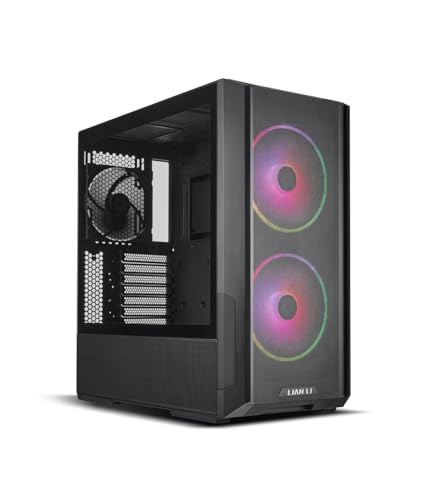
The ASUS Prime AP201 suits builders who want a compact, understated tower that breathes from nearly every panel. Its quasi-filter mesh wraps the front, sides, and top, so air-cooled and liquid-cooled builds both stay fed without a glass panel choking the intake.
- Dimensions: 205 × 350 × 460 mm (33 L)
- Motherboard support: Micro-ATX, Mini-ITX
- Max GPU length: 338 mm
- Max CPU cooler height: 170 mm
- Radiator support: up to 360 mm top, 120 mm rear
- Power supply: ATX, 140–180 mm
- Included fans: 1× 120 mm rear
Strengths
- Mesh on nearly every surface gives flexible intake options
- Fits ATX power supplies and 338 mm graphics cards despite 33 L volume
- Tool-free side panels and a clean, logo-light design
Trade-offs
- Only one fan included, so budget for intakes
- No front fan mounts — intake comes through the mesh panels and bottom
- Cable space behind the tray is a modest 32 mm
The AP201’s trick is that the whole case is the intake. The steel mesh panels have holes fine enough to act as a basic filter, so air enters wherever your components need it rather than only through a front grille. A graphics card at the bottom of the case draws air through the lower mesh, a top radiator exhausts through the roof, and the single included rear fan keeps the path moving. It is a calm, logical design that suits air cooling especially well.
Fit is generous for 33 litres. Graphics cards up to 338 mm cover most models, CPU coolers up to 170 mm cover most towers, and — unusually for this size — a standard ATX power supply up to 180 mm drops straight in, which saves real money versus an SFX unit. Top radiator support reaches 360 mm, so a full-size AIO is on the table; builders comparing coolers should see best aio liquid coolers for sizes that suit compact towers.
The one planning note is fans: ASUS includes only a single rear 120 mm fan. The mesh design means you do not need many — two bottom intakes under the GPU transform the case — but do order them with the case rather than discovering the omission mid-build.
Honest limitation: with only one included fan and no front mounts, first-time builders sometimes assemble the AP201, find GPU temperatures mediocre, and blame the case — the fix is bottom intake fans, but they are on you.
Best for: compact air-cooled gaming builds that reuse an ATX power supply / Not suited for: builders who want a complete fan set in the box or a glass showcase
Montech AIR 100 ARGB — Best Value
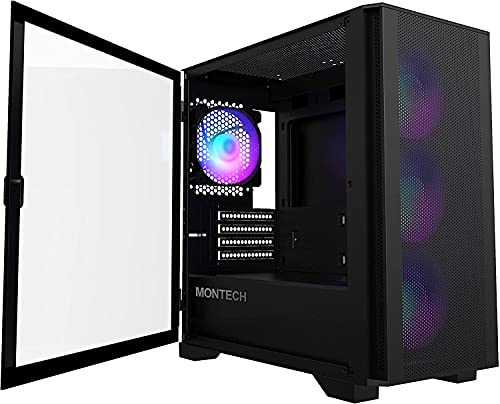
The Montech AIR 100 ARGB suits budget builders who want a complete, good-looking Micro-ATX build in one purchase. Four ARGB fans and a mesh front come in the box, so the money you save can go straight into the graphics card.
- Dimensions: 405 × 210 × 425 mm
- Motherboard support: Micro-ATX, Mini-ITX
- Max GPU length: 330 mm
- Max CPU cooler height: 161 mm
- Power supply: ATX up to 160 mm
- Expansion slots: 4
- Included fans: 4× 120 mm ARGB
Strengths
- Four ARGB fans included — no extra cooling purchase needed
- Fine mesh front panel with a swing-open design for easy cleaning
- Tempered glass side panel shows the build without choking airflow
Trade-offs
- 161 mm CPU cooler height excludes taller tower coolers
- 330 mm GPU clearance is adequate, not generous
- Materials and finish reflect the budget tier
Montech repeats its big-tower value formula at Micro-ATX size. The AIR 100 ARGB ships with three front ARGB fans behind a fine mesh panel and one at the rear, all pre-wired to a controller, so a first-time builder gets a finished-looking, well-ventilated system without a second purchase. The front mesh panel swings open on hinges, which makes filter cleaning a ten-second job rather than a panel-removal project.
Inside, the limits are honest budget limits. A 330 mm GPU ceiling covers most mid-range and many high-end cards, but the longest flagship models need checking. CPU cooler height of 161 mm rules out the tallest towers, though it accepts the vast majority of popular air coolers. The ATX power supply limit of 160 mm is standard for the class and fine for mainstream units.
For an office-and-gaming desk build, this is the easiest recommendation in the group — and it pairs naturally with the combos in best keyboard and mouse combos for office if the PC splits its time between work and play. Nothing here is best-in-class, but the total package per dollar is very hard to beat.
Honest limitation: the included fans are pretty rather than quiet, and at full speed they are audible in a quiet room; a fan curve is mandatory, not optional.
Best for: first Micro-ATX builds on a budget that still want lighting and airflow / Not suited for: the tallest air coolers or silence-focused builds

Jonsbo D31 Mesh — Best for Custom Layouts
The Jonsbo D31 Mesh suits tinkerers who enjoy solving a small case like a puzzle. Its power supply mounts at the front on an adjustable bracket with four height levels, and where you park it decides how much GPU and radiator room you get.
- Motherboard support: Micro-ATX, Mini-ITX
- Max GPU length: 330–400 mm depending on PSU mounting level
- Max CPU cooler height: 168 mm
- Power supply: ATX or SFX, 100–220 mm by position
- Radiator support: up to 360 mm top, up to 360 mm bottom
Strengths
- Four-level adjustable PSU bracket lets you trade space between components
- Top and bottom radiator support up to 360 mm — rare at this size
- 168 mm cooler height fits serious air cooling
Trade-offs
- Layout decisions are interdependent, so planning takes longer
- Documentation is thinner than the big brands’
- Availability and support vary by region
Most small cases fix the power supply in one place and let the rest of the build suffer the consequences. The D31 instead mounts the PSU vertically at the front on a bracket with four height settings. Drop it low and a top radiator breathes; raise it and a graphics card up to 400 mm long fits. Few Micro-ATX cases let you choose your own compromise, and experienced builders will enjoy the flexibility.
The cooling menu is unusually long for the footprint: radiators up to 360 mm at the top and the bottom, plus 168 mm of CPU cooler height for the air-cooled route. That makes the D31 a genuine custom-loop candidate at Micro-ATX size, something normally reserved for much larger or much more expensive cases. The mesh version keeps panels breathable while you experiment.
The cost of flexibility is homework. Clearances interact — PSU position changes GPU room, GPU length changes bottom radiator options — so sketch the build before ordering parts. Builders who enjoy that process will find the D31 rewarding; builders who want to drop parts into a fixed layout should look at the AP201 instead. Our pc case buying guide walks through the clearance math in detail.
Honest limitation: the D31 rewards planning and punishes improvisation; a mid-build change of graphics card can force a full re-layout of the PSU and radiators.
Best for: experienced builders who want custom-loop options in a Micro-ATX footprint / Not suited for: first-time builders or anyone who wants a fixed, foolproof layout

Thermaltake View 170 TG ARGB — Best for Show Builds
The Thermaltake View 170 TG ARGB suits builders who want their Micro-ATX PC to look like an aquarium for components. Tempered glass wraps the front and side, three ARGB fans glow through it, and the right-side intake fans keep the showcase fed with air.
- Dimensions: 438 × 212 × 377.5 mm
- Motherboard support: Micro-ATX, Mini-ITX
- Max GPU length: 340 mm
- Max CPU cooler height: 160 mm
- Radiator support: up to 280 mm top, 120 mm rear
- Power supply: ATX up to 180 mm
- Included fans: 3× 120 mm ARGB Lite (2 side intake, 1 rear)
Strengths
- Front and side tempered glass gives an unobstructed component view
- Side intake fans feed the GPU zone directly despite the glass front
- Compact depth of 377.5 mm suits shallow desks
Trade-offs
- Glass front means intake depends entirely on the side fans
- 160 mm CPU cooler height is the tightest here alongside the AIR 100
- Showcase layout shows sloppy cables mercilessly
The View 170 accepts a trade and manages it cleverly. A glass front cannot breathe, so Thermaltake moves the intake to the right side panel: two of the three included ARGB fans sit there, pulling air in beside the motherboard and washing it across the graphics card. The third fan exhausts at the rear. Thermals will not match a full mesh front, but for mainstream gaming hardware the arrangement works, and the view through the dual glass panels is the entire point.
Size is the other attraction. At 377.5 mm deep, the View 170 is the shallowest tower in this guide, which matters on narrow desks where a 460 mm case would hang over the edge. GPU clearance of 340 mm and a top radiator mount up to 280 mm keep the build options respectable, and the 180 mm ATX power supply allowance is generous for the class.
Treat cable management as part of the build, not an afterthought: with glass on two sides, every stray cable is on display. Take the extra twenty minutes with the tie points behind the tray and the showcase effect lands properly. If you prefer your compact build invisible instead, the AP201 above is the same size class with the opposite philosophy.
Honest limitation: high-heat flagship GPUs will run warmer here than in the mesh cases; the View 170 is a showcase first and a wind tunnel second.
Best for: display builds on shallow desks with mid-range to upper-mid-range hardware / Not suited for: maximum-power GPUs or builders who hide their cables

Fractal Design Pop Mini Air — Best for Optical Drive Users
The Fractal Design Pop Mini Air suits builders who want a friendly, colourful small tower — and it is the only case in this guide that still hides a 5.25-inch bay behind its front panel, for an optical drive or drawer.
- Dimensions: 215 × 393 × 432 mm (W × H × D)
- Motherboard support: Micro-ATX, Mini-ITX
- Max GPU length: 365 mm
- Max CPU cooler height: 170 mm
- Radiator support: 240 mm front, 240 mm top, 120 mm rear
- Power supply: ATX up to 150 mm
- Included fans: 3× 120 mm Aspect RGB
Strengths
- Concealed 5.25-inch bay keeps optical drives and front drawers possible
- 365 mm GPU clearance is the best in this guide
- Three RGB fans included and a genuinely open mesh front
Trade-offs
- ATX power supply limit of 150 mm is restrictive for high-wattage units
- Radiator support tops out at 240 mm front and top
- The playful design language will not suit every desk
The Pop Mini Air is Fractal’s friendliest case: a mesh front with a distinctive pattern, three RGB fans, and a little storage drawer or optical bay hidden behind a panel at the bottom of the front. That bay sounds like a relic until you need to rip a disc, install legacy software, or simply want somewhere to keep USB drives and screws — then it is the only case on the shortlist that can help you.
The fundamentals are strong. GPU clearance of 365 mm beats every other case in this guide, CPU cooler height of 170 mm is comfortable, and the mesh front keeps the three included fans effective. Radiator support is more modest — 240 mm front and top — which suits mainstream AIOs rather than enthusiast loops. For smaller still, the same design family thinking appears in best mini itx cases for gaming, where every litre is negotiated.
The one figure to respect is the 150 mm ATX power supply limit. Compact 150 mm units exist across mainstream wattages, but high-wattage supplies often run longer, so check your PSU’s depth before ordering. Respect that single constraint and the Pop Mini Air is a charming, capable small tower.
Honest limitation: the 150 mm PSU ceiling quietly excludes many 850 W-plus power supplies, which limits the Pop Mini Air’s usefulness for flagship GPU builds.
Best for: mainstream gaming builds, media PCs, and anyone who still uses optical media / Not suited for: high-wattage power supplies or 360 mm radiator plans
Cooler Master MasterBox NR400 — Best Budget Classic
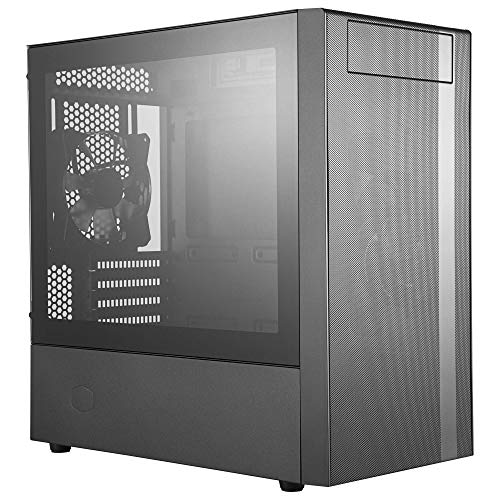
The Cooler Master MasterBox NR400 suits builders who want a proven, no-nonsense Micro-ATX tower with a mesh front and room to grow.
- Dimensions: 411 × 210 × 411 mm
- Motherboard support: Micro-ATX, Mini-ITX
- Max GPU length: 346 mm
- Max CPU cooler height: 166 mm
- Radiator support: up to 280 mm front, 240 mm top, 120 mm rear (no-ODD version)
- Power supply: ATX (up to 325 mm without cage constraints)
Strengths
- Balanced clearances across GPU, cooler, and PSU for the class
- Mesh front with a clean, professional look that suits offices
- Available with or without a 5.25-inch optical drive bay
Trade-offs
- Design is plain next to the View 170 or Pop Mini Air
- Front radiator support depends on which version you buy
- Included fan provision is basic
The NR400 has survived in Cooler Master’s catalogue because it gets the basics right at a fair price. The mesh front breathes, the interior is a simple open layout with a power supply shroud, and the clearances are balanced: 346 mm for the graphics card, 166 mm for the CPU cooler, and radiator support up to 280 mm in the front of the no-optical-drive version. Nothing is extreme, and nothing is missing.
Two versions exist — with and without a 5.25-inch bay — and the choice changes the front radiator options, so read the listing carefully. The with-bay version suits a home server or media build that still reads discs; the without-bay version is the better gaming pick. Either way, the NR400’s restrained styling fits an office desk as happily as a gaming setup, which is why it keeps appearing in builds for both — see the office-friendly systems discussed alongside best cheap pc cases for the budget end of the same idea.
Expect to add a fan or two for a gaming build, and do not expect lighting or glass drama. What you get instead is a case that has been assembled thousands of times, with every quirk documented in forums — an underrated virtue when something does not fit at midnight.
Honest limitation: the NR400’s age shows in small ways — no front USB-C on many versions and basic included fans — so check the exact revision before buying.
Best for: budget gaming and office builds that value proven design over novelty / Not suited for: showcase builds or anyone who needs front-panel USB-C as standard
Comparison Table
| Case | Form factor | Max GPU length | Max CPU cooler height | Radiator support |
|---|---|---|---|---|
| ASUS Prime AP201 | mATX / ITX | 338 mm | 170 mm | Up to 360 mm top |
| Montech AIR 100 ARGB | mATX / ITX | 330 mm | 161 mm | See manufacturer spec page |
| Jonsbo D31 Mesh | mATX / ITX | 330–400 mm (PSU position) | 168 mm | Up to 360 mm top and bottom |
| Thermaltake View 170 TG ARGB | mATX / ITX | 340 mm | 160 mm | Up to 280 mm top |
| Fractal Design Pop Mini Air | mATX / ITX | 365 mm | 170 mm | 240 mm front and top |
| Cooler Master MasterBox NR400 | mATX / ITX | 346 mm | 166 mm | Up to 280 mm front (no-ODD version) |
How to Choose a Micro-ATX Tower
Confirm the board, then work outward
Micro-ATX boards measure 244 × 244 mm, but some budget boards are narrower, and a few enthusiast boards push traces to the very edge. Any case here accepts the standard size; what varies is everything around it. Start your planning from the three clearances that decide a small build: GPU length, CPU cooler height, and power supply length.
Write the three numbers for your parts next to the three numbers for the case before you buy anything. In Micro-ATX, the failures are almost always one of these three, and they are always preventable on paper.
ATX or SFX power supply — the quiet budget decision
Most towers in this guide accept standard ATX power supplies, which are cheaper and quieter per watt than SFX units. Respect their length limits, though: the Pop Mini Air stops at 150 mm, the AIR 100 ARGB at 160 mm, while the AP201 stretches to 180 mm. High-wattage ATX supplies often exceed 160 mm, so measure before assuming your existing PSU will move over.
The Jonsbo D31 is the exception that accepts both ATX and SFX, and its adjustable bracket turns PSU choice into a layout tool. If you already own a good ATX supply, let that fact steer you toward the AP201 or View 170.
Airflow strategy in a small box
Small cases have short air paths, which is an advantage: fresh air reaches the GPU quickly, but there is less volume to buffer heat. Mesh designs like the AP201 let you place intake exactly where the heat is — under the graphics card — while front-intake designs like the AIR 100 ARGB follow the classic path. Either works if the exhaust is unobstructed.
Whatever the case, add fans deliberately. A common Micro-ATX mistake is filling every mount and creating turbulence that helps nothing. Two or three fans in a clear front-to-back or bottom-to-top path beat five fans fighting each other, a point our best pc case fans guide explores with placement diagrams in words.
When Micro-ATX is the wrong answer
If you need multiple expansion cards — a capture card plus a sound card plus extra networking — Micro-ATX’s four slots will frustrate you, and a mid tower from best airflow mid tower cases is the honest recommendation. If you need the PC to travel or vanish behind a monitor, go the other way toward best small form factor pc cases.
Micro-ATX shines in the middle: one graphics card, maybe one extra card, a full-power processor, and a case that leaves room on the desk for everything else.
Reading a Micro-ATX spec sheet like a builder
Manufacturer spec sheets reward careful reading in this category. GPU clearance is sometimes quoted with the front fan removed, radiator support sometimes assumes a slim radiator, and power supply length sometimes ignores the cables exiting the unit. When a figure in this guide differs from a retailer’s table, the manufacturer’s manual is the tiebreaker — download it before the case arrives, not after a part refuses to fit.
Pay attention to what is missing, too. A spec sheet that never mentions front-panel connectors may be hiding a USB 2.0-era front panel; one that never mentions included fans may be shipping one. In Micro-ATX, the omissions are where the compromises live, and a five-minute read of the manual is the cheapest insurance in the entire build.
Storage: the forgotten Micro-ATX advantage
One quiet advantage of this size class deserves a paragraph: most Micro-ATX towers still make honest room for storage. Two or three 2.5-inch mounts plus a 3.5-inch bay or two is typical across this guide, which suits the way people actually store things — a fast NVMe for the system, a big inexpensive hard drive for the media library and backups. Mini-ITX cases increasingly skip 3.5-inch support entirely, and some ATX cases hide their bays behind so much shrouding that fitting them is a project.
If your build is part gaming rig, part home server, check the drive bay lines in each review above before the radiator lines. The Pop Mini Air’s hidden bay and the NR400’s flexible cage exist for exactly this hybrid life, and they are features no amount of mesh can substitute for.
Plan the cabling before a single part goes in, because a Micro-ATX chassis forgives improvisation far less than a full tower. Sketch the route each cable will take from the power supply to its header or device, note which grommets and tie-down points it will pass, and check that nothing has to cross a fan or bend sharply around the motherboard tray. Pay particular attention to the space under the PSU shroud: the supply itself, its bundled or modular leads and the slack you coil away all compete for the same few centimetres, and a shroud that closes happily on an empty case can refuse to sit flat once stiff cables are folded beneath it. Leave gentle bend radii, keep spare leads out of the airflow path, and test-fit the shroud before the final cables are dressed.
Key Takeaways
- The ASUS AP201 is the best all-round Micro-ATX tower: mesh everywhere, ATX PSU support, 338 mm GPU room.
- Check three numbers before buying: GPU length, cooler height, PSU length.
- Every pick here (including the Pop Mini Air and NR400) links to a verified Amazon listing.
- The Jonsbo D31’s adjustable PSU bracket makes it the tinkerers’ choice.
- Most Micro-ATX builds need one or two added fans, not a full set.
How to Plan a Micro-ATX Build on Paper
Ten minutes with a list prevents the classic small-case failure: a part that almost fits. Work through these steps in order before ordering anything.
- Write down your graphics card’s exact length and your CPU cooler’s exact height from their manufacturer pages.
- Write down your power supply’s depth and confirm whether it is ATX or SFX.
- Open the case manufacturer’s spec page and compare all three numbers, keeping at least 10 mm of margin on the GPU for power cables.
- Decide your cooling route — air cooler, top AIO, or front AIO — and confirm the radiator support line for that exact position.
- Count the fans included with the case and order any missing intake or exhaust fans in the same basket.
- Check the front panel connectors on the case against your motherboard headers, especially USB-C.
- Sketch cable routes: in a small case, the PSU cables are the build, so know where the excess length will live.
If any number fails on paper, change the plan on paper. Every case in this guide lists its limits in its review above, and swapping a cooler or PSU at the planning stage costs nothing.
Problem: the graphics card fits on paper but the power cable will not bend in the space left.
You measured the card but not the connector. Add the cable bend radius — roughly 20–30 mm for a stiff cable — to the card length, or route the cable from above if the layout allows.
Problem: the AIO radiator fits the mount but its fans hit the motherboard heatsinks.
Top mounts have a combined radiator-plus-fan thickness limit in the manual. Check that figure, not just the radiator size, before ordering.
Problem: the build fits but the front-panel USB-C cable has nowhere to plug in.
Your motherboard lacks a USB-C header — a common pairing issue between newer cases and older boards. A USB 3.0-to-C header adapter exists for exactly this, or leave the port unconnected and note it for the next motherboard upgrade.
How to Route Cables in a Small Tower
Cable management in Micro-ATX is a space puzzle with real thermal stakes: a nest of cables in front of an intake fan is a wall, not a decoration.
- Install the power supply first and plug in every modular cable the build needs before mounting the motherboard.
- Route the 24-pin and CPU power cables through the nearest grommets immediately; they are the stiffest and least forgiving.
- Mount the motherboard, then connect front-panel and fan cables while access is still easy.
- Install the graphics card last among the major parts, and route its power cable so it does not drape across the card’s own fans.
- Bundle excess cable in the PSU shroud area or behind the tray, keeping it out of the intake path.
- Spin every fan by hand before closing the panels to confirm no cable touches a blade.
Close the case, run a game for fifteen minutes, and compare GPU temperature with the side panel on and off. If removing the panel drops temperatures sharply, a cable or a mis-aimed fan is blocking the path — open it up and fix the route, not the fan speed.
Problem: the rear panel will not close over the cable bundle.
Spread the bundle flatter rather than forcing the panel; a single thick knot behind the tray is the usual cause. Re-route one cable at a time until the panel sits flush.
Micro-ATX vs Mini-ITX vs ATX: Picking Your Size Honestly
The three mainstream sizes are not better and worse versions of one another; they are answers to different questions. ATX asks “what if I expand?” and answers with seven slots, the widest board selection, and cases that start around 40 litres. It is the right answer for multi-card workstations, capture-and-stream rigs, and anyone who genuinely uses the slots. It is wasted volume for the far more common build: one graphics card and nothing else in the slots, ever.
Mini-ITX asks “how small can a real PC be?” and answers with one slot, a 170 × 170 mm board, and cases from 5 to 20 litres. The performance ceiling is the same as ATX for gaming — the same chips fit — but everything around the performance costs more and fits tighter: SFX power supplies, low-profile coolers, riser cables, and build sessions measured in patience. It is a delightful hobby and a demanding first build.
Micro-ATX asks “what does the typical build actually need?” Four slots instead of seven, a board 244 mm square, standard power supplies, full-size coolers in most cases, and volumes mostly between 25 and 40 litres. The parts premium over ATX is small to nonexistent; the space saving is real; the expansion you give up is expansion most owners never use. That is why this category keeps quietly winning the value argument.
The honest way to choose is to inventory your last PC. If its extra slots sat empty for five years, ATX was insurance you never claimed, and Micro-ATX is your size. If you ran a capture card and a sound card, stay ATX without regret. If the PC must travel, sit on a TV stand, or share a small desk with two monitors, Mini-ITX earns its premium. Size is a lifestyle decision wearing a technical costume.
One more consideration: motherboard selection. ATX and Mini-ITX boards exist at every price and quality tier; Micro-ATX boards are plentiful in the mainstream tiers and thinner at the exotic high end. If your build depends on a specific high-end board feature, check that a Micro-ATX version exists before committing to the smaller tower — the case will wait patiently while you do.
There is a final, underappreciated variable: how long you intend to keep the case. Towers outlive everything else in a build — a good case serves three motherboards across a decade. Micro-ATX’s stability as a standard makes it the safest long-term bet of the three sizes: boards will keep coming in this format, power supplies will keep fitting it, and its cases ask so little of a desk that they survive redecorations that exile bigger boxes. Buy the size you will still be happy to see in five years.
If you are genuinely torn between Micro-ATX and Mini-ITX, the deciding question is not size but temperament. Mini-ITX rewards builders who enjoy constraints and plan carefully; Micro-ATX rewards builders who want the build finished by dinner. Both produce excellent PCs. Only one of them produces an excellent first weekend.
A last word on future-proofing, since the phrase gets abused in this category: no case is future-proof, but a Micro-ATX tower with 340 mm or more of GPU room, a 170 mm cooler ceiling, and an ATX power supply bay will accept the next two generations of mainstream hardware without argument. That is as close to the idea as honesty allows, and it describes most of this guide.
Common Buying Mistakes
- Assuming your ATX power supply fits. Length limits in this class run from 150 mm to 180 mm. Measure the PSU, not the box it came in.
- Buying the with-ODD or without-ODD version at random. On the NR400 the choice changes front radiator support; on any case, check which version the listing describes.
- Forgetting fans entirely. The AP201 ships with one fan. It is a great case that assumes you will add intakes — order them together.
- Judging clearance by photos. Product photos make every case look roomy. The spec table is the truth; this guide prints the manufacturer figures for exactly that reason.
- Blocking the bottom intake. Several small towers breathe from below. Sitting one directly on thick carpet suffocates the GPU zone; use a hard surface or a stand.
- Over-lighting a work desk. ARGB is fun for a gaming corner and distracting in a home office. The AP201 and NR400 exist for people who feel that way.
- Copying a build list without checking versions. Cases like the NR400 exist in multiple revisions with different ports and fan bundles. A parts list from two years ago may describe a case you can no longer buy exactly.
Final Recommendation
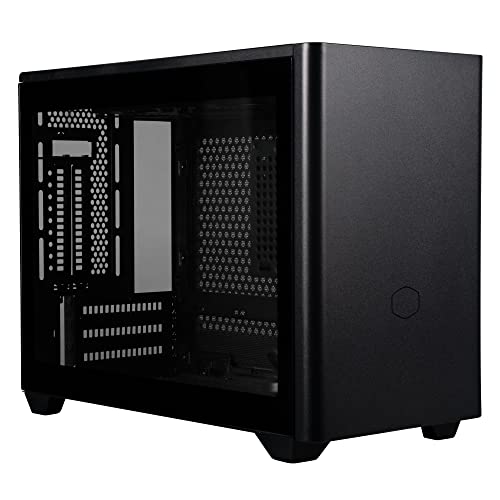
The ASUS Prime AP201 is the Micro-ATX tower we would buy first: its all-mesh design, ATX power supply support, and honest clearances make it the most flexible compact case in this guide, and it flatters both air and liquid cooling.
The runner-up is the Montech AIR 100 ARGB, which wins on sheer completeness for the money — four fans, mesh front, glass side, done. Choose the AP201 for the better long-term chassis; choose the AIR 100 when the budget needs to stretch to a better graphics card today.
Frequently Asked Questions
Is Micro-ATX worse than ATX for gaming?
No. A Micro-ATX board runs the same CPUs and graphics cards as an ATX board. You give up expansion slots and sometimes a couple of rear ports, not performance. For a single-GPU gaming PC, Micro-ATX is usually the smarter size.
Can a Micro-ATX tower fit a full-size graphics card?
Mostly yes. Clearances in this guide run from 330 mm to 365 mm, which covers the majority of cards. The longest flagship triple-fan models still need a measurement check against the specific case.
Do I need an SFX power supply for a Micro-ATX case?
Usually not — most Micro-ATX towers, including the AP201, AIR 100, and View 170 here, accept standard ATX supplies within a length limit. SFX becomes necessary in smaller Mini-ITX cases, not this class.
How many fans should a Micro-ATX build have?
Three is a good target: two intakes and one exhaust, or the AP201-style arrangement of bottom intakes plus a rear or top exhaust. More fans help only if they follow a clear air path.
Are all six cases in this guide linked to Amazon?
Yes. The Fractal Pop Mini Air and Cooler Master NR400 listings were verified through the Amazon Creators API, so all six cases now carry a direct Amazon link above.
Can I liquid cool a Micro-ATX build?
Yes. The AP201 supports a 360 mm radiator up top, the D31 supports 360 mm top and bottom, and the View 170 takes 280 mm up top. Compact AIOs are a natural fit for this class.
Can I reuse my ATX motherboard in a Micro-ATX tower?
No. A full ATX board is physically larger than a Micro-ATX case’s board area, and no adapter changes that. You would need a Micro-ATX motherboard — but your CPU, memory, storage, graphics card, and usually your power supply can all make the move.