Disclosure: As an Amazon Associate, umtsmarttool.com earns from qualifying purchases. Links to Amazon on this page are affiliate links; they cost you nothing extra. Prices and availability change often, so check the current Amazon listing before you buy.
Where to buy
- Belkin 12-Outlet Surge Protector (BE112230-08) — Best Overall Example
- APC Performance SurgeArrest 11-Outlet (P11U2) — Best Desk Example
- Tripp Lite Protect It! 12-Outlet Surge Protector (TLP1208TELTV) — Best Wired Example
- Anker 351 Power Strip (A9192) — Best Modern Example
Start with the top pick: Check on Amazon
Read the full guide ↓
Key Takeaways
- Read the UL 1449 Voltage Protection Rating before the joule figure; it describes the event, joules describe the lifespan.
- Require three-mode protection and a Protected indicator or automatic shut-off.
- Fit the strip to your bulkiest adapters, not to the outlet count on the box.
- Route signal lines through protection if any are connected; verify the outlet is grounded.
- Label the install date and replace on evidence — indicator, event or three to five years.
This guide teaches how to choose a surge protector the way the specifications are actually written, step by step, so the method survives any particular product cycle. The current products that pass the method are ranked in Best Surge Protector Under $75 Best Surge Protector Under $75; the worked reviews are in Surge Protector Review Surge Protector Review.
In this guide
Step One: Inventory What You Are Protecting
Write the equipment list before opening a single product page. Note each device, and mark every bulky adapter — the wall warts decide the purchase more than the device count does. Note also which devices are wired to signal lines: a modem on coax, a desktop on Ethernet, a phone on a landline. Finally, note the room: where the outlet is, how far the desk or rack sits from it, and whether furniture must sit flush to the wall. This one page of notes converts shopping from impression to specification.
- List devices per cluster (desk, media, network, charging).
- Count standard plugs and bulky adapters separately.
- Flag signal connections: coax, Ethernet, telephone.
- Measure outlet-to-equipment distance for cord length.
- Write down the total replacement value; it sizes the protection budget honestly.
Step Two: Read the Protection Specification Like an Engineer
Open the maker’s datasheet — if none exists, the lesson is already taught. Find the joule rating and treat it as a lifespan figure: more is longer-lived, not stronger in the moment. Find the UL 1449 Voltage Protection Rating and treat it as the event figure: the voltage your equipment experiences while the strip works, lower being better, published per mode on serious products. Find the protection modes and require all three — L-N, L-G, N-G. Find the failure behaviour: automatic shut-off first, fail-safe circuitry second, a Protected indicator as the minimum. A product that publishes all four lines is a candidate; a product that publishes only a joule number in a marketplace title is not, however large the number.
Step Three: Match the Hardware to the Room
Now spend the inventory from step one. Bulky adapters map to transformer-spaced rows, rotating outlets, swivel taps or multi-face housings — pick the geometry your plugs need. Cord length maps to your measurement, with 14-gauge conductors on full-size strips; plug shape maps to your furniture, flat or right-angle where things sit tight. Mounting slots matter if the strip will live in a tray. USB charging is the last decision, not the first: dedicated USB-C Power Delivery removes bricks; a shared 2.4A USB-A pair merely tops up overnight. Choose it if your charging actually consolidates, skip it if the desk charges nothing by cable.
Step Four: Close the Forgotten Paths
If step one flagged signal lines, the protector needs the matching jacks and you need ten extra installation minutes to route those cables through them — a surge entering on coax bypasses an AC-only strip entirely. Then verify the foundation: plug an outlet tester or read the strip’s own wiring indicator, because protection diverts energy to ground and an ungrounded outlet quietly cancels the design. If the ground is missing, the correct purchase is an electrician’s visit, after which every protector you own starts working as specified. This step is the difference between owning protection and owning its packaging.
Step Five: Install, Label and Schedule the End
Installation is a five-rule ceremony: direct to the wall, never chained; indicator confirmed before equipment connects; bulkiest adapters seated first; cord uncoiled, uncovered and out of traffic; signal lines routed. Then write the install date on the unit. The end of a protector’s life is scheduled the day it begins — quarterly indicator glances, replacement after any major event, and a three-to-five-year outer bound in active regions. Owners who do this step own protection; owners who skip it own a hope with outlets.
Problem: the strip you want has every spec but the cord is too short. Fix: choose the same class with a longer cord rather than adding an extension cord; the extension is the compromise that quietly undoes the specification you just read so carefully.
Problem: two finalists differ mainly in joules. Fix: choose on failure behaviour and VPR, then on layout; joules break ties, they do not make decisions.
Gear That Makes This Easier
The four units below are the current reference points for the method — each publishes its full specification and each wins a defined situation described in its linked guides. The Belkin is the capacity benchmark, the APC the layout and documentation benchmark, the Tripp Lite the fail-safe and wired-network benchmark, and the Anker the modern charging benchmark. Measure any other candidate against whichever of these matches your room, using Surge Protector Buying Guide Surge Protector Buying Guide as the scoring sheet.
- Belkin 12-Outlet Surge Protector (BE112230-08) — when the inventory is long and wired.
- APC Performance SurgeArrest 11-Outlet (P11U2) — when adapters rule the desk.
- Tripp Lite Protect It! 12-Outlet Surge Protector (TLP1208TELTV) — when the network arrives on a cable.
- Anker 351 Power Strip (A9192) — when the desk charges by USB-C.
Mistakes to Avoid
- Buying the headline: a five-digit joule claim with no datasheet is fiction with a price tag.
- Chaining for reach: one correct strip per receptacle; chains defeat breakers and policies.
- Protecting power only: coax and Ethernet are doors too.
- Trusting forever: an unchecked five-year-old strip is an hypothesis, not a protector.
- Heater on the strip: heat appliances belong on bare wall outlets, always.
The Ten-Minute Version
Everything in this guide compresses into a ten-minute drill for readers in a hurry, and it loses surprisingly little in the compression. Two minutes on the inventory: devices, bulky adapters, signal lines, distance. Three minutes on the datasheet: joules for lifespan, VPR for the event, three modes, failure behaviour. Two minutes on fit: geometry for the adapters, cord for the room, plug for the furniture. Two minutes on the forgotten paths: signal jacks if needed, ground verified. One minute on the ending: date labelled, checks calendared. Ten minutes, and the purchase is defensible against any critic — including your future self after the first storm.
What the full guide adds is not more steps but the reasons, and the reasons matter exactly once: the first time a salesperson, a review or a bargain bin argues against the drill. Buyers who know why VPR outranks joules do not get talked out of it by a bigger number in a brighter box. That is the entire purpose of teaching the method instead of merely publishing the ranking.
Your First Purchase, Revisited in a Year
The final test of a choosing method is the second purchase. A year after applying this guide, the replacement or the second room’s strip takes ninety seconds: same inventory habit, same datasheet lines, same fit questions, answered from a labelled install date and a year of indicator glances. Owners report the second purchase feels less like shopping and more like restocking — the method has become the household’s standard, and standards are what separate maintained systems from accumulating gadgets. If this guide achieves anything beyond one good purchase, it is that: a reader who never has to relearn the lesson.
Why a Method Beats a Recommendation
Recommendations expire; methods compound. The reader who learns to read a datasheet in this guide will evaluate next year’s models, a neighbour’s purchase and a workplace procurement with the same five steps, long after the specific products named here have been replaced. That is the deliberate design of this article: the gear section exists to calibrate the method against known-good examples, not to substitute for it. If you remember nothing else, remember the order — inventory, documentation, fit, paths, lifecycle — because the order is the expertise.
The method also protects against the category’s one reliable trend: numbers inflation. When next season’s boxes advertise double this season’s joules, the reader of this guide will ask for the VPR, the modes and the failure behaviour, and will watch the conversation change. Markets improve when buyers ask better questions; this article is an attempt to improve the questions.
The Alternatives in Depth
APC Performance SurgeArrest 11-Outlet (P11U2) — Best Desk Example
- 11 AC outlets, 6 transformer-spaced
- 2,880-joule surge energy rating
- UL 1449 rating L-N 400V, L-G 500V, N-G 500V
- 2 USB charging ports, 2.4A total
- 8 ft cord with rotating right-angle plug; building-wiring-fault LED
Strengths
- Six widely spaced outlets fit the bulky bricks that defeat most strips
- Wiring-fault LED warns you about a problem in the wall circuit itself
- Fail-safe design disconnects equipment once protection is compromised
Trade-offs
- Schneider Electric lists the model as end-of-commercialisation, so stock may thin out
- Big footprint for a strip with eleven outlets
- USB output is shared 2.4A, which is slow for two modern phones at once
APC built its name on power protection, and the P11U2 shows the habits: a wiring-fault LED that flags a dangerous wall circuit, fail-safe circuitry that disconnects your equipment rather than passing unprotected power, and a published UL 1449 voltage protection rating for each mode. Six of the eleven outlets are spaced for transformers, which is the layout detail that decides whether a strip works in real life. The rotating cord is a small mercy in tight office corners.
The honest caveat is lifecycle: Schneider Electric’s own datasheet marks this model end-of-commercialisation, so buy it from a listing you trust and register the equipment protection policy promptly. In use, nothing about it feels dated — 2,880 joules, an 8 ft cord and two USB ports cover a full desk, and the build quality is a step above supermarket strips. If the listing disappears, the Tripp Lite in this guide is the natural substitute.
As an alternative in this guide, it is judged on the same documented criteria as the main subject, and its full specification is listed in its section.
Best for: a desk with several wall-wart adapters that need real spacing plus everyday USB top-ups / Not suited for: anyone whose needs run against the trade-offs above.
Check on Amazon

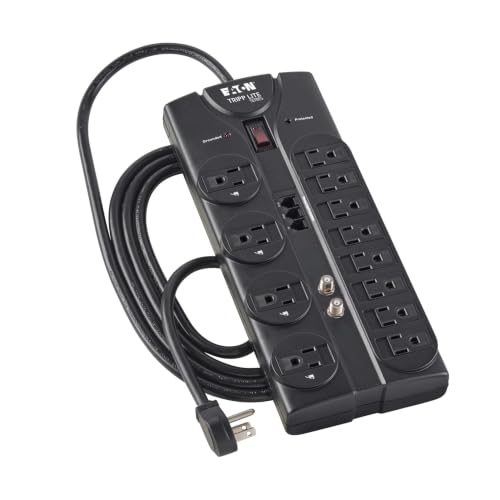
Tripp Lite Protect It! 12-Outlet Surge Protector (TLP1208TELTV) — Best Wired Example
- 12 AC outlets, 4 of them transformer-spaced
- 2,880-joule AC suppression rating (Eaton datasheet)
- UL 1449 let-through rating 330V L-G, 400V L-N, 400V N-G
- 8 ft cord, 14-gauge, right-angle plug
- RJ11 telephone and 2.2 GHz coaxial protection, automatic shut-off
Strengths
- Published UL 1449 let-through figures, not just a joule headline
- Automatic shut-off cuts power if the protection circuit is compromised
- Diagnostic LEDs confirm grounding and protection status at a glance
Trade-offs
- No USB ports for direct phone charging
- The two-row layout is wide, so measure your shelf or desk tray first
- Coax and phone jacks are wasted if your setup is fully wireless
Eaton publishes the numbers that actually predict behaviour: a UL 1449 let-through rating as low as 330V on one mode, response under a nanosecond, and automatic shut-off that disconnects your gear if the suppression circuit is ever compromised. That last feature is the honest one — a worn-out strip that keeps passing power is worse than no strip, because it inspires false confidence. The RJ11 and coax jacks cover the modem and cable paths, and the four transformer-spaced outlets take the big bricks.
This is the strip to choose when the equipment list is long and mixed: desktop PC, two monitors, a printer, a router, a cable box and a phone charger all fit without adapters fighting. The 14-gauge, 8 ft cord reaches from a corner outlet to a desk tray without strain, and the right-angle plug lets furniture sit close to the wall. Diagnostic LEDs confirm the wall outlet is grounded and the protection is alive, which turns a monthly safety check into a glance.
As an alternative in this guide, it is judged on the same documented criteria as the main subject, and its full specification is listed in its section.
Best for: a home office or media rack where the router, PC and TV all share one wall outlet / Not suited for: anyone whose needs run against the trade-offs above.

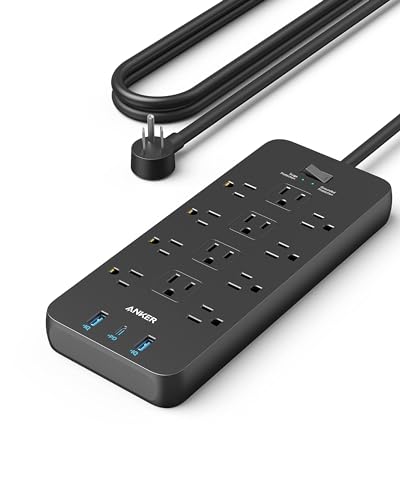
Anker 351 Power Strip (A9192) — Best Modern Example
- 12 AC outlets
- 2,100-joule surge protection
- 2 USB-A ports plus 1 USB-C port with 20W Power Delivery
- 5 ft extension cord
- TUV listed; fire-resistant housing
Strengths
- USB-C fast charging removes one brick from the desk entirely
- Twelve outlets in a comparatively compact, low-profile body
- Outlets on multiple faces help with awkward adapter shapes
Trade-offs
- The 5 ft cord is shorter than the 8 ft cords on rival desk strips
- 2,100 joules is mid-pack rather than class-leading
- No coax, Ethernet or phone-line protection
Anker’s pitch is consolidation: twelve AC outlets plus a USB-C port that fast-charges a phone at 20W, so the phone brick leaves the desk entirely. The 2,100-joule rating is respectable rather than extreme, and TUV listing gives the safety story third-party backing. Outlets face multiple directions, which helps with the odd-shaped adapters that defeat flat strips. For a laptop-centred desk, this is usually the tidiest single purchase.
The compromise is reach and depth of protection. Five feet of cord assumes the desk sits near the outlet, and there is no coax or Ethernet protection, so a wired router’s other cables remain exposed paths. Within those limits it is a very complete desk strip: enough sockets for a dual-monitor setup, a dock, speakers and chargers, with surge capacity sized for everyday events rather than worst-case storms.
As an alternative in this guide, it is judged on the same documented criteria as the main subject, and its full specification is listed in its section.
Best for: a modern desk built around a laptop, monitor and USB-C phone charging / Not suited for: anyone whose needs run against the trade-offs above.

Ownership Notes
Ownership of the Belkin settles into a routine quickly: the covers keep unused sockets clean, the lamps get a glance whenever the cabinet opens, and the strip otherwise disappears. Owners upgrading from a basic bar notice the difference in the first week — not in protection, which is invisible when it works, but in the absence of the adapter shuffle that used to greet every new device.
Living with the P11U2 means the desk stops being renegotiated. New gear arrives, a spaced outlet is free, and the wiring-fault lamp stays dark — the three experiences its design was optimised for. Its size, criticised in the abstract, is precisely what the spacing costs, and owners consistently report forgiving it within a week.
In daily service the Eaton’s LEDs become the household’s quiet status board: protection alive, ground present. The coax run through its jacks is the step owners most often skip and the one this programme most often recommends, because the cable feed is a genuine surge path into exactly the equipment the strip was bought to defend.
The A9192 changes desk behaviour in a small, compounding way: the phone’s brick leaves, the cable count drops, and the strip becomes the desk’s single point of truth for power. Owners should still treat it as a protector first — capacity checked against the room’s risk, indicator part of the routine — and as a charger second.
Background and Detail
Surge protectors are consumables. Each absorbed event spends part of the protection budget, and a single severe event can spend all of it at once — after which some strips keep passing power with no protection left. Prefer models with a Protected indicator light or automatic shut-off, check the light every few months, and replace any strip after a major storm event even if it still works. A common planning horizon is three to five years for a primary strip in an active storm region, sooner if the indicator ever goes dark.
A plug-in strip is the last layer of defence, not the only one. A Type 2 surge protective device installed at the breaker panel by an electrician blunts large, externally generated surges before they spread through the house wiring, and the plug-in strips then handle what remains plus the smaller surges generated inside the home by motors and compressors switching. The two layers multiply rather than duplicate each other. If you protect only one layer, protect the point of use for sensitive electronics — but the panel device is the upgrade that guards everything at once.
Surges do not respect the power cord’s monopoly. A spike can arrive on a coaxial cable feed, a telephone line or an Ethernet run and enter a TV, modem or computer from the signal side, bypassing an AC-only strip completely. If your setup still has wired coax or Ethernet feeding the same equipment, choose a strip with matching line protection and route those cables through it, accepting the small signal loss as the price of a closed door. Fully wireless setups can honestly skip this feature.
Campground pedestals fail in ways house outlets rarely do: neutrals work loose, grounds disappear, voltage sags when every rig on the loop runs its air conditioner, and miswired pedestals present faults that damage equipment slowly. That is why RV protection splits into two classes — surge-only plugs that absorb spikes, and electrical management systems that also monitor voltage and wiring and disconnect the rig when power goes bad. For an RV with an air conditioner, a converter and modern electronics, the second class is the one that matches the risk.
How to Choose a Surge Protector: The Five-Step Method
Keep this guide’s checklist where the household keeps its other standards — with the appliance manuals, in the notes app, wherever your family’s operating procedures live. Methods kept are methods used; the second purchase will thank the first for the filing.
Related Guides in This Series
Neighbouring questions in this cluster are covered by Best Surge Protector For Home Office Under $150 Best Surge Protector For Home Office Under $150, Best Surge Protector For Travel Under $150 Best Surge Protector For Travel Under $150 and Surge Protector Reviews Surge Protector Reviews — each written to the same documentation standard as this page.
Further Detail
Home NAS boxes and small servers are the strongest quiet case in this whole subject. They hold the only copies of things, they run around the clock, and their power supplies meet every transient the house generates. The standard of care that has emerged — protector at the wall, UPS downstream, backups that do not depend on either — is cheap relative to the data. Any household that has graduated to network storage has also graduated past the question of whether protection is worth it.
The 3D printer, the laser cutter and the home CNC share a profile: costly control electronics, long unattended runs, and power supplies that dislike surprises. Their owners learned early what this guide teaches generally — a documented protector is part of the machine’s installation cost, and a UPS joins it when a ruined ten-hour print costs more than the battery does. Maker spaces that skip the protection eventually teach the lesson at retail price.
There is a small, satisfying ritual available to owners of indicated protectors after any storm: the walk. Kettle on, then room to room, a glance at each green light — network shelf, desk, media wall, chargers. Two minutes, and the household’s invisible infrastructure has reported for duty. Rituals like this are how maintenance actually survives in real homes: not as chores on a list, but as habits attached to events that already happen.
Power quality is becoming a household topic for a structural reason: the modern home’s load has quietly become electronic. Twenty years ago a surge threatened the television and the computer; today it threatens the fridge’s board, the washer’s board, the boiler’s board, the charger’s negotiation with the car. Every appliance that gained a display gained a vulnerability, which is why panel devices and point-of-use protection have moved from enthusiast purchases to standard advice.
When a protector retires, its replacement decision is the programme in miniature: same inventory, same datasheet lines, same fit questions, answered faster because the household now owns the method. That acceleration is the real return on the first careful purchase. It is also why this cluster of guides spends so many words on criteria and so few on urgency — the goal was never one transaction, but a household that buys power protection correctly forever.
Child safety changes the outlet calculation in family homes. Sliding safety covers, found on the Belkin flagship in this programme, close unused sockets against curious fingers and dropped objects; tamper-resistant receptacles in the wall do the same job upstream. Neither replaces supervision, but a protector chosen with covers removes one category of nursery and playroom hazard without any ongoing effort from the adults.
Aquariums and home theatres share a trait: their equipment is expensive, always on, and quietly intolerant of power events. Pumps, heaters with electronic controls, LED drivers and AV receivers all sit behind control boards now. Owners of both setups converge on the same answer — a documented strip or conditioner, checked on the same schedule as the water or the dusting — because the cost of the protection rounds to zero against the cost of the inhabitants or the installation.
Smart plugs and surge protectors solve different problems and should not be confused. A smart plug switches and measures; unless it is explicitly rated and listed as a surge protective device, it contains no meaningful protection. Stacking a smart plug into a protector’s outlet for scheduling is legitimate; substituting one for the other because both are white plastic rectangles is how equipment ends up defended by a radio.
Treadmills and exercise equipment invert the usual advice in an instructive way. Their motors draw hard, their manuals often demand a dedicated circuit, and a shared strip is a nuisance-trip machine. The electronics in a modern treadmill console are real, but the correct protection is the panel device and the dedicated outlet the maker specified — a case where the layered architecture, not the point-of-use strip, is the answer. Knowing when not to use a strip is part of knowing strips.
Finally, a word about buying the second unit. Owners consistently report that the second documented protector is an easier purchase than the first, because the first has already taught the household where its unprotected clusters are — the router in the hallway, the chargers in the kitchen, the spare-room desk. Coverage grows by observation. Programmes like this one publish rankings; households build systems one noticed gap at a time, and the noticing is the skill worth acquiring.
One underused diagnostic deserves promotion: the protector as witness. A unit whose indicator dies, a conditioner that logs shutdowns, an EMS that reports a pedestal’s sag — each converts an invisible property of your power into a dated observation. Households and campers who keep those observations make better decisions about everything downstream, from which appliance is really failing to whether the utility needs a call. Protection that reports is worth more than protection that merely absorbs.
Registering a protector’s warranty is the dullest five minutes in this entire subject and the one owners most regret skipping. Connected-equipment policies are contracts with conditions — correct installation, timely claims, sometimes registration — and the time to learn the conditions is the day the box opens, not the day the television dies. Photograph the receipt, save the manual’s policy page, and store both with the household documents. If a claim ever comes, it will be won or lost on exactly that paperwork.
Dormitories and rented rooms add rules of their own: many prohibit daisy-chained strips, some prohibit extension cords entirely, and cruise-style inspections of student wiring are not unknown. A single listed protector with enough outlets, plugged directly into the wall, satisfies both the safety office and the resident — which is why compact, documented units are the standard recommendation for student rooms in this programme’s travel and budget guides.
The refrigerator question comes up in every emergency discussion: should it have a surge protector? The honest answer is layered. A fridge’s control board is genuinely vulnerable and genuinely expensive, and dedicated appliance-rated protectors exist for exactly that socket. But a standard desk strip is the wrong device — the compressor’s startup draw and the strip’s design do not suit each other. If the fridge matters, buy the appliance-specific unit or rely on the panel device, and keep the strips for electronics.
Generator transfer arrangements change the surge picture at a house in ways worth one paragraph. When a home switches between utility and generator power, the changeover itself and the generator’s less regulated output argue for protection that is already installed on the important clusters — the same point-of-use units recommended throughout this programme — and for giving sensitive electronics a pause during the switchover minute itself. Backup power and surge protection are partners, not substitutes.
Voltage events have a geography. Homes at the end of rural feeders, homes under old overhead lines in tree country, and homes in lightning-dense regions simply meet more and larger transients than a new suburb on underground cable. Protection budgets should follow that geography honestly: the same equipment list justifies a flagship and a panel device in one postcode and a single documented strip in another. Local electricians, who replace the boards either way, are candid witnesses to which postcode you live in.
The connected-equipment policy figures printed on boxes — five and six digits — deserve a calm reading. They are ceilings under conditions, not balances in an account, and claims require the protector to have been correctly installed and the equipment correctly connected, signal lines included where the policy says so. Read the figure as the maker’s confidence interval made visible: a company expecting its protection to fail does not attach six figures to the failure.
Compatibility between protectors and modern lighting is a niche worth ten seconds: some LED drivers and dimmers object to the noise or the switching behaviour of particular power accessories, showing it as flicker or buzz. The fix is almost always arrangement — the lighting on its own circuit or outlet, the protector serving the electronic loads it was designed for — rather than any defect in either product. Separation of load types is the quiet theme underneath this entire subject.
Spent surge protectors should not go in the household bin without thought. They contain metal oxide varistors, circuit boards and copper that recyclers handle routinely through electronics waste streams. Many municipalities and retailers run e-waste collections that accept small power accessories. Retiring a strip responsibly is the last step of the replacement cycle this guide keeps recommending — and a strip that has absorbed a major event has genuinely earned its recycling.
Workshop and garage loads deserve a separate word. Power tools themselves are crude loads that neither need nor benefit much from surge protection, but the modern workshop also holds battery chargers with real electronics, a radio, and increasingly a computer or tablet running plans and measurements. Protect the chargers and the electronics on a documented strip; let the circular saw have the bare outlet it was designed for, and keep every protector out of the dust-and-moisture path of actual work.
Frequently Asked Questions
What is more important, joules or clamping voltage?
Clamping voltage — published as the UL 1449 VPR — describes what your equipment experiences during the event. Joules describe how much total energy the unit can absorb across its life. Read VPR first, joules second.
How many joules do I need?
For a desk or media cluster, 2,000+ documented joules is a strong figure; 900-1,200 documented joules serves smaller loads honestly. Undocumented figures at any size are worthless.
Does my outlet need to be grounded?
Yes. Protection diverts energy to ground; an ungrounded outlet disables the design. Strips with wiring indicators will tell you, and the fix is an electrician.
Should I buy one with USB ports?
If your desk charges phones and tablets by cable, a USB-C Power Delivery port genuinely simplifies the setup. If not, spend the money on capacity or a second strip instead.
What is the difference between a power strip and a surge protector?
Protection components and a listing. A surge protector is rated, documented and indicated; a power strip merely multiplies outlets. The label and datasheet decide, not the shape.
When do I replace the one I chose?
When its indicator says so, after a major event, or at three to five years — whichever comes first. The install-date label you wrote in step five makes this a fact instead of a feeling.
The circuit breaker in a strip protects against overload — too many amps drawn for too long — which is a different hazard from a surge. Fifteen amps at 120V is roughly 1,800 watts shared across every outlet, and space heaters, kettles and hair dryers consume most of that alone. Keep high-draw heat appliances off surge strips entirely; they gain nothing from surge protection and they crowd out the electronics the strip exists to guard. The breaker tripping is information: something on the strip does not belong there.
Never daisy-chain surge protectors, and never plug one into an extension cord that is not rated for the load. Chaining strips defeats their overload design, can void the connected-equipment policies that back them, and creates the exact overheating scenario the breaker is meant to prevent. One strip per wall receptacle, plugged directly in, with its cord uncoiled and uncovered, is the installation rule. If you need more outlets, buy a strip with more outlets — that is the safe version of the same purchase.
Built-in USB ports are a convenience feature, not the protection story, but they shape daily life with a strip. A shared 2.4A output charges one modern phone reasonably or two slowly; a dedicated 20W USB-C port with Power Delivery fast-charges a phone while leaving every AC outlet free. Check whether the USB output is quoted per port or in total before you buy — the difference decides whether the second device charges overnight or merely eventually.
Cord length and gauge decide where a strip can actually live. A 14-gauge cord carries the strip’s full 15A rating without meaningful voltage drop over typical lengths; thinner cords on long runs are a quiet compromise. Measure from the outlet to the desk tray or cabinet before choosing: an 8 ft cord forgives awkward rooms, while a 4 ft cord demands the furniture come to it. Flat and right-angle plugs matter in equal measure, letting furniture sit against the wall instead of perched on a plug.
Can I use a surge protector with a generator?
Yes — generator output can swing as loads change, and a documented protector is sensible downstream. Keep it dry, indoors or under shelter, and never run it in rain.
Does a surge protector protect against power outages?
It protects against the surges and sags around outages, especially the restoration spike, but it provides no power itself. Continuity is a UPS’s job.
What is the difference between a surge protector and a power conditioner?
A protector absorbs or disconnects against over-voltage. A conditioner additionally filters line noise and, in the Furman class, shuts down through sustained bad voltage. The conditioner is the broader instrument at a broader price.
The joule rating tells you how much surge energy the protection circuit can absorb over its life before it is spent. Metal oxide varistors — the components that do the absorbing in most strips — degrade a little with every event, including the small ones you never notice. A higher rating therefore means a longer useful life and more headroom for a big event, not a force field. Ratings only compare meaningfully between reputable brands that publish them the same way, which is why every pick in this guide comes from a maker that prints a full datasheet.
Clamping voltage, published under UL 1449 as the Voltage Protection Rating (VPR), is the level the strip lets through to your equipment while it works. Lower is better: a strip rated at 330V or 400V L-N exposes your gear to less of the spike than one rated at 600V or 800V. Joule headlines get the marketing space, but the VPR is the figure that describes what your power supply actually experiences during an event. When a maker publishes per-mode VPR figures, as APC, Eaton and CyberPower do, that is a sign the datasheet deserves trust.
A three-wire outlet gives a surge three roads in: hot to neutral, hot to ground, and neutral to ground. Cheap strips protect only the first and call it done. Full three-mode protection covers all three paths, because a surge riding the ground or neutral line reaches the same circuit boards in the end. When you compare spec sheets, look for protection listed across L-N, L-G and N-G; a single combined joule figure with no mode breakdown tells you less than it appears to.
Every plug-in surge protector needs a properly grounded outlet to work. The ground path is where much of the diverted energy goes; without it, the protection circuit is partially blind. That is why the better strips carry a Not Grounded or wiring-fault indicator, and why a two-prong cheater adapter quietly defeats the point of buying protection at all. If the indicator on a new strip says your outlet is not grounded, the correct move is an electrician, not a different strip.
Surge protectors are voltage-specific in a way phone chargers are not. A strip built for North American 120V service must never be plugged into a 220-240V outlet through a shape-only plug adapter: the protection components will fail, possibly taking connected equipment with them. For international travel, use a plain adapter with dual-voltage chargers, or a travel unit explicitly rated for the destination’s voltage. Within North America, the same unit that guards your laptop at home works in any hotel on the continent.
Storm preparation with surge protection is mostly about decisions made before the sky darkens. The expensive, always-plugged equipment — computers, TVs, network gear, the fridge’s control board via its outlet where accessible — should already live behind protection, because nobody reliably runs around unplugging things at midnight. During a severe event, unplugging the most valuable portable items still beats any strip; no plug-in device promises survival of a direct lightning strike, and honest makers say so. After the event, check every Protected indicator before trusting the strip again.
Some strips add EMI/RFI filtering, which strips high-frequency noise off the power line. That noise does not damage equipment the way a surge does, but it can buzz through audio gear, disturb sensitive measurement equipment and add shimmer to video. Filtering figures are quoted in decibels across a frequency range; treat them as a secondary benefit unless you run audio equipment, in which case a properly filtered bank — or a series-mode conditioner — becomes a genuine feature rather than a bullet point.
Connected-equipment policies — the dollar figures makers attach to their strips — are warranties with conditions, not insurance in the everyday sense. They generally require the strip to be correctly installed, the equipment to be properly connected including signal lines where specified, and a claim process that starts with the maker’s paperwork. Read the figure as a signal of how seriously the maker stands behind the protection rather than as a cheque already written, register the product if the maker asks, and keep the receipt with the manual.
Can I plug a UPS into a surge protector?
UPS makers generally advise plugging the UPS directly into the wall and protecting other gear separately, because a strip between the UPS and the wall can complicate its operation. Follow the UPS maker’s guidance for your model.
Do surge protectors work after a blackout?
Usually — but the restoration surge is exactly the event that can spend one. Check the Protected indicator after every outage before assuming the protection survived.
Are rack-mount and strip protectors different inside?
The protection principles are the same; format, outlet count and documentation differ. Judge any format by the same datasheet criteria used throughout this guide.
Should every outlet in the house have one?
No. Protect clusters of valuable, always-plugged electronics. Lamps, chargers for disposable devices and heat appliances do not need protectors, and heaters must never share one.
Should a surge protector feel warm?
No. A protector should run at room temperature in normal service. Warmth suggests overload or failing components; unplug it, reduce the load, and treat persistent warmth as a replacement signal.