Disclosure: As an Amazon Associate, umtsmarttool.com earns from qualifying purchases. Links to Amazon on this page are affiliate links; they cost you nothing extra. Prices and availability change often, so check the current Amazon listing before you buy.
Where to buy
- Soundance LS1 — check price on Amazon
- Besign LS03 — check price on Amazon
- MOFT Invisible — check price on Amazon
- Rain Design mStand — check price on Amazon
Read the full guide ↓
Is a laptop stand worth it
Is a laptop stand worth it? The question sounds like it is about a product, but it is really about an arithmetic problem built into every laptop ever made: the screen and the keyboard share one body, so at any flat desk, one of them is at the wrong height and your body pays the difference. A stand is the cheapest object that settles that bill. This guide works the question properly — what you get, who benefits, what it truly costs to own the whole setup, and when the honest answer flips to no.
The verdict up top is yes for daily laptop workers, with conditions that matter: the stand only completes its half of the bargain when an external keyboard completes the other. The sections below quantify that bargain in posture, heat, desk space, and years of service, and the alternatives section shows the price of entry at every level from adhesive sheet to sculpted aluminum.
In this guide
The Short Answer
Yes — for anyone who works at a laptop for more than a couple of hours a day, a stand is worth it, and the reasoning is mechanical rather than fashionable. A laptop forces a compromise no other computer does: the screen and keyboard are bolted together, so one of them is always at the wrong height. A stand is the cheapest object that breaks that compromise. The fuller answer — who benefits most, who should skip it, and what to buy instead at each level — is what the rest of this guide works through.
What You Actually Get
What the LS1 gets right is restraint. The front lip is tall enough to keep a laptop from sliding forward when the desk gets bumped, the silicone pads keep the aluminum from marking anodized shells, and the space underneath swallows a keyboard when you switch to a separate monitor. Because it breaks down into three flat pieces, it is also one of the few fixed stands that can travel in a laptop sleeve, even though most owners will assemble it once and leave it parked for years.
- Built from aluminum alloy
- Compatible with notebooks between 10 and 15.6 inches
- Lifts the display roughly six inches
- Three-piece detachable frame
- Padded contact points protect the laptop
Who Benefits and Who Does Not
Owners who measure before buying tend to keep this stand; owners who guess sometimes find the fixed height lands an inch lower than their ideal eye line. That is the honest trade of every fixed riser. Within its lane — a permanent desk, a 13- to 15-inch laptop, and a separate keyboard and mouse — the LS1 is about as close to a fit-and-forget purchase as this category offers.
Best for: full-time laptop workers, hybrid workers with one main desk, and anyone whose neck complains by mid-afternoon / Not suited for: occasional laptop users, and anyone unwilling to add an external keyboard for eye-level setups.
The Real Cost of Ownership: Keyboard, Mouse, and Nothing Else
A stand’s running costs are close to zero — no batteries, no subscriptions, no consumables beyond an occasional replacement silicone pad — which makes its ownership arithmetic unusually kind. The true cost of the setup is the one-time addition of a keyboard and mouse for eye-level configurations, and even that pairing usually costs less than the ergonomic chair it complements. Against that, weigh the lifespan: a metal stand routinely outlives two or three laptops, amortizing itself into cents per workday.
The alternative costs deserve the same honesty. Doing nothing costs posture, paid daily in small discomfort that people misattribute to age or chairs. A monitor costs more and cannot travel. A standing desk costs most of all and fixes a desk you may not keep. The stand is not the best ergonomic purchase in the abstract — it is the best first one, and for many laptop workers it turns out to be the only one they needed.
Alternatives Worth Considering

Besign LS03 Aluminum Laptop Stand (Black) — Best Alternative
The limits are the ones you would predict. Six inches of fixed lift either matches your chair and desk geometry or it does not, and the 8.8-pound support ceiling rules out the heaviest desktop-replacement machines once you add a dangling cable or two. For mainstream ultrabooks and mid-size laptops, though, the LS03 covers the ergonomic basics without asking you to fund features you will never touch.
- Aluminum frame in a black finish
- Suits laptops from 10 to 15.6 inches
- Adds about six inches of screen height
- Rated for loads up to 8.8 pounds
- Comes apart for storage, with rubber pads fitted
Strengths
- Featherweight yet rigid once built
- Stores flat in seconds
- Padded contact points spare laptop finishes
Trade-offs
- No adjustment of height or angle
- The load ceiling excludes the heaviest machines
- Its plain looks will not flatter every desk
Read Besign LS03 the way a careful buyer reads any long-term object: by its materials, its moving parts (or proud lack of them), and the specificity of its compromises. Generic praise is marketing; a named limitation is information. This guide’s reviews name the limitation of every pick in plain sight, because a stand whose weakness you have already accepted will never surprise you — and unsurprising equipment is what productive desks are built from.
Its honest weakness: fixed height with no angle adjustment. Decide now whether your routine can live with it.
Best for: the buyer this badge was written for / Not suited for: the buyer who needs the opposite compromise

MOFT Invisible Laptop Stand (Adhesive, Starry Grey) — Budget Alternative
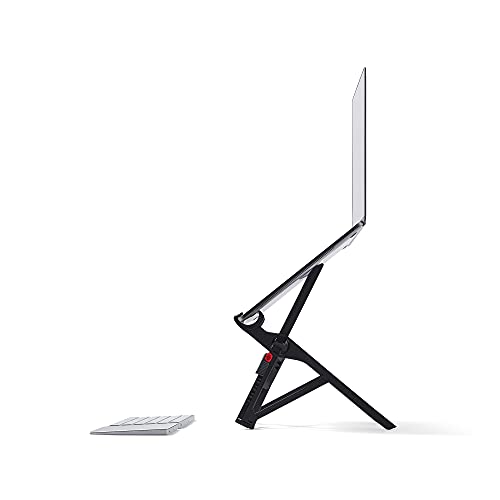
The MOFT Invisible is less a stand you carry than a stand your laptop carries. A sheet of PU and fiberglass barely thicker than a credit card sticks to the bottom of the machine with removable adhesive, folds flat to nothing, and pops into a triangular prop whenever you sit down. At roughly three ounces, it is the only stand on this page you will never forget to bring, because forgetting it is physically impossible.
- PU layered over fiberglass
- Roughly 1/9 inch thick, about three ounces
- Offers two working angles
- Rated for laptops up to 16 inches and 11 pounds
- Adhesive backing removes and reapplies cleanly
Strengths
- It travels because the laptop carries it
- Adds virtually no bulk or weight
- Angles for typing and for viewing
Trade-offs
- The lift is small, nowhere near eye level
- Bottom-vent laptops should not use it
- Needs a flat, clean surface to bond to
Read MOFT Invisible the way a careful buyer reads any long-term object: by its materials, its moving parts (or proud lack of them), and the specificity of its compromises. Generic praise is marketing; a named limitation is information. This guide’s reviews name the limitation of every pick in plain sight, because a stand whose weakness you have already accepted will never surprise you — and unsurprising equipment is what productive desks are built from.
Its honest weakness: low lift, not true eye level. Decide now whether your routine can live with it.
Best for: the buyer this badge was written for / Not suited for: the buyer who needs the opposite compromise

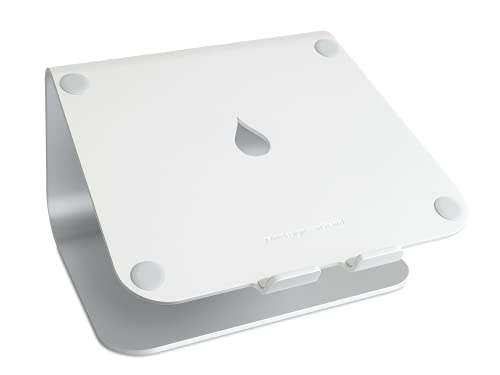
Rain Design mStand (10032, Silver) — Travel Alternative
That single-piece construction is why mStands from a decade ago are still in daily service. There is nothing to loosen, nothing to strip, nothing to sag. The anodized finish matches Apple’s laptops closely enough that the pairing looks designed rather than assembled, and the raised front edge plus rubber cushioning keep the machine settled when you plug and unplug docks all day.
- Machined from a single piece of aluminum
- Lifts the screen by about six inches
- Forward tilt for a natural gaze
- Rear hole routes cables neatly
- Sand-blasted, anodized surface
Strengths
- One piece means zero loosening, ever
- Finish flatters aluminum laptops
- The cable hole keeps the desk calm
Trade-offs
- Height and tilt are permanently fixed
- Too tall for everyday typing on the machine
- Design-led pricing above basic risers
Read Rain Design mStand the way a careful buyer reads any long-term object: by its materials, its moving parts (or proud lack of them), and the specificity of its compromises. Generic praise is marketing; a named limitation is information. This guide’s reviews name the limitation of every pick in plain sight, because a stand whose weakness you have already accepted will never surprise you — and unsurprising equipment is what productive desks are built from.
Its honest weakness: completely fixed height and tilt. Decide now whether your routine can live with it.
Best for: the buyer this badge was written for / Not suited for: the buyer who needs the opposite compromise


Soundance LS1 Laptop Stand — Reference Pick
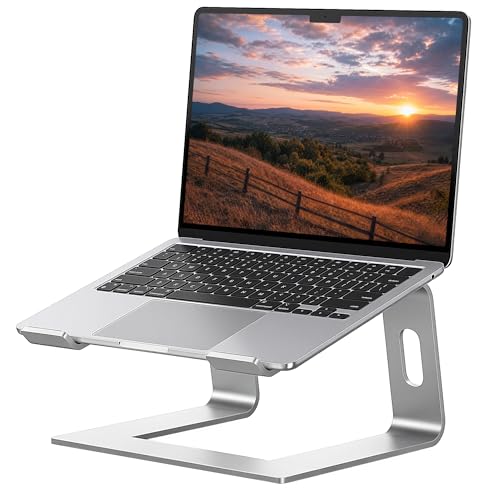
The Soundance LS1 is the fixed riser that keeps showing up on tidy desks for a simple reason: it is three pieces of thick aluminum that slot together in under a minute and then disappear from your attention. There are no hinges to loosen, no knobs to creep downward mid-afternoon, and no plastic flex when you rest your wrists near the front edge. The open frame leaves the underside of the laptop exposed to room air, which matters more than any marketing claim about cooling, because most thin laptops exhaust heat downward and sideways and simply need space to breathe.
- Built from aluminum alloy
- Compatible with notebooks between 10 and 15.6 inches
- Lifts the display roughly six inches
- Three-piece detachable frame
- Padded contact points protect the laptop
Strengths
- Nothing to loosen, because nothing moves
- Underside stays open to the air
- Packs flat when the desk has to change
Trade-offs
- The lift is fixed and cannot be tuned
- Not a comfortable height for typing on the laptop itself
- Very thick gaming machines may crowd the front lip
Read Soundance LS1 the way a careful buyer reads any long-term object: by its materials, its moving parts (or proud lack of them), and the specificity of its compromises. Generic praise is marketing; a named limitation is information. This guide’s reviews name the limitation of every pick in plain sight, because a stand whose weakness you have already accepted will never surprise you — and unsurprising equipment is what productive desks are built from.
Its honest weakness: fixed height cannot be fine-tuned. Decide now whether your routine can live with it.
Best for: the buyer this badge was written for / Not suited for: the buyer who needs the opposite compromise
How to Set Up Your Stand for the Best Result
Assembly takes minutes, and the order matters more than the effort. Follow the steps in sequence, keep the laptop off the stand until the frame is complete, and save your final judgment for the end of a real work session rather than the end of the setup.
- Unbox the stand and lay every piece on the desk; confirm pads and feet are seated before any laptop goes near it.
- Assemble or unfold the frame on a level surface and set it to its lowest or default position first.
- Place the laptop on the stand closed, center it left to right, and check that the front lip or grips engage the edge evenly.
- Open the laptop slowly and confirm the balance point feels planted, especially on taller settings.
- Connect power, dock, and display cables with slack to spare; route them so their weight does not pull the machine sideways.
- Sit in your chair, set your feet flat, and check that the top of the screen sits at or just below eye level; adjust the stand, not your neck.
- Place the external keyboard at elbow height with your shoulders relaxed, and the mouse within easy reach of it.
- Work for twenty minutes, then reassess: small height changes made on day one prevent the slow ache that appears in week two.
Problem: the display still sits below eye level. Fix: add a setting, or raise the whole stand on a stable platform — never solve it by leaning. Problem: the machine slides a little each day. Fix: clean the pads, confirm the front lip is fully engaged, and check that no cable is pulling the laptop off-center. Problem: the setup wobbles when you type. Fix: move typing to an external keyboard at desk height, which is the arrangement tall stands are designed around.
How to Choose Is a laptop stand worth it
Check the front edge and the vents
Two physical details quietly decide compatibility. The first is your laptop’s front edge: hook-style and grip-style stands need a lip they can hold, and very thin or unusually shaped front edges deserve a test fit. The second is the underside. Machines that intake air through bottom vents should sit on open frames, not solid slabs or adhesive sheets, so the fans can do their job. While you are underneath, note where the exhaust leaves the chassis — rear-hinged gaming laptops often push hot air straight back, which a stand does nothing to obstruct, while side-exhaust designs benefit most from open space around them.
Budget honestly across the whole setup
A stand is rarely the whole purchase. Tall lift demands an external keyboard and usually a mouse, and those belong in the budget conversation from the start. The good news is that the total still compares kindly with a monitor arm, a second display, or a standing desk. Spend first on correct height, second on stability, and only then on looks. The reverse order — looks first — is how desks end up beautiful and necks end up sore. If money is tight, a modest stand plus a decent keyboard beats a premium stand used with the laptop keyboard at neck-breaking height.
Start with screen height, not with the stand
The measurement that decides everything is the distance from your desk surface to where the top of your screen should sit — roughly at or just below your seated eye level. Sit in your chair as you actually sit, not as the posture poster imagines, and have someone measure from the desk to your eye line. Subtract your laptop’s own base-to-screen-top height and the remainder is the lift you need to buy. Stands cluster into three honest bands: low tilts that add a couple of inches, fixed risers around six inches, and adjustable towers that reach twelve inches or more. Buying inside the right band matters more than any feature list, because a beautifully made stand at the wrong height is just an expensive paperweight with good reviews.
The One-Week Test That Settles the Question for Your Desk
If this guide’s arguments leave you undecided, there is an experiment that costs nothing and answers the question for your specific body and desk. Stack stable books or a box under your laptop until the screen top reaches your eye line, borrow any external keyboard, and work that way for a week — not an afternoon, because novelty lies in both directions during the first days. Track three things: whether the end-of-day neck and shoulder feeling changes, whether you keep choosing the raised setup when you are free to dismantle it, and whether the improvised stack’s annoyances are about height or merely about books. If the week ends with you reluctant to go back, the stand question is settled and the only remaining decision is which kind — a question the alternatives section and this cluster’s buying guides answer by budget. If the week ends in indifference, believe it: some workflows, especially short-burst laptop use, genuinely gain little, and the honest purchase is no purchase. Worth-it questions deserve evidence, and your own desk is the cheapest laboratory available.
The Desk Around the Stand
Desk space is a system, and a raised laptop changes every relationship inside it — mostly for the better, if the change is planned.
Cables are the subtler dividend: routed behind a stand with honest slack, they stop migrating across the desk and stop leaning their weight against the machine they serve.
In everyday desk work especially, where every surface is negotiated, those manners are not decoration — they are the product.
Desks differ, bodies differ, and laptops differ, which is why this guide keeps returning to your numbers rather than its own preferences — the picks are ranked, but the measurement decides.
Longevity: What Five Years With a Stand Looks Like
Nothing in this category ages like software or dies like a battery; a stand’s lifespan is decided by its simplest parts — pads, hinges, and the honesty of its frame.
That independence is worth paying for in the right places — frame, joints, and the sacrificial pads that protect both the stand and the laptop from each other.
Priced per year of service, the leaders in this guide are not indulgences; they are among the cheapest lines in a workstation’s whole budget.
A week from now the stand will either have disappeared into your routine or started its journey to a drawer, and the difference is almost never the product — it is whether the setup matched the person.
Posture Is a Habit the Stand Merely Starts
The first week with any stand in this guide is a negotiation between new geometry and old habits, and the habits usually win unless the geometry is set correctly from the start.
Feet flat, elbows easy, screen top at the eye line, keyboard where the hands fall — the stand owns exactly one of those four, and it is the one most people were missing.
For everyday desk work, that small ritual is the difference between owning a stand and benefiting from one.
That is the unglamorous truth of this category: the best stand is the one whose compromises you never have to think about, bought at the height your own body specified.
Putting the Stand to Work: Everyday Desk Work in Practice
Demonstrations flatter every stand; the honest evidence arrives around mid-afternoon, when posture either holds or quietly collapses.
What matters at that point is boring and decisive: the laptop has not crept, the cables have not tightened into a slow sideways pull, and the frame has not developed the faint wobble that turns into tomorrow’s annoyance.
If a pick in this guide matches your measurements, this is the experience you are buying — not a feature list, but a workday that stops negotiating with your neck.
That is the unglamorous truth of this category: the best stand is the one whose compromises you never have to think about, bought at the height your own body specified.
Heat and Noise: the Quiet Benefits Nobody Unboxes
A laptop resting flat is a laptop breathing through its own exhaust puddle, and the fix is embarrassingly simple: give the underside back its air.
Slower fans mean quieter calls, and a chassis that cools quickly between loads means the next task starts from a better place; neither benefit appears on a box, and both appear in a life.
None of this turns a stand into a cooling pad, and this guide does not pretend otherwise; it simply removes the one cooling obstacle that costs nothing to remove.
The pattern repeats across every guide in this cluster: correct height first, honest mechanism second, and everything else a distant third — a boring order that happens to be the one that works.
The Desk Around the Stand, Revisited
A stand never sits alone; it negotiates with monitors, docks, notebooks, coffee, and the archaeology of a working desk, and the best stands are the ones that make the whole surface calmer.
The space beneath a raised laptop is the obvious dividend, swallowing the keyboard when a monitor takes over or simply holding the notebook that used to live under a wrist.
Judge the finalists in this guide by their manners as a set: footprint, cable behavior, storage, and the calm they leave behind them.
A week from now the stand will either have disappeared into your routine or started its journey to a drawer, and the difference is almost never the product — it is whether the setup matched the person.
Five Years On: Living With the Choice
The most honest way to price a stand is per year, because the good ones are measured in years and the disappointing ones in months.
It is also worth matching the object to your own maintenance temperament, because the finest adjustable stand is a poor purchase for an owner who will never touch it again.
Buy the lifespan you will actually use, and the stand will repay the decision at the rate of a few comfortable hours a day.
None of this is abstract for long: set the stand to your measurement, work a full day, and the verdict your shoulders deliver will be more precise than any ranking — including this one.
Habits That Make the Stand Work
Ergonomics marketing sells objects; ergonomics itself is a set of small repeated behaviors, and the stand is simply the object that makes the most important behavior — looking straight ahead — the easiest one.
Set the lower steps honestly and the stand’s contribution becomes obvious within a day: the head stops traveling forward to meet a low screen, because the screen finally travels to meet it.
For everyday desk work, that small ritual is the difference between owning a stand and benefiting from one.
That is the unglamorous truth of this category: the best stand is the one whose compromises you never have to think about, bought at the height your own body specified.
A Second Look: Everyday Desk Work in Practice
Judge any stand in this guide by a full working session, because the first impression and the lasting impression are rarely the same object.
By then, the screen height has either removed the small forward lean that builds neck fatigue, or it has not — and no specification sheet can argue with the result your shoulders report.
For everyday desk work, that long-session composure is the difference between a stand that becomes furniture and one that becomes clutter.
A week from now the stand will either have disappeared into your routine or started its journey to a drawer, and the difference is almost never the product — it is whether the setup matched the person.
Heat, Noise, and the Long Session
A laptop resting flat is a laptop breathing through its own exhaust puddle, and the fix is embarrassingly simple: give the underside back its air.
Gamers notice it first, but anyone whose laptop shares a small room with its owner notices eventually: a machine that breathes freely is a quieter machine to live beside.
Check your own machine’s vent map before choosing, and the thermal section of every review in this cluster will read as a direct answer rather than a general promise.
That is the unglamorous truth of this category: the best stand is the one whose compromises you never have to think about, bought at the height your own body specified.
The Desk Around the Stand, Revisited — Further Notes
Desk space is a system, and a raised laptop changes every relationship inside it — mostly for the better, if the change is planned.
Even the cleaning changes — a desk whose largest object floats can be wiped in one pass, which sounds trivial until you have lived with the alternative for a year.
Judge the finalists in this guide by their manners as a set: footprint, cable behavior, storage, and the calm they leave behind them.
That is the unglamorous truth of this category: the best stand is the one whose compromises you never have to think about, bought at the height your own body specified.
Five Years On: Living With the Choice — Further Notes
Time is the strictest reviewer in this category, and it publishes its verdicts in hinge play, flattened pads, and finishes that either aged gracefully or did not.
Fixed aluminum answers that question best, which is why it anchors so many rankings here: there is nothing to loosen, and the sacrificial silicone pads are the only scheduled replacement.
That arithmetic — not novelty, not branding — is the real argument at the top of this category.
A week from now the stand will either have disappeared into your routine or started its journey to a drawer, and the difference is almost never the product — it is whether the setup matched the person.
Habits That Make the Stand Work — Further Notes
Posture is built from the floor upward — feet, chair, desk, screen — and the stand owns the final, most visible step of that staircase.
Set the lower steps honestly and the stand’s contribution becomes obvious within a day: the head stops traveling forward to meet a low screen, because the screen finally travels to meet it.
That ritual, repeated at every change, is the entire maintenance schedule of a healthy workstation, and it costs less time than one coffee.
The pattern repeats across every guide in this cluster: correct height first, honest mechanism second, and everything else a distant third — a boring order that happens to be the one that works.
A Second Look: Everyday Desk Work in Practice — Further Notes
In practice, the stand’s job starts the moment the laptop lid opens, and it is judged by everything that does not happen afterward: no creep, no sag, no slow negotiation with your own shoulders.
Fatigue is an accountant that never misses an entry, and screen height is one of its favorite line items — which is why a few correct inches outperform a long feature list.
If a pick in this guide matches your measurements, this is the experience you are buying — not a feature list, but a workday that stops negotiating with your neck.
The pattern repeats across every guide in this cluster: correct height first, honest mechanism second, and everything else a distant third — a boring order that happens to be the one that works.
Heat, Noise, and the Long Session — Further Notes
Nobody buys a stand for its thermal résumé, yet thermal behavior is one of the two benefits — along with posture — that owners can actually feel by the end of the first week.
Slower fans mean quieter calls, and a chassis that cools quickly between loads means the next task starts from a better place; neither benefit appears on a box, and both appear in a life.
Check your own machine’s vent map before choosing, and the thermal section of every review in this cluster will read as a direct answer rather than a general promise.
Desks differ, bodies differ, and laptops differ, which is why this guide keeps returning to your numbers rather than its own preferences — the picks are ranked, but the measurement decides.
The Desk Around the Stand, Revisited — Further Notes
Look past the stand itself for a moment, because its real job is organizing everything that touches the laptop: cables, docks, drives, and the keyboard that completes the setup.
The space beneath a raised laptop is the obvious dividend, swallowing the keyboard when a monitor takes over or simply holding the notebook that used to live under a wrist.
When you compare the picks in this guide, compare their desk manners as well as their lift: footprint, cable behavior, and what each one does to the square foot it occupies.
That is the unglamorous truth of this category: the best stand is the one whose compromises you never have to think about, bought at the height your own body specified.
Five Years On: Living With the Choice — Further Notes
A stand bought well is a rare thing in technology: an object whose usefulness does not depend on updates, batteries, or the survival of the company that made it.
Fixed aluminum answers that question best, which is why it anchors so many rankings here: there is nothing to loosen, and the sacrificial silicone pads are the only scheduled replacement.
Choose the lifespan model that matches your temperament, because a stand you must maintain and will not is worse than a stand with nothing to maintain.
A week from now the stand will either have disappeared into your routine or started its journey to a drawer, and the difference is almost never the product — it is whether the setup matched the person.
Habits That Make the Stand Work — Further Notes
A stand can put a screen at eye level, but it cannot sit you in the chair, and the buyers who get the most from this category are the ones who treat the purchase as the start of a routine rather than the end of a problem.
Recheck the arrangement when chairs, desks, or laptops change, because a stand set for a previous life will quietly argue with the current one.
The picks above were ranked assuming the ritual is done — under that assumption, their order holds for almost every reader.
The pattern repeats across every guide in this cluster: correct height first, honest mechanism second, and everything else a distant third — a boring order that happens to be the one that works.
A Second Look: Everyday Desk Work in Practice — Further Notes
There is a particular satisfaction in a setup that needs no daily management, and it is the satisfaction this category at its best is really selling.
By then, the screen height has either removed the small forward lean that builds neck fatigue, or it has not — and no specification sheet can argue with the result your shoulders report.
If a pick in this guide matches your measurements, this is the experience you are buying — not a feature list, but a workday that stops negotiating with your neck.
The pattern repeats across every guide in this cluster: correct height first, honest mechanism second, and everything else a distant third — a boring order that happens to be the one that works.
Heat, Noise, and the Long Session — Further Notes
Nobody buys a stand for its thermal résumé, yet thermal behavior is one of the two benefits — along with posture — that owners can actually feel by the end of the first week.
Gamers notice it first, but anyone whose laptop shares a small room with its owner notices eventually: a machine that breathes freely is a quieter machine to live beside.
In everyday desk work, where sessions run long and rooms run small, that quiet competence compounds daily.
If there is a single habit to take from this page, it is measuring before ordering; the stand is a long-term object, and two minutes of arithmetic is what separates the keepers from the returns.
The Desk Around the Stand, Revisited — Further Notes
Look past the stand itself for a moment, because its real job is organizing everything that touches the laptop: cables, docks, drives, and the keyboard that completes the setup.
Cables are the subtler dividend: routed behind a stand with honest slack, they stop migrating across the desk and stop leaning their weight against the machine they serve.
In everyday desk work especially, where every surface is negotiated, those manners are not decoration — they are the product.
A week from now the stand will either have disappeared into your routine or started its journey to a drawer, and the difference is almost never the product — it is whether the setup matched the person.
Five Years On: Living With the Choice — Further Notes
Ask of any pick in this guide not how it performs this week, but what will have worn on it by the time the laptop it carries has been replaced twice.
It is also worth matching the object to your own maintenance temperament, because the finest adjustable stand is a poor purchase for an owner who will never touch it again.
Choose the lifespan model that matches your temperament, because a stand you must maintain and will not is worse than a stand with nothing to maintain.
That is the unglamorous truth of this category: the best stand is the one whose compromises you never have to think about, bought at the height your own body specified.
Desk Depth, Viewing Distance, and the Forgotten Dimension
Stand guides talk endlessly about height and almost never about depth, yet depth decides whether a raised laptop feels right. Raising a laptop on most stands also moves its screen away from you, because the machine travels up an inclined or vertical path above a base that sits forward on the desk. On a deep desk that extra distance is a gift — laptop screens are usually sat too close, and the stand quietly corrects it. On a shallow desk against a wall, the same geometry can push the screen to the desk’s back edge and leave the external keyboard crowding your stomach. The practical check takes ten seconds: measure from the desk’s front edge to the wall, subtract the stand’s footprint depth and a keyboard’s depth, and what remains is your comfort margin. Small-desk guides in this cluster return to this arithmetic repeatedly because it eliminates more bad purchases than any review score. If the margin comes out negative, the answers are the folding and adhesive stands, whose footprints shrink or vanish, rather than a fixed riser however beautiful.
Common Buying Mistakes
Skipping the keyboard in the budget
The stand is the visible purchase; the keyboard and mouse make it work. Total the whole setup before comparing against a monitor or a new desk, or the comparison is rigged.
Buying lift by guessing
The fix is a tape measure and two minutes: seated eye height minus laptop height equals required lift. Guessing produces the two classic outcomes — a stand that changes nothing or one that overshoots and strains the shoulders instead of the neck.
Blocking the vents you meant to free
Solid platforms and adhesive sheets can cover underside intakes. Check your laptop’s vent map before choosing, and prefer open frames for machines that breathe through the base.
Forgetting cables and docks
A raised laptop moves every port. Short dock cables that reached on the desk may not reach in the air. Plan cable slack, and prefer stands with routing space or a cable hole when a dock lives on the desk.
Bottom Line
Weighed in full, the case rests on daily compounding: small ergonomic gains, repeated over thousands of hours, against a one-time accessory purchase. Start with the Soundance LS1 Laptop Stand as the reference point, compare the alternatives against your own desk, and let the measurement — not the marketing — make the final call.
Related guides in this cluster: Laptop Stand Pros And Cons Laptop Stand Pros And Cons, Best Laptop Stand For Small Spaces Under $30 Best Laptop Stand For Small Spaces Under $30, Best Laptop Stand Under $50 Best Laptop Stand Under $50, Best Laptop Stand For Gaming Under $50 Best Laptop Stand For Gaming Under $50, Best Laptop Stand For Home Office Under $50 Best Laptop Stand For Home Office Under $50. Each covers a different budget, desk, or working style, so start with the one that matches your own setup.
Frequently Asked Questions
Should I buy a stand or a cooling pad first?
A stand, in almost every case. Elevation opens the underside to room air permanently, silently, and without another cable, which covers most of what a cooling pad promises. Reserve the cooling pad for machines that run genuinely hot under sustained load — and even then, check that the pad’s platform does not undo the stand’s posture work.
Can a laptop stand replace an external monitor?
Not entirely — a monitor is bigger, higher, and better for long documents. But a stand closes most of the ergonomic gap at a fraction of the cost, travels where monitors cannot, and later partners with a monitor by turning the laptop into a proper second screen. For many workers it is the right first purchase and a permanent second one.
How long should a laptop stand last?
A fixed aluminum stand should last a decade; there is nothing in it to wear out beyond its pads. Folding and telescoping designs trade some of that lifespan for versatility, and with basic care — deliberate hinge use, clean joints, replaced pads — they still measure their service in years rather than months.
What if my laptop is too thick or heavy for most stands?
Then shop by the two numbers that exclude you: the stand’s stated thickness range for its hooks or grips, and its load rating against your machine’s true weight. High-capacity fixed risers and wide adjustable stands are built for exactly this buyer, and the reviews in this cluster flag them wherever they appear.
What is the first thing to check before buying a laptop stand?
Your required lift: seated eye height minus your laptop’s open height. That number, plus your laptop’s weight and vent layout, eliminates most of the catalog before opinions enter the process. Buyers who start with these three facts almost never return their stands; buyers who start with bestseller lists sometimes do.
Do laptop stands work with docking stations?
Yes, and the pairing is natural: the dock stays on the desk, the laptop rises above it, and one cable connects the two worlds. The planning point is cable slack — ports move upward with the machine, so give every lead visible room and route drops behind the stand rather than off its edges.