Disclosure: As an Amazon Associate, umtsmarttool.com earns from qualifying purchases. Links to Amazon on this page are affiliate links; they cost you nothing extra. Prices and availability change often, so check the current Amazon listing before you buy.
Where to buy
Mini-ITX gaming is an exercise in millimetres. Every case below was checked against its manufacturer’s clearance figures — GPU length, thickness, cooler height, and radiator support — because in this class a spec error is not an inconvenience, it is a returned case.
- Cooler Master NR200P — Check on Amazon
- Cooler Master NR200P MAX — Check on Amazon
- Lian Li x DAN A4-H2O — Check on Amazon
- Fractal Design Terra — Check on Amazon
- SSUPD Meshlicious — Check on Amazon
- HYTE Revolt 3 — Check on Amazon
Read the full guide ↓
The best mini itx cases for gaming prove that a small PC no longer means a weak PC. The six cases in this guide all accept full-power graphics cards, and several accept cards over 320 mm long, inside volumes between roughly 10 and 19 litres. What separates them is how they spend those litres: on air cooling, on a 240 or 280 mm radiator, on a bundled power supply and cooler, or on simply being as small as physics allows.
Before the picks, one piece of honest framing: Mini-ITX gaming always costs more per litre than a mid tower. SFX power supplies, Mini-ITX motherboards, and low-profile coolers all carry a small-form-factor premium, and your first build will take longer than the same parts in a big case. If that trade does not appeal, our best airflow mid tower cases guide is the comfortable alternative. If it does appeal — if you want a gaming PC that fits in a backpack or disappears beside a TV — read on, and cross-check the wider market in best mini itx cases.
Every clearance figure below comes from the manufacturer’s own pages. In Mini-ITX, third-party spec tables are notoriously unreliable, and the difference between a 322 mm and a 330 mm GPU limit is the difference between a build and a refund.
A word about expectations for noise and thermals, because this is where Mini-ITX marketing most often misleads. A well-chosen ITX gaming build runs its games at full performance with temperatures a few degrees above a mid tower’s and noise you can hear in a quiet room at full load. That is the honest deal. Anyone promising tower-class silence from 11 litres is selling something, and what they are selling is usually a case.
In this guide
Quick Picks
| Pick | Badge | Key spec |
|---|---|---|
| Cooler Master NR200P | Best Overall | 18.25 L; GPU up to 330 mm triple-slot; 280 mm side radiator support |
| Cooler Master NR200P MAX | Best Ready-to-Build Kit | Includes 280 mm AIO and 850 W SFX Gold PSU; GPU up to 336 mm |
| Lian Li x DAN A4-H2O | Best Ultra-Compact | 11 L; GPU up to 322 mm triple-slot; 240 mm top radiator |
| Fractal Design Terra | Best Design | 10.4 L; walnut and aluminium panels; adjustable spine; GPU up to 322 mm |
| SSUPD Meshlicious | Best for Big GPUs | 14.67 L vertical tower; full-length GPU up to 334 mm; 280 mm front radiator |
| HYTE Revolt 3 | Best Portable | 18.4 L vertical tower with carry handle; GPU 335 mm; no riser needed |
How These Picks Were Chosen
Selection started with a hard filter: the case must accept a genuinely powerful graphics card — at least 300 mm of length or a documented triple-slot allowance — because a gaming case that only fits entry-level cards is a gaming case in name only. Cases also needed a credible cooling story: either room for a serious air cooler, support for a 240 mm or larger radiator, or mesh panels generous enough to let a GPU breathe against them.
Within that filter, we picked six different answers to the same question. The NR200P maximises compatibility per litre, the NR200P MAX removes the two hardest purchases by bundling them, the A4-H2O goes smallest with liquid cooling, the Terra turns the case into furniture, the Meshlicious stands the whole build upright, and the Revolt 3 adds a handle and skips the riser cable entirely. Prices were ignored throughout; fit and thermals decided the list.
Two kinds of cases were deliberately left out. The first is the ultra-cheap ITX box with a proprietary, low-wattage power supply bundled in — those supplies limit graphics cards to entry level and turn a gaming build into a dead end. The second is the exotic boutique case with a six-month waiting list; however brilliant, a case you cannot buy cannot anchor a buying guide. Everything above can be ordered today from mainstream channels, which is a feature, not a lack of adventure.
The 6 Best Mini Itx Cases For Gaming

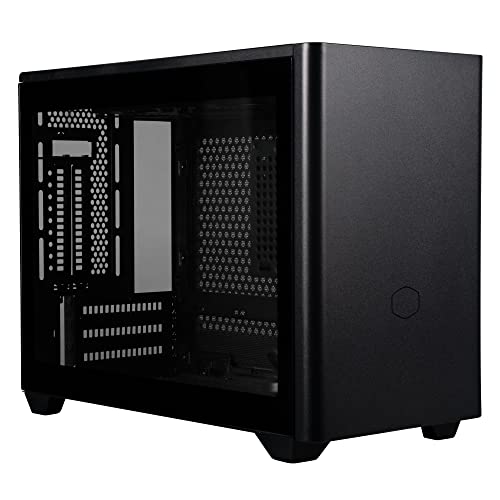
Cooler Master NR200P — Best Overall
The Cooler Master NR200P suits gamers who want the fewest compromises per litre. It fits long triple-slot graphics cards, tall air coolers by ITX standards, and a 280 mm radiator on its side bracket — a combination no smaller case here can match.
- Dimensions: 376 × 185 × 292 mm including protrusions (18.25 L)
- Motherboard support: Mini-ITX, Mini-DTX
- Max GPU: 330 mm long, 156 mm high, 60 mm (triple-slot)
- Max CPU cooler height: 155 mm with vented panel
- Radiator support: 280 mm side, 240 mm bottom, 92 mm rear
- Power supply: SFX or SFX-L up to 130 mm
Strengths
- Best compatibility-per-litre in this guide
- Vented steel and tempered glass panels included in the box
- Supports both big air coolers and a 280 mm side radiator
Trade-offs
- SFX power supply required — an added cost over ATX
- Bottom radiator mounting fights the GPU for space in thick-card builds
- Assembly is denser work than any mid tower
The NR200P earned its reputation by refusing to specialise. At 18.25 litres it is the largest case in this guide, and it spends that volume on options: a 155 mm air cooler ceiling that accepts serious tower coolers, a side bracket that takes a 280 mm radiator, and GPU clearance of 330 mm in length and a full triple-slot 60 mm of thickness. Most Mini-ITX cases force you to choose your cooling religion before buying; the NR200P lets you change your mind.
The two included panel types underline the point. Build with the vented steel panel and the CPU cooler gets its full 155 mm and fresh air; build with the tempered glass and you lose a couple of millimetres and some intake, but gain the showcase. Either way, the graphics card mounts horizontally in the traditional position with no riser cable required, which removes a whole category of PCIe troubleshooting.
For a first Mini-ITX gaming build, this is the case that forgives. Parts fit, cables have somewhere to go, and the community has documented every possible configuration. Pair it with a compact card from best graphics cards after measuring twice, and you have a gaming PC that outperforms systems three times its size.
Honest limitation: at 18.25 L the NR200P is big by ITX enthusiast standards, and purists chasing a sub-15 L build will find it ordinary.
Best for: first Mini-ITX gaming builds and anyone who wants air or liquid options in one case / Not suited for: ultra-compact purists or builders reusing an ATX power supply

Cooler Master NR200P MAX — Best Ready-to-Build Kit
The NR200P MAX suits gamers who want the NR200 formula with the two hardest decisions pre-made. Cooler Master installs a 280 mm AIO liquid cooler and an 850 W SFX Gold power supply at the factory, and routes the cables for its vertical-GPU layout before you open the box.
- Dimensions: 377 × 185 × 292 mm including protrusions (18.30 L)
- Motherboard support: Mini-ITX
- Max GPU: 336 mm long, 160 mm high, 75 mm (triple-slot), vertical mount
- CPU cooling: included 280 mm AIO (67 mm CPU clearance zone)
- Included PSU: 850 W SFX 80 Plus Gold
- Includes PCIe 4.0 riser cable
Strengths
- AIO and 850 W PSU included and pre-routed — the fastest ITX build here
- 336 mm vertical GPU support fits flagship cards
- Cooling and power are matched to the case by the manufacturer
Trade-offs
- Vertical GPU only — no traditional layout option
- You pay for the bundle whether or not you wanted those exact parts
- Air cooling is effectively off the menu
The MAX is a kit, not just a case. The 280 mm radiator mounts at the top with its fans set as exhaust, the 850 W SFX supply sits ready with custom-length cables, and the PCIe 4.0 riser is already in place for the vertical graphics card. What remains for the builder is the motherboard, processor, memory, storage, and GPU — an afternoon build instead of a weekend of cable origami.
The vertical layout is the one real commitment. Your graphics card stands upright against the side, up to 336 mm long and a full 75 mm thick, which covers the largest gaming cards made. CPU cooling is the AIO’s job alone; the 67 mm clearance figure reflects the pump block zone, not a tower cooler. If your plan involved a big air cooler, buy the standard NR200P instead.
Value depends on your parts bin. If you already own an SFX power supply, the bundle duplicates it. If you are starting from zero, the MAX’s combined price is often kinder than buying case, cooler, and PSU separately — and the warranty covers them as one product. For gamers eyeing a complete small system without building at all, best mini pcs is the other end of that spectrum.
Honest limitation: the bundle locks you into Cooler Master’s cooler and PSU choices; enthusiasts with strong preferences either way should buy the base NR200P and choose their own.
Best for: builders starting from zero who want a fast, tidy, liquid-cooled ITX system / Not suited for: air-cooling fans or anyone who already owns an SFX power supply
Lian Li x DAN A4-H2O — Best Ultra-Compact
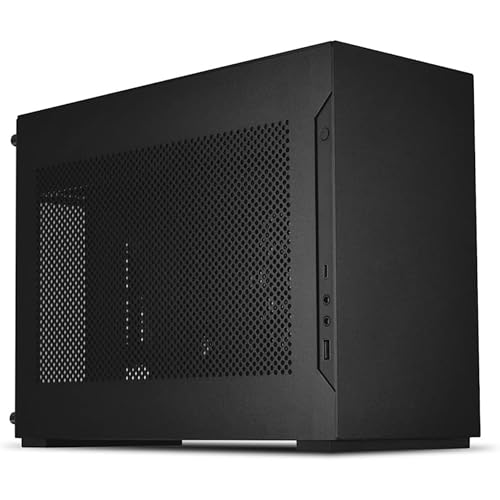
The A4-H2O suits gamers who measure their PC in litres and want the smallest case that still takes a flagship graphics card and a 240 mm liquid cooler. At 11 litres, it is the performance-per-litre champion of this guide.
- Dimensions: 326 × 140 × 244 mm (11 L)
- Motherboard support: Mini-ITX
- Max GPU: 322 mm, triple-slot
- Max CPU cooler height: 55 mm (pump block zone)
- Radiator support: 240 mm top (55 mm max combined thickness)
- Power supply: SFX or SFX-L
- PCIe 4.0 riser cable included
Strengths
- Only 11 L yet fits 322 mm triple-slot graphics cards
- Purpose-built around a 240 mm AIO for the CPU
- Premium aluminium construction with a clean, minimal look
Trade-offs
- No meaningful air-cooling option for the CPU
- Radiator plus fans must total <55 mm thick — check your AIO
- Cable space is extremely tight; patience required
The A4-H2O is a collaboration between Lian Li and DAN Cases, and it shows: every millimetre is argued for. The sandwich layout puts the graphics card behind the motherboard on a PCIe 4.0 riser, the power supply sits at the front, and the top of the case is dimensioned exactly around a 240 mm radiator with standard fans. The result holds a triple-slot card up to 322 mm long in a box smaller than many shoeboxes.
That precision cuts both ways. The radiator and its fans together must stay under 55 mm thick, which excludes a handful of thick-radiator AIOs; the CPU gets 55 mm of height, which in practice means the AIO’s pump block and nothing else. Air cooling a high-end processor is simply not this case’s plan, and pretending otherwise leads to a hot, loud PC.
Build it the way it was designed — a mainstream-to-high-end CPU under the 240 mm AIO, a flagship GPU against the mesh side panel where it can breathe directly — and the A4-H2O is astonishing: a full gaming system that fits in a carry-on. It is the connoisseur’s pick, best appreciated by builders who enjoy a case with a point of view.
Honest limitation: component choice is a narrow corridor. If your exact AIO or GPU variant is a few millimetres too large, there is no plan B inside this case.
Best for: experienced builders chasing maximum performance in minimum volume / Not suited for: first-time builders, air-cooling plans, or thick-radiator AIOs

Fractal Design Terra — Best Design
The Fractal Design Terra suits gamers who want the PC to look like furniture, not equipment. Anodised aluminium, a solid walnut front accent, and an adjustable internal spine make it the design object of this guide — with real gaming hardware support underneath.
- Dimensions: 343 × 153 × 218 mm (10.4 L)
- Motherboard support: Mini-ITX
- Max GPU: 322 mm long; width 43–72 mm depending on spine position
- CPU cooler height: 48–77 mm depending on spine position
- Radiator support: 120 mm side only (GPU <200 mm in that layout)
- Power supply: SFX or SFX-L up to 130 mm
- PCIe 4.0 riser cable included
Strengths
- Materials and finish a clear class above the rest of this guide
- Adjustable spine lets you trade GPU width against CPU cooler height
- At 10.4 L it is the smallest case here
Trade-offs
- The spine trade-off means very thick GPUs force a very short cooler
- Liquid cooling is effectively limited to a 120 mm side radiator
- Premium materials carry a premium price
The Terra’s party trick is a motherboard spine that slides. Move it toward the GPU side and the graphics card can be up to 72 mm thick while the CPU cooler shrinks to 48 mm; move it the other way and the cooler grows to 77 mm while the GPU thins to 43 mm. No other case in this guide lets you re-decide that balance after purchase, and it makes the Terra unusually adaptable across hardware generations.
Cooling strategy here is low-profile air for the CPU and direct mesh intake for the GPU, whose fans sit millimetres from the perforated side panel and draw fresh air straight through it. That works well for mainstream and upper-mid processors; the hottest flagship CPUs will want the spine set for the tallest cooler you can fit and a quality low-profile unit from best cpu air coolers. A 120 mm side radiator exists as an option, but only with a short GPU, so treat liquid as the exception.
And then there is how it looks. The Terra is the case people ask about when they visit — the walnut front and aluminium shell belong in a living room, which makes it the natural partner for a TV gaming setup alongside best wireless gaming keyboards for fps for couch play. It is a gaming case that happens to be beautiful, not the reverse — but the beauty is real.
Honest limitation: flagship CPUs under a 48–77 mm air cooler will run warm and audible under sustained all-core loads; the Terra favours gaming loads over workstation punishment.
Best for: living-room and design-led gaming builds with mainstream-to-strong hardware / Not suited for: sustained heavy CPU workloads or thick-GPU plus tall-cooler combinations

SSUPD Meshlicious — Best for Big GPUs
The SSUPD Meshlicious suits gamers who want a full-length, full-thickness graphics card and a 280 mm radiator in a case with the desk footprint of a shoebox stood on end. Mesh on nearly every surface gives its name and its cooling.
- Dimensions: 245 × 166.4 × 360 mm (14.67 L)
- Motherboard support: Mini-ITX (some ATX-PSU layouts vary)
- Max GPU: full-length cards up to 334 mm; CPU cooler 73 mm in 3-slot mode, 53 mm in 4-slot mode
- Radiator support: 120/140/240/280 mm front
- Power supply: ATX up to 170 mm or SFX
Strengths
- Vertical format gives a tiny desk footprint for its capability
- Accepts ATX power supplies as well as SFX — rare in this class
- Mesh everywhere means the GPU always has fresh air
Trade-offs
- Ports exit at the bottom, so cable access needs planning
- 4-slot GPU mode cuts CPU cooler height to 53 mm
- Finish and panel fit trail the Terra and A4-H2O
Stand a normal case’s layout on its end and you get the Meshlicious. The graphics card runs vertically along the front, the motherboard sits behind it, and a front radiator up to 280 mm handles the CPU. Because the footprint is only 245 × 166 mm, the whole system occupies less desk than a sheet of paper while still swallowing graphics cards up to 334 mm long — the longest allowance in this guide.
The configurable GPU spine offers 3-slot and 4-slot modes. In 3-slot mode the CPU cooler can be 73 mm tall, enough for competent low-profile air cooling alongside the radiator option. Flip to 4-slot mode for the thickest graphics cards and the cooler budget falls to 53 mm, which realistically means liquid cooling takes over. Choose the mode around your graphics card first; everything else follows.
A practical delight: the Meshlicious accepts a standard ATX power supply up to 170 mm as well as SFX units, which can save a meaningful sum and lets many builders reuse an existing PSU. The bottom-facing ports are the daily-life compromise — you will route display cables with right-angle adapters or a little patience. One sourcing note: the linked listing is for the tempered-glass PCIe 3.0 variant found during research, so confirm the exact variant on the listing before ordering.
Honest limitation: reaching the bottom I/O to swap a cable means tilting or lifting the case, which gets old in setups where peripherals change often.
Best for: desk-space misers running long, thick graphics cards with liquid CPU cooling / Not suited for: frequent cable-swappers or builders who need tall air coolers beside thick GPUs

HYTE Revolt 3 — Best Portable
The HYTE Revolt 3 suits gamers who move their PC — to a friend’s house, between rooms, or between home and office. A built-in carry handle, a vertical footprint, and a layout that mounts the GPU directly on the motherboard (no riser cable) make it the traveller of this guide.
- Dimensions: 253 × 178 × 409 mm (about 18.4 L)
- Motherboard support: Mini-ITX
- Max GPU: 335 × 140 × 58 mm (triple-slot)
- Max CPU cooler height: 140 mm
- Radiator support: 120/140/240/280 mm side, up to 35 mm thick
- Power supply: SFX or SFX-L (optional bundled 700 W Gold)
Strengths
- Integrated carry handle rated for the loaded case
- No riser cable — the GPU plugs straight into the motherboard
- 140 mm CPU cooler height is generous for an ITX tower
Trade-offs
- At about 18.4 L it is portable, not tiny
- Side radiator thickness is capped at 35 mm
- Handle only helps if the rest of your setup travels too
The Revolt 3 was designed with iBUYPOWER’s LAN experience in mind, and the handle is not a gimmick: it is rated to carry the loaded case, and the vertical tower shape means the PC rides in a car footwell or sits on a hotel desk without drama. For gamers whose PC genuinely moves every week, that matters more than two litres of volume.
Inside, the layout is refreshingly conventional. The graphics card — up to 335 mm long and a full triple-slot 58 mm thick — mounts directly to the motherboard in the traditional orientation, so there is no riser cable to add cost, latency worries, or a failure point. CPU coolers can stand 140 mm tall, which opens the door to real tower air cooling that the A4-H2O and Terra cannot consider, and a side radiator up to 280 mm covers the liquid route.
Storage and power are sensible: SFX or SFX-L supplies, with an optional factory bundle using a 700 W Gold unit, plus room for a 3.5-inch drive alongside 2.5-inch SSDs — a flexibility NAS-leaning gamers will appreciate. If your PC never moves, the NR200P is the better buy; if it moves monthly, the Revolt 3 earns its handle. Protect it in transit and at the venue with one of the best surge protectors for computers in your travel kit.
Honest limitation: the Revolt 3’s portability tax is size — it is nearly twice the Terra’s volume, so it will not satisfy builders chasing the smallest possible PC.
Best for: LAN-goers, students, and anyone whose gaming PC travels regularly / Not suited for: minimum-volume builds or desks where the PC never moves
Comparison Table
| Case | Form factor | Max GPU length | Max CPU cooler height | Radiator support |
|---|---|---|---|---|
| Cooler Master NR200P | Mini-ITX / Mini-DTX | 330 mm, triple-slot | 155 mm (vented panel) | 280 mm side, 240 mm bottom |
| Cooler Master NR200P MAX | Mini-ITX | 336 mm, triple-slot vertical | AIO included (67 mm zone) | 280 mm top (included AIO) |
| Lian Li x DAN A4-H2O | Mini-ITX | 322 mm, triple-slot | 55 mm (AIO pump zone) | 240 mm top |
| Fractal Design Terra | Mini-ITX | 322 mm; 43–72 mm wide (spine) | 48–77 mm (spine) | 120 mm side (short GPU only) |
| SSUPD Meshlicious | Mini-ITX | Up to 334 mm | 73 mm (3-slot) / 53 mm (4-slot) | Up to 280 mm front |
| HYTE Revolt 3 | Mini-ITX | 335 mm, triple-slot | 140 mm | Up to 280 mm side (35 mm thick) |
How to Choose a Mini-ITX Case For Gaming
Measure the graphics card three ways
In Mini-ITX, GPU fit has three dimensions and all of them bite. Length decides whether the card enters the case at all; thickness, expressed in slots or millimetres, decides whether the side panel closes and the card can breathe; height decides whether power cables clear the panel. The NR200P allows 330 × 156 mm and 60 mm thick; the Terra allows 322 mm long but as little as 43 mm thick at one spine extreme. Check all three numbers against your exact card model, because partner cards with the same GPU chip differ wildly in size.
Leave breathing room, too. A card pressed directly against a solid panel will suffocate; against mesh, as in the Terra and Meshlicious, it effectively gets its own intake. That is why mesh-sided ITX cases game above their size.
Decide your CPU cooling before the case
The case and the CPU cooler are one decision in this class. If you want a 240 mm AIO, the A4-H2O and Meshlicious are designed around liquid; if you want air, the NR200P’s 155 mm ceiling or the Revolt 3’s 140 mm are your playgrounds; if you want the cooler and PSU chosen for you, the NR200P MAX bundles both. Choosing the case first and the cooler second is how builds end up in return parcels.
Match the cooler to the processor honestly. Mainstream gaming CPUs are happy under a good low-profile air cooler; flagship chips under sustained load want the radiator. Gaming loads are bursty and forgiving — rendering and compiling are not.
Budget for the small-form-factor tax
Add the hidden costs before comparing with a mid tower: an SFX power supply (unless your case takes ATX, like the Meshlicious), a Mini-ITX motherboard premium, possibly a low-profile cooler, and the riser cable if your chosen case does not include one. The NR200P, A4-H2O, and Terra include their risers; always confirm, because a quality PCIe 4.0 riser bought separately is not cheap.
None of this makes Mini-ITX a bad deal — it makes it a deliberate one. You are paying for volume saved, and for many desks and living rooms that is money well spent. Our best small form factor pcs guide covers the prebuilt route if the parts premium plus build time stops making sense.
Plan the build order, not just the parts
In a mid tower you can install parts in almost any order. In an 11-litre sandwich case, order is survival: power supply cables often route before the motherboard lands, radiators go in before graphics cards, and one forgotten front-panel connector can mean partial disassembly. Read the case manual’s build sequence before the parts arrive, and keep the Allen keys and patience equally handy.
It also helps to assemble the core parts outside the case first — motherboard, CPU, cooler backplate, memory, and M.2 drive on the bench — then move the assembly in. Every ITX builder learns this eventually; learn it from this paragraph instead of from experience.
Riser cables, explained plainly
Sandwich-style cases place the graphics card behind the motherboard, connected by a short ribbon called a riser cable. A good riser is electrically invisible — your card performs exactly as it would plugged directly into the board. The complications are practical: the riser must match your PCIe generation (a Gen 4 card on a Gen 3 riser needs the slot set to Gen 3 in the BIOS before first boot, or the system may not post), and cheap risers are a genuine failure point.
The cases in this guide that use risers — the A4-H2O, Terra, and NR200P MAX — include quality PCIe 4.0 units, which is one reason they cost what they cost. The NR200P, Meshlicious in its standard layout, and Revolt 3 avoid the question entirely by mounting the card directly. Neither approach is superior; they are different shapes of the same solution.
Key Takeaways
- The NR200P is the safest first Mini-ITX gaming case: 330 mm GPU room, 155 mm cooler height, 280 mm radiator option.
- Check GPU length, thickness, and height — all three, against the exact card model.
- A4-H2O (11 L) and Terra (10.4 L) are the true compacts; both demand deliberate part choices.
- The NR200P MAX bundles a 280 mm AIO and 850 W SFX PSU for the fastest build.
- Budget for SFX power and the ITX motherboard premium, not just the case.
How to Assemble a Mini-ITX Gaming PC Without Tears
The parts are the same as any build; the choreography is not. Follow this order and the small case stops fighting you.
- On the bench, fit the CPU, memory, and M.2 SSD to the motherboard, and mount the cooler’s backplate or the AIO pump block hardware.
- Install the power supply in the case and route its cables to roughly where each connector will land, before the motherboard goes in.
- Fit the radiator and its fans now if your layout puts them behind or above other parts — in the A4-H2O and NR200P MAX this is far easier before the GPU arrives.
- Lower the motherboard assembly in, connect the front-panel and fan cables while you can still see the headers, then secure it.
- Connect PSU cables to the motherboard, leaving the GPU power cable loose for last.
- Install the graphics card (and riser, if your case uses one), then connect its power cable with a gentle bend radius.
- Before closing the panels, power the system on the bench setup and confirm it posts, all fans spin, and the GPU is detected at full PCIe width.
- Close the case, run a game for twenty minutes, and check GPU and CPU temperatures against the open-bench numbers to confirm the panels are not starving the build.
That final open-versus-closed temperature check is the ITX builder’s smoke test. A small difference is normal; a large one means a panel, a cable, or a fan direction needs attention while the build is still fresh in your mind.
Problem: the system does not post with the riser cable, but works with the GPU directly in the board.
Set the motherboard’s PCIe slot to the riser’s generation (Gen 3 or Gen 4) manually in the BIOS with the card installed directly, then refit the riser. Auto negotiation across risers is the classic ITX failure.
Problem: GPU temperatures jump sharply when the side panel goes on.
Your card is exhausting against a panel or starving for intake. Confirm the panel over the GPU is the mesh one, check fan direction, and in spine-adjustable cases like the Terra, trade a few millimetres toward the GPU side.
Problem: the AIO fans are the loudest part of the system at idle.
Radiator fans are often wired to a CPU header chasing a spiky sensor. Move them to a curve with a long delay and a low idle floor, or control them from the liquid temperature if your cooler supports it. The pump should run at a constant speed; only the fans need a curve.
How to Keep a Small Gaming PC Cool Under Load
Small cases have little air volume, so temperatures respond fast — which also means small fixes work fast.
- Set an FPS cap or use your monitor’s refresh rate as the limit in games; rendering 300 frames for a 144 Hz screen is pure heat.
- Give the GPU a custom fan curve that starts earlier than stock; in a small case the GPU is usually the heat source that matters.
- Undervolt the graphics card slightly if you are comfortable doing so — gaming performance typically holds while power and heat fall noticeably.
- Keep the case off carpet and away from walls; mesh panels on three sides only help if all three sides can breathe.
- Dust the mesh panels monthly with a soft brush or air; fine perforations clog faster than coarse grilles.
If temperatures remain high after these steps, the honest answer is usually a mismatch between processor and cooler class, not a defective case. A flagship CPU under a 55 mm cooler zone is a liquid-cooling build whether you planned it that way or not.
Problem: the PC is quiet in menus but roars in gameplay.
That is a fan curve keyed to CPU temperature while the GPU does the heating. Tie case fan speed to GPU temperature if your software allows, or set a higher baseline speed during gaming hours.
Thermals in Tiny Cases: What the Numbers Actually Mean
Temperature discussions about small cases tend to generate more heat than the cases do. Start with the only comparison that matters: your components have maximum safe operating temperatures set by their manufacturers, and modern GPUs and CPUs manage themselves against those limits by adjusting clock speeds. A graphics card running at 78°C in an ITX case and 72°C in a tower is not damaged, endangered, or meaningfully slower — it is six degrees warmer inside a box one quarter the size. That is the entire scandal.
Where small cases genuinely differ is in how hard the cooling works to hold those temperatures. Fans spin faster, and faster fans are louder. The engineering responses are the ones this guide keeps returning to: put the GPU against mesh so it breathes outside air directly, give the CPU a radiator sized for the job, and avoid asking a 55 mm cooler zone to tame a flagship processor. Heat is a budget; small cases simply have less slack in it.
Noise perception deserves a paragraph of its own. A Mini-ITX PC usually sits on the desk, close to your ears, while a tower often sits on the floor, further away and partially muffled by the desk itself. The same fan at the same speed measures louder in the ITX setup because of distance, not because the case is worse. Before blaming a small case for noise, try it where a tower would sit — many “loud ITX builds” are simply close ITX builds.
Frame rate capping is the most underused thermal tool in gaming. Rendering far beyond your monitor’s refresh rate converts electricity directly into heat and fan noise for frames you never see. Cap the frame rate, and a small gaming PC gets cooler and quieter at literally no visual cost. In a mid tower that is a nicety; in 11 litres it is close to a design requirement.
Finally, dust. Fine mesh panels are wonderful intakes and efficient dust collectors, and in a small case the distance between a clogged panel and a hot GPU is measured in centimetres. Monthly attention with a brush or blower keeps an ITX build at its day-one temperatures; neglected, it will slowly trade degrees for dust. Small cases ask for small, regular care — that is the real price of the format.
A closing thought on longevity: small cases age differently from big ones. A mid tower absorbs a decade of hardware growth — longer GPUs, thicker radiators, new connectors — without complaint. An 11-litre case is a bet on a specific hardware era, and when graphics cards grow again, it may decline the upgrade. That is not a flaw; it is the format’s honesty. Buy the small case for the system you are building now, enjoy it completely, and let the next build make its own bargains.
Common Buying Mistakes
- Checking GPU length but not thickness. Triple-slot cards veto more ITX builds than length does. The slot count is a clearance figure, not a suggestion.
- Assuming the riser is included — or the right generation. A Gen 3 riser on a Gen 4 auto-negotiated board is the most common ITX no-post. Confirm both.
- Buying the cooler after the case. In this class the cooler decision is the case decision. Make them together.
- Reusing an ATX power supply by default. Only the Meshlicious here accepts one (up to 170 mm). Everything else needs SFX or SFX-L.
- Skipping the open-bench test. Troubleshooting a no-post inside 11 litres is miserable. Ten minutes on the bench saves an evening.
- Sealing the case against a wall. Mesh on the back panel is an exhaust or intake too. Give every side air to work with.
- Treating the GPU support list as fine print. Several manufacturers publish tested GPU compatibility lists for their ITX cases. If your exact card is on the list, fit is proven; if it is not, your tape measure is the only authority — use it.
Final Recommendation
Buy the Cooler Master NR200P first. It fits the widest range of graphics cards and coolers, forgives first-time ITX builders, and leaves both air and liquid paths open — the complete Mini-ITX gaming case against which the rest of this guide is specialised.
The runner-up is the Lian Li x DAN A4-H2O for builders who know exactly what they want: flagship GPU, 240 mm AIO, 11 litres, nothing wasted. Choose the NR200P for flexibility, the A4-H2O for the smallest serious gaming PC you can build.
Frequently Asked Questions
Can a Mini-ITX PC really run high-end graphics cards?
Yes. Every case in this guide accepts cards over 320 mm or a full triple-slot design, which covers flagship gaming cards. The constraints are cooling and power delivery, not the motherboard size — plan both and the small PC keeps up.
Is liquid cooling or air cooling better in a Mini-ITX case?
It depends on the case. Designs like the A4-H2O are built around a 240 mm radiator; the NR200P and Revolt 3 give air coolers unusual room (155 mm and 140 mm). Match the case to the method rather than forcing a favourite cooler into the wrong box.
What power supply do Mini-ITX gaming cases need?
Most need an SFX or SFX-L unit; wattage depends on your GPU, and 750–850 W covers the large majority of gaming builds. The Meshlicious is the exception here that also accepts ATX supplies up to 170 mm, and the NR200P MAX includes an 850 W SFX unit.
Are riser cables a problem for gaming performance?
A quality PCIe 4.0 riser performs identically to a direct slot connection. The real risk is compatibility during setup — a Gen 3 riser with an auto-negotiating Gen 4 board can fail to post until you set the slot generation manually in the BIOS.
How loud is a Mini-ITX gaming PC?
Small cases place fans closer to you and offer less material to absorb sound, so fan quality and curves matter more. Mesh designs let GPUs breathe at lower fan speeds, which helps; a capped frame rate helps more than any hardware change.
Can I build a Mini-ITX gaming PC as my first build?
Yes, with the right case. The NR200P and Revolt 3 are forgiving; the A4-H2O and Terra reward experience. Budget extra time, follow the manual’s build order, and test the parts outside the case first.
Do Mini-ITX cases support full-size power supplies?
Most do not — SFX or SFX-L is the standard in this class. The Meshlicious is the exception in this guide, accepting ATX units up to 170 mm, and the NR200P MAX sidesteps the question by including an 850 W SFX supply in the box.