Disclosure: As an Amazon Associate, UMT Smart Tool earns from qualifying purchases. This guide is built from product listings and maker specifications, not from our own hands-on testing. Prices are approximate and can change, so check the current price before you buy. Last updated: November 10, 2026.
A smart alarm clock is really three products in one: a clock that wakes you, a screen or light that manages the room at night, and a voice assistant that runs alarms, routines and the rest of the smart home from your nightstand. Which of those jobs matters most decides the right pick. A voice-first household wants Alexa or Google Assistant and good speakers. A light sleeper wants a display that truly goes dark, or a sunrise lamp instead of a screen. A family that video-calls from the kitchen wants a bigger display with a camera. This guide is organized by those jobs, with one honest note up front: every pick here needs Wi-Fi and a free account with its maker for its smart tricks.
In this guide
Quick Picks
The short version: six smart alarm clocks we would look at first, one per use case.
| Pick | Type | Best for |
|---|---|---|
| Amazon Echo Spot (2024) | Compact smart alarm clock | Best overall nightstand clock with Alexa |
| Amazon Echo Show 5 (3rd Gen) | Small smart display | Video calls and camera feeds on a small nightstand |
| Amazon Echo Show 8 (3rd Gen) | Mid-size smart display | Bigger rooms, kitchens and a built-in smart home hub |
| Google Nest Hub (2nd Gen) | Smart display, no camera | Google households and sleep sensing |
| Philips SmartSleep Connected (HF3670/60) | Smart sunrise light | Waking to light instead of sound, with an app |
| Amazon Echo Dot with Clock (5th Gen) | LED clock speaker | Budget Alexa clock with a simple LED readout |
Our Picks
1. Amazon Echo Spot (2024) — Best Overall
The Echo Spot is the one device on this list designed from the start to be an alarm clock rather than a speaker with a clock bolted on. Its 2.83-inch touchscreen (240 × 320) shows the time, weather and song titles behind a tinted, half-circle cover glass, and Amazon offers a library of clock faces so the display can look like a clock instead of a gadget. Alarms are set by voice or touch, can wake you to music or a radio station, and there is a sunrise option that brightens the display gradually before the sound starts. A tap on top snoozes, and Alexa routines can tie the alarm to lights, a thermostat or a morning briefing. The 1.73-inch front-firing speaker is tuned for clear vocals at bedroom volume, and the built-in motion sensor and eero Wi-Fi extension are useful extras in larger homes.
The deliberate trade-off is what the Spot leaves out: there is no camera at all, which many people will count as a bedroom plus, but it means no video calls and no viewing camera or doorbell feeds — Amazon states this plainly in the listing. Sound is fine for a nightstand, not a party. It comes in Black, Glacier White and Ocean Blue, at a mid-range tier that drops toward budget during Amazon’s frequent sales. If you want one clock that handles waking, information and smart-home control without a camera pointed at the bed, this is the safest pick here.

2. Amazon Echo Show 5 (3rd Gen) — Best Small Smart Display
Choose the Echo Show 5 when you actually want a screen: at 5.5 inches (960 × 480) it is big enough for video calls, weather radar, recipe steps and a look at a nursery or doorbell camera, yet at 5.8 × 3.6 × 3.2 inches it still fits a crowded nightstand. The 3rd Gen model (2023) added a faster AZ2 Neural Edge processor, an extra microphone for clearer Alexa responses, and a redesigned 1.75-inch speaker with deeper bass than the generation before. As an alarm clock it covers the bases — voice-set alarms, a sunrise alarm that warms the display before the tone, and a night mode that dims the screen after lights-out. A 2 MP camera handles Drop In and video calls.
That camera is the honest compromise: it has a physical shutter and a mic/camera-off button, and you will want to use them in a bedroom. The small screen makes long video sessions cramped, and Echo home screens rotate promoted content, which some owners find busy on a nightstand. It also works as a Matter controller for smart-home gear. In Charcoal, Glacier White or Cloud Blue, it sits in the same mid-range tier as the Spot. Pick it over the Spot if seeing people and camera feeds matters more than a camera-free room.
3. Amazon Echo Show 8 (3rd Gen) — Best for Bigger Rooms and Smart Homes
The Echo Show 8 (3rd Gen, 2023) is the pick when the “alarm clock” also has to anchor a kitchen or a large bedroom. The 8-inch HD touchscreen (1280 × 800) is genuinely useful at a distance — video calls on the centered 13 MP auto-framing camera, recipes you can read from the counter, and camera feeds that are more than thumbnails. Sound is a clear step up: spatial audio from dual 2-inch drivers with a passive bass radiator fills a room in a way the smaller devices cannot. Under the hood it is also the most capable hub here, with Zigbee, Matter and Thread radios built in, so bulbs, locks and sensors connect without a separate bridge.
The costs are footprint and privacy homework. At 7.9 × 5.5 × 4.2 inches it eats nightstand space, and unlike the Show 5 it has no physical camera shutter — there is a mic/camera-off button, but the lens is always exposed when the device is on. It is the premium tier of the three Echo picks. For a primary bedroom with room to spare, or a kitchen counter that doubles as the household’s morning station, that trade is worth it; for a small bedside table, it is simply too much device.
4. Google Nest Hub (2nd Gen) — Best for Google Homes and Sleep Tracking
If your home already runs on Google Assistant, the Nest Hub (2nd Gen) is the natural bedside screen. The 7-inch display sits low on a fabric base, and an ambient light sensor keeps it properly dim at night — in a dark room it settles to a soft, glanceable clock rather than glowing. Its signature feature is Sleep Sensing: a low-energy Soli radar sensor tracks motion and breathing from the nightstand, with no camera and nothing worn, and builds sleep reports in the Fitbit app. The Sunrise Alarm brightens the display gradually before your chosen sound, Quick Gestures let you snooze with a wave in front of the screen, and there is deliberately no camera on board at all.
Two honest caveats. First, Sleep Sensing’s deeper features live inside Google’s Fitbit ecosystem, so read the current terms before counting on any specific report. Second, buying: Google does not sell Nest products through Amazon itself, so Amazon listings are third-party sellers — check who is selling and the return terms, or buy from Google and its retail partners instead. In Chalk or Charcoal at a mid-range tier, it remains the only pick here that watches your sleep without a camera.

5. Philips SmartSleep Connected (HF3670/60) — Best Smart Sunrise
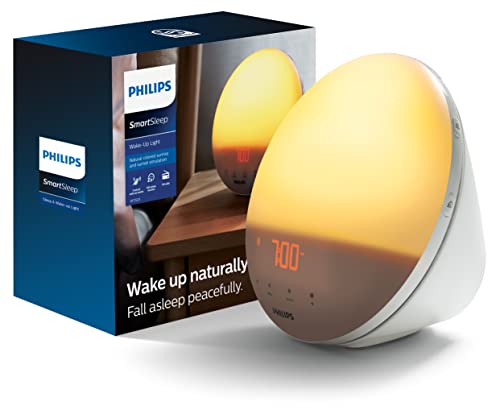
Not everyone wants a screen and a microphone as the first thing they see in the morning. The SmartSleep Connected HF3670/60 is a sunrise lamp with a smart layer: the SleepMapper app sets alarms and light profiles from your phone, and the lamp wakes you with a simulated sunrise that climbs through 25 brightness settings to 315 lux, paired with one of eight wake-up sounds or FM radio. In the evening it runs in reverse, with a sunset fade and RelaxBreathe light-guided wind-down. Its AmbiTrack sensor module tracks bedroom temperature, humidity, light and noise, and the app turns that into sleep-environment advice — genuinely useful if your room runs hot or street-lit. A USB port charges your phone overnight.
The trade-offs are price and scope: this is the premium tier of this list, and it is a lamp, not an assistant — no voice control of its own and no streaming beyond radio. App dependence also means setup takes longer than shouting at an Echo. Distinct from the older HF3520 covered in our main alarm clock guide, the Connected model is the one to buy if light, not sound, is what actually gets you up.

6. Amazon Echo Dot with Clock (5th Gen) — Best Budget
The simplest smart clock here is a speaker with an LED readout shining through its fabric. The Echo Dot (5th Gen, 2022 release) with clock shows the time, timers, outdoor temperature and song titles on its front LED display, which auto-dims in a dark room. You get full Alexa — voice alarms, routines, smart-home control, music — a 1.73-inch speaker the same size as the Echo Spot’s, a built-in temperature sensor that can trigger routines, tap-to-snooze on top, and eero Wi-Fi extension. The spherical 3.9 × 3.9 × 3.5-inch body in Cloud Blue or Glacier White disappears onto a small nightstand.
Be clear-eyed about its age: this is a 2022 model, and Amazon has since handed the bedside role to the Echo Spot, so new stock comes and goes and listings are not always live — if the exact model matters to you, check availability before planning around it. There is no screen for video or camera feeds, and the LED can only ever show a line of information. But as the lowest-cost route to voice-set alarms and routines in this roundup, with the Cloud Blue variant named here, it still earns the budget slot for Alexa households that do not need a display.
Best Picks by Category
- Smart alarm clock: Amazon Echo Spot (2024) — purpose-built clock face, sunrise option and no camera.
- Small smart display: Amazon Echo Show 5 (3rd Gen) — video calls and camera feeds in a nightstand-friendly size.
- Smart display and hub: Amazon Echo Show 8 (3rd Gen) — 8-inch screen, spatial audio and Zigbee/Matter/Thread built in.
- Google smart display: Google Nest Hub (2nd Gen) — camera-free sleep sensing and the gentlest night display here.
- Smart sunrise light: Philips SmartSleep Connected (HF3670/60) — app-set sunrise to 315 lux plus bedroom environment tracking.
- Budget smart clock: Amazon Echo Dot with Clock (5th Gen) — LED clock, full Alexa and tap-to-snooze for the least money.
Notice the pattern: the more a device tries to be a television and a hub, the bigger and brighter it gets. Buy for the nightstand first — screen size, night brightness and camera policy — and let the assistant features be the tiebreaker.
How to Choose
Assistant ecosystem first
Pick Alexa or Google Assistant before you pick hardware, because the clock inherits your home’s ecosystem. If your lights, plugs and routines already live in the Alexa app, an Echo clock slots in; a Google household gets more from the Nest Hub’s routines and Fitbit sleep integration. Mixing ecosystems on one nightstand usually means one device ends up half-configured. All six picks need Wi-Fi and the maker’s free app for setup.
Screen size versus nightstand space
Measure the table, not the marketing photo. The Echo Spot and Dot with Clock occupy roughly a 4-inch circle; the Show 5 needs about 6 inches of width; the Show 8 needs 8 inches plus clearance for its deeper body. Bigger screens earn their space in kitchens and shared rooms, where you read recipes and take calls across the room. On a small bedside table, a big bright rectangle is mostly a liability.
Night brightness and display behavior
The feature that decides whether a smart clock can live in a bedroom is how dark it gets. Look for an ambient light sensor, a scheduled night mode and a clock face designed for darkness — these picks handle it differently, from the Nest Hub’s very dim ambient display to the Philips lamp, which puts out no screen light at all. If you are a light sleeper, favor the camera-free, low-glow designs (Spot, Nest Hub, Dot with Clock) and turn off rotating content cards where settings allow.
Cameras and bedroom privacy
Three of these devices have no camera (Echo Spot, Nest Hub, SmartSleep Connected) and two of the rest can see you: the Show 5 and Show 8 carry cameras for video calls. If a camera model is your pick, check how it is disabled: the Show 5 has a physical shutter, the Show 8 relies on an electronic mic/camera-off button. Microphones can be muted on all the assistant devices here. Decide your comfort level before the device is beside your bed — and remember the mic is what makes voice alarms work, so muting it nightly means setting alarms by touch or app.
Alarm styles: sound, sunrise and routines
Basic beeps are the floor, not the ceiling. Every pick here can wake you to music or radio; the Echo devices and the Philips add a sunrise element that brightens light before sound, which suits people who wake poorly to sudden noise. Routines are the real smart feature: one alarm can also raise the lights, read the weather and start the coffee maker. Heavy sleepers should note that none of these replaces a dedicated loud or vibrating alarm — treat a smart clock as the scheduler and keep a stronger backup.
Power, connectivity and ongoing costs
All six picks are mains-powered with no meaningful battery backup, so a power cut can silence the alarm — an overnight phone alarm remains cheap insurance. Check the radios if the clock doubles as a hub: only the Show 8 here carries Zigbee and Thread. Finally, scan for subscriptions: alarms, timers and routines are free on every pick, but some extras — advanced assistant features, detailed sleep reports, music services — can sit behind memberships whose terms change; verify the current deal before you buy.
Which smart alarm clock should you buy?
The right smart alarm clock depends on your assistant ecosystem, your nightstand size and how you feel about cameras in the bedroom. Match your situation to the picks above.
- A dark, camera-free bedroom with Alexa: choose the Amazon Echo Spot (2024), which was built as an alarm clock and has no camera.
- Video calls and camera feeds in a small space: the Amazon Echo Show 5 (3rd Gen) adds a screen and camera, and it has a physical shutter.
- A kitchen or large bedroom that doubles as a smart home hub: the Amazon Echo Show 8 (3rd Gen) has the bigger screen and the extra radios the post describes.
- A Google Assistant household or sleep tracking without a camera: the Google Nest Hub (2nd Gen) fits best, as long as you are comfortable with its Fitbit-linked reports.
- Waking to light instead of sound, with no microphone: the Philips SmartSleep Connected (HF3670/60) is a sunrise lamp with an app.
- Voice alarms for as little as possible: the Amazon Echo Dot with Clock (5th Gen) gives you Alexa and an LED readout without a screen.
If you are unsure, start with the Echo Spot or the Nest Hub depending on your assistant, because both keep the bedroom simple.
What to check before you buy a smart alarm clock, and who should skip it
A smart alarm clock is more convenient than a basic one, but only if it fits your room and habits. Check these points on the current listing.
- Dimensions against your nightstand, including the depth of the base.
- Whether the device has a camera, and how the camera and microphone are switched off.
- Which assistant it uses and whether your existing lights and plugs work with it.
- How dark the display can go at night and whether you can schedule night mode.
- Whether you need a free account or app to set it up, and which extras may need a subscription.
- Who the seller is, especially for products that the maker may not sell through Amazon directly.
- Return terms and warranty details shown on the listing.
Some honest objections are worth weighing. Every pick needs Wi-Fi for its smart features, and none of them is a replacement for a battery-backed alarm if power cuts are common where you live. Voice assistants listen for a wake word, so a bedroom microphone is a real trade-off even when it can be muted. Screens and LEDs can be too bright for some light sleepers, and heavy sleepers may find a gentle tone is not enough.
You may want to skip a smart alarm clock if you simply want a loud, simple alarm that never depends on a network, or if you do not want an assistant in your bedroom at all. In that case a conventional clock or a phone alarm does the job with fewer compromises.
Compare the picks above, check the current listing for size and what is included, then choose the one that fits how you will use it.
Frequently Asked Questions
Do smart alarm clocks work without Wi-Fi?
Only partially. An alarm set before an outage will usually still sound, and the time display keeps working, but voice control, music alarms, routines and app settings all need the connection. If your Wi-Fi is unreliable at night, keep a phone alarm as backup.
Which smart alarm clock is best for a bedroom without a camera?
The Echo Spot and the Google Nest Hub (2nd Gen) are both camera-free by design, and the Philips SmartSleep Connected has no camera or microphone at all. Of the camera models, only the Echo Show 5 has a physical shutter. For most bedrooms, camera-free is the simpler answer.
Can a smart clock wake me up with music or radio?
Yes — every pick here except the Philips (which offers FM radio and nature sounds) can use streaming music, radio stations or playlists as the alarm sound through its assistant. The Philips HF3670/60 includes an FM tuner, so radio waking is covered there too, just not streaming services.
Is a sunrise alarm actually easier to wake up to?
For many people, yes: light that builds over 20–40 minutes raises alertness more gently than a sudden tone, and both the Philips SmartSleep Connected and the Echo sunrise options follow that pattern. It is not a medical treatment and results vary — deep sleepers may still need sound at the end, which all of these provide after the light phase.
Do I need a subscription for a smart alarm clock?
Not for the core job. Alarms, timers, weather and basic routines are free on Alexa and Google Assistant devices, and the Philips app features are included with the lamp. Paid tiers exist around the edges — premium assistant features, music services, extended sleep reporting — so check which specific extras you care about before assuming they are included.
What happens to my alarm if the power goes out?
None of these six has a real battery backup, so an outage overnight means the alarm may not sound and the clock will need to reconnect and re-sync when power returns. If outages are common where you live, pair the smart clock with a battery-backed conventional clock or a phone alarm.
Can I use a smart alarm clock without a voice assistant?
Yes, in most cases you can set alarms by touch or in the app and mute the microphone. Some features, such as routines and hands-free snoozing, work best with the assistant enabled. Check the listing for what works with the microphone off.
Where should I place a smart alarm clock in the bedroom?
Put it within reach on a stable nightstand, away from the edge and from direct sunlight. Keep it close enough to your router for a steady Wi-Fi connection, and make sure the display does not shine straight into your eyes.
Does a smart alarm clock replace a phone alarm?
It can, but many people keep a phone alarm as backup for power or Wi-Fi problems. A smart clock is best treated as the main scheduler, with a second alarm for important mornings.
Can a smart alarm clock control my lights in the morning?
Yes, if the lights are compatible with the same assistant, routines can turn them on with the alarm. Check that your bulbs or plugs work with Alexa or Google Assistant before you count on this.
Are smart displays good for kids' rooms?
It depends on your comfort with cameras and microphones. Camera-free models and the physical shutter on the Echo Show 5 are the options in this guide to consider, and parental settings are worth checking in the app before you decide.
How do I stop a smart clock display from being too bright at night?
Use the night mode or dimming schedule in the settings, and turn off rotating content cards if the device offers it. A model with an ambient light sensor adjusts on its own. If it is still too bright, consider the sunrise lamp option, which has no screen.
Bottom Line
For most nightstands, start with the Amazon Echo Spot (2024): it is the only device here designed purely as a smart alarm clock, with a proper clock face, a sunrise option and no camera. Step up to the Echo Show 5 for video calls in a small footprint, or the Echo Show 8 if the clock doubles as a kitchen display and smart-home hub. Google households should take the Nest Hub (2nd Gen) for its camera-free sleep sensing, light-averse sleepers the Philips SmartSleep Connected, and budget buyers the Echo Dot with Clock. Check dimensions, the seller and the current price before you order.