Disclosure: As an Amazon Associate, umtsmarttool.com earns from qualifying purchases. Links to Amazon on this page are affiliate links; they cost you nothing extra. Prices and availability change often, so check the current Amazon listing before you buy.
Where to buy
Short on time? Start with our top pick among the best surge protector wall outlets, the Belkin SurgePlus USB Wall Mount (BSV602tt) — check price on Amazon — then read the full guide below for the picks matched to narrower needs.
- Belkin SurgePlus USB Wall Mount (BSV602tt) — Best Overall Wall Tap — check price on Amazon
- GE Pro 6-Outlet Extender Wall Tap (36727) — Best Joule Rating in a Tap — check price on Amazon
- TESSAN Surge Protector Wall Outlet Extender (TS-1611-C) — Best with USB-C Charging — check price on Amazon
- TESSAN Flat Plug Extension Cord (TS-1020-C) — Best Behind Furniture — check price on Amazon
- CyberPower CSP300WU — Best Compact Travel Tap — Check on Amazon
- APC SurgeArrest Essential P6W Wall Mount — Best No-Frills Brand-Name Tap (listed without a purchase link; see the review for why)
Read the full guide ↓
A surge protector wall outlet does the job of a power strip without the strip: it plugs straight into the wall, multiplies your outlets, and stands guard against the voltage spikes that quietly kill chargers, TVs and computers. The best surge protector wall outlets combine a meaningful joule rating, enough outlets to matter, USB charging that replaces a wall wart or two, and indicator lights that tell you the protection is still alive. The six picks below cover kitchens, bathrooms, behind-TV walls and travel bags.
Two specs decide whether a wall tap is a surge protector or merely an outlet splitter wearing the costume. The first is the joule rating — how much surge energy the unit can absorb across its life; for wall taps, roughly 900 joules and up is a sensible floor for electronics you care about. The second is that it must actually contain surge protection components at all: some popular outlet extenders, including a well-known Anker model we excluded from this list, multiply outlets with no surge protection inside. Every pick here has a verified joule rating from the manufacturer’s own documentation or listing. For corded protection for a whole desk, compare with best surge protectors for computers.
Wall taps also live by different rules than strips: they must grip the outlet firmly, keep their weight supported, and avoid blocking the second socket more than necessary. The reviews below flag which designs cover both sockets, which need the outlet’s centre screw for stability, and which are really short-cord extenders rather than true taps — a distinction worth understanding before you buy.
Read the reviews with your own walls in mind. A tap that is perfect for a kitchen counter (six outlets, USB for the recipe tablet) is wrong for a travel bag, and the travel pick would be absurd on a family charging wall. The badges are written as use-case labels rather than rankings for exactly this reason: start from the wall, not from the product, and the right choice usually selects itself.
In this guide
Quick Picks
| Pick | Badge | Key spec |
|---|---|---|
| Belkin SurgePlus USB Wall Mount (BSV602tt) | Best Overall Wall Tap | 900 joules, 6 AC outlets, 2 USB-A ports (2.1A combined) |
| GE Pro 6-Outlet Extender Wall Tap (36727) | Best Joule Rating in a Tap | 1,020 joules, 6 grounded outlets, automatic shutdown |
| TESSAN Surge Protector Wall Outlet Extender (TS-1611-C) | Best with USB-C Charging | 900 joules, 4 AC outlets, 3 USB ports including USB-C (15W) |
| TESSAN Flat Plug Extension Cord (TS-1020-C) | Best Behind Furniture | 900 joules, 4 AC outlets, 3 USB ports, 5 ft ultra-thin flat cord |
| CyberPower CSP300WU | Best Compact Travel Tap | 918 joules, 3 outlets, 2 USB charging ports, folding plug |
| APC SurgeArrest Essential P6W Wall Mount | Best No-Frills Brand-Name Tap | 1,080 joules, 6 outlets, EMI/RFI noise filtering |
How These Picks Were Chosen
Each candidate had to prove real surge protection: a stated joule rating and clamping behaviour traceable to the manufacturer or a detailed retail listing, not just the words ‘surge protector’ in a title. We checked outlet counts, USB output, physical design (direct tap versus short cord), indicator lights, and safety listings, and we dropped at least one famous extender after its own manufacturer’s support page confirmed it contains no surge protection at all.
Two of the six picks are listed without an Amazon purchase link, deliberately: their specifications are fully verified from manufacturer documentation, but we could not tie a specific Amazon listing to either exact model with confidence, so they are recommended in prose rather than linked on a guess. That is the standard this whole list follows — a missing link is better than a wrong one. Homeowners planning a wider protection strategy should also read best surge protectors for gaming pcs for the high-capacity end of the category.
The 6 Best Surge Protector Wall Outlets
Belkin SurgePlus USB Wall Mount (BSV602tt) — Best Overall Wall Tap
This is the default recommendation for most walls: a compact direct-plug tap that turns one outlet into six protected AC sockets plus two USB ports, from the most established name in the category.
- Surge rating: 900 joules
- Outlets: 6 AC, arranged to accept bulky adapters
- USB: 2 USB-A ports, 2.1A combined output
- Protected and grounded indicator lights
- Backed by a $25,000 Connected Equipment Warranty
Strengths
- Six real outlets in a tap that still feels compact
- Indicator lights confirm protection and grounding at a glance
- Belkin’s warranty and support infrastructure behind it
Trade-offs
- USB output is USB-A only and modest by modern fast-charge standards
- Covers both wall sockets, so nothing else can share the receptacle
- 900 joules is adequate, not generous, for high-value equipment
The SurgePlus earns the top spot by being the tap with the fewest asterisks. Six outlets is the most you can reasonably hang off one receptacle, the spacing accepts real-world adapters without a jigsaw puzzle, and the two USB ports retire a pair of phone chargers from the kitchen counter. The indicator lights matter more than they sound: surge components wear out silently, and a tap that can tell you it is still protecting is categorically better than one that cannot.
It is the natural choice for the high-traffic walls — kitchen counters, bathroom vanities, the outlet behind the TV stand where a strip would dangle. Buyers protecting a full entertainment stack with a console and PC should step up to the corded capacity in best surge protectors for gaming pcs, but for single-wall duty this Belkin is the benchmark the others are measured against.
A practical note on placement: because the SurgePlus covers the whole receptacle and stands proud of the wall, it suits outlets with a little breathing room around them — behind a sofa arm it can be nudged by cushions, and in a tight bathroom with a GFCI outlet’s test buttons nearby it may crowd the reset controls. In open kitchen and hallway walls it is flawless. Also worth knowing: the USB ports keep working as plain charging even in homes where you never think about surges, which is why this tap tends to become the household’s default phone-charging spot within a week of installation.
The honest limitation is charging speed: 2.1A shared across two USB-A ports is fine overnight and slow by current standards, and there is no USB-C. If fast phone charging is the priority, the TESSAN USB-C pick below serves you better.
Best for: kitchens, bathrooms and TV walls needing more protected outlets / Not suited for: fast-charge hunters or high-value home theatre stacks
Check on Amazon
GE Pro 6-Outlet Extender Wall Tap (36727) — Best Joule Rating in a Tap
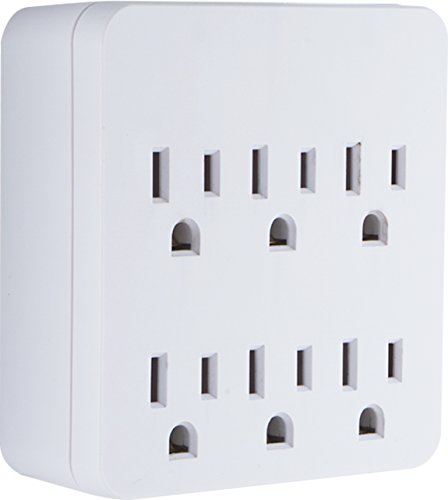
Pick the GE Pro tap when protection strength is the priority: at 1,020 joules it carries the highest rating in this wall-tap list, with an automatic shutdown feature that cuts power when protection is spent.
- Surge rating: 1,020 joules
- Outlets: 6 grounded AC outlets
- Automatic shutdown technology disconnects power when protection expires
- UL listed
- Direct plug-in wall tap design (model 36727)
Strengths
- Highest joule rating among the direct taps here
- Automatic shutdown means it can never silently become an unprotected splitter
- Trusted, widely available brand with straightforward specs
Trade-offs
- No USB ports — pair it with separate chargers
- Plain styling and a bulky body
- Also occupies the full receptacle
Most surge protectors fail silently: the components sacrifice themselves over years of small spikes, and the device keeps passing power with no protection left. The GE Pro’s automatic shutdown answers that failure mode directly — when the protection is exhausted, it stops supplying power rather than pretending. Combined with the highest joule rating in this tap category, it is the pick for walls feeding equipment you would rather not replace: a work-from-home corner, a fridge-adjacent small-appliance outlet, a network cabinet.
The compromises are convenience features. There is no USB charging, and the design is utilitarian. But as pure protection-per-outlet it leads this list, and its approach — fail loudly, not silently — is the one we wish every tap copied. It also makes a sensible companion to whole-desk protection from best surge protectors for computers: the strip guards the desk, the GE guards the wall across the room.
The automatic shutdown deserves a second look, because it changes the replacement conversation entirely. With ordinary taps, the owner must notice a dead indicator light — a light most people never look at — or guess an age. The GE removes the human from the loop: when protection ends, power ends, and the inconvenience of a dead tap is precisely the alarm bell. For rental properties, elderly relatives’ homes and anywhere else that maintenance attention is scarce, that self-reporting behaviour is worth more than the extra joules. It is the tap you install in houses you do not live in.
The honest limitation is the missing USB: in 2026 a wall tap without charging ports solves only half the modern outlet problem, so most buyers will still keep a separate USB charger plugged into one of its six sockets.
Best for: protection-first buyers and equipment you cannot afford to lose / Not suited for: anyone wanting built-in USB charging

TESSAN Surge Protector Wall Outlet Extender (TS-1611-C) — Best with USB-C Charging
Choose the TESSAN if your wall’s real problem is chargers: four AC outlets plus three USB ports (one of them USB-C) in a three-sided design that keeps plugs accessible from any angle.
- Surge rating: 900 joules
- Outlets: 4 AC in a three-sided layout
- USB: 3 ports — USB-A plus 1 USB-C at 15W
- Rated 1875W / 15A maximum
- Direct plug-in wall tap (model TS-1611-C)
Strengths
- USB-C port covers modern phones and tablets without a brick
- Three-sided layout genuinely reduces plug collisions
- Full 15A rating suits kitchen and workshop walls
Trade-offs
- Four AC outlets is fewer than the Belkin or GE taps
- USB-C at 15W is phone-speed, not laptop-speed
- Brand support is thinner than Belkin, GE or APC
TESSAN’s three-sided layout is the rare design flourish that solves a real problem: wall-wart chargers and right-angle plugs stop fighting each other when the sockets face three directions. Add a USB-C port that charges a phone at a respectable pace and the tap becomes a small charging station, which is exactly what entryway and bedside walls need.
The protection side is respectable rather than class-leading — 900 joules matches the Belkin — and the 15A rating means it will not be the weak link on a busy circuit. Buyers should simply weigh the trade: two fewer AC outlets than the six-outlet taps, in exchange for the best USB mix in a direct tap. For desks where USB-C charging is the daily bottleneck, that trade wins; our desk lighting and cable management guide shows how to build the rest of the charging corner around it.
Living with the three-sided layout teaches you its second benefit: heat and cable direction. Chargers plugged into the side faces route their cables along the wall rather than straight out into the room, which keeps walkways clear and stops plugs being kicked loose — a small, daily mercy in hallways and kids’ rooms. The USB-C port’s 15W will run a tablet slowly or a phone briskly; plan it as the phone’s home and keep the tablet on its own brick in an AC socket. As with all taps, give the unit a firm-seat check after installation: a three-sided body loaded with three chargers carries real leverage against the receptacle.
The honest limitation is support depth: TESSAN is a smaller brand, so warranty handling and long-term documentation are less proven than the legacy names on this list.
Best for: bedside and entryway charging walls / Not suited for: buyers who need six AC outlets or enterprise-grade support

TESSAN Flat Plug Extension Cord (TS-1020-C) — Best Behind Furniture
Strictly speaking this is a short-cord extender rather than a wall tap — and that is its superpower: a flat plug and five feet of ultra-thin cord let protection live behind sofas, beds and dressers where furniture sits flush against the wall.
- Surge rating: 900 joules
- Outlets: 4 AC on a compact desktop/wall-mountable body
- USB: 3 ports — 2 USB-A plus 1 USB-C
- Cord: 5 ft ultra-thin flat cord with a right-angle flat plug
- Rated 1250W / 10A (model TS-1020-C)
Strengths
- Flat plug lets furniture sit nearly flush to the wall
- Thin cord routes under rugs and along baseboards discreetly
- USB-C included for modern devices
Trade-offs
- 10A rating is lower than direct taps — not for heavy appliances
- Four outlets and a cord mean it is not a true no-footprint tap
- 900 joules is mid-pack protection
Every home has the outlet that furniture made useless: behind the bed, the sofa, the media console. Standard plugs force a gap; this flat plug nearly eliminates it, and the thin cord snakes to a reachable spot where the four outlets and three USB ports wait. For bedside duty — lamp, phone, tablet, watch — it is a better answer than any direct tap, because the outlets end up where your hands are, not behind the headboard.
Respect the 10A ceiling: this is an electronics extender, not a path for space heaters, kettles or hair dryers, and the listing’s rating should be treated as a hard boundary. Within electronics duty it is excellent, and it solves the exact problem that makes people buy unsafe workarounds. Pair it with the cable discipline in desk lighting and cable management guide and the whole wall disappears from thought.
The flat cord invites one more use case beyond furniture: travel within the home. Because the whole unit coils into a small loop, it becomes the household’s problem-solver for temporary setups — a guest room desk for a visiting relative, a holiday charging corner, a workbench project weekend. Its 10A ceiling keeps it honest in those roles: chargers, laptops, lamps and small electronics only. Households that buy one for the bedroom commonly buy a second for exactly this roaming duty, which tells you the design solves a real and recurring problem rather than a one-off annoyance.
The honest limitation is capacity: at 1250W / 10A it is the lightest-duty pick here, so it belongs with chargers and small electronics, never with heating appliances or heavy workshop tools.
Best for: bedsides, sofas and media consoles against the wall / Not suited for: high-wattage appliances or workshop use

CyberPower CSP300WU — Best Compact Travel Tap
The CSP300WU is the travel and small-space pick: a compact three-outlet tap with USB charging and a folding plug that drops into a bag or a cramped dorm outlet without drama.
- Surge rating: 918 joules
- Outlets: 3 AC
- USB: 2 charging ports (1A shared per CyberPower’s documentation)
- Clamping voltage 800V (UL 1449), response time <1 nanosecond
- EMI/RFI filtration; folding wall-tap plug; max peak current 45,000A
Strengths
- Folding plug makes it genuinely pocketable for travel
- CyberPower publishes full electrical specs, including clamping voltage
- 918 joules is strong protection for a three-outlet tap
Trade-offs
- Only three AC outlets — strictly small-scale duty
- USB charging is slow (1A shared)
- Widely sold, but check the exact CSP300WU model on the listing — a CSP300WUR1 variant also exists
Small taps usually hide weak protection behind small size. The CSP300WU is the exception: CyberPower documents it like a serious product, with a 918-joule rating, an 800V clamping figure, sub-nanosecond response and EMI/RFI filtration. For a hotel nightstand, a dorm desk or a guest-room wall, that is real protection in the smallest footprint on this list.
The folding plug deserves its own mention — it protects the prongs in a bag and keeps the tap flush in tight outlets. The trade-offs are scale and charging speed: three outlets and 1A of shared USB suit a phone-and-laptop traveller, not a family charging station. Travellers building a full kit should also see the compact-PC and travel thinking in best small form factor pc cases — different category, same discipline of verified specs over marketing.
Travellers should note the CSP300WU’s quiet advantage over the power strips people usually pack: there is no cord to tangle, no brick-sized body, and the folding plug means it rides in a laptop sleeve without stabbing anything. In hotel rooms — where the reachable outlet is often a single, already-contested socket behind the bed — three protected outlets plus two USB ports is a complete nightstand solution for a phone, a watch and a laptop. Its documented clamping and response figures also compare respectably with full-size strips, so the travel kit is not a protection downgrade, merely a smaller one.
The honest limitation is scale: with three outlets, it is a specialist recommendation for travellers and tiny spaces, not a whole-home answer.
Best for: travel bags, dorms and guest rooms / Not suited for: busy family charging walls
APC SurgeArrest Essential P6W Wall Mount — Best No-Frills Brand-Name Tap
The P6W is the pick for buyers who want a serious brand and serious numbers without paying for extras: six outlets and 1,080 joules — the joint-highest rating here — in a plain wall-mount tap from APC, the company behind half the world’s server-room protection. It is listed without a purchase link because we verified it from APC’s datasheet but could not confidently tie an Amazon listing to this exact wall-mount model.
- Surge rating: 1,080 joules
- Outlets: 6 (NEMA 5-15R) in a wall-mount design
- Input: 120V nominal
- EMI/RFI noise rejection: 40dB
- From APC’s SurgeArrest Essential line (model P6W)
Strengths
- 1,080 joules matches or beats everything in this category
- APC’s datasheet transparency and support network
- Noise filtering helps audio and networking gear behave
Trade-offs
- No USB ports at all
- Utilitarian design with no smart features
- No purchase link here; check APC retailers for the exact P6W model
APC’s Essential line is the quiet professional of this category: no app, no lighting gimmicks, just a documented 1,080-joule rating, six outlets and real EMI/RFI filtering that can calm interference-prone audio and networking equipment. In a wall tap, that joule figure is about as high as the format goes, which makes the P6W the protection maximalist’s alternative to the GE Pro — with a bigger brand’s support behind it.
Why is it prose-only here? Because APC sells several similar-looking six-outlet models, including desk-clamp versions with cords, and we will not guess which listing is the wall-mount P6W. Buy it from a retailer that names the model exactly. Buyers who want APC protection with USB and data-line coverage in a corded strip will find it in best surge protectors for computers.
The P6W’s filtering figure deserves translation for non-engineers: 40dB of noise rejection means the electrical hash generated by motors, dimmers and cheap LED drivers on your home’s circuits is substantially quieted before it reaches whatever is plugged in. The equipment that notices is audio gear, networking hardware and anything with a sensitive power supply — a modem that stops needing weekly reboots is often a filtering success story. If your home office wall feeds the router and a phone charger rather than a desk full of kit, this plain APC may quietly be the most effective device on the entire list.
The honest limitation is plainness: no USB, no smart features, no design flair — and the burden of sourcing the exact model from a specialist retailer rather than one click here.
Best for: protection-first buyers who trust datasheets over features / Not suited for: USB charging or smart-home features
Comparison Table
| Pick | Joule rating | AC outlets | USB | Design |
|---|---|---|---|---|
| Belkin SurgePlus USB Wall Mount (BSV602tt) | 900 joules | 6 | 2 USB-A (2.1A combined) | Direct tap |
| GE Pro 6-Outlet Extender Wall Tap (36727) | 1,020 joules | 6 | None | Direct tap |
| TESSAN Surge Protector Wall Outlet Extender (TS-1611-C) | 900 joules | 4 | 3 (incl. USB-C 15W) | Direct tap, 3-sided |
| TESSAN Flat Plug Extension Cord (TS-1020-C) | 900 joules | 4 | 3 (incl. USB-C) | Flat plug + 5 ft cord |
| CyberPower CSP300WU | 918 joules | 3 | 2 (1A shared) | Direct tap, folding plug |
| APC SurgeArrest Essential P6W Wall Mount | 1,080 joules | 6 | None | Direct tap |
How to Choose a Surge Protector Wall Outlet
Joules, clamping voltage and what they actually mean
The joule rating is the total surge energy a protector can absorb over its lifetime — think of it as the size of the shield. For wall taps guarding chargers, lamps and small electronics, around 900 joules is a sound floor; for anything feeding a TV, computer or console, prefer the top of this list’s range. Each surge the unit absorbs spends some of that budget, which is why protectors are consumables with a lifespan, not permanent fixtures.
Clamping voltage is how high the voltage is allowed to spike before the protector reacts — lower is better. It is quoted less often on taps than on strips (CyberPower’s 800V figure for the CSP300WU is unusually transparent), so on most taps the practical checks are the joule rating, a safety listing, and indicator lights that confirm the protection circuit is still alive.
Wall tap or short cord? Choose by furniture, not habit
Direct taps win where the outlet is accessible and you want zero footprint: kitchens, bathrooms, hallways. They fail where furniture stands against the wall, because plug bodies and adapter bricks need depth the furniture will not give. That is the flat-plug extender’s moment — the TESSAN TS-1020-C trades a small cord for outlets that end up reachable.
Whichever you choose, respect the physical rules: taps should sit firmly (many are designed to use the receptacle’s centre screw), never wobble under the weight of six plugs, and never be stacked into another tap or strip. Daisy-chaining surge devices voids the logic of both.
USB ports: convenience with fine print
Built-in USB replaces small chargers beautifully, but read the output figures properly: ‘2.1A combined’ means two devices share that budget, and 15W USB-C charges phones well but laptops slowly or not at all under load. If a port’s output is not stated in the listing or manual, assume it is slow and keep your real fast charger for one of the AC outlets.
Also remember that USB ports do not make an extender a surge protector. At least one famous extender line ships with no surge components inside at all — which is why this guide verified a joule rating for every pick, and why you should too, on any model you consider beyond this list.
Where wall taps belong — and where they do not
Ideal tap territory: phone-and-tablet charging walls, bathroom grooming appliances (with the usual water-and-electricity care), kitchen counters for small electronics, TV walls, guest rooms and travel. The 15A-rated taps can carry normal household loads, but heating appliances are better on bare wall outlets, and the 10A flat-cord pick should never feed a heater, kettle or hair dryer.
For a desk full of computing equipment, a tap is the wrong tool regardless of rating — outlet count, cord reach and data-line protection all favour a proper strip from best surge protectors for computers. Use each format where it is strong.
Reading a Surge Rating Like an Engineer
Three numbers on a datasheet tell you nearly everything about a tap’s protection. The joule rating is the lifetime absorption budget. The clamping or let-through voltage — when published — is how much of a spike gets past before the device reacts, and lower is better. The response time, usually under a nanosecond on any credible device, confirms the components react faster than the surge rises. If a product publishes only the first, it is probably adequate; if it publishes all three, as CyberPower does for its little travel tap, you are dealing with a manufacturer that expects scrutiny.
Certification is the fourth check. A genuine safety listing (UL or ETL) means the device was tested as an electrical product, not just assembled as one. On no-name taps with spectacular joule claims and no listing, treat the numbers as fiction: inflated ratings are the category’s oldest trick, and they are exactly why this guide sourced its figures from manufacturers and established retailers rather than marketplace copy.
Taps, GFCI Outlets and Older Homes
Bathroom and kitchen walls often carry GFCI outlets with their own test and reset buttons; a large tap can cover or crowd those buttons, so check the fit before committing, and never let a tap’s body press against them. In older homes with two-prong ungrounded outlets, no tap can manufacture a ground: surge protection depends on the ground path, and an adapter plug is not a substitute. If the ‘grounded’ indicator on any tap in this guide stays dark in your home, the honest fix is an electrician, not a different tap.
Finally, mind the receptacle itself. A tap carrying six plugs has real weight and leverage; in a worn outlet that no longer grips prongs firmly, replace the receptacle (a cheap part) rather than letting a loaded tap sag. Firm contact is both a safety and a protection-performance issue — arcing at a loose connection generates the very transients the tap exists to absorb.
Renters, Dorms and Other People’s Walls
Wall taps are the renter’s surge strategy: they install in seconds, leave no marks, and move house in a coat pocket. In dorms and shared housing they solve the contested-outlet problem without the trip hazard of a strip across the floor — check your housing rules first, since some dorms restrict taps and strips by type, and a documented, safety-listed model is both the compliant and the sensible choice.
For landlords and parents equipping a property, the same logic scales: a quality tap on the TV wall and the bedroom charging wall covers the realistic surge exposure of a modern tenant’s electronics at trivial cost per room. Choose models with indicator lights so a quick walkthrough can verify protection is alive — the GE’s automatic shutdown removes even that chore.
A Last Word on Wall Power
The humble wall tap is easy to treat as an afterthought, bought by colour at the checkout. Resist that. The device sits between your home’s raw power and the electronics you touch every day, and the difference between a verified protector and a hollow extender is invisible until the one moment it matters. Choose from verified specifications, check the indicator light twice a year, and the wall will quietly take care of everything plugged into it.
Key Takeaways
- Belkin’s SurgePlus is the best all-round wall tap; GE Pro and APC P6W lead on raw protection.
- Verify a joule rating before buying any ‘surge protector’ — some extenders contain none.
- Automatic shutdown (GE) and indicator lights (Belkin) solve the silent-failure problem.
- Flat-plug short cords beat taps wherever furniture sits against the wall.
- Two picks here are prose-only by design — the APC P6W and the Belkin SurgePlus: verified specs, no confidently matched Amazon listing.
How to Install a Wall Tap Safely
Five minutes of care separates a safe installation from a wobbly hazard:
- Switch off the breaker for the outlet if the tap uses a centre screw, and remove the outlet’s faceplate screw.
- Align the tap’s prongs (and its stabilizing screw tab, if fitted) with the receptacle and press it fully home.
- Fit the longer centre screw supplied with many taps so the unit is anchored, not hanging from its prongs.
- Restore power and check the protected and grounded indicator lights before plugging anything in.
- Add plugs one at a time, heaviest adapters lowest, and confirm the tap does not tilt or loosen under the load.
- Leave the second receptacle’s fate as designed — most six-outlet taps intentionally cover both sockets for stability.
Problem: the tap wobbles — fix: use the centre-screw anchor or move heavy adapters to a strip; a loose tap arcs and overheats. Problem: the protected light is out on an older tap — fix: the protection is spent; replace the unit, because it is now just a splitter. Problem: the tap blocks a needed second outlet — fix: choose a single-socket tap or a flat-cord extender rather than forcing an adapter stack.
A Simple Whole-Home Protection Routine
Surge protection works as a system. Put quality taps or strips at the walls that feed electronics, keep a note of purchase dates, and replace units after any major known surge event — a lightning strike nearby, a utility fault — rather than waiting for the indicator. Protectors that have absorbed a big hit may look fine and be finished.
Review the house once a year: check indicator lights, retire the oldest taps to low-stakes duty (lamps, fans) and put fresh protection on the equipment that matters. It is dull, cheap insurance — the kind that only gets noticed the one time it is missing.
Common Buying Mistakes
Buying an outlet extender believing it is a surge protector
Extenders and protectors look identical on a shelf. If the packaging and manual do not state a joule rating, assume there is no surge protection inside — a famous Anker extender is exactly this case, confirmed by Anker’s own support documentation.
Daisy-chaining taps and strips
Plugging a tap into a strip, or a strip into a tap, defeats both devices’ protection logic and creates a genuine fire risk. One protection device per wall receptacle, plugged directly into the wall.
Ignoring the amp rating on corded extenders
A 10A flat-cord extender is for electronics. Heaters, kettles and hair dryers belong on wall outlets or 15A-rated devices — the rating printed on the unit is a hard limit, not a suggestion.
Leaving a spent protector in service
Surge components are sacrificial. When the protected light goes out, the device has become a plain splitter. Replace it; the equipment downstream is currently unprotected.
Covering a tap with furniture or fabric
Taps and their plugs generate a little heat and need air. Pushing a sofa hard against a loaded tap traps heat and stresses the prongs — use a flat-plug design for behind-furniture walls instead.
Final Recommendation
For most homes, the Belkin SurgePlus USB Wall Mount is the wall tap to buy: six protected outlets, two USB ports, indicator lights and a connected-equipment warranty in a compact, proven design. It is the pick with the fewest compromises for the walls people actually struggle with.
The runner-up is the GE Pro 6-Outlet Extender Wall Tap, which trades USB away for the strongest protection story in a tap — 1,020 joules and automatic shutdown when protection expires. Choose the Belkin for convenience, the GE for maximum guard duty, and check the protected light on either once in a while: a surge protector’s whole job is to be ready on the worst day, not the average one.
Frequently Asked Questions
Is a wall tap as good as a surge protector strip?
For small clusters of electronics, yes — the protection components work the same way, and the taps here carry ratings comparable to entry-level strips. Strips win when you need many outlets, cord reach, data-line protection or higher total capacity, which is why desks and entertainment stacks belong on best surge protectors for computers picks instead.
How many joules do I need in a wall outlet protector?
Around 900 joules is a sensible floor for chargers and small electronics, and 1,000+ is preferable for TVs and computers. Remember that joules are a lifetime budget spent by every surge the unit absorbs, so higher ratings also mean longer useful protection life.
Do all multi-outlet wall plugs protect against surges?
No — and this is the category’s biggest trap. Many extenders only split the outlet. We excluded a popular Anker extender from this list after its manufacturer’s own support page confirmed it has no surge protection. Always verify a stated joule rating before trusting a device with your electronics.
Can I plug a space heater into a surge protector wall tap?
It is better not to. Heating appliances draw heavy, sustained current and belong directly in a wall outlet. If you must use a tap, it must be rated for the full load (15A) — and never use a 10A-rated corded extender like the flat-plug pick here.
Why do some picks in this guide have no buy link?
Two models — the APC P6W and the Belkin SurgePlus (BSV602tt) — are verified from manufacturer documentation but could not be matched to an Amazon listing for the exact model with the confidence we require. Rather than guess a link, we recommend them in prose and tell you what to search for at a retailer.
How often should wall surge protectors be replaced?
There is no fixed calendar, but treat them as consumables: replace after a major surge event, immediately if the protected indicator goes out, and proactively every few years on the walls feeding your most valuable equipment. Models with automatic shutdown, like the GE Pro, remove the guesswork by cutting power when protection ends.
Can I use a surge protector wall tap in a bathroom?
Yes, with ordinary care: keep it away from direct water spray, prefer outlets with GFCI protection (standard in modern bathrooms), and unplug heat-styling tools rather than leaving them connected. The tap itself is not waterproof, and no surge device changes the basic rules of electricity near water — it simply protects the grooming appliances you plug in from line surges.
Do wall taps work with smart plugs and timers?
They can share a receptacle, but do not stack them thoughtlessly: a smart plug belongs in the wall or in the tap’s outlet only if the combination stays firm and within ratings, and never plug a tap into a smart plug that may be switched off by a schedule you forget. The cleanest pattern is tap in the wall for protection, smart plug in one of the tap’s outlets for control — one layer of each, in that order.
Why does my new tap’s ‘grounded’ light stay off?
That indicator reports a problem with the wall outlet’s grounding, not with the tap: the receptacle may be ungrounded, miswired, or worn. Surge protection needs the ground path to work as designed, so have the outlet checked rather than ignoring the light — it is one of the few genuinely useful diagnostics a tap can give you.
Can a wall tap handle a TV and a games console together?
Yes — a TV and console together draw far less than a 15A tap’s capacity, and the six-outlet picks here were chosen with exactly that wall in mind. Keep the heating and cooling appliances off the same tap, route the console’s network cable with surge paths in mind if it is wired, and you have a tidy, protected entertainment corner without a strip on the floor.
What is the difference between a wall tap and a power strip with surge protection?
Mechanically, only the cord: a tap plugs directly into the receptacle, while a strip relocates its outlets on a cable. The protection components inside can be identical, and the taps here match entry-level strips on ratings. Choose by geometry — taps for accessible walls and zero footprint, strips for desks, entertainment stacks and anywhere the outlets need to live somewhere other than the wall itself.