Disclosure: As an Amazon Associate, umtsmarttool.com earns from qualifying purchases. Links to Amazon on this page are affiliate links; they cost you nothing extra. Prices and availability change often, so check the current Amazon listing before you buy.
Where to buy
Short on time? Start with our top pick among the best surge protectors for gaming pcs, the APC Performance SurgeArrest P12U2 — check price on Amazon — then read the full guide below for the picks matched to narrower needs.
- APC Performance SurgeArrest P12U2 — Best Overall for Gaming PCs — check price on Amazon
- Tripp Lite Protect It! TLP128TTUSBB — Best for Big Battlestations — check price on Amazon
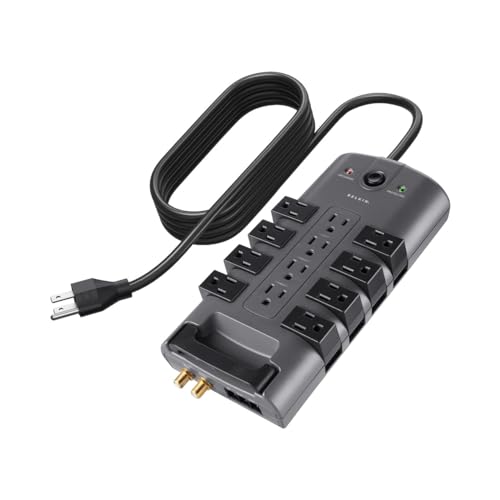
- Belkin 12-Outlet Surge Protector (BE112230-08) — Best Value 12-Outlet — check price on Amazon
- Furman PST-8D Power Station — Best Clean Power (Premium) — check price on Amazon
- Tripp Lite Isobar ISOBAR8ULTRA — Best Metal-Housed Durability — check price on Amazon
- CyberPower CSP706TG — Best Energy-Saving for Peripherals (listed without a purchase link; see the review for why)
Read the full guide ↓
A gaming PC is the most expensive surge target in the house: a high-wattage tower, two or three monitors, a router, speakers or a headset amp, console chargers and a forest of adapter bricks, all on one strip. The best surge protectors for gaming PCs bring flagship joule ratings, low let-through voltages, transformer-friendly outlet spacing and cords long enough to route properly — because a battlestation’s power strip is infrastructure, not an accessory. These six picks were verified spec-by-spec from manufacturer datasheets and listings opened during research.
Gaming adds two twists to ordinary computer protection. The first is noise: streamers and headphone players can hear electrical interference that office users never notice, which makes filtered models genuinely valuable. The second is density: gaming desks concentrate more high-draw equipment per outlet than any other room, so outlet layout and honest load discipline matter as much as the protection figures. If your rig is also your workstation, best surge protectors for computers covers the same category from the desk side; this guide is the battlestation cut.
Three picks below are deliberately prose-only — fully documented, but not confidently matched to an Amazon listing — and one premium pick publishes no joule rating at all, for engineering reasons its review explains. Both choices follow this guide’s rule: verified honesty over convenient links and numbers.
One theme runs through all six reviews and is worth stating plainly before you read them: at battlestation scale, surge protection stops being a commodity purchase. The differences that matter — let-through voltage, filtering behaviour, outlet geometry, failure mode — are engineering differences, and they are documented in the datasheets this guide worked from. The marketing differences (outlet counts inflated by unusable sockets, joule figures without clamping data) are documented nowhere, which is itself the documentation.
In this guide
Quick Picks
| Pick | Badge | Key spec |
|---|---|---|
| APC Performance SurgeArrest P12U2 | Best Overall for Gaming PCs | 4,320 joules, 12 outlets, 2 USB ports (2.4A total), UL 1449 let-through 330V (L-N) |
| Tripp Lite Protect It! TLP128TTUSBB | Best for Big Battlestations | 4,320 joules, 12 outlets (6 transformer-friendly), 8 ft cord, phone + coax protection |
| Belkin 12-Outlet Surge Protector (BE112230-08) | Best Value 12-Outlet | 3,940 joules, 12 outlets, 8 ft cord with flat plug, phone/coax/Ethernet line protection |
| Furman PST-8D Power Station | Best Clean Power (Premium) | Series Multi-Stage Protection (non-sacrificial), LiFT filtering, Extreme Voltage Shutdown at 137V+ |
| Tripp Lite Isobar ISOBAR8ULTRA | Best Metal-Housed Durability | 3,840 joules, 8 outlets in 4 isolated filter banks, 12 ft cord, steel housing |
| CyberPower CSP706TG | Best Energy-Saving for Peripherals | 2,250 joules, 7 outlets with master-controlled sockets, 400V clamping, $175,000 guarantee |
How These Picks Were Chosen
Gaming-PC duty set the filters: a documented joule rating in the flagship band (or, for the Furman, a published non-sacrificial protection design with full electrical specs), at least eight outlets on the full-size picks, transformer-spaced positions for the brick collection gaming gear accumulates, and a cord of six feet or more. EMI/RFI filtering figures earned real credit because gaming audio chains — headphone amps, DACs, capture gear — reveal noise that ordinary setups hide.
We also weighed the ownership details: lifetime warranties and equipment-protection policies (a gaming rig is exactly the equipment those policies exist for), indicator lights, and breaker ratings that suit high-draw towers. Models with unverifiable ratings or strip-only-in-name construction were cut. The result runs from a 4,320-joule APC flagship to a pro-audio power station, and every figure quoted traces to an opened datasheet or listing. Builders planning the whole setup will find the PC-side companions in best airflow pc cases and best gaming monitors coverage such as the 240Hz class.
The 6 Best Surge Protectors for Gaming PCs

APC Performance SurgeArrest P12U2 — Best Overall for Gaming PCs
The P12U2 is the battlestation default: twelve outlets, the joint-highest joule rating here, USB charging for controllers and headsets, and APC’s strongest published let-through figures — protection specified like the rig deserves.
- Surge rating: 4,320 joules
- Outlets: 12, including 4 transformer-friendly spaced positions, with safety shutters
- USB: 2 ports, 2.4A total, with Smart Charging
- UL 1449 let-through: 330V (L-N), 400V (L-G, N-G); EMI/RFI attenuation 75dB
- Cord: 6 ft; fail-safe mode; lifetime warranty with a $300,000 equipment protection policy
Strengths
- 330V line-to-neutral let-through is the tightest mainstream figure here
- 75dB noise attenuation keeps audio chains clean
- The equipment policy matches gaming-rig values
Trade-offs
- 6 ft cord is the shortest among the full-size picks
- No data-line (Ethernet/coax) protection on this model
- Premium APC pricing
Start with the number that matters most in a surge: when a spike arrives, the P12U2 lets through as little as 330V line-to-neutral before clamping — the best figure in this guide — while carrying 4,320 joules of absorption budget behind it. Add 75dB of EMI/RFI attenuation for clean audio, twelve outlets with real transformer spacing, and USB ports that retire two controller chargers, and the spec sheet reads like it was written for a gaming desk specifically.
The ownership terms finish the argument: a lifetime warranty and a $300,000 equipment protection policy are numbers that make sense when the protected equipment is a four-figure rig with dual monitors. Its weaknesses are reach and data lines — six feet of cord and no Ethernet pass-through — so wired-network players with distant walls should weigh the APC P11VNT3 from our computers guide, or the Tripp Lite below. A sourcing note: this model’s Amazon identity was confirmed through a single detailed listing whose UPC matches Schneider’s published data, and its full specifications are corroborated by APC’s own datasheet summary.
Living with the P12U2 settles the one question its spec sheet cannot: whether twelve outlets with four transformer positions is enough for a modern battlestation. For a tower, two monitors, speakers, a router, a console and chargers, it is — with the USB ports absorbing the controller and headset charging that usually steals two sockets. The fail-safe behaviour deserves its mention too: if the protection circuit is ever compromised, the unit is designed to stop passing power rather than silently retire, which is the failure mode a gaming rig — often left running downloads overnight — most needs guarded.
The honest limitation is the cord: at 6 ft, large desks and wall-distant setups will feel the reach, and stretching a strip tight is exactly what good installation forbids.
Best for: high-value battlestations wanting the tightest clamping and a serious equipment policy / Not suited for: distant-wall setups or Ethernet-protection seekers
Tripp Lite Protect It! TLP128TTUSBB — Best for Big Battlestations
Pick the Tripp Lite when the setup is sprawling: twelve outlets with six transformer-friendly positions, an 8-foot cord, USB charging and phone/coax data-line protection — the most complete big-desk package here.
- Surge rating: 4,320 joules
- Outlets: 12, including 6 transformer-friendly positions
- USB: 2 USB-A ports sharing 2.1A
- Data-line protection: RJ11 phone and coax
- Cord: 8 ft with a flat right-angle plug; UL 1449 let-through 800V; lifetime warranty with $150,000 insurance; 15A breaker
Strengths
- Six transformer outlets swallow a battlestation’s brick collection
- Phone and coax protection covers modem-fed setups
- 8 ft cord and flat plug suit against-wall desks
Trade-offs
- 800V let-through is looser than the APC’s figures
- USB output is modest and shared
- Big physical footprint when fully loaded
Battlestations fail strips in a specific way: not on protection, but on geometry. Six transformer-friendly outlets mean the PC brick, monitor supplies, console charger, speaker amp and router wart can all plug in without eating two sockets each — a mundane superpower that decides whether a 12-outlet strip delivers twelve outlets. The 4,320-joule rating and data-line coverage for the modem’s coax and phone lines complete a package aimed squarely at large, wired, always-on setups.
Its clamping figure is the honest weakness: an 800V let-through rating is looser than the APC flagship’s, which is the trade for the extra data-line protection and outlet flexibility at a similar tier. For most rigs the difference is acceptable insurance mathematics; for a truly high-value tower in storm country, the APC’s tighter clamp wins. Either way, this is the strip to pair with the cable discipline in desk lighting and cable management guide — big setups reward tidiness with reliability.
The flat plug on this strip is a small design decision with outsized daily value: desks pushed against walls no longer lever the plug half out of the socket when the desk shifts, and the cord exits downward instead of looping into the room. Combined with the 8-foot reach, it is the strip most likely to be installed once and never thought about again — the fate every protector wants. Streamers should note the coax protection covers the cable-modem feed that most gaming households actually have, closing the surge path that arrives disguised as internet service.
The honest limitation is protection finesse: the 800V let-through means more residual voltage reaches equipment than the best clamping here, so the most delicate, expensive rigs should take the APC instead.
Best for: sprawling multi-device battlestations with modem lines to protect / Not suited for: clamping purists protecting a single flagship tower
Check on Amazon

Belkin 12-Outlet Surge Protector (BE112230-08) — Best Value 12-Outlet
The BE112230-08 is the sensible-money flagship: near-top joules, twelve outlets, an 8-foot cord and protection for phone, coax and Ethernet lines in one of the longest-selling surge strips on the market.
- Surge rating: 3,940 joules
- Outlets: 12 with sliding safety covers
- Cord: 8 ft with a flat plug
- Line protection: phone, coax and Ethernet (per Belkin’s listing documentation)
- Surge and ground indicator LEDs
Strengths
- Data-line coverage most rivals charge more for
- 3,940 joules is near-flagship absorption at a value tier
- Huge installed base and long market history
Trade-offs
- No USB charging ports
- Design is functional rather than premium
- Clamping figures are less prominently documented than APC’s or Tripp Lite’s
Some products earn trust by surviving: this Belkin has been the default big strip in homes and offices for years, and its specification still competes — 3,940 joules, twelve outlets, a proper 8-foot cord, and the rare inclusion of Ethernet alongside phone and coax protection. For a gaming desk whose router and modem sit within reach, that Ethernet path closes the surge route most players forget exists.
It is not the connoisseur’s choice: no USB, no published clamping story as crisp as APC’s, and a design from a more utilitarian era. But as the strip you buy once and stop thinking about, at a price that leaves budget for the rig itself, it is hard to argue with. Players assembling the full station should route the network cable through it as a matter of habit — the same completeness instinct behind best gaming headsets and capture gear protection for streamers.
There is a reason this Belkin keeps appearing in setup photos year after year: it is the strip people buy when a previous one finally retires, because the category’s fundamentals have not changed and neither has its formula. The sliding safety covers, often dismissed as a child-safety nicety, also keep dust and pet hair out of unused sockets in carpeted gaming rooms — a genuine longevity factor. If your battlestation’s networking is wired and your budget has a hard ceiling, this remains the efficiency frontier: near-flagship joules, three kinds of line protection, no premium charged for design.
The honest limitation is documentation depth: Belkin publishes less granular clamping data for this model than APC or Tripp Lite do for theirs, so spec-driven buyers must take its (long, reassuring) track record partly on trust.
Best for: value-first battlestations with wired networking / Not suited for: USB charging or spec-sheet maximalists

Furman PST-8D Power Station — Best Clean Power (Premium)
The PST-8D is the streamer’s and audiophile’s pick: a pro-audio power station whose protection does not sacrifice itself, whose filtering is engineered for silent audio, and whose voltage shutdown guards against wiring faults ordinary strips ignore.
- Protection: Series Multi-Stage Protection (SMP) — non-sacrificial, so Furman publishes no joule rating
- Extreme Voltage Shutdown (EVS) disconnects at sustained 137V+
- Clamping: 188V peak at 6,000V / 3,000A (Furman’s published test figures)
- Noise attenuation: over 40dB (10kHz–100kHz) and over 80dB (100kHz–1GHz) via LiFT linear filtering
- Outlets: 8 in an aluminium chassis; coax and telephone protection included; 15A capacity
Strengths
- Protection that does not wear out absorbing surges
- EVS guards against sustained overvoltage, not just spikes
- The cleanest power here for headphone and capture audio
Trade-offs
- Premium price for eight outlets
- No joule figure to compare — you are buying an engineering philosophy
- Overkill for a purely functional setup
Every other pick here protects by sacrifice: components absorb surges and slowly spend themselves. Furman’s SMP works differently, clamping without self-destruction, which is why Furman does not quote a joule rating — the number would describe a mechanism this design does not use. Its published test figures are serious (188V peak clamping at 6,000V/3,000A), and the EVS circuit adds a protection class the others lack entirely: if a wiring fault feeds your rig a sustained 137V+, the PST-8D disconnects instead of passing it through.
The daily benefit is audible. LiFT filtering delivers the quietest power on this list, and on a resolving headphone chain or a streamer’s microphone path, that silence is a feature you hear every session. Buy it if your battlestation doubles as a studio or if ‘buy once, protect forever’ appeals; purely functional setups will find the same money buys more outlets elsewhere — clean power is the unglamorous half of clean sound.
A calibration note for buyers cross-shopping on numbers: comparing the PST-8D’s clamping figure with the joule leaders’ ratings is comparing a seatbelt with a crumple zone — both are protection, measured differently, and the Furman’s approach is the one that does not degrade with each event. Its aluminium chassis and rack-adjacent design language also make it the only pick that looks at home in a studio rack beside audio interfaces. If your battlestation includes a microphone arm, an interface and studio monitors, this is not the premium indulgence of the list; it is the list’s centre of gravity.
The honest limitation is comparability and cost: with no joule rating, you must trust Furman’s engineering and published test data rather than a headline number, and eight outlets at this price is a deliberate, premium trade.
Best for: streamers, audio-focused players and buy-it-for-life rigs / Not suited for: budget builds or outlet-maximalists
Tripp Lite Isobar ISOBAR8ULTRA — Best Metal-Housed Durability
The Isobar returns from our computers list with a gaming brief: its isolated filter banks keep a mini-fridge, printer or second PC’s noise out of your rig’s power, its steel case survives garage and LAN-party life, and its 12-foot cord reaches anywhere.
- Surge rating: 3,840 joules (current datasheet figure)
- Outlets: 8 in 4 isolated filter banks
- Cord: 12 ft with right-angle plug
- Clamping: 140V RMS; UL 1449 let-through 330V; EMI/RFI 40–80dB
- Metal housing; 12A breaker; $50,000 Ultimate Lifetime Insurance
Strengths
- Isolated banks stop device noise reaching your rig and audio
- 330V let-through matches the tightest protection here
- Steel housing and a 12 ft cord built for rough, real rooms
Trade-offs
- Eight outlets fill fast on a full battlestation
- Industrial styling
- Premium price per outlet
Gaming rooms are electrically messy: a mini-fridge cycling, LED lighting, a second machine, maybe a 3D printer. The Isobar’s isolated filter banks were designed for exactly this — each bank filters independently, so noise generated by one device cannot ride the strip into your PC’s power supply or your headset amp. Combined with a 330V let-through and a steel enclosure, it is the protection pick for rigs that live in real, shared, imperfect rooms rather than dedicated gaming caves.
The 12-foot cord deserves emphasis for gaming specifically: battlestations migrate — to the living room for a LAN night, to a garage for a sim-rig corner — and reach is what makes protection portable instead of theoretical. If your setup includes a racing or flight rig across the room, this is the strip that gets there. Sim builders will recognize the philosophy from best white pc cases and other showcase builds: buy infrastructure that survives rearrangement.
Gamers with a sim-racing or flight corner should read the Isobar’s 12-foot cord as its headline feature: cockpits live metres from the battlestation’s wall, and their wheel bases, pedal sets and button boxes all deserve the same filtered, isolated power as the main rig. The isolated banks also suit the two-PC streaming setup — gaming rig on one bank, streaming PC and capture gear on another — keeping each machine’s electrical noise out of the other’s audio and USB chains. It is infrastructure thinking, and battlestations that grow over years are exactly where infrastructure pays.
The honest limitation is outlet count: a tower, three monitors, speakers, router, console and chargers can exhaust eight sockets quickly, and the answer is a second unit on another receptacle — never a chained strip.
Best for: noisy shared rooms, garage rigs and LAN-goers / Not suited for: maximum-outlet battlestations on one strip
Check on Amazon
CyberPower CSP706TG — Best Energy-Saving for Peripherals
The CSP706TG is the efficiency pick for gaming desks: put the PC on the master outlet and the monitors, speakers and chargers on the controlled sockets, and the whole peripheral swarm powers down when the rig does. It is listed without a purchase link because its documentation is complete but no Amazon listing could be tied to the exact model with confidence.
- Surge rating: 2,250 joules
- Outlets: 7 — including 3 energy-saving master-controlled and 1 transformer-spaced
- Clamping voltage: 400V (all modes); maximum surge current 105,000A
- Cord: 6 ft with right-angle 45° plug
- RJ11 phone protection; EMI/RFI up to 43dB; $175,000 Connected Equipment Guarantee; response <1 nanosecond
Strengths
- Master control kills peripheral standby draw automatically
- Documented specs and the strongest equipment guarantee here
- Automatic shutdown when protection is compromised
Trade-offs
- 2,250 joules trails the 4,320-joule flagships
- Seven outlets is tight for a full battlestation
- No purchase link here; source from CyberPower retailers
A gaming desk idles expensively: monitors sip, speakers hum, chargers warm, RGB peripherals glow — all night, every night. The CSP706TG’s master-controlled outlets end that quietly: when the PC shuts down, the controlled sockets cut the swarm with it, and when the PC wakes, everything returns. It is the only pick that reduces your electricity bill while protecting the gear, and its documented 400V clamping and $175,000 guarantee are not budget-tier numbers.
Use it with intent: the router and anything that must stay alive go on the always-on outlets, and the PC itself belongs on the master — never put a NAS or a downloading console on a controlled socket. For a single-rig desk that sleeps when you do, it is arguably the smartest design here; sprawling always-on stations should take the Tripp Lite TLP128TTUSBB instead. The same energy logic scales to whole rooms in best surge protector wall outlets for the charging corners.
One scenario makes the CSP706TG the obvious pick over flagships with twice its joules: the single-rig room that doubles as a bedroom or studio flat, where the desk’s overnight glow and standby draw are felt in both the electricity bill and the room’s darkness. Master control gives the whole setup a true off state — one shutdown, total silence — while the always-on sockets keep the router alive for the household. Players who leave a rig rendering or downloading overnight should simply not use the controlled sockets for that machine’s chain; the design rewards owners who match sockets to habits.
The honest limitation is scale: seven outlets and a mid-pack joule rating suit a focused single-rig desk, not a multi-console battlestation, and the flagship picks protect harder.
Best for: single-rig desks that want zero standby waste / Not suited for: always-on multi-device stations
Comparison Table
| Pick | Joule rating | Outlets | Cord | Standout |
|---|---|---|---|---|
| APC Performance SurgeArrest P12U2 | 4,320 joules | 12 | 6 ft | 330V let-through (L-N), 75dB filtering |
| Tripp Lite Protect It! TLP128TTUSBB | 4,320 joules | 12 | 8 ft | Phone + coax protection |
| Belkin 12-Outlet Surge Protector (BE112230-08) | 3,940 joules | 12 | 8 ft | Phone + coax + Ethernet protection |
| Furman PST-8D Power Station | Not published (non-sacrificial SMP) | 8 | Built-in cord | EVS overvoltage shutdown, LiFT filtering |
| Tripp Lite Isobar ISOBAR8ULTRA | 3,840 joules | 8 | 12 ft | Isolated filter banks, metal housing |
| CyberPower CSP706TG | 2,250 joules | 7 | 6 ft | Master-controlled energy-saving outlets |
How to Choose a Surge Protector for a Gaming PC
Sizing protection to a gaming rig’s real value
Add up what the strip protects: tower, monitors, audio, networking. For most battlestations that sum justifies the flagship band — 3,800 joules and up, let-through at or under 400V, and a connected-equipment policy whose ceiling resembles your rig’s replacement cost. The APC P12U2’s $300,000 policy and the CyberPower’s $175,000 guarantee exist because this category of equipment is exactly what such policies are for.
Then be honest about your grid. Storm-prone regions and older wiring argue for the tightest clamping you can buy; stable urban power lets layout and filtering dominate the decision. Either way, register the product and keep the receipt — equipment policies only pay out for owners who can prove both.
Noise, filtering and why streamers care
Electrical noise rides power lines into audio gear and announces itself as hum, buzz through headphones, or a microphone floor that will not sit still. Filtered models attack it measurably: the APC’s 75dB attenuation, the Isobar’s isolated banks, and Furman’s LiFT filtering are three engineering answers to the same problem, in ascending order of obsession.
If your setup is speakers-only and you hear nothing wrong, filtering is a nice-to-have. If you stream, record, or use a sensitive headphone amp, it is closer to a necessity — and far cheaper than re-buying audio gear hunting a hum that was never the gear’s fault. Pair clean power with the right cans from best gaming headsets and the chain is quiet end to end.
Load discipline for high-draw rigs
A strip’s 15A ceiling is shared by everything on it. A high-end tower under load, three monitors, speakers and a console can approach territory where adding a space heater or a kettle (it happens in gaming rooms) trips breakers or worse. Keep heating appliances off the strip entirely, know roughly what your rig draws, and let the strip’s breaker be a backstop rather than a routine experience.
Master-controlled outlets (CyberPower) add a second discipline: they are for peripherals that may sleep. Routers, modems that the household depends on, and anything mid-download belong on always-on sockets — a lesson every household learns exactly once.
Where the strip lives: routing for glass desks and RGB showcases
Showcase setups hide their strips, which creates two risks: heat and forgetfulness. Mount the strip in a ventilated cable tray or on the desk’s rear rail, keep its indicator light visible from somewhere you actually stand, and leave cord slack for the desk’s height adjustment if it is a sit-stand frame. Flat right-angle plugs (Tripp Lite, Belkin) keep the wall end tidy behind furniture.
And because gaming desks evolve, photograph the power layout whenever you change it. When a device misbehaves at 1 a.m., knowing which outlet feeds what — without crawling — is a genuine quality-of-life feature. The broader routing philosophy lives in desk lighting and cable management guide.
Panel Protection and Point-of-Use: The Two-Layer Defence
Serious protection is layered. A whole-home surge device at the electrical panel absorbs the bulk of big external surges; point-of-use strips like these six then clamp what remains and guard against internally generated spikes from appliances cycling. Either layer alone helps; together they are the configuration electricians recommend for homes with serious electronics, and the point-of-use layer remains necessary even with panel protection because most damaging transients are born inside the house.
For renters and apartment gamers, the panel layer is usually out of reach — which raises, rather than lowers, the value of buying the point-of-use layer well. A flagship strip with tight clamping and a real equipment policy is the renter’s substitute for infrastructure they cannot install, and it moves with them when they do.
Cable Management Is Protection Maintenance
A battlestation’s power layout degrades socially before it degrades electrically: one new device plugged in hastily, one brick covering two sockets, one daisy-chained strip ‘temporarily’ added in 2023 and never removed. Schedule the power layer into your setup’s life — when a major component changes, re-audit the strip: outlet count, load, indicator light, cord condition. Five minutes, twice a year.
The audit habit also protects the protection: strips buried under dust blankets and cable nests run hotter and hide their indicator lights, defeating the only monitoring they offer. A tray, a visible light and a photograph of the layout are the whole maintenance programme — cheap, quick, and exactly what separates rigs that survive a decade from rigs that star in insurance claims.
Protecting the Rest of the Room: TVs, Consoles and VR Corners
The battlestation rarely ends at the desk. The TV and console across the room, the VR play space with its charging dock, the racing rig in the corner — each cluster deserves its own point-of-use protection rather than a heroic extension of the desk’s strip across the floor. A wall tap from our companion guide handles the TV corner; a second mid-size strip handles the sim corner; the desk keeps its flagship.
Thinking in clusters also simplifies replacement discipline: each zone’s protector has its own age and indicator, checked on the same twice-yearly walk around the room. It is the domestic version of how venues and offices manage protection — zoned, visible and boring — and boring is the highest compliment power infrastructure can earn.
A Last Word on Battlestation Power
Every other component in a gaming setup gets researched, benchmarked and argued about; the power strip usually gets grabbed. This guide exists to argue that the strip deserves one evening of the same seriousness — an evening spent on clamping figures, filter banks and outlet geometry rather than frame rates. The rig you protect properly is the rig that is still running, unchanged and unharmed, on the far side of the worst electrical day your house ever has.
Key Takeaways
- APC’s P12U2 is the gaming flagship: 4,320J, 330V let-through, 75dB filtering, huge equipment policy.
- Tripp Lite’s TLP128TTUSBB fits the biggest stations: 12 outlets, 6 transformer-friendly, data lines covered.
- Furman’s PST-8D protects without sacrificing itself — and silences audio chains.
- Isobar’s isolated banks are the answer when other devices pollute your power.
- Match the equipment policy to your rig’s value, and keep the receipt.
How to Wire a Battlestation’s Power Safely
One careful pass at setup time prevents years of gremlins:
- Inventory the desk: tower, monitors, audio, networking, consoles, chargers — and note which must never sleep.
- Mount the strip in a ventilated tray or rear rail with the cord slack to the wall; confirm the indicator light stays visible.
- Plug the tower in first, then monitors, putting the largest bricks on transformer-spaced outlets.
- Route Ethernet or coax through the strip’s data-line ports if it offers them, before those cables reach the PC or modem.
- Keep routers and always-on gear off master-controlled sockets; reserve those for monitors, speakers and chargers.
- Check total load stays sensible — no heaters, no kettles, ever, on the gaming strip.
- Label both ends of the main cables and photograph the layout for future changes.
Problem: breaker trips during gaming sessions — fix: something heavy shares the strip; move non-gaming loads to another receptacle and confirm the tower’s draw is within the strip’s rating. Problem: hum appears in headphones after adding a device — fix: move the offending device to a different filter bank or strip; isolated-bank models like the Isobar exist for this. Problem: peripherals stay on after shutdown — fix: they are on always-on outlets, or the master threshold needs the PC on the true master socket; check the manual’s diagram.
Protecting the Rig During Storm Season
When a serious storm is forecast and you will be away, the only perfect protection is unplugging — a direct strike defeats any strip. For everyday storm season, the layered approach is: quality point-of-use protection (this list), data lines routed through it, equipment policy registered, and your save data backed up somewhere that is not only inside the rig.
After any nearby strike or utility event, check the strip’s indicators before powering the rig, and treat a dark protected light as a replacement order, not a shrug. Protectors are consumables standing in front of non-consumables; keep the relationship that way round.
Common Buying Mistakes
Protecting a four-figure rig with a grocery-store strip
The cheapest strip on the shelf typically has a token joule rating, no published clamping figure and no equipment policy. The price difference to a documented flagship is small; the replacement-cost difference it covers is not.
Forgetting the Ethernet and coax paths
A surge through the modem’s lines bypasses power-side protection completely. If your rig is wired, choose a strip with data-line ports or accept the gap knowingly — the Belkin and Tripp Lite picks here close it.
Putting the router on a master-controlled outlet
The first time the PC sleeps and the household’s internet dies with it, the lesson lands. Always-on infrastructure belongs on always-on sockets, without exception.
Judging by outlet count alone
Twelve outlets that fit seven bricks are seven outlets. Transformer spacing and rotating designs decide real capacity — count your adapter bricks before you count sockets.
Hiding the strip where its light can never be seen
A spent protector looks exactly like a working one from the front of the desk. Keep the indicator visible; it is the only health signal the device will ever give you.
Final Recommendation
For most gaming PCs, the APC Performance SurgeArrest P12U2 is the surge protector to buy: 4,320 joules behind a 330V let-through, 75dB of noise attenuation for clean audio, twelve usable outlets and an equipment policy sized for real battlestations. It is protection specified the way the rig itself was.
The runner-up is the Tripp Lite Protect It! TLP128TTUSBB, the better fit for sprawling setups that need six transformer-friendly outlets and modem-line protection in the same strip. Choose the APC for the tightest protection, the Tripp Lite for the biggest desk — and if your audio chain matters as much as your frame rate, let the Furman make its premium case. Your rig took time and money to build; its power deserves the same seriousness.
Frequently Asked Questions
How many joules does a gaming PC need?
Aim for the flagship band — roughly 3,800 joules and above — because a battlestation concentrates a tower, multiple monitors and audio gear on one strip, and joules are a lifetime budget spent by every surge. Pair the rating with a low let-through voltage (400V or under; 330V is excellent) and an equipment policy that resembles your rig’s value.
Will a surge protector affect gaming performance?
No. A power strip sits outside the data path entirely; it cannot add latency or cost frames. Data-line pass-throughs (Ethernet, coax) on models like the Belkin and Tripp Lite here are rated for modern connection speeds, so routing the modem lines through them does not bottleneck your network either.
Do I still need a UPS for a gaming PC?
A surge protector stops spikes; it does nothing when power cuts out mid-match or mid-save. If outages are common or your data matters, add a UPS for the PC and main monitor — plugged into the wall as its maker directs — and let the strip protect the wider peripheral swarm.
Why does the Furman have no joule rating?
Because its Series Multi-Stage Protection does not work by absorbing energy into sacrificial components, which is what joules measure. Furman instead publishes test-based clamping figures and adds Extreme Voltage Shutdown for sustained overvoltage. It is a different, professional-audio engineering approach — judge it on those published figures, not on a missing number.
Can I plug my gaming PC strip into a wall tap for more outlets?
No. Never chain protection devices: one strip or tap per wall receptacle, plugged directly into the wall. If the battlestation outgrows one strip, the correct answer is a second quality strip on a second receptacle — a pattern the wall options in best surge protector wall outlets can complement across the room.
How do I know when to replace my gaming surge protector?
Replace it after a major nearby surge event, immediately if the protected indicator goes dark, and proactively every few years on a high-value rig. Write the purchase date on the case when you install it. Models with automatic shutdown remove the guesswork by cutting power when protection is spent.
Should my second monitor and console share the PC’s strip?
Yes — that is what a 12-outlet flagship is for, provided the total load stays sensible and no heating appliances join them. Consoles benefit from the same protection as the PC, and keeping the whole entertainment cluster on one well-chosen strip simplifies the indicator-light check to a single glance. If the cluster outgrows one strip, add a second strip on a separate wall receptacle rather than chaining them.
Do RGB-heavy setups need special surge protection?
No — lighting controllers and LED strips are ordinary low-draw electronics, and any pick here covers them. The surge-relevant parts of a showcase build are the same as any rig’s: the tower’s power supply, the monitors and the networking path. Spend on clamping quality and data-line coverage, not on protecting the light show specifically.
Is it safe to leave a gaming PC plugged into a surge protector during a thunderstorm?
A quality strip substantially reduces the risk, and for everyday storms that is the protection working as intended. For a severe storm directly overhead — or when leaving home during one — unplugging the rig entirely remains the only absolute defence, because a sufficiently close strike can overwhelm any plug-in device. Judge by severity, and never unplug or plug equipment while a storm is actively overhead.
My strip’s outlets are full but two hold tiny chargers. Is that a problem?
Not electrically — small chargers draw little — but it is a geometry problem worth solving, because those chargers are stealing sockets from devices that need protection. Models with built-in USB ports, like the APC P12U2 and the Tripp Lite TLP128TTUSBB here, exist precisely to give those small devices a home and return the AC outlets to the equipment the strip was bought for.
Does a surge protector protect against a power surge from my own appliances?
Yes — internally generated transients are actually the most common kind. Air conditioners, fridges, treadmills and laser printers all spit small spikes onto your home’s circuits as they cycle, and a point-of-use protector clamps them at the equipment. This is also why protectors wear out in homes that never see a thunderstorm: the joule budget is spent in small instalments, all year round.
How many outlets does a gaming PC setup really need?
Count honestly: tower, two or three monitors, speakers or an audio interface, router, a console or its charger, a headset stand or charger, and one spare for the device you have not bought yet. Most battlestations land between eight and twelve — which is why this list’s centre of gravity is the 12-outlet class, and why transformer spacing matters as much as the raw count.