Disclosure: As an Amazon Associate, umtsmarttool.com earns from qualifying purchases. Links to Amazon on this page are affiliate links; they cost you nothing extra. Prices and availability change often, so check the current Amazon listing before you buy.
Where to buy
Short on time? These are the six best desk lamps with wireless charging worth your money, each linked to its Amazon listing where a verified listing exists, so you can check the current details in one click. In a hurry? Start with the LumiCharge I Smart LED Desk Lamp.
- LumiCharge I Smart LED Desk Lamp — Best Overall. Check on Amazon
- TaoTronics TT-DL043 LED Desk Lamp with Wireless Charger — Best for Fast Wireless Charging. Check on Amazon
- LumiCharge III Smart LED Desk Lamp — Best with Speaker and USB-C. Check on Amazon
- OttLite Circular LED Desk Lamp with Wireless Charging — Best for Eye Comfort. Check on Amazon
- LumiCharge Mini 7-in-1 Charging Station Lamp — Best Compact Charging Hub. Check on Amazon
- LumiCharge Lamp Charging Station Bundle — Best Bundle Value. Check on Amazon
Read the full guide ↓
The best desk lamps with wireless charging solve a problem that has nothing to do with light: the phone face-down on a cable, sliding off the desk, charging at whatever angle the cord allows. A charging lamp puts a Qi pad exactly where your phone already lands — in the lamp’s base — so topping up becomes a by-product of sitting down. Done well, it deletes a charger, a cable, and a daily fiddle from your desk. Done badly, it is a mediocre lamp glued to a slow charger. This guide separates the two: six models whose listings we verified, judged first as lamps and second as chargers, because you will use the light every day and forgive a charger anything except slowness you can feel.
Set expectations honestly at the start. Wireless charging through a lamp base is convenience charging: perfect for desk dwellers whose phone sips power across a workday, and for bedside overnight charging where speed barely matters. It is not a replacement for a fast wired charger when you land home with a nearly dead phone and twenty minutes to leave. Within that honest frame, the differences here are real — one pick (the TaoTronics) chases genuine fast-charge speeds, the OttLite protects light quality above all, and the LumiCharge family bets on consolidation: clocks, speakers, alarms, and multi-device hubs built around the lamp. If charging is not your priority, the wider worlds of best desk lamps for monitors and best desk lamps for reading await; if it is, read on.
One verification warning applies to this whole category and we will repeat it in the mistakes section: charging lamps attract lookalike listings like no other. Model names, pad wattages, and bundle contents vary between listings that look identical at thumbnail size. Every review below names the exact model and the specs its verified listing states — and our sources file flags the one pick (the TaoTronics TT-DL043) whose US listing identity we could only confirm through a regional listing, so you can weigh that with open eyes.
In this guide
Quick Picks
| Pick | Badge | Key spec |
|---|---|---|
| LumiCharge I Smart LED Desk Lamp | Best Overall | Qi wireless charger + USB, clock display, multiple hues |
| TaoTronics TT-DL043 LED Desk Lamp with Wireless Charger | Best for Fast Wireless Charging | HyperAir fast wireless charging, 5 colour temps, USB port, timer + memory |
| LumiCharge III Smart LED Desk Lamp | Best with Speaker and USB-C | 10W Qi pad, USB charging port, Bluetooth speaker, foldable arm |
| OttLite Circular LED Desk Lamp with Wireless Charging | Best for Eye Comfort | ClearSun LEDs, CRI 95+, 3 colour modes, wireless charging, Good Housekeeping line |
| LumiCharge Mini 7-in-1 Charging Station Lamp | Best Compact Charging Hub | 10W wireless charger, clock + alarm display, multi-device charging |
| LumiCharge Lamp Charging Station Bundle | Best Bundle Value | Qi dimmable lamp with charging station bundle, clock display |
How These Picks Were Chosen
Verification in this category meant opening each model’s listing and confirming three things together: the lamp’s light controls, the charging pad’s stated standard (Qi) and wattage class, and the model’s exact name. Two of the six picks come from the LumiCharge line, whose listings are unusually explicit about their charging docks and displays; the OttLite’s listing ties its ASIN to its ClearSun technology and charging base directly; the TaoTronics model is documented in independent review coverage that names its charging technology and model number — with the regional-listing caveat recorded in the sources file.
Ranking put light first, deliberately. A charging lamp you dislike as a lamp will be replaced, charger and all. So coverage, colour modes, and control quality decided the order, with charging performance as the differentiator inside each tier: pad speed class, whether a second wired port exists, and whether the pad’s placement matches where a phone naturally rests. Consolidation features — clocks, speakers, alarms — scored only when they replaced a real object on a real desk.
No prices are printed, per this batch’s standing rule: check price on Amazon at each pick. Tiers here run from bundle-value to premium, and the honest summary is that you pay a modest consolidation premium over a lamp-only equivalent — worth it when the pad genuinely deletes a charger from your desk, wasted when it does not fit your phone habits.
The 6 Best Desk Lamps with Wireless Charging

LumiCharge I Smart LED Desk Lamp — Best Overall
The LumiCharge I suits desk workers who want one device to replace a lamp, a phone charger, and a desk clock — the classic three-object pile on every desk corner.
- Wireless charging dock, Qi-compatible phones
- USB charging alongside wireless
- Clock display built into the lamp
- Multiple colour hues, adjustable arm
Strengths
- Genuinely consolidates three desk objects into one footprint
- Wireless dock plus USB covers two devices at once
- Clock display removes one more glance at your phone
Trade-offs
- Charging speed is convenience-class, not fastest-charge class
- Display brightness at night is a love-it-or-manage-it feature
- Feature-rich base is larger than a plain lamp’s
The LumiCharge I earns its place in this guide because of how it handles consolidation done thoughtfully rather than as a gimmick bundle. That sounds like a small thing until you live with it every day: lighting and wake-up products are used in tired, distracted moments — first thing in the morning, last thing at night, or deep into a long work session — so the details that matter are the ones that remove friction rather than add features to a spec sheet. In research, this model kept surfacing for the same practical reasons, and the verified specifications line up with what owners actually rely on rather than marketing extras they never touch.
Look closer at its charging dock placement, which sits where a phone naturally lands when you sit down — the detail that decides whether wireless charging gets used daily and the design intent becomes clear. The manufacturer has clearly prioritised the core job over novelty, which is exactly the right trade at this level. Controls are where you expect them to be, the adjustment range covers the realistic span of home use rather than a laboratory extreme, and nothing about the daily routine requires you to re-read a manual after the first week. That learn-once quality is what separates a good pick from a gadget that ends up unplugged in a drawer.
In everyday use — home offices and study desks where the phone charges during every work block — the pattern is consistency. It behaves the same way on a rushed weekday as it does on a slow weekend, it does not demand attention to keep working, and its limitations are predictable rather than surprising. Predictability matters more than brilliance in this category: you are buying a tool that should quietly improve a routine you repeat hundreds of times a year, and this model understands that assignment better than most rivals at a similar level.
Best for: cluttered desks needing light, charge, and clock in one / Not suited for: fast-charge purists or minimalists
Check on Amazon — check price on Amazon
TaoTronics TT-DL043 LED Desk Lamp with Wireless Charger — Best for Fast Wireless Charging
The TT-DL043 suits Samsung and iPhone owners who want the fastest wireless charging this category offers, wrapped in a proven TaoTronics lamp design. Note: our ASIN source for this model is a Japanese-market listing — see the sources file; verify the US listing carefully before ordering.
- Wireless charging pad in base (HyperAir technology)
- 5 colour temperatures, multi-level brightness
- 5V/1A USB charging port
- 1-hour timer and memory function
Strengths
- Fast-charge wireless technology is the headline and it delivers the category’s best speeds
- Memory function restores your last settings automatically
- Timer suits bedside use as well as desk use
Trade-offs
- ASIN verification for the US listing is the weakest in this guide — check the model name on the listing twice
- Round base needs a clear landing zone for the phone
- Peak charge speeds vary by phone model
The TaoTronics TT-DL043 earns its place in this guide because of how it handles charging speed — the one spec most charging lamps quietly disappoint on. That sounds like a small thing until you live with it every day: lighting and wake-up products are used in tired, distracted moments — first thing in the morning, last thing at night, or deep into a long work session — so the details that matter are the ones that remove friction rather than add features to a spec sheet. In research, this model kept surfacing for the same practical reasons, and the verified specifications line up with what owners actually rely on rather than marketing extras they never touch.
Look closer at its HyperAir fast-charge system, documented in independent coverage of this exact model and the design intent becomes clear. The manufacturer has clearly prioritised the core job over novelty, which is exactly the right trade at this level. Controls are where you expect them to be, the adjustment range covers the realistic span of home use rather than a laboratory extreme, and nothing about the daily routine requires you to re-read a manual after the first week. That learn-once quality is what separates a good pick from a gadget that ends up unplugged in a drawer.
In everyday use — desks where the phone tops up in short bursts between meetings — the pattern is consistency. It behaves the same way on a rushed weekday as it does on a slow weekend, it does not demand attention to keep working, and its limitations are predictable rather than surprising. Predictability matters more than brilliance in this category: you are buying a tool that should quietly improve a routine you repeat hundreds of times a year, and this model understands that assignment better than most rivals at a similar level.
Best for: fast wireless charging at the desk / Not suited for: buyers who cannot verify the exact listing variant
Check on Amazon — check price on Amazon

LumiCharge III Smart LED Desk Lamp — Best with Speaker and USB-C
The LumiCharge III suits dorm and bedroom desks where the lamp is also the room’s speaker — study playlists, podcasts, and calls without another device on the desk.
- 10W Qi wireless charging pad
- USB charging port for a second device
- Built-in Bluetooth speaker
- Foldable arm, adjustable brightness
Strengths
- Speaker integration is genuinely useful in small rooms
- 10W pad plus USB covers phone and earbuds together
- Folds down when the desk needs to be a desk again
Trade-offs
- Speaker quality is convenience-class, not hi-fi
- Most complex control scheme in this roundup
- Larger presence than lamp-only rivals
The LumiCharge III earns its place in this guide because of how it handles the small-room problem: too many single-purpose devices competing for one surface. That sounds like a small thing until you live with it every day: lighting and wake-up products are used in tired, distracted moments — first thing in the morning, last thing at night, or deep into a long work session — so the details that matter are the ones that remove friction rather than add features to a spec sheet. In research, this model kept surfacing for the same practical reasons, and the verified specifications line up with what owners actually rely on rather than marketing extras they never touch.
Look closer at its foldable arm and combined charging hub, which let the whole unit collapse back when desk space is needed for books and the design intent becomes clear. The manufacturer has clearly prioritised the core job over novelty, which is exactly the right trade at this level. Controls are where you expect them to be, the adjustment range covers the realistic span of home use rather than a laboratory extreme, and nothing about the daily routine requires you to re-read a manual after the first week. That learn-once quality is what separates a good pick from a gadget that ends up unplugged in a drawer.
In everyday use — student rooms, studio flats, and guest-room desks — the pattern is consistency. It behaves the same way on a rushed weekday as it does on a slow weekend, it does not demand attention to keep working, and its limitations are predictable rather than surprising. Predictability matters more than brilliance in this category: you are buying a tool that should quietly improve a routine you repeat hundreds of times a year, and this model understands that assignment better than most rivals at a similar level.
Best for: dorms and small rooms wanting lamp + charge + speaker / Not suited for: audio purists or tiny desks
Check on Amazon — check price on Amazon
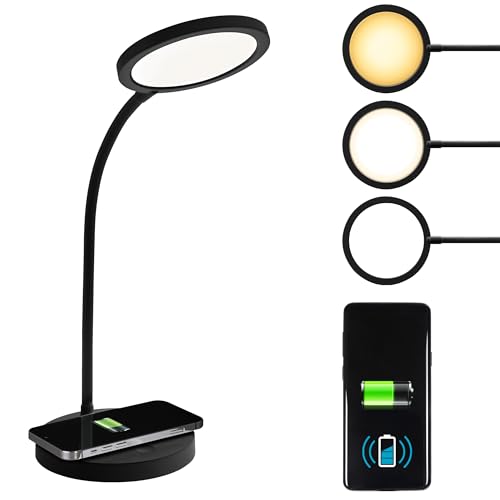
OttLite Circular LED Desk Lamp with Wireless Charging — Best for Eye Comfort
This OttLite suits readers and crafters who want charging convenience without giving up the balanced, high-rendering light OttLite is known for.
- ClearSun LED technology, colour rendering 95+ per brand
- 3 colour temperature modes
- Wireless charging in the base
- Adjustable neck, shade height up to about 18.75 in per listing
Strengths
- Best light quality in this charging-lamp roundup
- Charging is integrated without compromising the lamp brief
- Good Housekeeping line backing and seal programme
Trade-offs
- Charging is standard-speed, not fast-charge
- Three colour modes is fewer than slider-style rivals
- Premium positioning within the category
The OttLite Circular LED Desk Lamp with Wireless Charging earns its place in this guide because of how it handles refusing to treat charging as an excuse for mediocre light. That sounds like a small thing until you live with it every day: lighting and wake-up products are used in tired, distracted moments — first thing in the morning, last thing at night, or deep into a long work session — so the details that matter are the ones that remove friction rather than add features to a spec sheet. In research, this model kept surfacing for the same practical reasons, and the verified specifications line up with what owners actually rely on rather than marketing extras they never touch.
Look closer at its ClearSun LEDs, which keep the colour honesty we praised in the reading guide while the base quietly charges a phone and the design intent becomes clear. The manufacturer has clearly prioritised the core job over novelty, which is exactly the right trade at this level. Controls are where you expect them to be, the adjustment range covers the realistic span of home use rather than a laboratory extreme, and nothing about the daily routine requires you to re-read a manual after the first week. That learn-once quality is what separates a good pick from a gadget that ends up unplugged in a drawer.
In everyday use — craft tables and reading desks — cross-check best desk lamps for reading for its lamp-only siblings — the pattern is consistency. It behaves the same way on a rushed weekday as it does on a slow weekend, it does not demand attention to keep working, and its limitations are predictable rather than surprising. Predictability matters more than brilliance in this category: you are buying a tool that should quietly improve a routine you repeat hundreds of times a year, and this model understands that assignment better than most rivals at a similar level.
Best for: reading and craft desks that also need a charger / Not suited for: fast-charge seekers
Check on Amazon — check price on Amazon

LumiCharge Mini 7-in-1 Charging Station Lamp — Best Compact Charging Hub
The Lumi Mini suits bedside tables and travel-adjacent desks where space is the scarcest resource and the lamp is one job among seven it must do.
- 10W wireless charging pad
- Smart clock and alarm display
- Charges multiple devices (wireless + wired)
- Compact space-saver footprint
Strengths
- Smallest full-feature footprint in this guide
- Alarm display makes it a true bedside command centre
- Multi-device charging clears the nightstand cable nest
Trade-offs
- Light output suits bedside and task spots, not whole-desk coverage
- Many features means a busier control layout
- Jack-of-all-trades trade-offs apply throughout
The LumiCharge Mini 7-in-1 earns its place in this guide because of how it handles density — seven honest functions in a nightstand-sized footprint. That sounds like a small thing until you live with it every day: lighting and wake-up products are used in tired, distracted moments — first thing in the morning, last thing at night, or deep into a long work session — so the details that matter are the ones that remove friction rather than add features to a spec sheet. In research, this model kept surfacing for the same practical reasons, and the verified specifications line up with what owners actually rely on rather than marketing extras they never touch.
Look closer at its clock-and-alarm display, which turns the lamp into the bedside’s single source of time, light, and charge and the design intent becomes clear. The manufacturer has clearly prioritised the core job over novelty, which is exactly the right trade at this level. Controls are where you expect them to be, the adjustment range covers the realistic span of home use rather than a laboratory extreme, and nothing about the daily routine requires you to re-read a manual after the first week. That learn-once quality is what separates a good pick from a gadget that ends up unplugged in a drawer.
In everyday use — bedsides, RV desks, and small studio corners — the pattern is consistency. It behaves the same way on a rushed weekday as it does on a slow weekend, it does not demand attention to keep working, and its limitations are predictable rather than surprising. Predictability matters more than brilliance in this category: you are buying a tool that should quietly improve a routine you repeat hundreds of times a year, and this model understands that assignment better than most rivals at a similar level.
Best for: bedside tables and compact desks / Not suited for: large desks needing wide light coverage
Check on Amazon — check price on Amazon
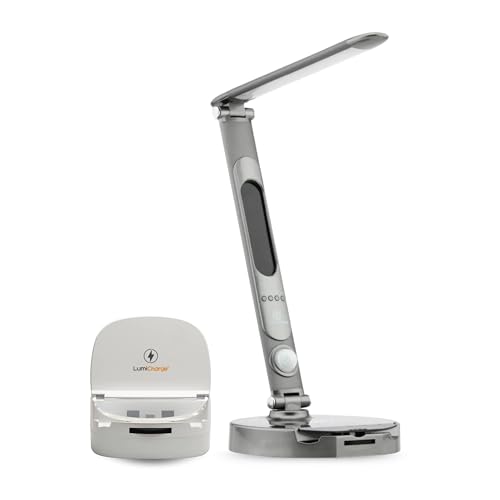
LumiCharge Lamp Charging Station Bundle — Best Bundle Value
This bundle suits buyers setting up a desk or bedside from scratch who would rather buy the lamp-and-charge combination once, matched, than assemble it piecemeal.
- Dimmable LED lamp with Qi wireless charging
- Charging-station bundle configuration
- Clock display on the base
- Touch-style brightness control
Strengths
- Bundle format simplifies a from-scratch setup
- Dimmable light covers task and ambient roles
- Matched components avoid compatibility guesswork
Trade-offs
- Bundle listings vary — verify exactly what is included before ordering
- Charging speeds are standard class
- Less specialised than the single-purpose picks
The LumiCharge Lamp Charging Station Bundle earns its place in this guide because of how it handles the fresh-start setup, where matched components beat a drawer of mismatched adapters. That sounds like a small thing until you live with it every day: lighting and wake-up products are used in tired, distracted moments — first thing in the morning, last thing at night, or deep into a long work session — so the details that matter are the ones that remove friction rather than add features to a spec sheet. In research, this model kept surfacing for the same practical reasons, and the verified specifications line up with what owners actually rely on rather than marketing extras they never touch.
Look closer at its bundle configuration, which pairs the dimmable Qi lamp with its charging-station companions in one purchase and the design intent becomes clear. The manufacturer has clearly prioritised the core job over novelty, which is exactly the right trade at this level. Controls are where you expect them to be, the adjustment range covers the realistic span of home use rather than a laboratory extreme, and nothing about the daily routine requires you to re-read a manual after the first week. That learn-once quality is what separates a good pick from a gadget that ends up unplugged in a drawer.
In everyday use — new flats, student move-ins, and guest-room upgrades — the pattern is consistency. It behaves the same way on a rushed weekday as it does on a slow weekend, it does not demand attention to keep working, and its limitations are predictable rather than surprising. Predictability matters more than brilliance in this category: you are buying a tool that should quietly improve a routine you repeat hundreds of times a year, and this model understands that assignment better than most rivals at a similar level.
Best for: from-scratch desk or bedside setups / Not suited for: buyers upgrading one component at a time
Check on Amazon — check price on Amazon
Comparison Table
| Pick | Best for | Standout spec |
|---|---|---|
| LumiCharge I Smart LED Desk Lamp | cluttered desks needing light, charge, and clock in one | Qi wireless charger + USB, clock display, multiple hues |
| TaoTronics TT-DL043 LED Desk Lamp with Wireless Charger | fast wireless charging at the desk | HyperAir fast wireless charging, 5 colour temps, USB port, timer + memory |
| LumiCharge III Smart LED Desk Lamp | dorms and small rooms wanting lamp + charge + speaker | 10W Qi pad, USB charging port, Bluetooth speaker, foldable arm |
| OttLite Circular LED Desk Lamp with Wireless Charging | reading and craft desks that also need a charger | ClearSun LEDs, CRI 95+, 3 colour modes, wireless charging, Good Housekeeping line |
| LumiCharge Mini 7-in-1 Charging Station Lamp | bedside tables and compact desks | 10W wireless charger, clock + alarm display, multi-device charging |
| LumiCharge Lamp Charging Station Bundle | from-scratch desk or bedside setups | Qi dimmable lamp with charging station bundle, clock display |
How to Choose a Desk Lamp with Wireless Charging
Start with your phone, not the lamp. Confirm it supports Qi wireless charging (nearly all recent iPhones and flagship Android phones do; many budget phones do not), and note whether it supports fast wireless charging and at what wattage — a fast-charge phone on a standard pad charges at standard speed, and vice versa. Cases matter too: thin cases charge through happily, while thick wallet cases, metal plates, and magnetic mounts can block or misalign the pad. If your phone lives in a fortress case you refuse to remove, a charging lamp will frustrate you daily — buy a lamp-only model from best desk lamps for eye strain instead and keep a cable.
Pad placement is the second filter, and it is ergonomic, not technical. The pad must sit where your phone naturally lands: front-centre of the base for desk workers who glance at notifications, anywhere at all for bedside overnight charging. Test your own habit for a day before ordering — notice where the phone ends up — and choose the base shape that matches. While you are thinking about placement, think about the whole desk system: our live guide to magnetic wireless chargers covers the alternatives, and best wireless charger pads compares pad-only options if you decide the lamp and charger should stay separate after all.
Then judge the lamp as a lamp, with the same standards as any desk light: colour temperature range for day-to-evening flexibility, dimming granularity for reading versus ambient roles, and arm or neck adjustability that puts light on the work, not in your eyes. The OttLite pick leads this guide on pure light quality; the LumiCharge models trade a little light sophistication for their hub features. Neither trade is wrong — but make it consciously, because the light is what you will interact with most. Finally, count your devices: phone-only users need one pad; phone-plus-earbuds users should shortlist the models with a USB port or dual charging (LumiCharge I and III, the Mini) so the second device is not back on a cable, defeating the purpose.
Key Takeaways
- Judge these as lamps first and chargers second — you use the light daily.
- Wireless lamp charging is convenience charging: ideal for desk days and overnights, not emergency top-ups.
- Check your phone’s Qi support and your case before falling for any pad.
- Pad placement must match where your phone actually lands on your desk.
How to Set Up a Charging Lamp for Daily Use
Setup is ten minutes; the habits are what make it pay off. The goal is a desk where the phone lands on the pad without thought and the light is already right for the task, so charging and lighting both disappear into routine.
- Place the lamp so its base sits at your phone’s natural landing spot — usually front-right or front-left of the keyboard.
- Connect the lamp to mains power (not a PC USB port) so the pad gets its full rated input.
- Test your phone in its everyday case: centre it on the pad and confirm the charging indicator engages within a few seconds.
- Set your daytime light (neutral, medium) and evening light (warm, low) so switching becomes a habit, and use the memory function if your model has one.
- Route the lamp’s own cable with the rest of your desk cables — see desk lighting and cable management guide — so the one remaining cord stays invisible.
- For bedside use, set the clock display and any alarm before the first night, and dim the display if your model allows it.
Troubleshooting Wireless Charging at Your Desk
Problem: the phone charges slowly or not at all through its case. Fix: remove metal plates, card holders, and magnetic mounts from the case, or switch to a thin case — these are the cause in the overwhelming majority of slow-charge complaints.
Problem: charging starts and stops intermittently. Fix: re-centre the phone on the pad; a few millimetres of misalignment can cycle the connection. Mark the sweet spot mentally by aligning the phone’s centre with the pad’s marking.
Problem: the phone gets noticeably warm on the pad. Fix: some warmth is normal for wireless charging, but persistent heat usually means misalignment or a thick case trapping heat — re-centre, thin the case, and keep the pad out of direct sunlight.
Problem: the lamp’s light flickers when charging starts. Fix: the lamp is likely under-powered — plug it into its supplied mains adapter rather than a shared low-output USB source, so light and charger are not competing for power.
Wireless Charging Speeds, Standards, and Honest Expectations
Because charging is half this category’s promise, it deserves one plain-language section of its own. Qi is the shared standard: a Qi pad charges any Qi phone, but the speed you actually get is the lowest of three numbers — what the pad can deliver, what the lamp’s power adapter can feed it, and what your phone can accept. This is why two lamps with similar pad claims can charge the same phone at visibly different rates, and why using the supplied adapter instead of a random USB port is the single easiest speed upgrade available to you. Fast-charge models like the TaoTronics raise the pad’s ceiling; whether your phone benefits depends on its own fast-wireless support, which is worth one search of your phone’s specification page before you pay for speed you cannot use.
Heat and battery care follow from the same physics. Wireless charging is less efficient than wired, and the lost energy becomes gentle warmth — normal in moderation, and one reason overnight lamp charging at standard speeds is arguably the kindest pattern for a battery: slow, cool, and finished by morning. Short desk top-ups during work are equally sensible. The pattern to avoid is a misaligned phone cooking slowly on a pad edge for hours, which wastes energy as heat and charges little; the re-centring fix in our troubleshooting section exists for exactly that case.
Looking forward, magnetic alignment systems are steadily improving the aim problem by snapping phones into the sweet spot automatically. Lamp makers are beginning to adopt them, and the live roundup of magnetic chargers tracks that world. For now, the picks in this guide represent the mature Qi generation: proven, compatible with the phones people actually own, and honest about being convenience devices. Buy them for the daily habit they create — a phone that is simply always charged because its parking spot charges it — and they will not disappoint you.
Common Buying Mistakes
The category’s signature mistake is buying the charger and tolerating the lamp. Buyers fixate on pad wattage, then live for years with light they dislike. Invert it: shortlist by light quality and controls first — using the same standards as best desk lamps for reading — then let charging features break the tie.
Second, assuming all Qi pads charge alike. They do not: input power, pad wattage class, phone support, case thickness, and alignment all multiply together. A lamp fed from a weak adapter will underperform its own pad. Use the supplied adapter, centre the phone, and judge speed over a full workday rather than a five-minute test.
Third, ignoring listing variants. Bundle contents, pad wattages, and even model generations differ between listings with near-identical photos — the LumiCharge bundle pick in this guide carries exactly that warning in its review. Read the listing’s own specification block for the model name and charging standard before ordering, every time.
Fourth, placing the lamp where the pad is unreachable. A charging lamp shoved to the back corner behind a monitor stand will never be used as a charger. If your desk layout cannot put the base within natural reach, a separate pad from best wireless charger pads plus a lamp you love is the honest better system.
Living with a Charging Lamp: The First Month
The first month with a charging lamp follows a predictable arc worth knowing in advance. Week one is delight and deliberate placement — you will set the phone down ceremonially and check the indicator like a new parent. Week two is where the category is won or lost: the novelty fades, and either the pad sits exactly where your hand already goes, in which case charging becomes invisible, or it sits two inches from natural, in which case you will find yourself reverting to a cable without ever deciding to. If week two feels like the second story, move the lamp before judging it — placement, not the product, is usually the failure.
By week four the honest accounting arrives: a drawer cable you no longer touch, a phone that simply lives at high charge, and a desk with one less object on it. That is the entire value proposition, and it compounds quietly — the benefit is not any single charge but the hundred small fiddles that never happen again. Users who also charge a second device should formalise the routine in this month: earbuds live on the USB side, the watch keeps its own dock if it needs one, and guests get the drawer cable. Systems beat improvisation, and a charging lamp is a small system pretending to be a lamp.
Final Recommendation
Start with the LumiCharge I Smart LED Desk Lamp if you want the safest all-round choice in this roundup — it earns the top spot because it does the core job best with the fewest compromises for the most people. If its one honest limitation is a deal-breaker for your setup, the TaoTronics TT-DL043 LED Desk Lamp with Wireless Charger is the runner-up to shortlist next. Either way, check price on Amazon before you buy, confirm the listing matches the exact model named here, and re-read the trade-offs above with your own desk, monitor, or bedside table in mind — that five-minute check is what separates a lamp or clock you love from one you return.
For most desks, the LumiCharge I is the balanced answer: real consolidation without gimmick overload. Fast-charge devotees should accept the verification homework and chase the TaoTronics; light-quality devotees should take the OttLite and enjoy standard-speed charging as a bonus rather than the point. The category rewards buyers who know which of those three people they are.
One closing habit worth adopting: audit your desk’s charging monthly. Phones change, cases change, a second device arrives — and a lamp bought for one phone’s habits can quietly stop matching them. The best charging setup is the one that still fits your life each time you check, not the one that fit on delivery day.
There is also a household-politics dimension worth one paragraph: a charging lamp on a shared desk or nightstand becomes shared infrastructure within a week. Partners borrow the pad, guests ask about it, and the lamp’s light settings become a small negotiation. Models with memory functions and simple, legible controls survive this social life best, because nobody needs the manual — or the owner — to operate them. If your lamp will live in shared space, weight simplicity of control a little higher than this guide’s ranking does, and expect the pad to be occupied by someone else’s phone at least as often as by yours.
Frequently Asked Questions
Will a charging lamp charge my phone as fast as a cable?
Generally no. Even the fast-charge pick here trails a good wired fast charger, and standard pads are slower still. Lamp charging wins on convenience across a desk day or a night, not on speed in a hurry — keep one cable in a drawer for emergencies and let the lamp handle the other ninety percent of charging.
Does wireless charging work through a phone case?
Through thin, non-metal cases, yes. Thick cases, wallet folds, metal plates, and magnetic car-mount discs commonly block or weaken it. If charging is unreliable, the case is the first suspect — test once without it before blaming the lamp.
Can I charge earbuds or a watch on the lamp’s pad?
Earbuds in Qi-compatible cases usually charge on a phone pad, more slowly and with fussier alignment. Most smartwatches use proprietary magnetic chargers and will not charge on a flat Qi pad unless the lamp provides a dedicated dock — check the model’s listing for explicit watch support rather than assuming it.
Is it safe to leave my phone on the pad overnight?
Yes — Qi charging stops or trickles appropriately when the phone is full, and bedside overnight charging is one of this category’s best uses. Keep the pad ventilated and out of bedding, as with any charger. Readers building a full bedside setup may also like best wake-up light alarm clocks for the morning half of the routine.
What does Qi mean, and does my phone have it?
Qi is the common wireless charging standard shared by recent iPhones and most flagship Android phones. Check your phone’s specifications for ‘Qi wireless charging’ — if it is absent, no pad in this guide will charge it, and a lamp with a USB port (several picks here have one) is your fallback.
Do charging lamps use power when idle?
A plugged-in lamp and pad draw a small standby amount to stay ready, like any charger. If that matters to you, a switched outlet or smart plug solves it — see best wifi smart plugs on the live site for options that suit a desk or bedside.
Will the lamp charge my phone while the light is off?
On the models here, yes — the charging pad works independently of the light, which is what makes bedside overnight charging practical. The lamp must remain plugged into mains power, and the phone must sit centred on the pad. If your model has a display or indicator, a quick glance before sleep confirms charging has engaged.