Disclosure: As an Amazon Associate, umtsmarttool.com earns from qualifying purchases. Links to Amazon on this page are affiliate links; they cost you nothing extra. Prices and availability change often, so check the current Amazon listing before you buy.
Where to buy
Short on time? Start with our top pick among the best surge protectors for computers, the Belkin PivotPlug 12-Outlet Surge Protector (BP112230-08) — check price on Amazon — then read the full guide below for the picks matched to narrower needs.
- Belkin PivotPlug 12-Outlet Surge Protector (BP112230-08) — Best Overall for Computers — check price on Amazon
- APC Performance SurgeArrest P11VNT3 — Best Data-Line Protection — check price on Amazon
- Tripp Lite Isobar ISOBAR8ULTRA — Best for Noisy Power and Audio — check price on Amazon
- Furman SS-6B Power Block — Best Steel Block, Longest Cord — check price on Amazon
- CyberPower CSP706TG — Best Energy-Saving Design (listed without a purchase link; see the review for why)
- Tripp Lite Protect It! TLP1008TELTV — Best Mid-Range All-Rounder — Check on Amazon
Read the full guide ↓
Your computer is the most surge-sensitive expensive object on your desk: a tower or laptop, one or more monitors, external drives, a printer, speakers and a router all drink from the same strip. The best surge protectors for computers are built for exactly that cluster — high joule ratings to absorb years of spikes, low clamping voltages so surges are stopped early, enough outlets with room for adapter bricks, and a cord long enough to reach the wall without strain. The six picks below span premium protection, audio-quiet filtering, data-line coverage and honest budget duty.
Specifications matter more here than in almost any other accessory category, because the product’s entire job happens invisibly in a fraction of a second. We verified each pick’s joule rating, clamping figures and outlet layout from manufacturer datasheets or detailed listings opened during research — and where brands disagree with their own older documents, the reviews say so. Two picks are recommended in prose without a purchase link because their specs are fully documented but no Amazon listing could be tied to either exact model with confidence. If your machine is a gaming rig first and a computer second, best surge protectors for gaming pcs applies the same standards with a battlestation lens.
One principle before the picks: a surge protector is not a battery backup. It guards against spikes, not blackouts. If your work cannot survive a power cut, a protector plus a UPS is the complete answer — the protector recommendations here are chosen to pair well with that setup, not replace it.
The reviews that follow share one habit worth copying: each names not only what a strip protects against, but what it does not — the path it leaves open, the capacity it lacks, the buyer it excludes. Surge protection is a category where the fine print is the product. Read for the gaps, and you will choose better than the shopper who reads for the superlatives.
In this guide
Quick Picks
| Pick | Badge | Key spec |
|---|---|---|
| Belkin PivotPlug 12-Outlet Surge Protector (BP112230-08) | Best Overall for Computers | 4,320 joules, 12 outlets (8 rotating), 8 ft cord, 400V clamping |
| APC Performance SurgeArrest P11VNT3 | Best Data-Line Protection | 3,020 joules, 11 outlets, Ethernet + phone + coax protection, 70dB EMI/RFI |
| Tripp Lite Isobar ISOBAR8ULTRA | Best for Noisy Power and Audio | 3,840 joules, 8 outlets in 4 isolated filter banks, 12 ft cord, metal housing |
| Furman SS-6B Power Block | Best Steel Block, Longest Cord | 540 joules, 6 outlets, 15 ft cord, EMI/RFI filtration, steel chassis |
| CyberPower CSP706TG | Best Energy-Saving Design | 2,250 joules, 7 outlets with master-controlled energy-saving sockets, 400V clamping |
| Tripp Lite Protect It! TLP1008TELTV | Best Mid-Range All-Rounder | 3,345 joules, 10 outlets, phone + coax protection, $150,000 insurance |
How These Picks Were Chosen
Candidates needed a documented joule rating appropriate for computing equipment (we set the bar high and made one deliberate, explained exception for a filtered power block), a published clamping or let-through figure from a datasheet or detailed listing, and a layout that fits real desks: transformer-spaced outlets, a cord of at least six feet, and a right-angle plug where possible. Data-line protection (Ethernet, phone, coax) earned credit because surges happily travel down those cables into a PC.
We also checked the fine print that decides long-term value: connected-equipment warranties, lifetime product warranties, EMI/RFI filtering figures, and whether the unit shuts down or signals when its protection is spent. Marketing-only models with unverifiable ratings were cut. The survivors range from a 4,320-joule flagship strip to a steel broadcast-grade block, plus two documented prose-only picks. Readers protecting a single wall rather than a desk should start with best surge protector wall outlets instead.
The 6 Best Surge Protectors for Computers

Belkin PivotPlug 12-Outlet Surge Protector (BP112230-08) — Best Overall for Computers
This is the desk-default pick: twelve outlets — eight of them rotating to fit bulky adapters — with a 4,320-joule rating and an 8-foot cord, sized for a full computer workstation in one strip.
- Surge rating: 4,320 joules
- Outlets: 12 total — 8 rotating/pivoting plus 4 stationary, with sliding safety covers
- Cord: 8 ft with a right-angle plug
- Clamping voltage: 400V; maximum spike voltage 6,000V
- EMI/RFI noise filtering; rated 15A / 125V / 1875W
Strengths
- Rotating outlets end the adapter-brick jigsaw puzzle for good
- 4,320 joules is flagship-tier absorption capacity
- Long 8 ft cord reaches real desks from real walls
Trade-offs
- Physically large — measure your cable tray or floor space
- No USB charging ports
- No data-line (Ethernet/coax) protection on this model
The PivotPlug’s rotating outlets sound like a gimmick until your desk holds a PC brick, two monitor supplies, a laptop charger and a speaker amp at once — then they are the difference between using all twelve outlets and using seven. Combined with the joint-highest joule rating on this list and a proper 8-foot cord, it is the strip that simply fits a workstation’s life, and its 400V clamping figure is documented rather than implied.
It is also a mature, widely deployed design, which matters for a product category where failure is invisible. The omissions are clear-eyed: no USB ports (use your chargers) and no data-line protection (the APC below covers that). For the typical desk — tower, monitors, peripherals, drives — this is the most complete single purchase, and the natural partner to the builds in best airflow mid tower cases and other mid-tower workstations.
Ownership is pleasingly dull, which is the compliment this category runs on. The sliding safety covers keep dust and curious fingers out of unused sockets, the status lights sit where a glance under the desk can find them, and the rotating outlets move with a firmness that suggests they will still be rotating in a decade. One layout tip from long experience with this design: put the two bulkiest bricks on the outermost rotating sockets, angled away from the strip, and the middle outlets stay usable for normal plugs — a small choreography that unlocks the full twelve.
The honest limitation is footprint: fully loaded with adapters, this is a big unit that wants floor space or a generous cable tray, and it will overwhelm a small desk’s under-surface.
Best for: full workstations with many adapter bricks / Not suited for: minimal desks or buyers needing Ethernet/coax protection

APC Performance SurgeArrest P11VNT3 — Best Data-Line Protection
Choose the APC if your computer’s exposure includes the wires people forget: Ethernet, phone/DSL and coax lines all carry surges, and this strip protects every one of them alongside eleven AC outlets.
- Surge rating: 3,020 joules
- Outlets: 11, with transformer-spaced positions
- Data-line protection: RJ11 phone, RJ45 Ethernet (1000BT) and coax
- UL 1449 let-through: 400V (L-N), 500V (L-G, N-G); EMI/RFI attenuation 70dB
- Cord: 8 ft per Schneider’s datasheet; lifetime warranty with a $100,000 equipment protection policy
Strengths
- The most complete data-line protection on this list
- APC’s datasheet transparency: every figure is published
- Lifetime warranty and equipment policy from a data-centre brand
Trade-offs
- 3,020 joules trails the Belkin’s 4,320 for pure AC absorption
- Coax and network pass-throughs add small signal considerations for exotic setups
- Utilitarian design, no USB charging
Ask a network engineer how a surge reached a PC and the answer is often ‘through the Ethernet cable.’ The P11VNT3 is built around that lesson: it guards the power cord and the data lines with equal seriousness, including gigabit-rated Ethernet pass-through and coax for cable-modem households. Its 70dB of EMI/RFI attenuation is also the strongest filtering figure among the mainstream strips here, which keeps electrically noisy environments from leaking into audio and peripherals.
The fine print is equally professional: published let-through voltages per mode, a lifetime product warranty, and a six-figure equipment protection policy. One sourcing note, because precision matters in this category: most documentation for this model specifies an 8-foot cord, while an occasional listing says 6 feet — plan your layout around the datasheet’s 8 ft and enjoy the slack if it arrives shorter. Home-office builders pairing it with best ergonomic office chairs and a tidy desk will have the complete, boring, correct setup.
The P11VNT3 also earns a note for what its datasheet culture implies about support: Schneider publishes let-through voltages per mode, attenuation curves and mechanical drawings for a consumer strip, which means warranty conversations start from documents rather than arguments. In practice, owners of this class of APC product tend to keep them through two or three computer generations, moving the strip from desk to desk — the correct lifecycle for protection, provided the indicator check happens at each move. If you buy one product on this list ‘for the next decade,’ the evidence points here or to the Isobar.
The honest limitation is that its talents are wasted on simple desks: if your PC connects by Wi-Fi and has no coax or phone exposure, you are paying for protection paths you will never use, and the Belkin’s higher joule rating serves you better.
Best for: wired-network desktops, cable-modem homes and data-centre-grade caution / Not suited for: Wi-Fi-only minimal setups
Tripp Lite Isobar ISOBAR8ULTRA — Best for Noisy Power and Audio
The Isobar is the connoisseur’s pick: a metal-housed strip whose eight outlets sit in four isolated filter banks, so noisy devices cannot pollute the power feeding your PC and audio gear — the reason Isobars live in studios and labs.
- Surge rating: 3,840 joules (current datasheet figure)
- Outlets: 8 in 4 isolated filter banks
- Cord: 12 ft with a right-angle plug
- Clamping: 140V RMS; UL 1449 let-through 330V; EMI/RFI filtering 40–80dB
- Metal housing, 12A circuit breaker, $50,000 Ultimate Lifetime Insurance
Strengths
- Isolated filter banks stop device-to-device noise — unique at this level
- Lowest let-through voltage story here: protection reacts early
- 12 ft cord and a metal case built for decades of service
Trade-offs
- Eight outlets is the fewest among the full-size strips here
- Industrial looks; it will not disappear under a designer desk
- Premium pricing for its class
Most strips protect against the wall; the Isobar also protects devices from each other. Its isolated filter banks mean a laser printer’s or mini-fridge’s electrical noise cannot ride the strip into your PC’s power supply or your audio interface — a real phenomenon that shows up as USB dropouts, coil whine and recording hiss. Add the category’s most conservative clamping figures and a 12-foot cord in a steel box, and you have the strip engineers buy with their own money.
A note on its joule figure, in the spirit of this guide’s sourcing standard: older Tripp Lite documents from decades past list a lower rating for this long-lived model, while the current datasheet specifies 3,840 joules — we quote the current figure. If your desk includes audio production or measurement gear alongside the PC, this is the pick; streamers will also find it in spirit in best surge protectors for gaming pcs, where clean power matters for capture setups.
A word about the Isobar’s second career: because its banks isolate noise in both directions, it is the strip to place between a PC and anything electrically rude on the same circuit — a treadmill desk, a window air conditioner on the same run, a 3D printer. Users plagued by USB devices disconnecting when a compressor kicks in have often chased drivers and cables for weeks before a filtered, isolated strip ends the mystery in an afternoon. That troubleshooting value never appears on a spec sheet, but in workshops and mixed-use rooms it is the reason this decades-old design still sells at a premium.
The honest limitation is capacity and cost: eight outlets fill quickly on a modern desk, and you pay a premium for filtering that pure-office setups may never audibly benefit from.
Best for: audio workstations, labs and noise-sensitive setups / Not suited for: outlet-hungry desks on a budget
Check on Amazon
Furman SS-6B Power Block — Best Steel Block, Longest Cord
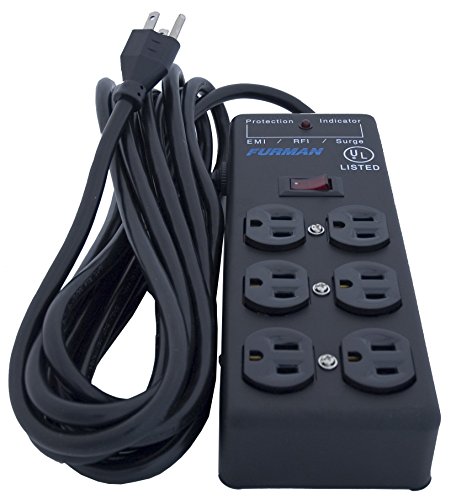
The SS-6B is a pro-audio power block rather than a conventional strip: six filtered outlets in a heavy steel chassis on a 15-foot cord — the longest here — built for stages, studios and workshops that happen to include a computer.
- Surge rating: 540 joules
- Outlets: 6, all surge-protected and filtered
- Cord: 15 ft captive, heavy-duty 14AWG
- UL 1449 voltage protection rating: 400V
- EMI/RFI filtration (−20dB minimum, 100kHz–1MHz); 15A rating with illuminated switch and circuit breaker
Strengths
- 15 ft cord reaches across rooms, stages and garages
- Steel chassis shrugs off being stepped on and knocked about
- Furman’s filtration pedigree from the pro-audio world
Trade-offs
- 540 joules is low for a primary computer protector — read the review
- Six outlets only, with no data-line protection
- Block format is bulky compared with slim strips
Honesty first: 540 joules is the lowest rating on this list, and as a computer’s only line of defence in a surge-prone area, the Belkin or APC above are stronger choices. The SS-6B earns its place for a different job — delivering filtered power at distance. Its 15-foot cord, steel body and Furman filtration make it the right tool for a garage workstation, a workshop bench PC, or a studio corner where the computer sits far from the wall and the floor is hostile.
Think of it as infrastructure rather than a desk strip: it gets clean, protected-enough power to places strips cannot reach, and its build quality is the kind that survives being coiled into a gig bag weekly. If your ‘computer desk’ is actually a workbench, this is your pick; the home-theatre and workshop crowd around best white pc cases builds will recognize the type.
The SS-6B’s natural habitat deserves a fuller picture: it was designed for the floor of stages and studios, where equipment is struck nightly and cables are yanked by professionals in a hurry. That heritage shows in details a desk strip never considers — the cord is genuinely heavy-gauge, the switch is illuminated so its state reads across a dark room, and the breaker resets rather than sacrificing a fuse. If your computer lives in a makerspace, a garage or a touring rack, these are not luxuries. Just remember the standing caveat from its review: pair it with high-joule protection at the panel or the desk if the PC it feeds is precious.
The honest limitation is the joule rating: treat the SS-6B as filtered distribution with basic surge protection, and pair it with a high-joule strip or panel protection if the computer it feeds is valuable.
Best for: workshops, studios and long-reach power distribution / Not suited for: primary protection for a high-value PC on its own
CyberPower CSP706TG — Best Energy-Saving Design
The CSP706TG adds a clever trick to solid mid-range protection: master-controlled outlets that cut power to peripherals when the computer sleeps or shuts down, draining the vampire load of monitors, speakers and printers automatically. It is listed without a purchase link because its documentation is complete but no Amazon listing could be tied to the exact model with confidence.
- Surge rating: 2,250 joules
- Outlets: 7 — including 3 energy-saving master-controlled and 1 transformer-spaced
- Clamping voltage: 400V (all modes); maximum surge current 105,000A
- Cord: 6 ft with a right-angle 45° plug
- RJ11 phone protection (1-in/2-out), EMI/RFI up to 43dB, $175,000 Connected Equipment Guarantee, response <1 nanosecond
Strengths
- Energy-saving outlets kill standby draw without any effort from you
- Fully documented specs, including an unusually high equipment guarantee
- Automatic shutdown when protection is compromised
Trade-offs
- 2,250 joules is mid-pack next to the 4,320-joule leaders
- Master-control behaviour can confuse setups with always-on devices
- No purchase link here; source it from CyberPower retailers
Standby power is the quiet line item on every electricity bill, and the CSP706TG is the only pick that attacks it automatically: plug the PC into the master outlet, peripherals into the controlled sockets, and the strip switches the peripherals off when the PC powers down. For a home office that sleeps sixteen hours a day, that design pays for itself in saved draw while still delivering a documented 2,250 joules and 400V clamping to the equipment.
CyberPower’s documentation culture shows again — full clamping, current and response figures, plus the category’s most generous connected-equipment guarantee among these picks. The caution is behavioural: anything that must stay awake (a router, a NAS, a charging phone) belongs on the always-on outlets, not the controlled ones. Gamers will meet this model again in best surge protectors for gaming pcs, where the same trick suits peripheral-heavy rigs.
Setting up the master-control logic correctly takes one deliberate minute. The PC goes in the master socket; the peripherals you want slaved (monitors, speakers, printer, desk lamp chargers) go in the controlled sockets; anything with its own schedule or an always-on duty (router, NAS, a phone that charges overnight) goes in the always-on sockets. Get that mapping right on day one and the system disappears — get it wrong and you will debug one confusing morning where the monitors ‘died’ because the PC slept. The manual’s diagram is clear; the only real requirement is reading it before, not after, plugging in.
The honest limitation is mid-tier absorption: 2,250 joules is respectable, but buyers in lightning-prone regions protecting an expensive tower should step up to the 4,320-joule class and treat this as the energy-saving alternative.
Best for: home offices that want standby savings without smart plugs / Not suited for: maximum-joule buyers in storm country

Tripp Lite Protect It! TLP1008TELTV — Best Mid-Range All-Rounder
The TLP1008TELTV is the balanced middle of this category: 3,345 joules, ten outlets, phone and coax protection and a large insurance backing, in a mainstream strip.
- Surge rating: 3,345 joules
- Outlets: 10, including transformer-spaced positions, with sliding safety covers
- Clamping: 150V RMS; UL 1449 let-through 400V
- Data-line protection: RJ11 phone/modem (1-in/2-out) and 2.2GHz gold coax connectors
- Cord: 8 ft with right-angle plug; 15A resettable breaker; $150,000 Ultimate Lifetime Insurance
Strengths
- Strong joule rating with both phone and coax coverage
- Ten outlets suits a full desk without going oversize
- Tripp Lite’s insurance and lifetime backing
Trade-offs
- No Ethernet protection (the APC covers that path)
- No USB charging ports
- Verify the exact model name on the listing — similar Protect It! models differ
If the Belkin is the capacity pick and the APC is the data-line pick, the TLP1008TELTV is the hedge: nearly flagship joules, a full ten outlets, and the two most common legacy data paths (phone and coax) protected, all in a sensibly sized strip with an 8-foot cord. Its datasheet discipline — published clamping and let-through figures, a stated insurance ceiling — is exactly what this guide rewards.
It loses to the APC on Ethernet and to the Belkin on raw joules and outlet count, which is why it sits sixth rather than first; but for a cable-modem household with a wired phone line still in service, it may be the most precisely matched strip here. Check the listing by the full model name — Tripp Lite’s range is wide and similarly named models differ in exactly the specs that matter.
This model’s safety covers and breaker deserve a mention for households with children or workshop dust: sliding covers keep small fingers and debris out of live sockets, and the resettable 15A breaker means an overload is an inconvenience rather than a fuse hunt. Its coax protection also uses gold connectors rated for modern cable bandwidth, so routing the modem feed through it does not throttle a fast connection — a detail worth verifying on any data-line protector, since legacy coax pass-throughs were designed for slower eras. Verify the model string when buying, and this is as close to a default recommendation as a mid-range pick can be.
The honest limitation is model confusion: Tripp Lite’s range is wide, so check the model string and the 3,345-joule figure on the listing before paying.
Best for: balanced desks with coax and phone exposure / Not suited for: Ethernet-protection seekers
Comparison Table
| Pick | Joule rating | Outlets | Cord | Data-line protection |
|---|---|---|---|---|
| Belkin PivotPlug 12-Outlet Surge Protector (BP112230-08) | 4,320 joules | 12 | 8 ft | None |
| APC Performance SurgeArrest P11VNT3 | 3,020 joules | 11 | 8 ft | Ethernet + phone + coax |
| Tripp Lite Isobar ISOBAR8ULTRA | 3,840 joules | 8 | 12 ft | None (isolated filter banks) |
| Furman SS-6B Power Block | 540 joules | 6 | 15 ft | None |
| CyberPower CSP706TG | 2,250 joules | 7 | 6 ft | Phone (RJ11) |
| Tripp Lite Protect It! TLP1008TELTV | 3,345 joules | 10 | 8 ft | Phone + coax |
How to Choose a Surge Protector for Your Computer
How much protection does a computer actually need?
For a desktop workstation, shop in the 2,000–4,500 joule band: enough absorption budget to handle years of routine spikes plus a serious event, without paying for ratings you will never spend. Clamping (or UL 1449 let-through) voltage matters alongside it — 400V and below is the healthy zone for computing gear, and the Isobar’s 330V let-through shows what premium engineering buys.
Then match the strip to the exposure. A Wi-Fi laptop desk needs less than a wired tower with Ethernet, coax and a printer; a workshop PC needs reach and armour more than outlet count. The mistake is buying by price or outlet count alone — read the protection figures first, then the furniture questions.
Data lines: the forgotten surge path
Surges do not respect the distinction between power and data. A spike arriving on an Ethernet cable, a DSL phone line or a coax feed can enter a PC through its network port and do the same damage as one on the power cord — sometimes to equipment whose power side was perfectly protected. If your computer is wired to the network or the modem sits on the same desk, data-line protection is not an optional extra.
The APC P11VNT3 covers Ethernet, phone and coax; the Tripp Lite TLP1008TELTV covers phone and coax. Check that pass-throughs are rated for your connection speed (gigabit Ethernet, modern cable bandwidth) so protection does not become a bottleneck.
Surge protector vs UPS: know which problem you are solving
A surge protector stops voltage spikes. It does nothing in a blackout, a brownout or a flicker — your PC still dies instantly when the power does. A UPS (battery backup) covers those events and includes surge protection of its own, usually more modest than a dedicated strip’s.
The complete setup for valuable work is both ideas combined sensibly: quality surge protection for the whole desk cluster, and a UPS sized for the PC and main monitor so you can save and shut down cleanly. Never plug a UPS into a surge strip’s controlled outlets or chain the two devices’ protection in ways their manuals prohibit — follow each maker’s guidance, and keep the strip’s master/energy-saving features (CyberPower) for peripherals only.
Placement, cords and the physics of a tidy desk
Cord length is a protection feature: a strip stretched tight to reach the wall gets unplugged by chair wheels and feet. The 8–12 ft cords on most picks here exist so the strip can live in a cable tray or on the floor with slack to spare. Right-angle plugs keep furniture off the cord; rotating or spaced outlets keep adapter bricks from eating two sockets each.
Keep strips ventilated and visible enough to check their indicator lights, off the floor in flood-prone rooms, and never under rugs. A protector you can see is a protector whose ‘protection working’ light you will actually notice — the cheapest monitoring system in this whole category. The desk-setup thinking in desk lighting and cable management guide covers trays and routing in detail.
The Desk Audit: Finding Your Real Protection Gaps
Before buying anything, spend five minutes auditing the desk you actually have. Count the devices and their bricks. Trace the cables that enter your PC: power is one path, but Ethernet, coax, USB hubs powered from elsewhere and even a wired printer on another strip all create side doors. Note the distance to the wall outlet and whether the current strip’s cord is stretched — a stretched cord is a protection system one chair-wheel away from being unplugged.
Most audits end with a short, specific shopping list: a strip with two more usable outlets than today (growth is certain), data-line ports matching the cables you traced, and a cord one size longer than the tape measure says. That is a far better purchase than the highest-joule strip bought blind, and it is exactly the process that produced this guide’s six picks for six distinct desks.
Understanding Equipment Protection Policies
The dollar figures attached to these strips — $50,000, $100,000, $175,000 — are insurance-style policies, not warranties in the casual sense. They pay out when protected equipment is damaged by a surge the device should have stopped, and they come with conditions: the device must be plugged directly into a properly wired outlet, the equipment must have been connected correctly, and claims need documentation, typically including the failed strip itself and proof of purchase.
None of that makes the policies worthless — manufacturers do honour them — but it does mean the paperwork is part of the product. Register the strip, keep the receipt somewhere findable, and photograph your setup once installed. Five minutes of administration is what turns a marketing number into a real safety net for a workstation worth thousands.
Two Computers, One Desk: Protection for Hybrid Setups
The modern desk often runs two machines — a work laptop on a dock and a personal tower — and protection planning should treat them as one system. A single generous strip can serve both if the outlet geometry allows (this is the PivotPlug’s home turf), but the cleaner pattern is one strip per machine on separate receptacles, so a fault, a breaker trip or a replacement cycle never takes the whole desk down at once.
Laptop docks deserve a specific note: the dock concentrates the laptop, monitors and peripherals behind one power brick, which makes it a single point of surge entry for everything. Put the dock’s brick on a transformer-spaced outlet of a quality strip — not on the leftover wall tap — and the whole laptop side inherits the strip’s protection in one move.
A Last Word on Protecting the Desk
No single strip makes a workstation immortal, and none of these picks claims to. What a well-chosen protector does is convert a category of sudden, expensive, data-threatening failures into a non-event — repeatedly, silently, for years. That is an unglamorous promise, and it is kept entirely in the specifications: joules, clamping, filtering, indicators. Buy the numbers, verify the lights, and let the desk’s power become the part of your setup you never have to think about again.
Key Takeaways
- Belkin’s PivotPlug (4,320J, rotating outlets) is the best all-round computer strip.
- APC’s P11VNT3 is the pick when Ethernet, phone or coax lines reach your PC.
- Tripp Lite’s Isobar is the clean-power specialist: isolated banks, 330V let-through, steel case.
- Joules are a lifetime budget — buy generously, check the indicator light yearly.
- A surge protector is not a UPS; valuable work deserves both ideas, correctly combined.
How to Set Up Surge Protection for a Whole Desk
Lay the protection out once, properly, and it will serve for years:
- List every device on the desk and its plug size; count transformer bricks separately — they decide outlet spacing.
- Place the strip in its permanent home (tray, floor or wall-mounted) with the cord slack, not stretched, to the wall outlet.
- Plug the PC and main monitor in first, then peripherals, putting the biggest bricks on rotating or transformer-spaced outlets.
- Route any protected data lines (Ethernet, coax, phone) through the strip’s pass-throughs before they reach the PC or modem.
- Keep always-on devices (router, NAS) off any master-controlled or energy-saving sockets.
- Confirm the protected/grounded indicators are lit, then photograph the setup — future troubleshooting starts there.
- Write the purchase date on the strip with a marker; replacement planning becomes trivial.
Problem: a new device has no free outlet — fix: it is time for a second strip on a different wall receptacle, never a tap stacked into this one. Problem: the strip’s breaker trips under load — fix: move a heating or motor device (laser printers are classic culprits) to a plain wall outlet; strips are for electronics. Problem: USB devices drop out intermittently — fix: suspect electrical noise and try a filtered bank (Isobar) or a different outlet position before replacing cables.
When to Replace a Surge Protector
Replace immediately after a known major event nearby — a lightning strike, a utility fault, a visible scorch or smell — even if everything still works; the protection may be spent invisibly. Replace when the protected indicator goes dark. And replace proactively on a cycle of a few years for the strips guarding your most valuable equipment, demoting the old units to lamps and chargers.
Models with automatic shutdown, like the CyberPower CSP706TG, take the judgement call away by cutting power when protection fails. For the rest, the indicator light plus a purchase date written on the case is a complete management system — simple, and exactly as rigorous as the category allows.
Common Buying Mistakes
Buying a power strip that is not a surge protector
Plain strips and ‘surge’ strips look identical. If there is no joule rating and no UL 1449 figure in the documentation, you bought a splitter. Every pick here publishes its numbers; demand the same of anything else.
Plugging a laser printer into the strip
Laser printers draw heavy current spikes as their fusers cycle and are the classic cause of tripped strip breakers and shortened protector life. Give the printer its own wall outlet.
Chaining strips, taps and UPS units together
Protection devices are designed to plug directly into the wall. Daisy-chaining voids warranties, confuses protection circuits and creates real hazards. One device per receptacle; add receptacles, not chains.
Ignoring the indicator light for years
A dark ‘protected’ light means your equipment is currently unprotected, whatever the strip cost. Glance at it whenever you are under the desk — and write the purchase date on the case so age is never a guess.
Protecting power but not data
An Ethernet or coax surge bypasses your power protection entirely. If those cables reach your PC, choose a strip that guards them, or accept the gap knowingly.
Final Recommendation
For most computer desks, the Belkin PivotPlug 12-Outlet is the surge protector to buy: 4,320 joules, twelve outlets that actually fit adapter bricks, a proper 8-foot cord and documented 400V clamping. It is the rare strip with no weak line in its specification.
The runner-up is the APC Performance SurgeArrest P11VNT3, the better choice the moment Ethernet, phone or coax cables touch your setup, with APC’s lifetime warranty behind it. Whichever you choose, plug it straight into the wall, route the data lines through it if it offers the ports, and check its indicator light now and then — protection you verify beats protection you assume.
Frequently Asked Questions
How many joules does a computer surge protector need?
For a desktop workstation, 2,000 joules and up is a sound target, with 4,000+ preferable for expensive towers and multi-monitor desks. Remember joules are a lifetime absorption budget: every spike spends some, so a higher rating also means a longer useful life before replacement.
What clamping voltage should I look for?
Look for a UL 1449 let-through (clamping) rating of 400V or lower for computing equipment; 330V, as on the Tripp Lite Isobar, is better still. Lower means the protector reacts earlier and lets less energy through to your power supply. If a strip publishes no clamping figure at all, treat that as a warning sign.
Can a surge protector save my PC from lightning?
It reduces risk substantially but guarantees nothing against a direct or very close strike — no plug-in device can. Quality strips with high joule ratings, data-line protection and connected-equipment warranties are layers of defence; for storm-prone areas, whole-home panel protection plus point-of-use strips is the serious answer.
Should I plug my UPS into a surge protector?
Generally no: UPS manufacturers typically instruct plugging the UPS directly into the wall, and its built-in surge protection handles the PC side. Use a separate quality strip for the non-UPS peripherals on the desk instead, and never plug a UPS into a master-controlled energy-saving outlet.
Why does my surge protector feel warm or buzz slightly?
Mild warmth under load is normal; heat, discoloration, a burning smell or loud buzzing is not — unplug and replace the unit. Slight audible noise from filtering components can occur on filtered models like the Isobar, but any change in sound over time deserves a check.
Do surge protectors wear out if there are no storms?
Yes, slowly: everyday minor spikes from the grid and from appliances cycling spend the same joule budget, just in smaller instalments. That is why indicator lights, purchase dates and periodic replacement matter even in calm weather — and why high-joule picks like the ones in best surge protectors for gaming pcs age more gracefully.
Does a surge protector help with brownouts or flickering power?
Only marginally. A protector clamps voltage that is too high; a brownout is voltage that is too low, and flickers are brief interruptions — different problems that belong to a UPS, which conditions power and bridges gaps with its battery. If your lights dim when appliances start, that is a wiring or circuit observation worth an electrician’s opinion, and no strip on this list is the fix.
How long is too long for a surge protector cord?
For a strip, longer is a feature up to the lengths sold here (15 ft maximum on this list) because the cords are sized for it. What you should never do is extend a strip with a separate extension cord to gain reach — buy the strip whose built-in cord reaches, as the Furman SS-6B’s 15 ft cord exists precisely to make that possible safely.
My strip has no indicator light. How do I know it still protects?
Honestly, you cannot — which is why this guide favours models that report their status. For a light-less strip, the fallback is age discipline: note the purchase date, retire it to low-stakes duty after a few years or any major surge event, and let a newer, indicating model guard the computer.
Should my monitor and PC be on the same strip?
Yes, ideally — a single quality strip keeps the whole workstation on one protection standard and one indicator light to check, and it avoids the ground differences that can cause ground-loop hum in audio setups. The exception is load: if a laser printer or heater shares the desk, those belong on their own wall outlets, not on the computer’s strip.
Is it worth paying more for a strip with a higher equipment-protection policy?
If the desk it guards holds a workstation worth several thousand, yes — the policy ceiling should at least resemble the replacement cost of what is plugged in, and the premium for a higher ceiling is usually small. Keep the registration and receipt discipline from the guide above, because the policy’s value is only real when the paperwork is in order before anything goes wrong.